Restoring to Self-built Database
Baixar
Modo Foco
Tamanho da Fonte
Restoring a Physical Backup to a Self-Built Database
A replica set instance has only one copy of data, while each shard of a sharded cluster has one copy of data. Restore your data based on your business needs. This document describes how to restore a single copy of data.
Restoring data to a single node
1. Copy the data to an empty data directory in the self-built database, such as /data/27017/.
cp -r * /data/27017/
2. Restart mongod and check the data. Below is a command sample:
./mongod --dbpath /data/27017 --port 27017 --logpath /var/log/mongodb/27017.log --fork
Restoring data to a replica set
As a physical backup retains the configuration of the original instance by default, the original configuration needs to be removed first; otherwise, the data may become inaccessible.
1. Restore the data to a single-node self-built database and then restart the node in the form of replica set. Below is a command sample:
./mongod --replSet mymongo --dbpath /data/27017 --port 27017 --logpath /var/log/mongodb/27017.log --fork
2. Log in to the node and remove the replica set configuration of the original instance by running the following command:
rs.secondaryOk()use localdb.system.replset.remove({})
3. Restart the node, add a node to the replica set, initialize it, and check the data. The node added to the replica set should have been started with no data contained. Below is a command sample:
rs.initiate({"_id":"mymongo","members":[{"_id":0,"host":"127.0.0.1:27017"},{"_id":1, "host":"127.0.0.1:27018"},{"_id":2, "host":"127.0.0.1:27019"}]})
Notes:
Data cannot be restored to a sharded cluster. As the route of physical backup is missing in a sharded cluster, mongos can only read the data of the primary shard even if the data of each shard is restored to the self-built replica set (each shard of the sharded cluster).
Restoring a Logical Backup to a Self-Built Database
To avoid any impact on data check after the data is restored to a self-built database, the self-built database must be empty.
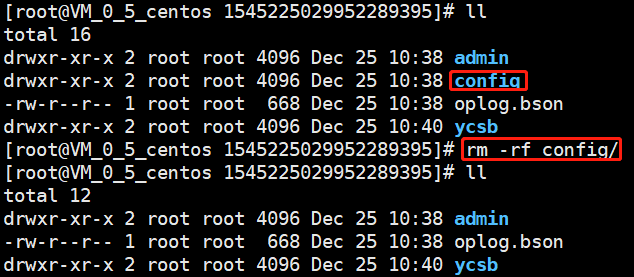
For version 3.6, you need to manually delete the config directory and then use the mongorestore command to restore data for each shard sequentially, as shown in the following figure:
For version 3.2, you need to manually merge the files of a single table before restoring data. The following is an example of the file merge operation:
In the
ycsb database directory, there is a table named c_10. The data files involved in this table are from c_10.bson.gz.chunk-64 to c_10.bson.gz.chunk-127, and the merge command is cat c_10.bson.gz.chunk-* > ./c_10.bson.gz.Notes:
In some scenarios of version 3.2, chunk differentiation occurs.
Use the mongorestore command to restore your data. In this command, the -h option specifies the address of your self-managed database, the --dir option specifies the directory where the data files are located, and the --gzip option must be specified to decompress the backup file. The command is as follows:
./mongorestore --gzip --drop -h127.0.0.1:27017 --dir ./1544517027220146694
Ajuda e Suporte
Esta página foi útil?
Você também pode entrar em contato com a Equipe de vendas ou Enviar um tíquete em caso de ajuda.
comentários