Transferring Skill Groups
Baixar
Modo Foco
Tamanho da Fonte
Feature Introduction
Use the Transfer to Agent node to route the call to a TCCC skill group when a conversation needs to be escalated to a live agent for example, when the customer requests an agent, the AI cannot resolve the question, or the workflow enters a high-value branch (claims, complaints, manual approval).
Guide
Go to the created workflow canvas. Then, choose Start Call> +> Transfer to Agent > Transfer Skill Group on the canvas in order. Fill in the following configuration items in the pop-up window.
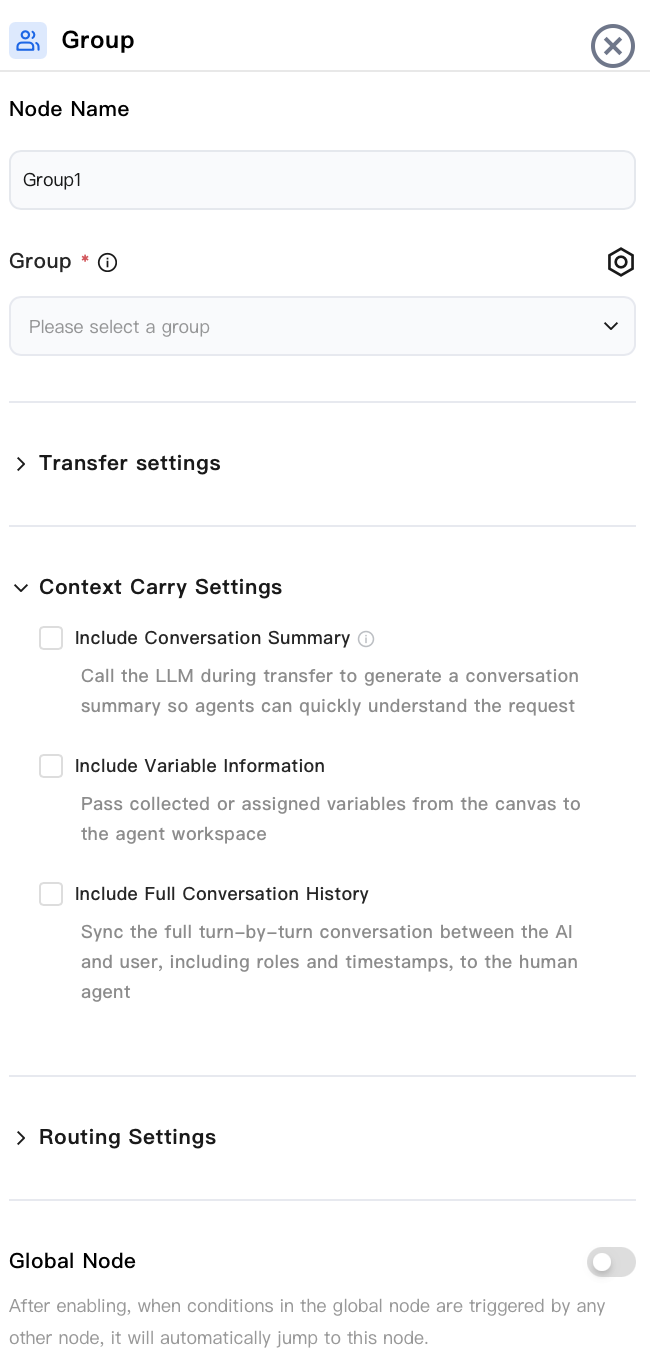
Node Name
Enter a node name, for example, "Upgrade to Customer Support".
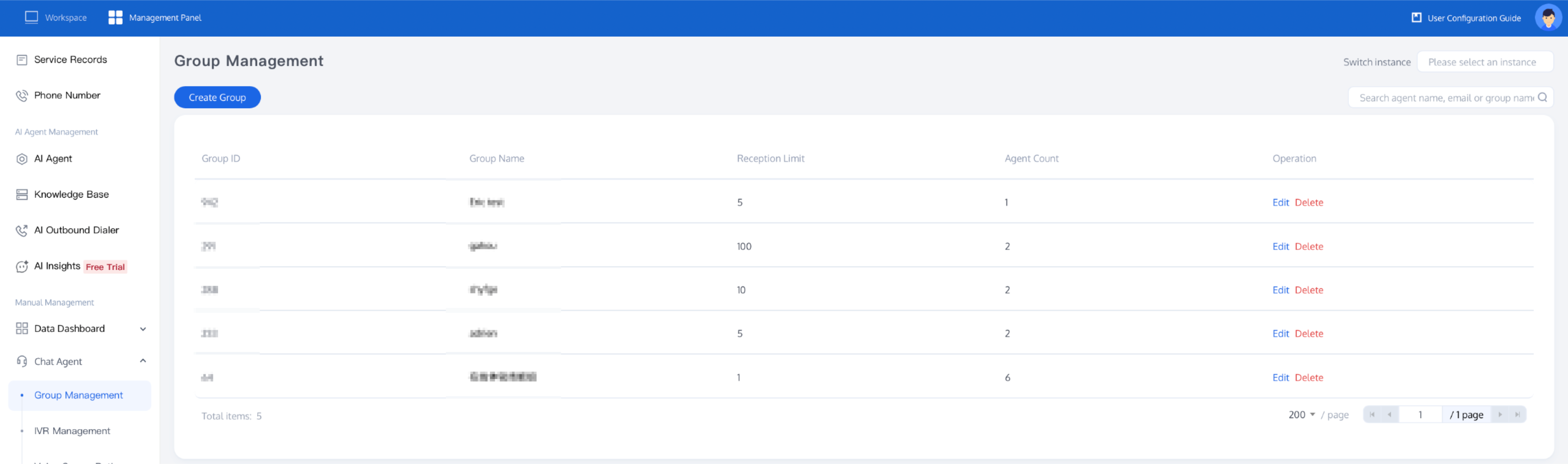
Skill Group
Required. Select the Agent skill group that will answer this transferred call. Skill groups are managed under TCCC management panel > Phone Customer Service > Skill Group Management.
Transfer Settings
Transfer Success Settings: You can configure the Transfer Initiation Prompt text, the audio Played During Wait, and the Transfer Success Prompt text.
Transfer Failure Settings: A transfer fails when all agents are offline or the transfer information is configured incorrectly. You can configure the corresponding Transfer Failure Prompt text.
Transfer Timeout Settings: You can set a wait time. If the wait exceeds this set time, a wait timeout prompt tone and text will be played. After the playback ends, the customer can press any key to continue waiting or press the # key to exit the wait.
Carry-Over Information Settings
During transfer, the context accumulated during the AI phase is delivered to the agent, so the customer does not need to repeat the description to the Agent. You must first select the corresponding item for the information to be carried during transfer.
Carry Call Summary: During transfer, the large model is called in real time to generate a summary of the current call, helping agents quickly understand the customer's request.
Carry Variable Information: Variables that have been collected/assigned in the process (for example, customer name, order number, vehicle model) are delivered to the agent. You can choose to deliver all variables or specified variables.
Carry Complete Conversation Record: The turn-by-turn conversation between the AI and the user (including roles and timestamps) is synchronized to the agent.
Routing Settings
Specify Priority: You can specify the priority based on the actual situation.
Specify Agent Priority: The variable type is a string array, for example, "staff1@tencent.com,staff2@tencent.com", used to pass the email list of agents for priority transfer. Agent emails can be viewed in Customer Service Management.
Specify Skill Group Priority: The variable type is numeric, for example, "70185", used to pass the skill group ID. After successful configuration, the call will be transferred to the configured skill group with priority. The skill group ID can be viewed in Phone Customer Service - Skill Group Management. When no agents are available in the skill group, the system will end the call with a polite closing message, record a voice message, or return to a specific dialog node and provide other options.
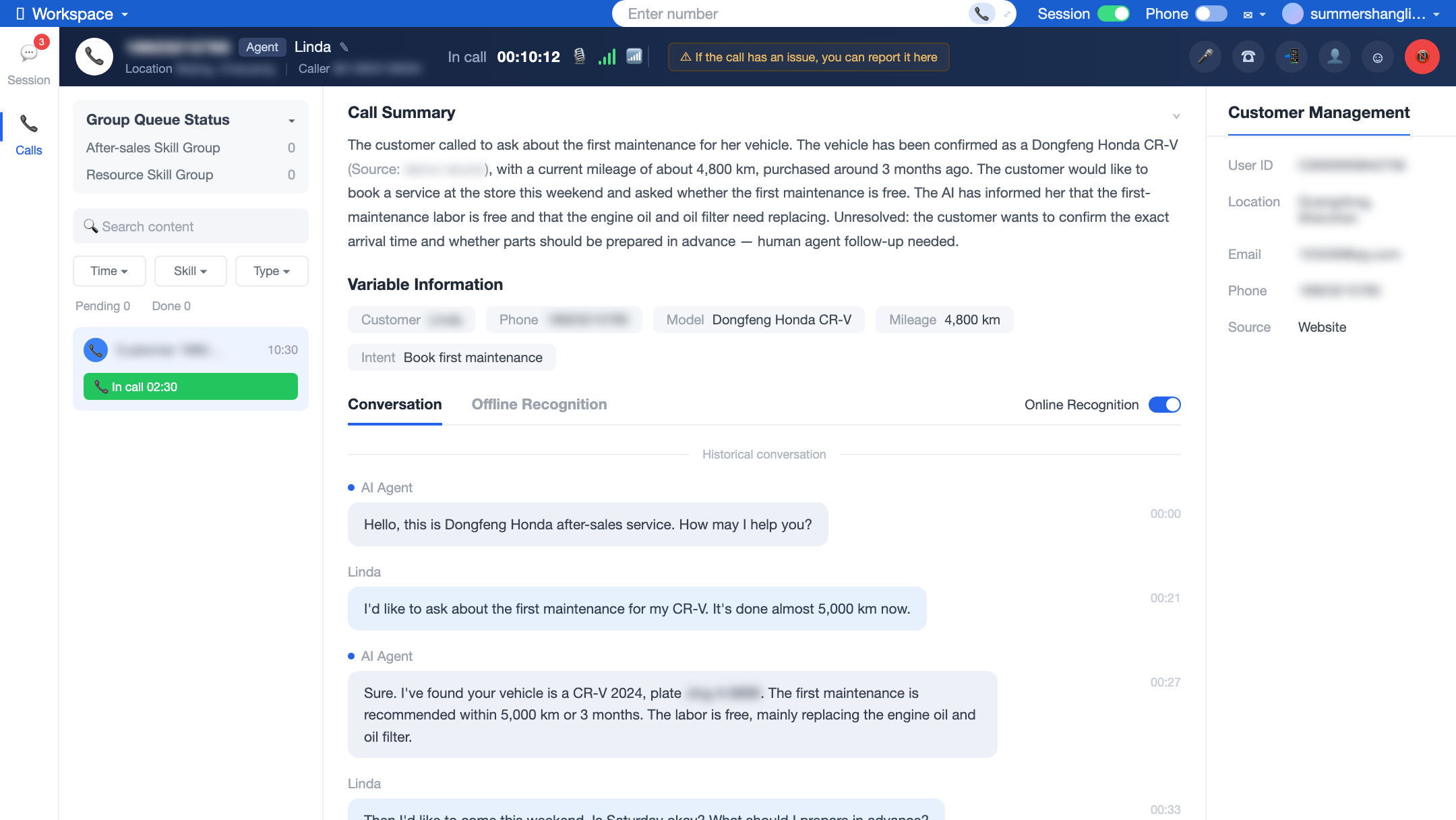
After selecting the above information, when the transfer is completed, the agent can immediately view the carried-over call summary, variable information, and conversation record in the workspace and quickly take over the call without requiring the customer to repeat the description.
Node Overview
Node | Purpose |
Core interaction unit plays prompts, listens to user replies, classifies replies, and branches. | |
Exchanges data with external systems during a call (for example, queries orders, writes back results). | |
Explicitly writes or updates variables within a flow (sets default values, derives values, normalizes slots). | |
Branches based on variable values using comparison operators a generalized if/else if/else logic. | |
Branches based on date, time, and time zone (for example, business hours or non-business hours). | |
Collects numeric keypad inputs (0–9, *, #) applicable to menu-based IVR branching, Captcha/PIN entry, or numeric data collection. | |
Transfers the call to an Agent skill group. | |
Transfers the call to another AI Agent (dialog flow or proprietary model), retaining conversation history and variables. | |
Terminates the call with an optional closing message. |
Related Guides
Select the corresponding path based on your deployment method:
First time user? Deploy a functional AI Agent in just five minutes create a conversation flow or integrate an external model.
Want to learn about our conversation flow nodes? Go to Conversation Nodes.
Want to build a knowledge base for your dialogue flow? Go to Build Your Knowledge Base.
How to test your model? Refer to Test Dialogue Workflow.
Configure a voice AI Agent with your own model? Go to Integrate External Model, Edit Conversation Content, Configure Voice Interaction, and Add Call Control.
Want to view application scenarios? Try Voice Notification, Lead Mining, Feedback Collection, or Customer Support.
How to make outbound and inbound calls with an AI Agent? Refer to AI Agent Outbound Calls or AI Agent Inbound Calls.
View data logs? Refer to Call Records, Call Recordings, Latency.
How to create and view post-call tags? Refer to Post-call Tags (Created via Conversation Flow) or Post-call Tags (Created via External LLM).
Ajuda e Suporte
Esta página foi útil?
Você também pode entrar em contato com a Equipe de vendas ou Enviar um tíquete em caso de ajuda.
comentários