Business hour
Baixar
Modo Foco
Tamanho da Fonte
Feature Introduction
The Business Hours Judgment node branches the workflow based on the current date, time, and timezone. For example, it can transfer calls to AI during business hours, transfer to human agent only on weekdays, or play an after-hours message at night.
Guide
Go to the created workflow canvas. Then, click Start Call> +> Business Hours Judgment on the canvas in order. Fill in the following configuration items in the pop-up window.
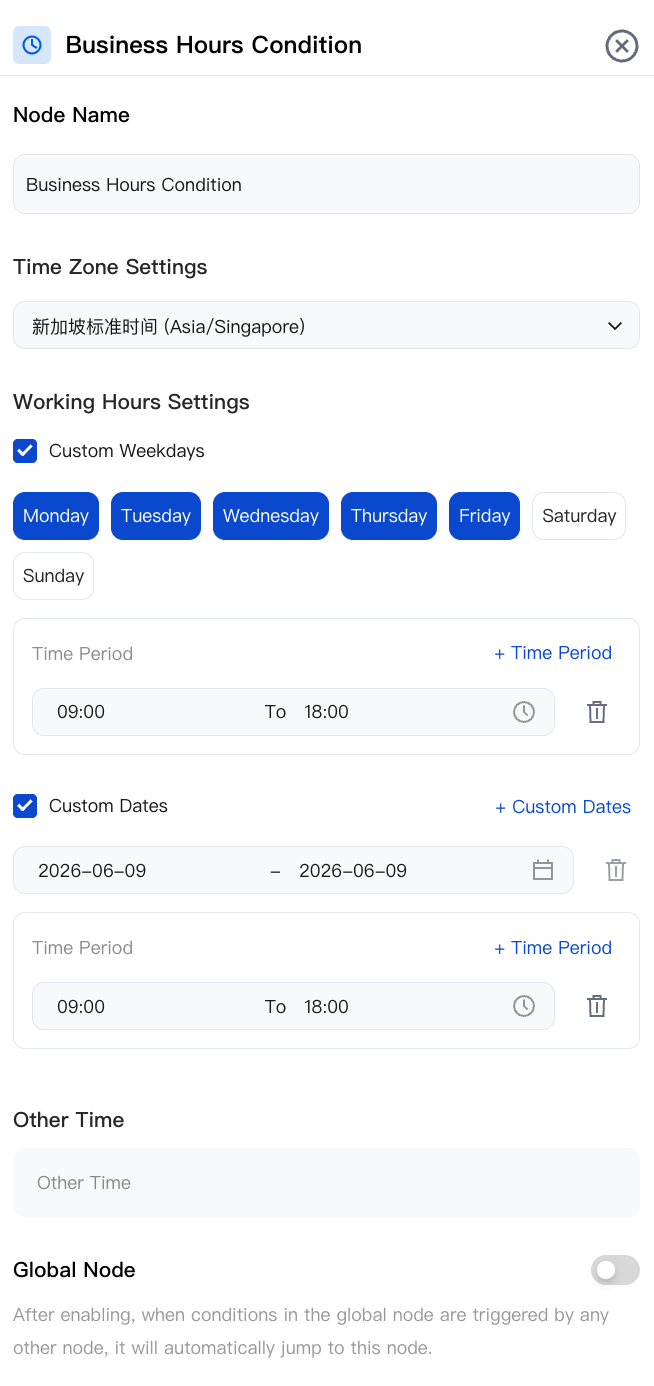
Node Name
Add a node name, for example, "Business Hours Judgment 1".
Time Zone Settings
Select a global time zone (this field supports search). The selected time zone is used for all time evaluations on this node, ensuring that cross-region workflows behave consistently regardless of the origin of the call.
Business Hour Settings
Multiple rule types can be combined. The node is matched if any one of them is true (logical OR / union). Rule Type Description:
Statutory Workdays (China time zone only): Uses the official Chinese workday calendar synchronized into the system.
Statutory Holidays (China time zone only): Uses the official Chinese public holiday calendar.
Custom Days of the Week: Select any subset from Monday to Sunday. All days are selected by default.
Custom Dates: The displayed
[Start, End] range supports multiple ranges. By default, the start date is today, and the end date is open-ended (indefinite).Other Times: One or more
[Start, End] time slots per day.Cross-day time slots are automatically identified: A time slot is considered to span midnight when its end time is earlier than or equal to its start time (for example,
22:00 – 06:00 indicates the period from 10:00 PM to 6:00 AM the next day).Click + to add more time slots. Click the trash can icon to delete a specific time slot.
Note:
Matching Rule
Match: This branch is taken when both the date rule and a specific time slot evaluate to true.
No Match: The fallback branch is matched. Common targets include an after-hours dialogue node ("Our team is currently offline. Please call back during business hours.") followed by a call termination node, or an alternative route that transfers to an Agent.
For inbound call flows, you can place a business hours judgment node immediately after the "Start Call" node to route traffic to Agent hours and self-service/after-hours handling.
Node Overview
Node | Purpose |
Core interaction unit plays prompts, listens to user replies, classifies replies, and branches. | |
Exchanges data with external systems during a call (for example, queries orders, writes back results). | |
Explicitly writes or updates variables within a flow (sets default values, derives values, normalizes slots). | |
Branches based on variable values using comparison operators a generalized if/else if/else logic. | |
Branches based on date, time, and time zone (for example, business hours or non-business hours). | |
Collects numeric keypad inputs (0–9, *, #) suitable for menu-based IVR branching, Captcha/PIN entry, or numeric data collection. | |
Transfers the call to an Agent skill group. | |
Transfers the call to another AI Agent (dialog flow or proprietary model), retaining conversation history and variables. | |
Terminates the call with an optional closing message. |
Related Guidelines
Select the corresponding path based on your deployment method:
First time user? Deploy a functional AI Agent in just five minutes create a conversation flow or integrate an external model.
Want to learn about our conversation flow nodes? Go to Conversation Nodes.
Want to build a knowledge base for your dialogue flow? Go to Build Your Knowledge Base.
How to test your model? Refer to Test Dialogue Workflow.
Configure a voice AI Agent with your own model? Go to Integrate External Model, Edit Conversation Content, Configure Voice Interaction, and Add Call Control.
Want to view application scenarios? Try Voice Notification, Lead Mining, Feedback Collection, or Customer Support.
How to make outbound and inbound calls with an AI Agent? Refer to AI Agent Outbound Calls or AI Agent Inbound Calls.
View data logs? Refer to Call Records, Call Recordings, Latency.
How to create and view post-call tags? Refer to Post-call Tags (Created via Conversation Flow) or Post-call Tags (Created via External LLM).
Ajuda e Suporte
Esta página foi útil?
Você também pode entrar em contato com a Equipe de vendas ou Enviar um tíquete em caso de ajuda.
comentários