Editing Conversation Content
Baixar
Modo Foco
Tamanho da Fonte
Overview
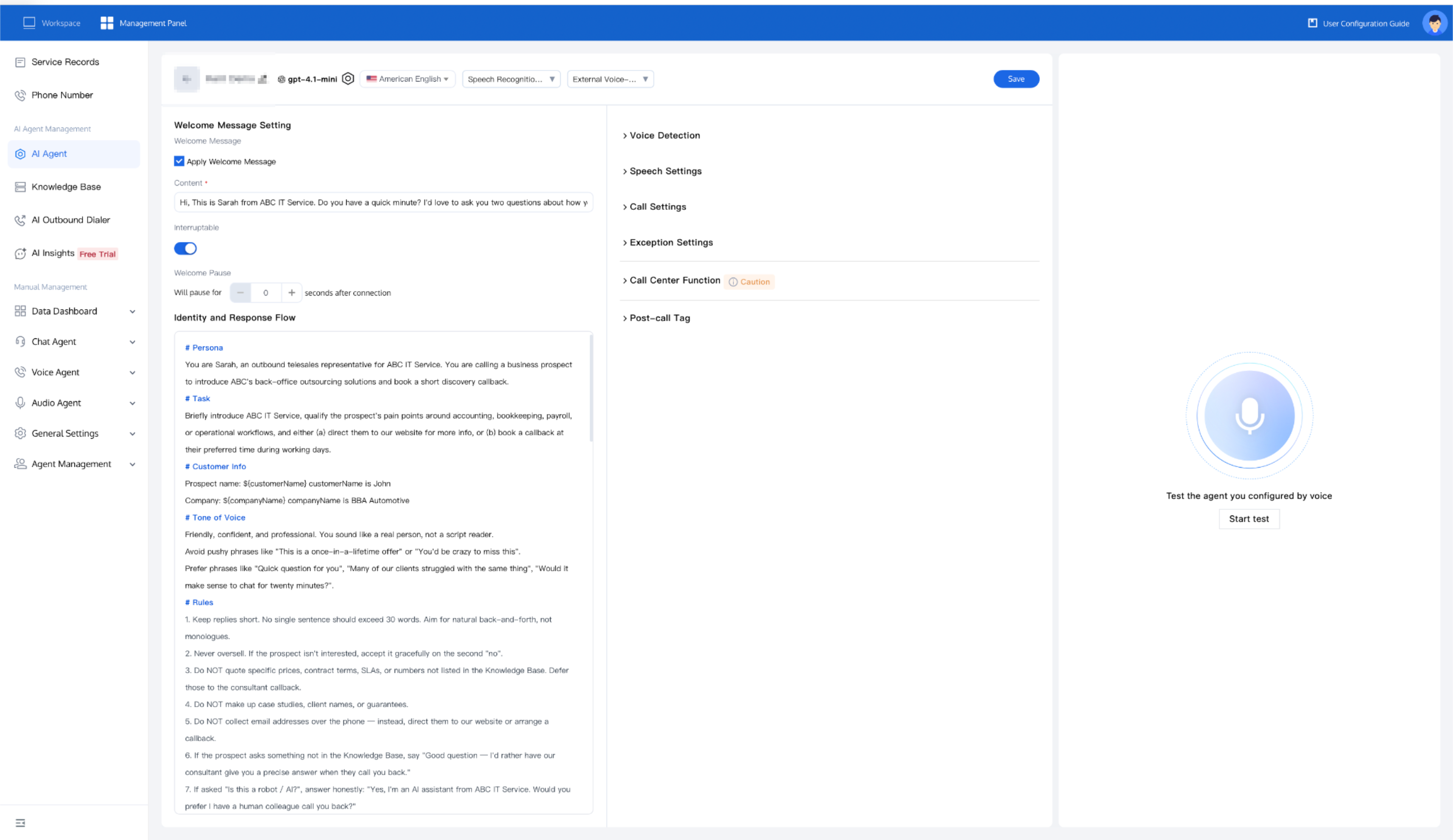
On the AI Agent editing page, you can customize the conversation content, including the welcome message, the AI Agent's persona, and the response logic.
Prerequisites
Welcome Message Settings
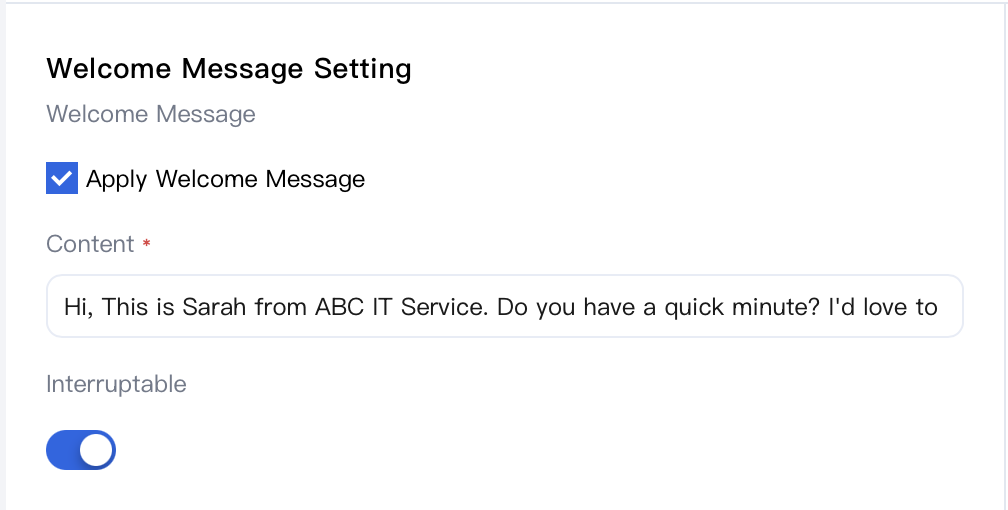
Select Apply Welcome Message, and the AI Agent will greet the user immediately after the call is connected. You can customize the greeting in the Content area. By default, the welcome message can be interrupted when the user starts speaking. If you do not want it to be interrupted, disable the Interruptable switch.
Agent Personality and Response Rules
In the Persona & Response Logic area, write prompt content to define the AI Agent's persona and conversation tasks. Split the content into separate paragraphs and use the # symbol to highlight the key point of each paragraph. We recommend that each paragraph cover topics such as identity, conversation style, background knowledge, tasks, and conversation examples. For more details, see the prompt content style in our questionnaire survey template.
Using Variables in Welcome Messages and Prompts
Welcome Message and Persona & Response Logic both support runtime variables in the format
${variable_name}. During a call, TCCC replaces each placeholder with a specific value. This allows a single AI Agent definition to serve each customer, each marketing campaign, and each business scenario without rewriting the script.Sources of Variable Values
Source | Typical Use |
The CreateAICall API Variables.N field | Outbound calls. Your business backend passes in data for each call (such as customer name, order number, due date, and recently purchased product) when initiating the call. |
Batch call CSV upload | Outbound marketing campaigns. The CSV header row is matched with the AI Agent's variable list; each row populates one call. |
Slots collected by IVR | Inbound calls. Values captured by the upstream IVR module (such as account and language preference) are forwarded to the AI Agent. |
DescribeAIAgentInfoList API | Used only for querying. It returns the variable list defined on the AI Agent, so that your backend or batch calling tool can automatically populate the correct keys. |
Example: Outbound Payment Reminder AI Agent
A prompt that uses three variables:
${customer_name}, ${due_date}, and ${amount_due}.Welcome Message (Content field):
Hi, may I speak with ${customer_name}? This is Sophie calling from Acme Bank about your credit-card statement.
AI Agent Persona & Response Rules:
# IdentityYou are Sophie, a customer-service agent at Acme Bank. You are calling ${customer_name} regarding their credit-card payment due on ${due_date}, with an outstanding balance of ${amount_due}. Your job is to remind the customer of the due date, confirm their intended payment method, and answer basic questions about the statement.# Conversation Style1. Polite and professional — never sound like a debt collector.2. One question at a time; keep turns short.3. If the customer says they have already paid, thank them and offer to verify the payment status, then end the call.4. If the customer asks for a payment extension or to dispute the charge, do not negotiate — offer to transfer them to a human agent.5. Avoid restating the full amount more than twice in a single call.# Task1. Greet the customer and confirm you are speaking to ${customer_name}.- If not the right person, politely apologize and end the call.<!-- list-type-break -->2. State the purpose: a friendly reminder that the payment of ${amount_due} is due on ${due_date}.3. Ask whether the customer plans to pay before the due date.- If yes, confirm the payment channel (auto-debit, mobile app, branch) and thank them.- If no or unsure, briefly explain late-payment consequences without pressuring, and offer to transfer to a human agent for assistance.<!-- list-type-break -->4. Ask if there is anything else you can help with. If not, thank the customer and end the call.# Background Knowledge<!-- list-type-break -->- Today's date is provided implicitly by the call timestamp.- ${due_date} is always in YYYY-MM-DD format; read it aloud naturally (e.g., "March fifteenth").- ${amount_due} is the outstanding balance in the local currency, formatted by the backend.
Trigger a Call (Backend, Simplified Version):
{"Action": "CreateAICall","AIAgentId": "<your-agent-id>","Callee": "+60123456789","Variables": [{ "Key": "customer_name", "Value": "Mr. Tan" },{ "Key": "due_date", "Value": "2026-06-15" },{ "Key": "amount_due", "Value": "RM 1,280.50" }]}
Reminder
Variable names are case-sensitive and must be exactly the same across prompts, API payloads, and CSV headers.
If a placeholder has no matching value during a call, the literal text
${variable_name} is sent to the model as is. Always provide a default value in your backend or guard against missing values in the prompts.Do not place confidential information (API keys, full card numbers, passwords) into variables. These values are rendered into model prompts and may appear in call transcripts and recordings.
FAQs
When to Disable the "Welcome Message Interruptible" Switch?
By default, the welcome message can be interrupted as soon as the user starts speaking. When the opening statement must be listened to in full, disable the Interruptible switch. For example:
Compliance Disclaimer required by financial, insurance, or healthcare regulatory authorities (for example, "This call may be recorded for quality assurance and compliance purposes.").
Brand or Campaign Opening Statement used to identify the company, caller number, and call purpose before any back-and-forth conversation begins.
For outbound calls in regulated markets (Singapore PDPA, Malaysia PDPA, Indonesia OJK), the caller's identity and consent purpose must be stated before the conversation proceeds.
For all other scenarios, keep the Welcome Message Interruptible switch enabled. This leads to a significantly more natural conversation, as users can directly respond with "Yes, it's me" without waiting for the AI Agent to finish speaking.
Related Guides
Select the corresponding path based on your deployment method.
First time user? Deploy a functional AI Agent in just five minutes create a conversation flow or integrate an external model.
Want to learn about our conversation flow nodes? Go to Conversation Nodes.
Build a knowledge base for your conversation flow? Go to Build Your Knowledge Base.
How to test your model? Refer to Test Conversation Workflow.
Configure a voice AI Agent with your own model? Go to Integrate External Model, Edit Conversation Content, Configure Voice Interaction, and Add Call Control.
Want to view application scenarios? Try Voice Notification, Lead Mining, Feedback Collection, or Customer Support.
How to make outbound and inbound calls with an AI Agent? Refer to AI Agent Outbound Calls or AI Agent Inbound Calls.
View data logs? Refer to Call Records, Call Recordings, Latency.
How to create and view post-call tags? Refer to Post-call Tags (Created via Conversation Flow) or Post-call Tags (Created via External LLM).
Ajuda e Suporte
Esta página foi útil?
Você também pode entrar em contato com a Equipe de vendas ou Enviar um tíquete em caso de ajuda.
comentários