Dual-Active Deployment
Baixar
Modo Foco
Tamanho da Fonte
The EMR Serverless HBase deployment mode supports Dual-Active deployment to ensure service availability for instance-level failures or single availability zone fault scenarios.
Introduction to Dual-Active Deployment
Technical Principles
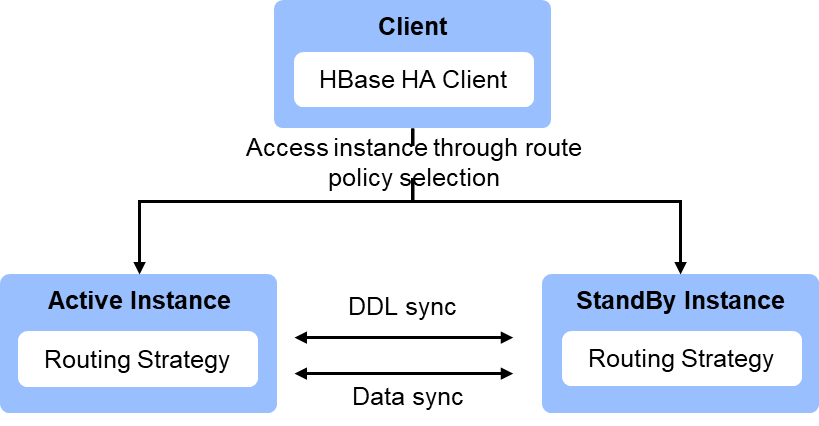
Dual-Active Deployment scenario: When creating an instance, 2 instances (primary and secondary instances) with real-time data synchronization can be automatically created in 1 or 2 availability zones. The console supports setting to prioritize access to the secondary instance for certain tables. The client uses the HBase HA Client module to prioritize requests to the specified instance according to the routing policy and automatically switch to another instance when the request fails.
Availability Description
1. RPO (Recovery Point Objective): less than 30 minutes, depending on the load of the primary and secondary clusters. Under low load, the RPO can stably remain below 1 minute. Under sustained high load, data backlog may occur, causing the RPO to continuously increase.
2. RTO (Recovery Time Objective): less than 1 minute, depending on the request retry interval (hbase.client.pause), number of retries (hbase.client.retries.number), and timeout duration (hbase.client.operation.timeout) configured by the client.
3. Data Consistency: Achieve ultimate data consistency of the primary and secondary clusters based on asynchronous replication capabilities.
Constraints and Limits
Scenario | Constraints and Limits |
Creating an instance | When creating an instance, select Dual-Active Deployment. The instance name, node specifications, and number of nodes of the secondary instance are the same as those of the primary instance, and the configuration fee is twice that of the selected configuration. |
Managing an Instance | 1. The primary and secondary instances support adjusting the number of nodes and scale-out node storage separately. For data synchronization efficiency, it is recommended that the primary and secondary instance node configurations remain consistent. 2. Operations, including conversion from pay-as-you-go to monthly subscription, setting auto-renewal, renewal, termination, and editing tags, are only supported through the primary instance. 3. Alarm configurations are set separately for the primary and secondary instances. |
Table management | 1. Operations, including creating a namespace, creating a table, and modifying a table, will be automatically synchronized to the associated instance through the primary or secondary instance. 2. The operations of deleting a table, deleting a namespace, enabling a table, and disabling a table are only valid for the current operation instance. Associated instances should be operated separately. 3. The query table only queries the current instance data. |
Routing Option Settings
Routing options can be used to set certain tables to prioritize access to the secondary instance, avoiding excessive load on the primary instance.
1. Log in to the EMR Serverless HBase console, find the instance you want to modify from the instance list, and click the instance ID to go to the instance information page.
2. In the Instance Information > Access Method module, click the routing options and then click Edit.
3. After opening the routing option editing operation panel, add the table information that needs to be accessed preferentially on the secondary instance as needed.
4. Click Save to apply the settings.
Development Guide
Ajuda e Suporte
Esta página foi útil?
Você também pode entrar em contato com a Equipe de vendas ou Enviar um tíquete em caso de ajuda.
comentários