tencent cloud

Elastic MapReduce

  • Release Notes and Announcements
  • Product Introduction
  • Purchase Guide
    • EMR on CVM Billing Instructions
    • EMR on TKE Billing Instructions
    • EMR Serverless HBase Billing Instructions
    • EMR Serverless TCBase Billing Overview
  • Getting Started
  • EMR on CVM Operation Guide
    • Planning Cluster
    • Administrative rights
    • Configuring Cluster
    • Managing Cluster
    • Managing Service
    • Monitoring and Alarms
    • TCInsight
  • EMR on TKE Operation Guide
  • EMR Serverless HBase Operation Guide
  • EMR Serverless TCBase Operation Guide
  • EMR Development Guide
    • Hadoop Development Guide
    • Spark Development Guide
    • Hbase Development Guide
    • Phoenix on Hbase Development Guide
    • Hive Development Guide
    • Presto Development Guide
    • Sqoop Development Guide
    • Hue Development Guide
    • Oozie Development Guide
    • Flume Development Guide
    • Kerberos Development Guide
    • Knox Development Guide
    • Alluxio Development Guide
    • Kylin Development Guide
    • Livy Development Guide
    • Kyuubi Development Guide
    • Zeppelin Development Guide
    • Hudi Development Guide
    • Superset Development Guide
    • Impala Development Guide
    • Druid Development Guide
    • TensorFlow Development Guide
    • Kudu Development Guide
    • Ranger Development Guide
    • Kafka Development Guide
    • StarRocks Development Guide
    • Flink Development Guide
    • JupyterLab Development Guide
    • MLflow Development Guide
  • Practical Tutorial
    • Practice of EMR on CVM Ops
    • Data Migration
    • Practical Tutorial on Custom Scaling
  • API Documentation
    • History
    • Introduction
    • API Category
    • Making API Requests
    • Cluster Resource Management APIs
    • Cluster Services APIs
    • User Management APIs
    • Information Query APIs
    • Scaling APIs
    • Configuration APIs
    • Other APIs
    • Cluster Lifecycle APIs
    • Serverless HBase APIs
    • YARN Resource Scheduling APIs
    • Data Types
    • Error Codes
  • FAQs
    • EMR on CVM
  • Service Level Agreement
  • Contact Us

Oozie Development Guide

Download
Modo Foco
Tamanho da Fonte
Última atualização: 2025-02-12 16:49:07
Apache Oozie is an open-source workflow engine. It is designed to orchestrate the tasks of Hadoop ecosystem components into workflows and then schedule, execute, and monitor them. This document briefly describes how to use Oozie in EMR. For detailed directions, visit the website. Here, we recommend you use Oozie through Hue's GUI as instructed in the Hue development documentation.

Prerequisites

You have created an EMR Hadoop cluster and selected the Oozie service. For more information, see Creating EMR Cluster.

Accessing Oozie WebUI

If you have enabled public network access for cluster nodes during cluster purchase, you can click the WebUI link in the EMR console for access.
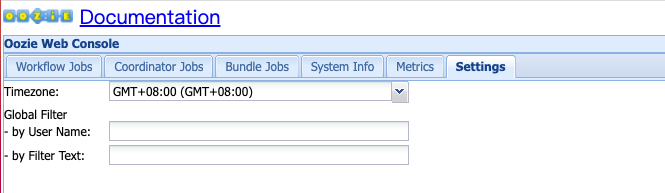
If you are in the Chinese mainland, we recommend you set the WebUI time zone to GMT+08:00.


Updating ShareLib

As the EMR cluster is preinstalled with ShareLib, you no longer need to install it when using Oozie to submit a workflow job. Of course, you can edit and update ShareLib as instructed below:
cd /usr/local/service/oozie
Add `tar -xf oozie-sharelib.tar.gz` to `bin/oozie-setup.sh sharelib create -fs hdfs://active-namenode-ip:4007 -locallib shareoozie admin --oozie http://oozie-server-ip:12000/oozie -sharelibupdate` in the directory of the action to be supported in the `share` directory generated by decompressing the JAR package.

Submitting Workflow in Non-Kerberos Environment

Decompress the oozie-examples.tar.gz file in the Oozie installation directory /usr/local/service/oozie, which provides the sample workflows of the components supported by Oozie:
tar -xf oozie-examples.tar.gz
Take action hive2 as an example:
su hadoop.
cd examples/apps/hive2/.
Modify job.properties:
Set the value of namenode to the value of fs.defaultFS in core-site.xml.
Set the value of resourceManager to the value of yarn.resourcemanager.ha.rm-ids in yarn-site.xml in HA mode, or to the value of yarn.resourcemanager.address in non-HA mode.
The value of jdbcURL is jdbc:hive2://hive2-server:7001/default.
hadoop fs -put examples.
oozie job -debug -oozie http://oozie-server-ip:12000/oozie -config examples/apps/hive2/job.properties -run.
oozie job -info the job ID returned in the previous step (or viewed on the WebUI).

Submitting Workflow in Kerberos Environment

Take action hive2 as an example again. Check the README file in the hive2 directory for other notes.
kinit -kt /var/krb5kdc/emr.keytab hadoop's principal && su hadoop.
cd examples/apps/hive2/.
mv job.properties.security job.properties && mv workflow.xml.security workflow.xml.
Modify job.properties:
Set the value of namenode to the value of fs.defaultFS in core-site.xml.
Set the value of resourceManager to the value of yarn.resourcemanager.ha.rm-ids in yarn-site.xml in HA mode, or to the value of yarn.resourcemanager.address in non-HA mode.
The value of jdbcURL is jdbc:hive2://hive2-server:7001/default.
The value of jdbcPrincipal is the value of hive.server2.authentication.kerberos.principal.
hadoop fs -put examples.
oozie job -debug -oozie http://oozie-server-ip:12000/oozie -config examples/apps/hive2/job.properties -run.
oozie job -info the job ID returned in the previous step (or viewed on the WebUI).

Ajuda e Suporte

Esta página foi útil?

comentários