tencent cloud

Elastic MapReduce

  • Release Notes and Announcements
  • Product Introduction
  • Purchase Guide
    • EMR on CVM Billing Instructions
    • EMR on TKE Billing Instructions
    • EMR Serverless HBase Billing Instructions
    • EMR Serverless TCBase Billing Overview
  • Getting Started
  • EMR on CVM Operation Guide
    • Planning Cluster
    • Administrative rights
    • Configuring Cluster
    • Managing Cluster
    • Managing Service
    • Monitoring and Alarms
    • TCInsight
  • EMR on TKE Operation Guide
  • EMR Serverless HBase Operation Guide
  • EMR Serverless TCBase Operation Guide
  • EMR Development Guide
    • Hadoop Development Guide
    • Spark Development Guide
    • Hbase Development Guide
    • Phoenix on Hbase Development Guide
    • Hive Development Guide
    • Presto Development Guide
    • Sqoop Development Guide
    • Hue Development Guide
    • Oozie Development Guide
    • Flume Development Guide
    • Kerberos Development Guide
    • Knox Development Guide
    • Alluxio Development Guide
    • Kylin Development Guide
    • Livy Development Guide
    • Kyuubi Development Guide
    • Zeppelin Development Guide
    • Hudi Development Guide
    • Superset Development Guide
    • Impala Development Guide
    • Druid Development Guide
    • TensorFlow Development Guide
    • Kudu Development Guide
    • Ranger Development Guide
    • Kafka Development Guide
    • StarRocks Development Guide
    • Flink Development Guide
    • JupyterLab Development Guide
    • MLflow Development Guide
  • Practical Tutorial
    • Practice of EMR on CVM Ops
    • Data Migration
    • Practical Tutorial on Custom Scaling
  • API Documentation
    • History
    • Introduction
    • API Category
    • Making API Requests
    • Cluster Resource Management APIs
    • Cluster Services APIs
    • User Management APIs
    • Information Query APIs
    • Scaling APIs
    • Configuration APIs
    • Other APIs
    • Cluster Lifecycle APIs
    • Serverless HBase APIs
    • YARN Resource Scheduling APIs
    • Data Types
    • Error Codes
  • FAQs
    • EMR on CVM
  • Service Level Agreement
  • Contact Us

Label Management

Download
Modo Foco
Tamanho da Fonte
Última atualização: 2023-12-27 14:34:47

Overview

Label management allows you to create, edit, or delete a label or bind it to a node. Adding different labels to cluster nodes helps allocate resources at a finer granularity based on Capacity Scheduler and specify the running locations of applications.

Prerequisites

You have enabled YARN resource scheduling, switched to Capacity Scheduler, and enabled label-based scheduling.

Directions

1. Log in to the EMR console and click Details of the target Hadoop cluster in the cluster list to enter the cluster details page.
2. On the cluster details page, select Cluster Service and click Operation > Resource Scheduling in the top-right corner of the YARN component block to enter the Resource Scheduling page.
3. Toggle on Resource scheduler and select Capacity Scheduler.
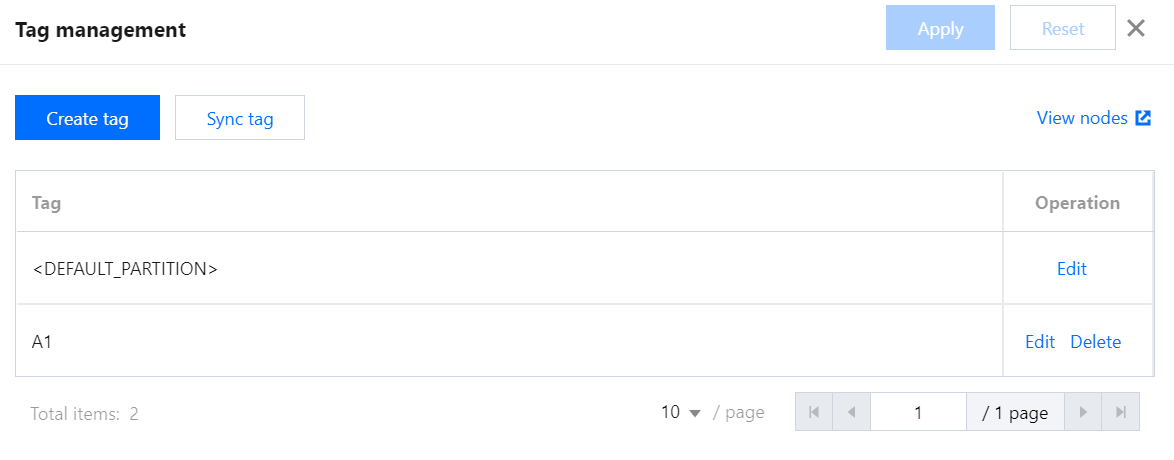
4. Toggle on Label-based scheduling and click Label Management to enter the Label Management page.

5. On the Label Management page, view all labels of the cluster, create, edit, delete, or sync a label, or redirect to the web UI to view the node to which the label is bound.

Ajuda e Suporte

Esta página foi útil?

comentários