Billing Capabilities
다운로드
포커스 모드
폰트 크기
PostgreSQL Database
Instance Types and Specifications
Feature definition
Instance types: Shared and exclusive. Shared instances share CPU and memory resources among multiple instances, ensuring isolation at the database level. Exclusive instances have dedicated CPU and memory resources, ensuring better performance.
Instance specifications: Provide specific CPU and memory specifications of instances. In shared instances, CPU and memory are displayed based on shared specifications. In exclusive instances, CPU and memory are displayed based on the actual specifications of the instance.
▶ When to use a dedicated instance
1. Slow log optimization: Eliminate performance bottlenecks
In a shared database environment by default, slow queries from other tenants consume system resources, causing query performance degradation for all users.
The "exclusive" feature ensures that user query performance is not affected by others through resource isolation, while allowing database configurations to be optimized based on specific business characteristics.
Typical scenario: During major promotions on e-commerce platforms, database queries surge. In a shared environment, query time increases from milliseconds to seconds, seriously affecting user experience. In an exclusive environment, even in the face of traffic peaks, query performance remains stable, and order processing latency is controlled within the acceptable range.
2. Performance guarantee: Eliminate resource contention
In a shared database environment, concurrent requests from multiple users cause CPU and I/O resource contention, leading to soaring business response latency (for example, from 10 ms to over 500 ms).
Exclusive mode allocates a dedicated resource pool for users, guaranteeing core business stability and low latency (such as payment, real-time transactions), with distinct user experience enhancement.
3. Business stability: Key business assurance
Financial transactions, medical imaging, and other scenarios with extremely high stability requirements where any performance fluctuations may result in significant loss.
The "exclusive" feature uses physical isolation to eliminate multi-tenant interference, ensuring over 99.99% SLA (service availability), enabling business operations to run like an "exclusive expressway".
▶ When to change instance specifications
1. Performance breakthrough: Eliminate computing power bottlenecks
In the early stage of business, the 1C2G specification is sufficient to support daily read and write operations. However, as data volume accumulates and concurrent requests grow, the CPU remains fully utilized and memory becomes tight, leading to alarms such as increased slow queries, connection timeouts, and even OOM. As a result, the API response time degrades from tens of milliseconds to hundreds of milliseconds.
The "Specification Change" feature upgrades compute resources from 1 core 2 GB to 2 cores 4 GB with one click, doubling computing power and memory instantly. Bottlenecks are eliminated immediately without the need to modify business code or migrate data.
Typical scenario: In the early stage after launch, a mini program starts with 1C2G to control costs. As it enters a growth phase, active users surge, and CPU usage of the original specification remains above 90% during peak hours. After the mini program is upgraded to 2C4G, the average API response time drops from 480 ms to 80 ms, significantly improving user experience.
2. Cost elasticity: Scale resources on demand to avoid waste
If a high specification is purchased from the beginning, insufficient early traffic will lead to idle resources and wasted costs. If a low specification is maintained throughout, the system will be unable to handle traffic after business growth.
The "Specification Change" feature supports on-demand scaling, keeping resource capacity aligned with business rhythms. Scale down during off-peak seasons to save costs, and scale up during peak seasons or growth periods to ensure user experience, avoiding the need to pay for peak capacity year-round.
Typical scenario: During marketing campaigns, traffic doubles, prompting a temporary upgrade to 2C4G to handle the surge. After the campaign ends, the specification is scaled back down to 1C2G, allowing costs to flexibly scale with business fluctuations.
3. Business continuity: Online specification changes with zero service impact
Traditional scaling often requires service downtime for maintenance, posing interruption risks to online businesses. This is especially critical for availability-sensitive scenarios such as transactions and orders, where any downtime translates directly into losses.
The "Specification Change" feature supports smooth online upgrades. During the change process, the instance remains continuously available, and business requests are not affected. After the upgrade is completed, the instance automatically runs with the new specification, ensuring that core business operations remain uninterrupted.
Typical scenario: Before a major e-commerce promotion, there is no need to stop services for hours for migration. You only need to select the target specification, and the online upgrade can be completed within minutes. Order processing remains uninterrupted throughout the process, and peak traffic is handled smoothly.
Compute usage metering
Depending on the instance type, metering uses a usage-based approach for shared instances and an instance-based approach for exclusive instances.
Shared instances: activity-based metering
Shared instances are billed based on database usage. If no database is used, no compute usage is generated.
Currently, TCB PostgreSQL database shared instances are metered in 5-minute intervals, with each shared instance counted as 0.5 cores.
Within the current 5-minute interval, if there is database access or scheduled tasks, functions, or transactions within the database, the system records this 5-minute interval as used.
If usage occurs within this 5-minute interval, CU is calculated as 5 minutes * 0.5 cores, which equals 0.5 * 5 / 60 = 0.04167 CU.
If there is no usage in the next 5-minute interval, meaning no database connections, no reads or writes, and no scheduled triggers, functions, or instance processing, the interval is not counted as used, and it generates 0 CU.
If access occurs throughout an entire hour, the cumulative usage for that hour is counted as 0.5 CU.
Dedicated instances: specification-based metering
Dedicated instances are billed based on instance specifications and actual running duration, and compute usage is generated regardless of whether the instance is accessed.
An instance with 1 core and 2 GiB of memory is billed as 1 CU for one hour of usage, and generates 24 CU of usage over 24 hours.
An instance with 2 cores and 4 GiB of memory is billed as 2 CU for one hour of usage, and generates 48 CU of usage over 24 hours.
After an instance specification is upgraded or downgraded, metering is performed based on the new specification.
Storage usage metering
Depending on the instance type, metering uses a method that calculates storage based on actual usage for shared instances and based on allocated storage space for exclusive instances.
Shared instances: used storage
Shared instances are calculated based on the used storage space, which is the space occupied by the actual data in the database. After a database is created, a certain amount of storage is used even when no data is written, due to the default tables and default data.
Dedicated instances: allocated storage
After a dedicated instance database is created, or a shared database is upgraded to a dedicated database, a fixed amount of storage space is allocated. Storage usage for a dedicated instance is calculated based on the allocated storage space. Usage is calculated based on the allocated space regardless of how much storage space is actually used.
20 GB of storage space is billed as 20 (GB*hour) for one hour of usage, and generates 480 (GB*hour) of usage over 24 hours.
100 GB of storage space is billed as 100 (GB*hour) for one hour of usage, and generates 2400 (GB*hour) of usage over 24 hours.
During initial allocation, storage space can be set based on its own usage. It can also be further increased later. Storage space can only be increased, not decreased.
Serverless cloud function (SCF)
Timeout and memory configuration
Feature definition
Users are allowed to customize the running time cap and memory allocation of cloud functions according to business needs, breaking through default resource limitations, supporting more complex and compute-intensive task processing to enhance application performance and user experience.
▶ When to configure timeout and memory
1. Complex task processing: Break through default limits
The default SCF configuration (3-second timeout, 256 MB memory) cannot meet the demands of complex computing tasks such as data processing and AI inference.
The "Timeout/Memory Configuration" feature allows the runtime to be extended up to 900 seconds and memory to be expanded to several GB, enabling SCF to handle a wider range of business scenarios.
Typical scenario: A video transcoding service needs to process large video files. By configuring a longer timeout (for example, 600s) and larger memory (for example, 2GB), complex transcoding tasks can be completed smoothly without interruptions caused by insufficient resources.
2. Performance optimization: Accelerate business response
SCF performance is directly proportional to allocated memory. Insufficient memory can cause slow computation and affect user experience.
The "Timeout/Instance Memory Configuration" feature significantly improves function execution speed, reduces waiting time, and enhances business response efficiency by adding memory allocation.
Typical scenario: A product recommendation algorithm on an e-commerce platform needs to calculate user preferences in real time and return results. By increasing memory from the default 128 MB to 1 GB, the computation time is reduced from 3 seconds to 300 milliseconds, significantly improving the user browsing experience.
3. Cost-effective balance: Flexible resource allocation
Different business scenarios have varying needs for computational resources. Unified configuration may lead to resource waste or shortage.
"Timeout/Memory Configuration" feature support allows adjusting resource configuration as needed to achieve the best balance between cost and performance, improving resource utilization efficiency.
Typical scenario: Business data analysis tasks execute every midnight with low real-time requirement but need to process large volumes of data. By configuring an extended timeout period (such as 10 minutes) and moderate memory (such as 512MB), it ensures task completion while avoiding additional cost caused by excessive configuration.
Connecting to Tencent Cloud VPC
Feature definition
Allow SCF to connect to designated Tencent Cloud VPC (Virtual Private Cloud) network environments, enabling functions to securely access private resources within the VPC, such as databases, cache, and internal APIs. Meanwhile, hybrid private and public network access capability can be achieved by configuring the gateway.
▶ When to use a VPC connection
When your cloud function needs to access resources deployed in Tencent Cloud VPC, this feature must be enabled.
Typical use cases:
Access databases, cache, or Message Queue only accessible over a private network
Call in-house APIs or microservices
Access local data center resources via dedicated line
Strict cybersecurity requirements, avoid exposing resources to public networks
Fixed public egress IP
Feature definition
Provide a fixed public outbound IP for SCF with public network access enabled. This IP remains consistent across multiple functions in the same environment, ensuring requests from SCF always originate from the same identifiable source IP.
▶ When to use a fixed egress IP
When your SCF needs to call a third-party service with allowlist restriction, this feature must be enabled.
Typical use cases:
WeChat Pay, WeCom and other services that require IP allowlist configuration
Banks, financial institutions' API Gateway (usually requiring fixed source IP)
Enterprise-level API for partners (access control based on IP)
Access Control
Traffic throttling and rate limiting
Feature definition
Support setting call frequency limits for SCF, cloud hosting service, or cloud access path settings, enabling granular control from both resource and path perspectives, effectively preventing resource abuse and abnormal calls, ensuring system stability and cost control.
▶ When to use throttling and rate limiting
1. Backend service scenario: Backend throttling
Third-party access security: Defend against DDoS attacks
Businesses face the risk of malicious attacks or misuse when opening APIs to partners, possibly resulting in service interruption.
The "Traffic Throttling" feature allows setting differentiated call quotas for accessing parties. Once abnormal traffic is detected, throttling is triggered immediately to ensure core business not affected.
Typical scenario: When a payment platform faces a DDoS attack, the throttling mechanism automatically identifies and blocks abnormal traffic while ensuring normal merchant transaction requests remain unaffected, maintaining business continuity.
Resource optimization allocation: Partner hierarchical management
Different levels of partners require differentiated API call permission and resource allocation.
"Traffic throttling and frequency limiting" feature supports setting different QPS caps based on partner identity to allocate resources reasonably and provide flexible support for business models.
Typical scenario: The map service platform provides differentiated API invocation limits for corporate customers with different payment levels. Senior members enjoy higher call frequency, while basic members are subject to stricter limits, achieving commercialized service tiering.
2. End-user scenario: C-end user security gateway
WAF firewall mechanism: Comprehensive security protection
Websites and applications face various network attack threats, such as SQL injection, XSS attack and malicious bots.
The "Traffic Throttling" feature integrates WAF firewall capabilities and supports configuring IP address allowlists and blocklists, hotlink protection, and access frequency limits to build a multi-layered security protection system.
Typical scenario: The content platform prevents resources from being illegally referenced through hotlink protection mechanisms, while configuring an IP address blocklist to block known malicious sources, effectively protecting platform content assets and service stability.
Abnormal behavior control: Prevent resource abuse
End users' abnormal operations (such as frequent refresh and script automated operations) may consume a large amount of system resources, impacting overall service quality.
The "Traffic Throttling" feature can perform fine-grained rate limiting based on user ID or IP to underwrite that single-user abnormal behavior will not affect overall system performance.
Typical scenario: An infinite loop in a user's code caused continuous database calls, exhausting resources and incurring arrears before the platform reminder. After enabling rate limiting, the system will detect abnormal invocation methods in a short time frame and apply automatic throttling, keeping the loss within the acceptable range.
Fair resource allocation: Enhance overall user experience
Under high concurrency scenarios, a few users' high-frequency requests may occupy excessive resources, leading to poor user experience for most.
"Traffic throttling and frequency limiting" feature ensures fair resource allocation by limiting single-user request frequency to enhance overall service quality.
Typical scenario: In ecommerce platform flash sales, by setting a limit on request frequency for single users, it prevents "flash sale robots" (automated order grabbing programs) from resource preemption, ensuring general users have a fair opportunity to participate while maintaining stable operation during peak traffic periods.
Operations monitoring
Log Management
Feature definition
It provides comprehensive log collection, storage, search, and analysis capabilities, supporting real-time log collection and centralized management for various cloud services such as SCF, Cloud Run, and cloud databases, helping developers efficiently troubleshoot issues, monitor system running status, and analyze business data. Depending on the edition, it offers multiple log retention policies ranging from real-time short-term storage (2 hours for the Personal Edition) to long-term storage (7 to 180 days for the Enterprise Edition).
▶ When to use log management
1. Troubleshoot: quickly locate anomalies
When an exception or error occurs in the system, no log records will cause troubleshooting difficulty and extend fault repair time.
The "log management" feature provides real-time log stream and advanced retrieval power, with time-based support, level, keyword, and multi-dimensional filtering to help developers quickly locate problems Root Cause.
Typical scenario: An e-commerce app encountered payment exceptions during promotional events. By retrieving error logs from the log management platform within the relevant time period, the third-party payment API timeout issue was identified and resolved in 10 minutes, preventing massive transaction loss.
Log retention period comparison: The 2-hour log retention period of the Personal Edition is suitable for real-time monitoring and immediate troubleshooting, while the 7 to 180 days of long-term log storage in the Enterprise Edition supports historical issue tracing, performance trend analysis, and compliance audit requirements.
2. Compliance and audit requirements
The finance, health care and other industries need to meet strict data retention and audit requirements, usually requiring operation logs to be kept for a long time.
Long-term log storage (30 to 180 days) meets regulatory compliance requirements and supports post-incident auditing and security event investigation.
Typical scenario: Financial institutions need to retain user operation logs for at least 90 days to trace and investigate in case of disputes or security events.
Version selection suggestion: For organizational users requiring historical tracing, compliance audit or long-term data analysis, recommend choose the enterprise edition supporting longer log retention. For individual developers or scenarios only needing real-time monitoring, the personal edition's 2-hour log retention meets basic requirements.
Environment Management
QPS overage pay-as-you-go billing
Feature definition
Currently, TCB has environment-level QPS limits. When there is a sudden increase in activity or user volume, the QPS limit can be easily reached, causing service disruption. In this case, TCB supports enabling the QPS over-limit pay-as-you-go capability. After enabling it, you can manually set the environment QPS limit to address the issue of continuous QPS growth after business volume increases. When the actual QPS of the environment exceeds the environment quota, the excess portion is metered and billed on a pay-as-you-go basis.
▶ When to enable QPS overage billing
1. Natural overflow during business growth
The product is in a period of rapid growth, with user volume and call volume continuing to climb. At some point, they may silently reach or exceed the environment QPS limit. Without the over-limit capability, faster-growing businesses hit the wall sooner, new users encounter service unavailability upon entry, and customer acquisition costs are completely wasted. The over-limit pay-as-you-go capability removes the ceiling for businesses during growth periods, giving development teams buffer time to evaluate and adjust quota plans.
2. Social sharing / trending events
A tweet or a WeChat official account article goes viral, or gets recommended by a key opinion leader, and traffic surges N-fold within minutes. Such scenarios cannot be predicted in advance or addressed by submitting a ticket for scaling out, because by the time the process is completed, the trending moment has already passed. The over-limit pay-as-you-go capability provides automatic protection, allowing the team to calmly decide afterward whether to maintain a high quota or scale it back down.
▶ QPS overage metering and billing rules
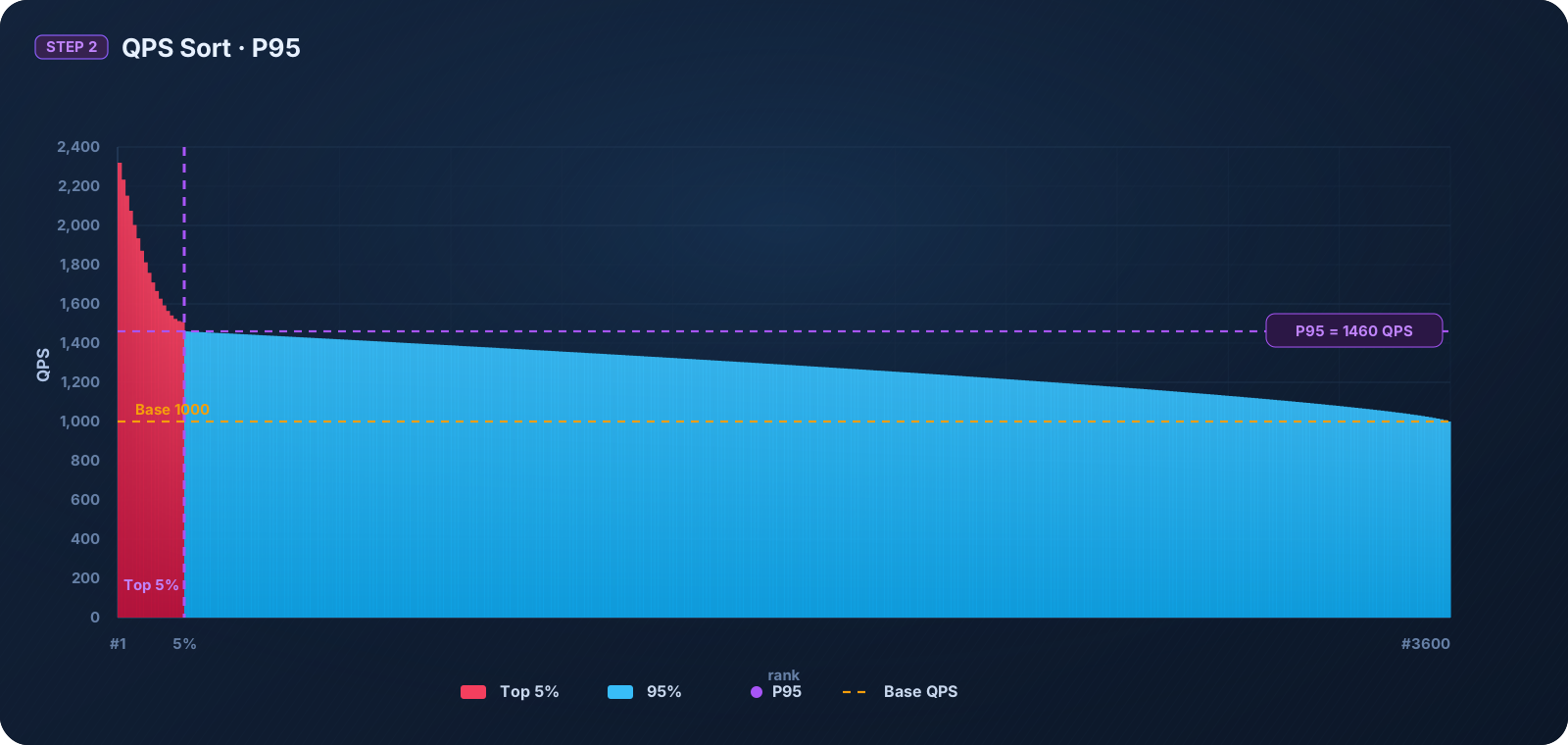
After the QPS over-limit pay-as-you-go capability is enabled, the system performs an independent metering for your environment every hour. We use the industry-standard 95th percentile peak-shaving algorithm to ensure fair billing: 3,600 QPS sampling points are collected every hour (one per second), sorted from low to high, and the top 5% of peaks (that is, 180 spike points) are removed. The highest value among the remaining data is used as the metered QPS for the hour. The metered QPS minus the plan quota QPS yields the billable QPS. The billable QPS is rounded up to the nearest hundred QPS, and then credits are calculated and deducted. QPS over-limit pay-as-you-go metering and credit deduction are performed on an hourly basis.
QPS statistical metering diagram within 1 hour:
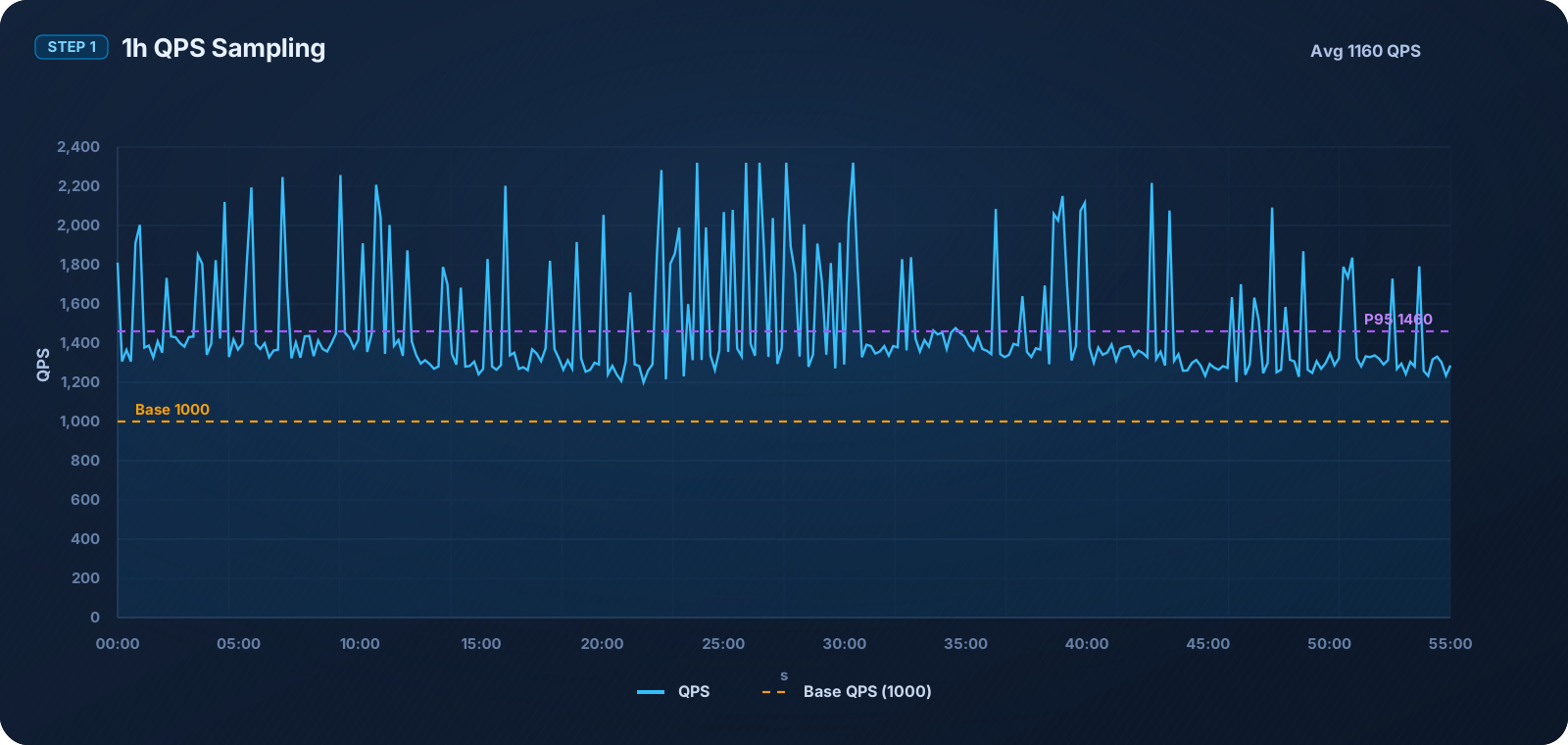
Diagram for obtaining the metered QPS value after sorting hourly statistics and applying 95th percentile peak shaving:
Billing example (based on the enterprise edition environment)
QPS over-limit pay-as-you-go is measured and billed on an hourly basis. If the QPS does not exceed the environment plan quota within an hour, no fees are incurred. When the QPS exceeds the environment plan quota within an hour, the excess amount is metered and billed. For details, see CloudBase Billing Overview.
At 10:00, the metered QPS reaches 1,050 QPS, exceeding the plan quota of 1,000 QPS. After the excess QPS is rounded up, 100 QPS needs to be metered and billed.
At 11:00, the metered QPS reaches 1,100 QPS, and the excess quota of 100 QPS needs to be metered and billed.
At 12:00, the metered QPS reaches 950 QPS, which does not exceed the plan quota, so no fees are incurred.
At 21:00, the metered QPS reaches 1,300, and the excess quota of 300 QPS needs to be metered and billed.
피드백