Flutter
다운로드
포커스 모드
폰트 크기
Preview
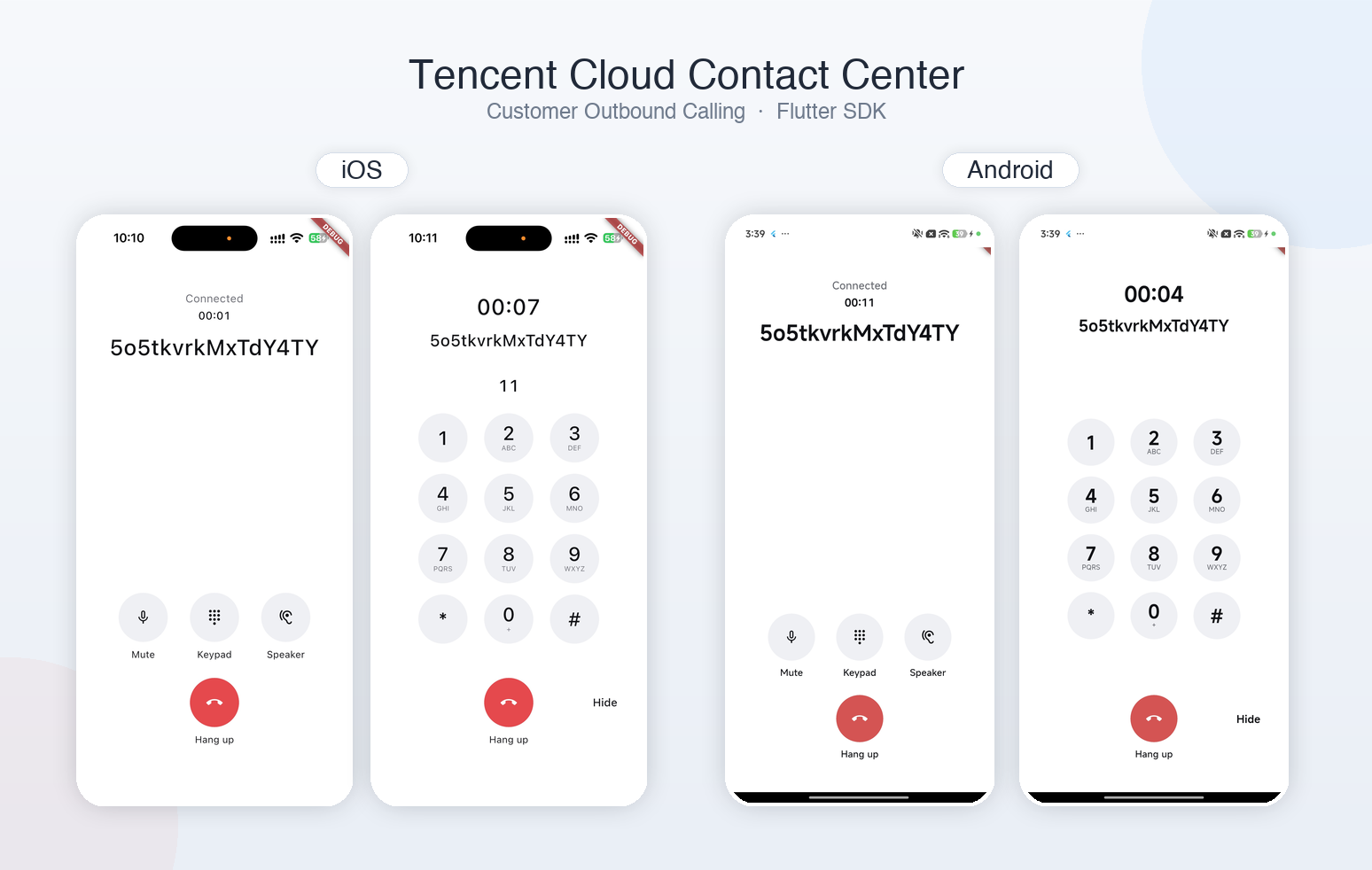
Installation
flutter pub add tccc_user_call_sdk
Platform Requirements
Flutter >= 3.7.0(Dart >= 2.19.6)
Android minSdk 21
iOS 13.0
Permission
Complete the permission application before use.
Edit AndroidManifest.xml and add the following permission declaration in the permissions section.
<uses-permission android:name="android.permission.RECORD_AUDIO" /><uses-permission android:name="android.permission.INTERNET" /><uses-permission android:name="android.permission.ACCESS_NETWORK_STATE" /><uses-permission android:name="android.permission.MODIFY_AUDIO_SETTINGS" /><uses-permission android:name="android.permission.FOREGROUND_SERVICE" /><uses-permission android:name="android.permission.FOREGROUND_SERVICE_MICROPHONE" /><uses-permission android:name="android.permission.FOREGROUND_SERVICE_MEDIA_PLAYBACK" /><uses-permission android:name="android.permission.POST_NOTIFICATIONS" />
Edit Info.plist and add the following permission declaration.
<key>NSMicrophoneUsageDescription</key><string>Used for Voice</string><key>NSCameraUsageDescription</key><string>The audio calling SDK links the camera capability, but this app is used only for Voice.</string><key>UIBackgroundModes</key><array><string>audio</string></array>
Quick Start
Parameter descriptions for subsequent use
Parameter | Type | Required | Description |
sdkAppId | number | Yes | SDKAppId of the Tencent Cloud Contact Center. |
userId | string | Yes | The business-side user ID cannot be empty and cannot contain the @ character. If an email address is used as the user identifier, replace it with a URL-safe identifier. |
userSig | string | Yes | User identity signature. For the obtainment process, see Prerequisites > Step 4: Obtain the userSig signature. |
userClientData | string | No | If the ClientData parameter is specified when the CreateUserSig API is called to obtain the userSig, it must be passed in as well. For details, see Prerequisites > Step 4: Obtain the userSig signature. |
With UI Integration
To facilitate your use and reduce development costs, the SDK includes a built-in calling UI. To use it, follow these steps:
1. Register navigatorKey.
import 'package:flutter/material.dart';import 'package:tccc_user_call_sdk/tccc_user_call_sdk.dart';import 'package:tccc_user_call_sdk/ui.dart';final navigatorKey = GlobalKey<NavigatorState>();void main() {WidgetsFlutterBinding.ensureInitialized();// Global registration of navigatorKeyTcccCallUI.install(navigatorKey: navigatorKey);// Configure navigatorKey in MaterialApp.runApp(MaterialApp(navigatorKey: navigatorKey, home: const HomePage()));}
2. Listen for events and initiate a call.
final userCallInstance = TcccUserCall.instance;// Subscribe to ready first, then init.userCallInstance.events.listen((event) async {switch (event.type) {case 'ready':// Initiate a call (pass only channelId).final started = await userCallInstance.startAudioCall(channelId,showUI: true, // The default value is true.);final session = started.data!;session.events.listen((event) {if (event.type == 'ended') {userCallInstance.unInit();}});case 'connecting':case 'connected':case 'disconnected':case 'error':break;default:break;}});
3. Create a user.
userCallInstance.createUser(sdkAppId: sdkAppId,userId: userId,userSig: userSig,);
4. Initialize.
userCallInstance.init();
Without UI Integration
You can implement your own calling page based on the interfaces and event callbacks of
TcccUserCall and Session.1. Listen for events and initiate a call.
final userCallInstance = TcccUserCall.instance;// Subscribe to ready first, then init.userCallInstance.events.listen((event) async {switch (event.type) {case 'ready':// Initiate a call (pass showUI: false).final started = await userCallInstance.startAudioCall(channelId,showUI: false,);final session = started.data;session.events.listen((event) {switch (event.type) {case 'warning':// (event as TcccWarningEvent).code / .serverType.trtc → TRTC warning code documentation.break;case 'newDTMF':// (event as TcccNewDTMFEvent).tone / originator / durationbreak;case 'muted':case 'unmuted':// muted / unmutedbreak;case 'error':// See the error code table below.break;case 'networkquality':// The current value is also in status.uplinkQuality / downlinkQuality.break;case 'disconnected':case 'connecting':case 'connected':break;case 'loginExpired':break;case 'onRoomEntered':break;case 'progress':// (event as TcccProgressEvent).response.statusCode / reasonPhrasebreak;case 'accepted':// SIP 200.(event as TcccAcceptedEvent).response.statusCodebreak;case 'confirmed':// This event is triggered when the other party answers and the local protocol stack confirms it (by sending an ack signal). It has no event object parameters.break;case 'ended':case 'failed':// (event as TcccEndedEvent / TcccFailedEvent).cause / .originatoruser.unInit();break;default:break;}});case 'connecting':case 'connected':case 'disconnected':// connecting.attempts;disconnected.error / .code / .reasonbreak;case 'error':// See the error code table below.break;default:break;}});
2. Create a user.
userCallInstance.createUser(sdkAppId: sdkAppId,userId: userId,userSig: userSig,);
3. Initialize.
await userCallInstance.init();
4. Operate during a call.
// The following are the methods you need during a call. Call them as needed.await session.muteAudio(true);await session.setAudioRoute(TcccAudioRoute.speakerphone);await session.sendDTMFTone('1');await session.terminate();
Method and Event Description
TcccUserCall Method
TcccUserCall.instance is a singleton.createUser
Create a user.
Parameter | Type | Required | Description |
sdkAppId | int | Yes | SDKAppId of Tencent Cloud Contact Center |
userId | String | Yes | Cannot be empty or contain @. |
userSig | String | Yes | Issued by the service backend |
userClientData | String | No | Required and consistent when ClientData is included in CreateUserSig; otherwise, do not specify it. |
Return value: TcccResult<TcccUserCall>
final userCallInstance = TcccUserCall.instance;final created = userCallInstance.createUser(sdkAppId: 1400000000,userId: userId,userSig: userSig,);
init
Initialize SDK.
Return value: TcccOutcome
final userCallInstance = TcccUserCall.instance;final ready = userCallInstance.init();
updateUserSig
Replace the bound userSig.
Parameter | Type | Required | Description |
userSig | String | Yes | New userSig issued by the service backend |
userClientData | String? | No | Pass this parameter when replacing it simultaneously; otherwise, keep the original value. When ClientData is included in CreateUserSig, it must be consistent with the issued value. |
Return value: TcccOutcome
final userCallInstance = TcccUserCall.instance;userCallInstance.updateUserSig(userSig);
unInit
Deinitialize the SDK and clear the identity of the user created by the
createUser API. Call this method after the call ends or when the page is terminated.Return value: TcccOutcome
final userCallInstance = TcccUserCall.instance;userCallInstance.unInit();
startAudioCall
Initiate an audio call.
Note:
Call this method after the ready event is triggered.
Parameter | Type | Required | Description |
audioChannelId | String | Yes | Channel ID |
showUI | bool | No | Whether to display the built-in call UI. Default value: true. |
peerDisplayName | String? | No | Peer display name (built-in UI) |
peerSubtitle | String? | No | Peer subtitle (built-in UI) |
ringback | TcccRingback | No | Default value: builtIn. If set to none, the built-in ringback tone is not played. |
Return value: TcccResult<Session>
final userCallInstance = TcccUserCall.instance;final started = await userCallInstance.startAudioCall(channelId);final session = started.data;
TcccUserCall Event
Event name | Type | Trigger Timing |
connecting / connected / disconnected | TcccConnectingEvent / TcccConnectedEvent / TcccDisconnectedEvent | During the first init, the state transitions from connecting to connected and then to ready. |
ready | TcccReadyEvent | Triggered only once, when the first init succeeds. |
error | TcccErrorEvent | createUser / init / seat reservation failure |
warning | TcccWarningEvent | Only -11001 (outbound call still made without the built-in UI installed) |
Session Method
The session instance returned after startAudioCall succeeds.
terminate
Hang up the current call. If the call is connected, it will be hung up. If the call is not connected, it will be canceled.
Return value: TcccOutcome
await session.terminate();
muteAudio
Mute / unmute the local microphone.
Parameter | Type | Required | Description |
mute | bool | Yes | true mutes, false unmutes. |
Return value: TcccOutcome
await session.muteAudio(true);await session.muteAudio(false);
sendDTMFTone
Send a single DTMF (IVR key). Consecutive calls are queued.
Parameter | Type | Required | Description |
tone | String | Yes | Single character: 0–9, #, *, A–D |
duration | int? | No | INFO Duration=, in milliseconds. Default: 100. Range: 70–6000. |
interToneGap | int? | No | Same as Web: queue interval is duration + interToneGap. Default: 500. Lower limit: 50. |
Return value: TcccOutcome
await session.sendDTMFTone('1');await session.sendDTMFTone('#', duration: 160);// await session.sendDTMFTone('1', duration: 160, interToneGap: 500);
setAudioRoute
Switch between earpiece / speaker.
Parameter | Type | Required | Description |
route | TcccAudioRoute | Yes | earpiece; speakerphone |
Return value: TcccOutcome
await session.setAudioRoute(TcccAudioRoute.speakerphone);// await session.setAudioRoute(TcccAudioRoute.earpiece);
Session Event
Session events, with details shown in the following table.
Event name | Type | Trigger Timing |
progress | TcccProgressEvent | 18x.originator,response.statusCode / reasonPhrase |
warning | TcccWarningEvent | Warning. The call continues. |
newDTMF | TcccNewDTMFEvent | DTMF sent successfully. |
muted / unmuted | TcccMutedEvent / TcccUnmutedEvent | Local mute status changes. audio; the current value is also in isMuted().audio. |
error | TcccErrorEvent | Errors after room entry (non-terminal errors after the call continues or is connected). For TRTC onError after room entry, serverType is trtc; for others, it is tccc. |
networkquality | TcccNetworkQualityEvent | Quality changes. uplinkNetworkQuality / downlinkNetworkQuality; the current value is also in status. |
connecting / connected / disconnected | TcccConnectingEvent / TcccConnectedEvent / TcccDisconnectedEvent | TRTC. serverType is trtc. |
loginExpired | TcccLoginExpiredEvent | Ticket refresh failed. |
onRoomEntered | TcccOnRoomEnteredEvent | TRTC room entry succeeded. Not sent in pure IVR mode. |
accepted | TcccAcceptedEvent | SIP 200.originator,response.statusCode / reasonPhrase |
confirmed | TcccConfirmedEvent | The INVITE 2xx response has been ACKed. The Web demo switches to the in-call state at this point. The originator's calling ACK is local. Whether the call can proceed still depends on status.state == accepted. |
ended | TcccEndedEvent | Ended after being connected. cause / originator / optional failure. session.ended is also completed. |
failed | TcccFailedEvent | Failed before being connected (rejected, canceled, ticket refresh failed, removed from TRTC room, and so on). cause / originator. session.ended is also completed. No additional fatal error is sent. |
Example code:
session.events.listen((event) {switch (event.type) {case 'ended':case 'failed':break;default:break;}});
End Cause ended.cause
Value (cause / cause.value) | Meaning |
terminated / Terminated | Hung up after being connected. originator.local indicates local, remote indicates the peer BYE. ended.success == true |
canceled / Canceled | Canceled before being connected. originator.local indicates local, remote indicates the peer. |
busy / Busy | 486,600 |
rejected / Rejected | 403,603 |
notFound / Not Found | 404,604 |
unavailable / Unavailable | 480,410,408,430 |
noAnswer / No Answer | TcccConfig.noAnswerTimeout: No 200 response after the first 18x response. No upper limit by default. |
expires / Expires | Session Timer timeout |
requestTimeout / Request Timeout | Signaling transaction timeout (not SIP 408) |
connectionError / Connection Error | WSS / network |
sipFailureCode / SIP Failure Code | Other SIP failures |
internalError / Internal Error | Internal error (including 18x no media 20002) |
authenticationError / Authentication Error | userSig / ticket refresh failure; SIP 401, 407 |
webRtcError / WebRTC Error | TRTC room entry failure or kickout (Rtc.KickedOut results in failed) |
addressIncomplete / Address Incomplete | 484,424 |
redirected / Redirected | 300,301,302,305,380 |
incompatibleSdp / Incompatible SDP | 488,606 |
dialogError / Dialog Error | Dialog error |
userDeniedMediaAccess / User Denied Media Access | Microphone access denied |
rtpTimeout / RTP Timeout | Media timeout |
Error code
Error code | Error Code Type | Source | Trigger Timing |
-11010 | ErrorCode.User.instanceExists | Return Value | Calling createUser again without unInit |
-11004 | ErrorCode.User.notReady | Return Value | createUser or init not called |
-11002 | ErrorCode.User.invalidParam | Return Value | sdkAppId / userSig / channelId is empty or invalid |
20003 | ErrorCode.User.invalidUserId | Return Value | userId or channelId is invalid |
-11003 | ErrorCode.User.disconnected | Return Value or ended | init handshake failed, or reconnection exhausted during the call. |
-10004 | ErrorCode.User.cannotReset | Return Value | unInit during a call |
-11005 | ErrorCode.User.callInProgress | Return Value Only | A call is already in progress. |
-11006 | ErrorCode.Session.invalidState | Return Value Only | Performing an operation on an ended call |
-11007 | ErrorCode.Session.endedBeforeMilestone | Milestone Future | The call has ended, and the sent / ringing / accepted milestone was not reached. |
-10002 | ErrorCode.User.invalidUserSig | ended | Empty userSig / empty jwt / sdkLogin bizCode -2014 / second 401 |
-10003 | ErrorCode.Cgi.bizError | ended | sdkLogin HTTP succeeds but errorCode != 0 (except -2014). failure.detail contains bizCode / httpStatus / requestId. |
-10001 | ErrorCode.Cgi.error | ended | Authentication network failure or HTTP 4xx/5xx. failure.detail contains bizCode / httpStatus / requestId. |
20002 | ErrorCode.Session.answerFailure | ended | No available media in 18x response. |
-3301 | ErrorCode.Rtc.joinRoomFailed | ended | Failed to join the room |
-3325 | ErrorCode.Rtc.kickedOut | ended(failed) | Kicked out / room dismissed |
100–699 | SIP status (same value as failure.sipStatusCode) | ended | Peer SIP. For busy/rejected/not found, check ended.cause instead of hardcoding based on the code. |
20006 | ErrorCode.Dtmf.invalidState | Return Value Only | Sending DTMF before the call is connected. |
20005 | ErrorCode.Dtmf.invalidParam | Return Value + session.events error | Invalid DTMF character |
-11008 | ErrorCode.Dtmf.queueFull | Return Value Only | DTMF queue is full. |
20004 | ErrorCode.Dtmf.sendFailed | Return Value + session.events error | An error occurs when DTMF INFO is sent, or no InviteSession exists when the queue is drained. |
20007 | ErrorCode.Dtmf.timeout | Return Value + session.events error | DTMF INFO timeout or 408 |
20008 | ErrorCode.Dtmf.transportError | Return Value + session.events error | DTMF INFO transport layer failure |
20009 | ErrorCode.Dtmf.dialogError | Return Value + session.events error | DTMF INFO 481 or no dialog |
20010 | ErrorCode.Dtmf.responseError | Return Value + session.events error | Peer returns 4xx/5xx for DTMF INFO (excluding 408/481) |
-1332 | ErrorCode.Rtc.audioRouteFail | Return Value Only | setAudioRoute exception |
-13xx / -33xx | ErrorCode.Rtc.* (except -3301 / -3325) | session.events error |
피드백