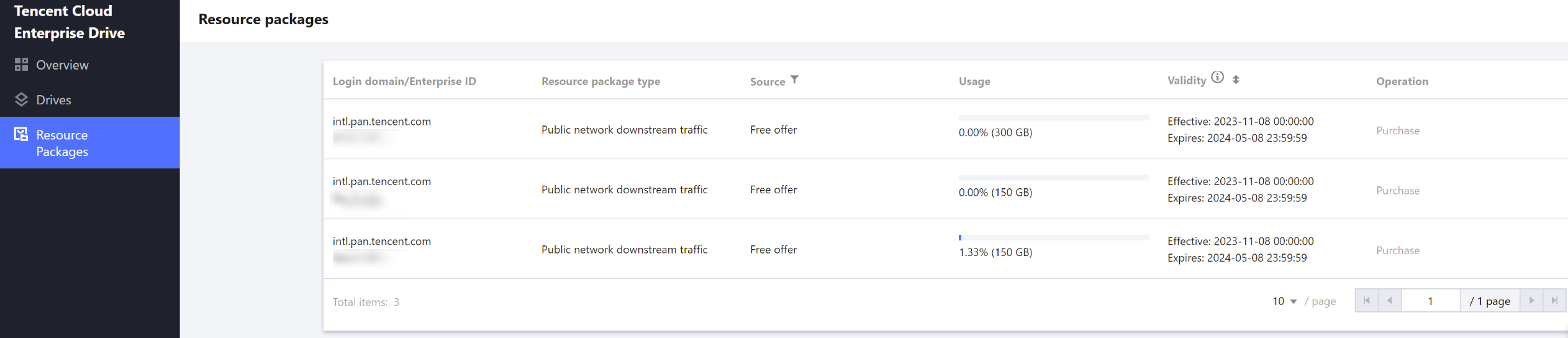
Access the Drive Console and navigate to the Resource Packages page. Here, you can view all your resource pack information and perform relevant operations.
Login Domain and Enterprise ID: This displays the drive to which the resource pack belongs. The traffic resource pack corresponds to the drive. If you have purchased multiple drives, you need to purchase the corresponding traffic resource packs separately for offsetting.
Resource Package Type: This indicates the type of resource pack. Currently, only external network downstream traffic packs are available.
Source: Divided into Self-purchased and Gifted. Self-purchased refers to the traffic resource packs that you have purchased on your own, and Gifted refers to the traffic resource packs given by the system.
Usage Description: Displays the specifications and usage status of the resource pack.
Validity Period: The validity period of the resource pack aligns with that of the corresponding drive.
Operation: For self-purchased traffic resource packs, you can request a refund provided the conditions for a refund are met. For more details, please refer to the Refund.