Automatic disk capacity expansion
다운로드
포커스 모드
폰트 크기
TDMQ for Apache Pulsar pro clusters with fixed storage support automatic disk capacity expansion. You can enable automatic disk capacity expansion to adjust disk space after the disk watermark reaches the default (configured) threshold.
Scenarios
Automatic disk capacity expansion: When the disk load is too high, normal production and consumption may be affected. You can manually configure an automatic disk capacity expansion policy in the console to enable this feature. After it is enabled, once the disk load reaches the trigger threshold, the system automatically adjusts the disk capacity based on the preset policy to prevent the disk from being fully written.
Constraints and Limitations
Pro fixed storage clusters: They support disk watermark handling policies, which take effect only after being manually enabled in the console.
Pro Edition/Standard Edition elastic storage clusters: They adopt a pay-as-you-go usage model, and their storage capacity automatically scales, eliminating the need to monitor disk watermarks.
Policy Type | Pro Edition (Fixed Storage) | Pro Edition (Elastic Storage) | Standard Edition (Elastic Storage) |
Automatic disk capacity expansion | Supported | Not supported. | Not supported. |
Operation Steps
1. Log in to the TDMQ for Apache Pulsar console.
2. In the left sidebar, choose Cluster . After you select a region, click the ID of the target cluster to go to the cluster details page.
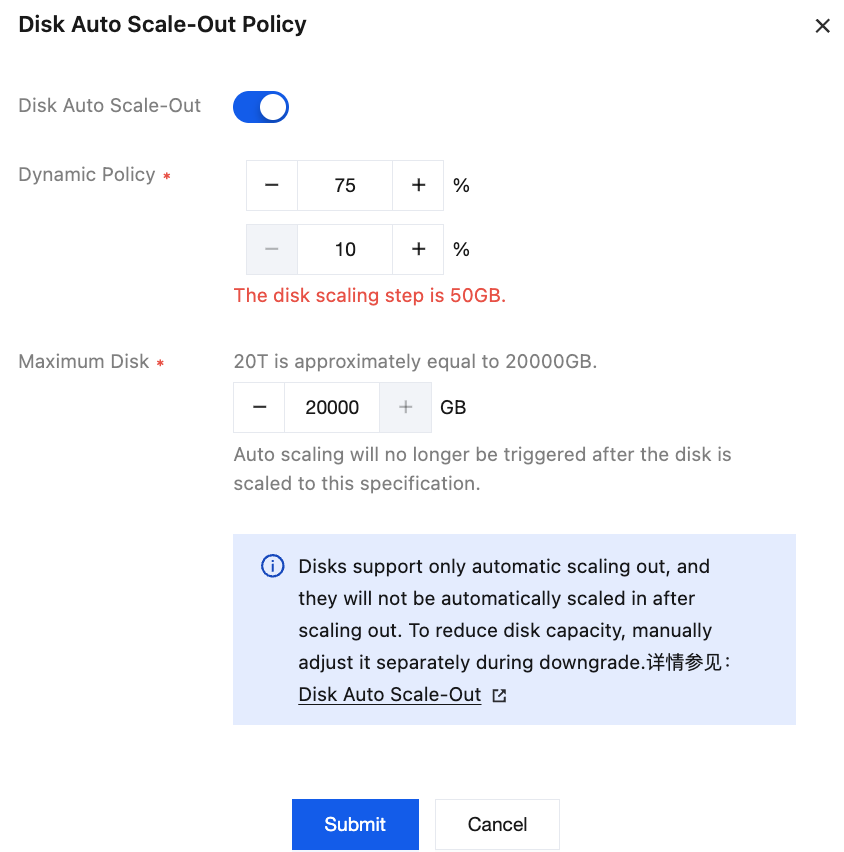
3. In the Configuration Information module on the cluster details page, locate the Automatic Disk Capacity Expansion entry, and click it to enable and configure an automatic disk capacity expansion policy.
Change Impacts
Automatic disk capacity expansion does not affect business operations. However, if disk usage surges within a short period, the system cannot guarantee that automatic disk capacity expansion is completed before disk usage reaches the capacity threshold. It is recommended to plan capacity in advance and expand disk capacity based on the watermark before automatic disk capacity expansion is enabled.
If automatic disk capacity expansion is enabled for a cluster, it will be paused during disk downgrade. Confirm whether the target capacity for the downgrade is appropriate. After the downgrade is completed, automatic expansion will still be triggered if disk usage reaches the expansion threshold again, which may cause the capacity to grow again. For more information, see Storage Space Downgrade.
피드백