Configuring StreamPackage SSAI Service Domain Name
다운로드
포커스 모드
폰트 크기
마지막 업데이트 시간: 2026-11-02 10:56:11
AI 번역
You can use CDN service to improve the efficiency of StreamPackage ad replacement service. The benefits of CDN include content and ad caching, consistent domain names in personalized manifests, and CDN DNS resolution.
When using CDN, the request and response process of StreamPackage SSAI service is as follows:
1. The player sends a request to the CDN to obtain the playback manifest. The CDN forwards the request to StreamPackage.
2. StreamPackage retrieves the source stream manifest from the source stream server, performs ad replacement, and replaces the source stream content prefix and ad segment prefix with the source stream CDN prefix and SSAI service CDN prefix, respectively. The personalized manifest is sent to the CDN, which returns it to the player.
3. The player initiates a request to the segment URL in the manifest.
4. The CDN sends the source stream segment request to the source server and sends the ad request to the StreamPackage SSAI service.
5. The source server returns the source stream segment; when the SSAI service receives the ad request, it triggers the reporting of tracking data and redirects to obtain the actual ad segment as the return.
6. The player starts playing.
Use Tencent Cloud Streaming Services (CSS)
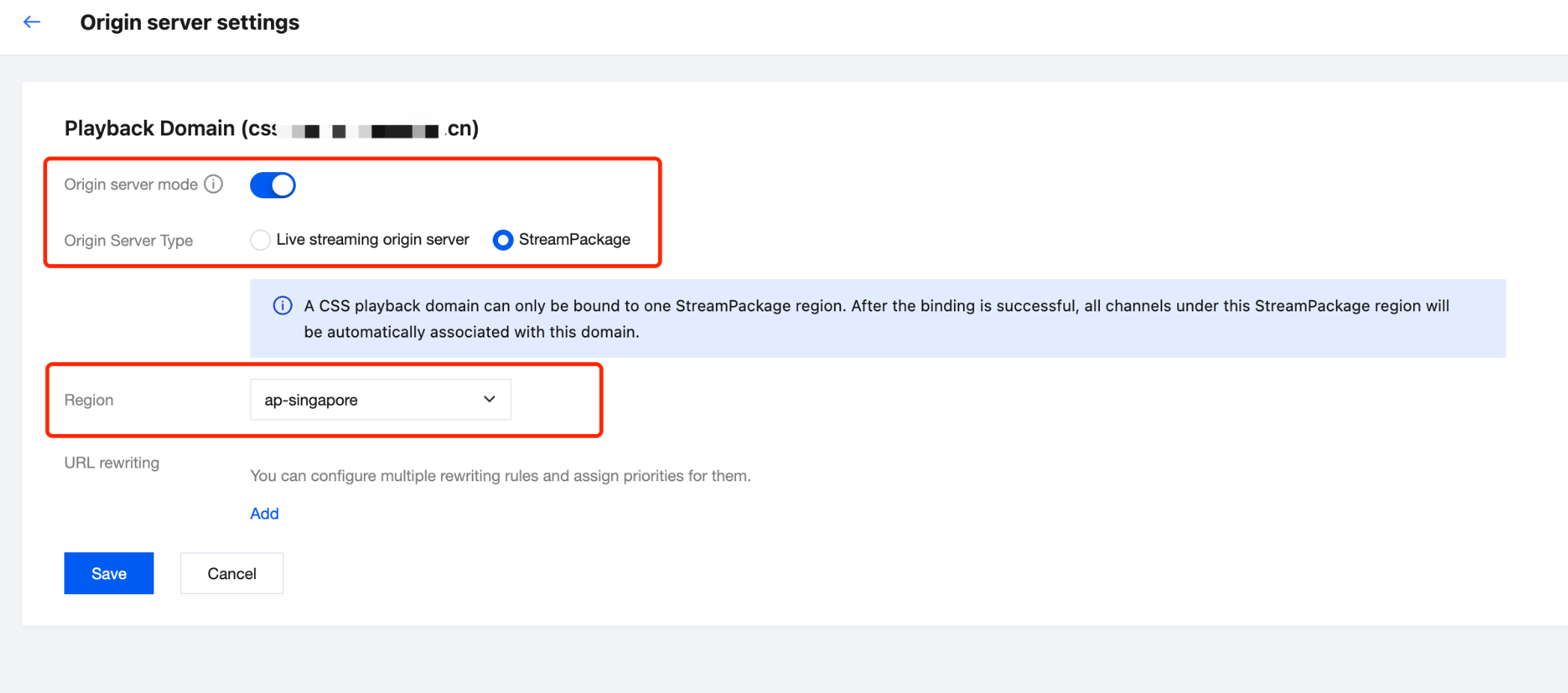
In CSS > Domain > Origin server mode > Select StreamPackage as the origin server type > Select the region of the ad insertion configuration, the required configuration will be automatically distributed for the domain.
1. Master manifest requests, that is, paths starting with /v1/ssai/master or /v1/ssai/dash, are not cached and are passed through directly.
GET <StreamPackageURL>/v1/ssai/master/<uniq_id>/xxx.m3u8?xxx1=p1&xxx2=p2
2. For sub-manifest requests, that is, paths starting with /v1/ssai/manifest, configure them as regular manifests. For HLS live streaming scenarios, refer to the cache configuration for live .m3u8 files. For HLS VOD scenarios, refer to the cache configuration for VOD .m3u8 files.
GET <StreamPackageURL>/v1/ssai/manifest/<uniq_id>/<session_id>/xxx.m3u8
3. For personalized ad requests, that is, paths starting with /v1/ssai/segment, /v1/ssai/dashsegment, or /v1/ssai/redirect, configure them as regular .ts/m4s/mp4 files.
GET <StreamPackageURL>/v1/ssai/segment/<uniq_id>/<session_id>/<asset_id>/<seq_num>
4. All request parameters are completely transparent.
Operation Process
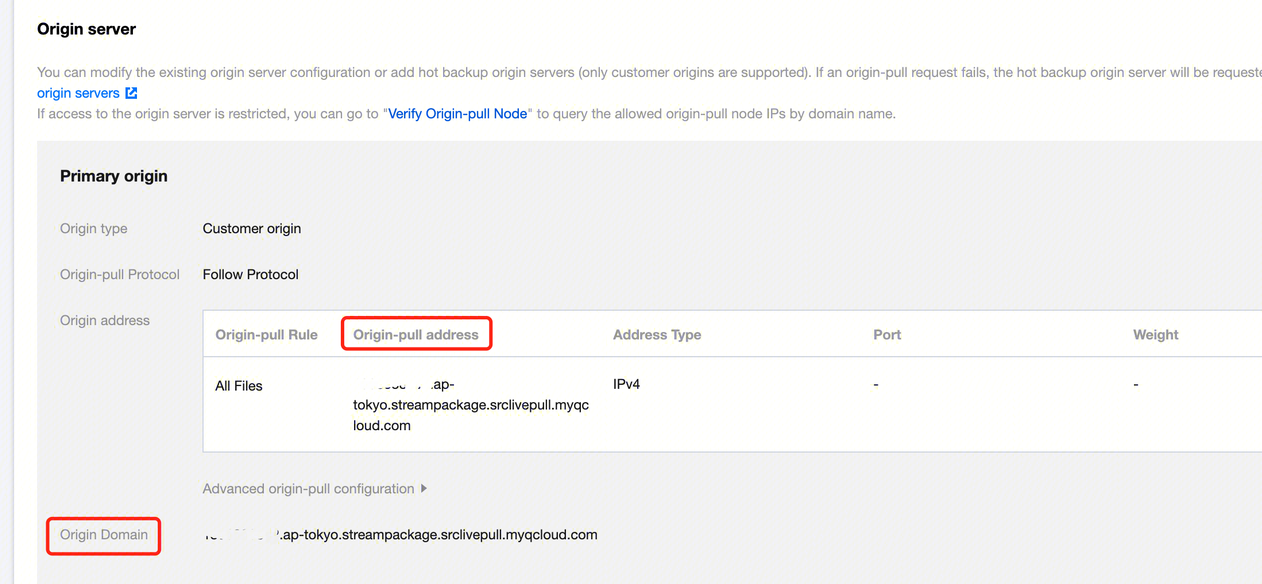
1. In the Tencent Cloud console > CDN > Domain Management > Basic Configuration > Origin Server Information, configure the origin server address and origin HOST for the playback domain.
You need to set it as the playback domain for the StreamPackage ad insertion configuration, and it is also the domain in the Playback endpoint prefix, in the format: {appid}.{region}.streampackage.srclivepull.myqcloud.com.
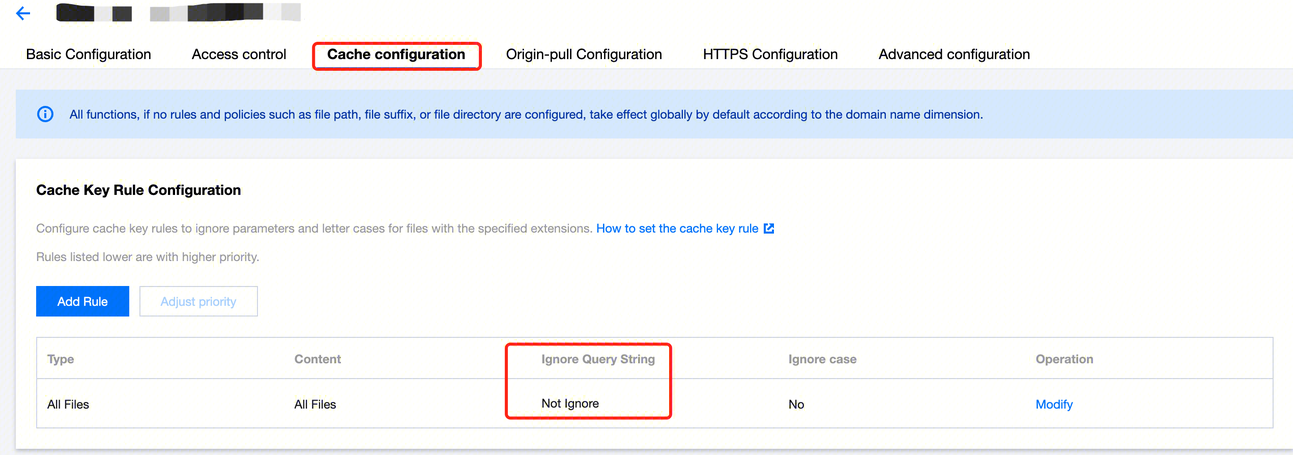
2. In the cache configuration, set it to not ignore parameters, which means all request parameters are passed through.
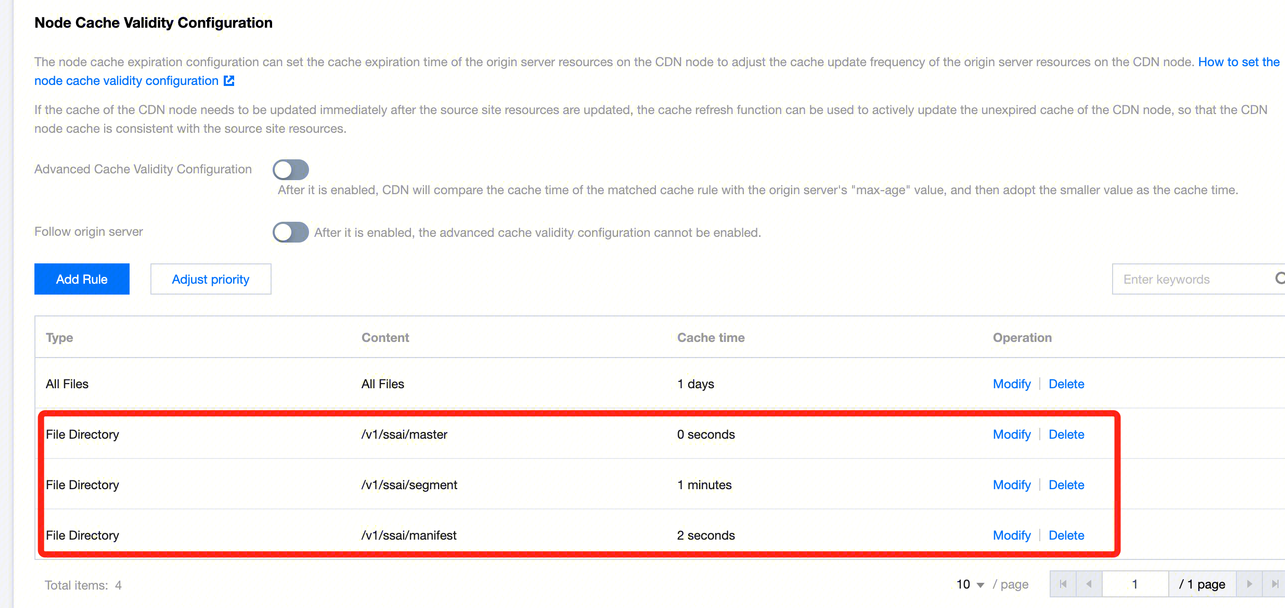
3. In the node cache expiration configuration, configure caching separately for different requests based on their paths.
Use Third-Party CDN
To use a third-party CDN to implement personalized ad replacement, you need to configure the following at the external CDN:
1. Master manifest requests, that is, paths starting with /v1/ssai/master or /v1/ssai/dash, are not cached and are passed through directly.
GET <StreamPackageURL>/v1/ssai/master/<uniq_id>/xxx.m3u8?xxx1=p1&xxx2=p2
2. For sub-manifest requests, that is, paths starting with /v1/ssai/manifest, configure them as regular manifests. For HLS live streaming scenarios, refer to the cache configuration for live .m3u8 files. For HLS VOD scenarios, refer to the cache configuration for VOD .m3u8 files.
GET <StreamPackageURL>/v1/ssai/manifest/<uniq_id>/<session_id>/xxx.m3u8
3. For personalized ad requests, that is, paths starting with /v1/ssai/segment, /v1/ssai/dashsegment, or /v1/ssai/redirect, configure them as regular ts/m4s/mp4 files.
GET <StreamPackageURL>/v1/ssai/segment/<uniq_id>/<session_id>/<asset_id>/<seq_num>
4. All request parameters are completely transparent.