Rate Limiting Rule
ダウンロード
フォーカスモード
フォントサイズ
After enabling the rate limiting rule, you can configure access frequency thresholds for a single API or an entire domain. Requests that meet the matching criteria (such as request method, parameter name/value, IP address location) are counted. Rate limiting is triggered when the threshold is exceeded. This feature helps mitigate resource exhaustion caused by brute-force attacks, batch crawling, CC attacks, or sudden traffic spikes. Rate limiting rules are not pre-configured in the system. You must add custom rules. These rules support setting differentiated frequency limits based on caller dimensions such as IP address, user, or Token. They also support configuring enforcement actions (Observe, Redirect, Block), priority, and the order of application (API rate limiting first or security protection first).
Adding Custom Rule
After enabling the rate limiting rule, you can customize rate limiting rules based on your business scenarios. Requests that meet the matching criteria are counted. Rate limiting is triggered when the threshold is exceeded.
Note:
A maximum of 50 custom rate limiting rules can be manually added for a single domain.
1. On the API Security > Rule Configuration > Rate Limiting Rules page, click Add Rule.
2. In the Add Rule window, configure the following parameters and click OK to create the rule.
3. After you add a rule, you can edit or delete the corresponding rule.
Configuration Item Description
Domain Name: Displays the current domain.
Rule Name: Allows you to enter a custom rule name.
Rate Limiting Scope
API: When you select API as the application scope, enter the API asset paths that require rate limiting in the Rate Limiting Object field. You can separate multiple API assets by pressing Enter. The maximum length is 128 characters.
Domain Name: When you select the current domain as the application scope, the access frequency for the entire domain is calculated. Rate limiting is triggered when the specified frequency is exceeded.
Throttling Object
Custom: When you select manual entry, you can configure the detection path scope. After configuration, all API assets under the specified path are detected. The detection scope can be flexibly defined using the belongs-to rule or regular expression matching.
Select assets from existing API assets: This feature allows you to select multiple APIs that require rule configuration from the existing API assets with one click. It also supports sorting by the number of calls in the last 30 days and filtering by data Tags.
Matching Criteria: At least one condition must be added, and up to five can be added.
Field | Parameter Description | Operator | Matching Content Description |
Request method | - | Belong to Not belong to Regex match | Please select an item or enter content. |
Header name | - | Each parameter value Belong to Not belong to Regex match | Up to 20 values (one per line, lower-case recommended). |
Header value | Enter parameter name. | Belong to Not belong to Regex match | Up to 20 values (one per line, lower-case recommended). |
GET parameter name | - | Each parameter value Belong to Not belong to Regex match | Up to 20 values (one per line, lower-case recommended). |
GET parameter value | Enter parameter name. | Belong to Not belong to Regex match | Up to 20 values (one per line, lower-case recommended). |
POST parameter name | - | Each parameter value Belong to Not belong to Regex match | Up to 20 values (one per line, lower-case recommended). |
POST parameter value | Enter parameter name. | Belong to Not belong to Regex match | Up to 20 values (one per line, lower-case recommended). |
IP location | - | Belong to Not belong to | Select a region. |
Access Frequency: Required. Rate limiting is triggered when the frequency exceeds the specified threshold. You can limit the rate for each URL or all URLs. When multiple API assets are configured within the rate limiting scope, the system calculates the access frequency for all URLs collectively. Rate limiting is triggered when the frequency exceeds the specified threshold.
Action
Observe: Only attack logs are recorded, and no interception is performed.
Redirect to: Attack logs are recorded, and the request is redirected to a specified page. Session requests that meet the matching criteria will be redirected to a specified URL. Note that redirection is only supported to URLs under the current domain.
Block: Attack logs are recorded, and the request is blocked. Two response forms are supported: returning status code 429 or a custom return page.
Priority: Enter an integer from 1-100. A smaller number indicates a higher execution priority for this rule. For rules with the same priority value, the later the creation time, the higher the priority.
Traffic Throttling Sequence
API Traffic Throttling Priority: When you select this mode, the system first performs rate limiting on requests entering the WAF instance, and then applies security protection filtering to the requests that pass the rate limiting. This approach is suitable for scenarios that require high stability and prioritize server availability, such as e-commerce promotions or flash sales.
Security Protection Priority: When you select this mode, the system first performs security protection filtering on requests entering the WAF instance, and then applies rate limiting control to legitimate requests that pass the security inspection. This approach is suitable for scenarios that require high business security or where known attack signatures demand precise protection.
Configuration Example
Scenario 1: Rate Limiting Different Callers
Different users are identified based on the
Header parameter test. Tiered rate limiting is then applied to these users. Regular users are limited to 2000 QPS by default, while special users have custom rules that limit them to 10000 QPS.Fallback Rule: It sets a rate limit of 2000 QPS for each parameter value that appears in the
test parameter. Its priority is lower than that of custom rules.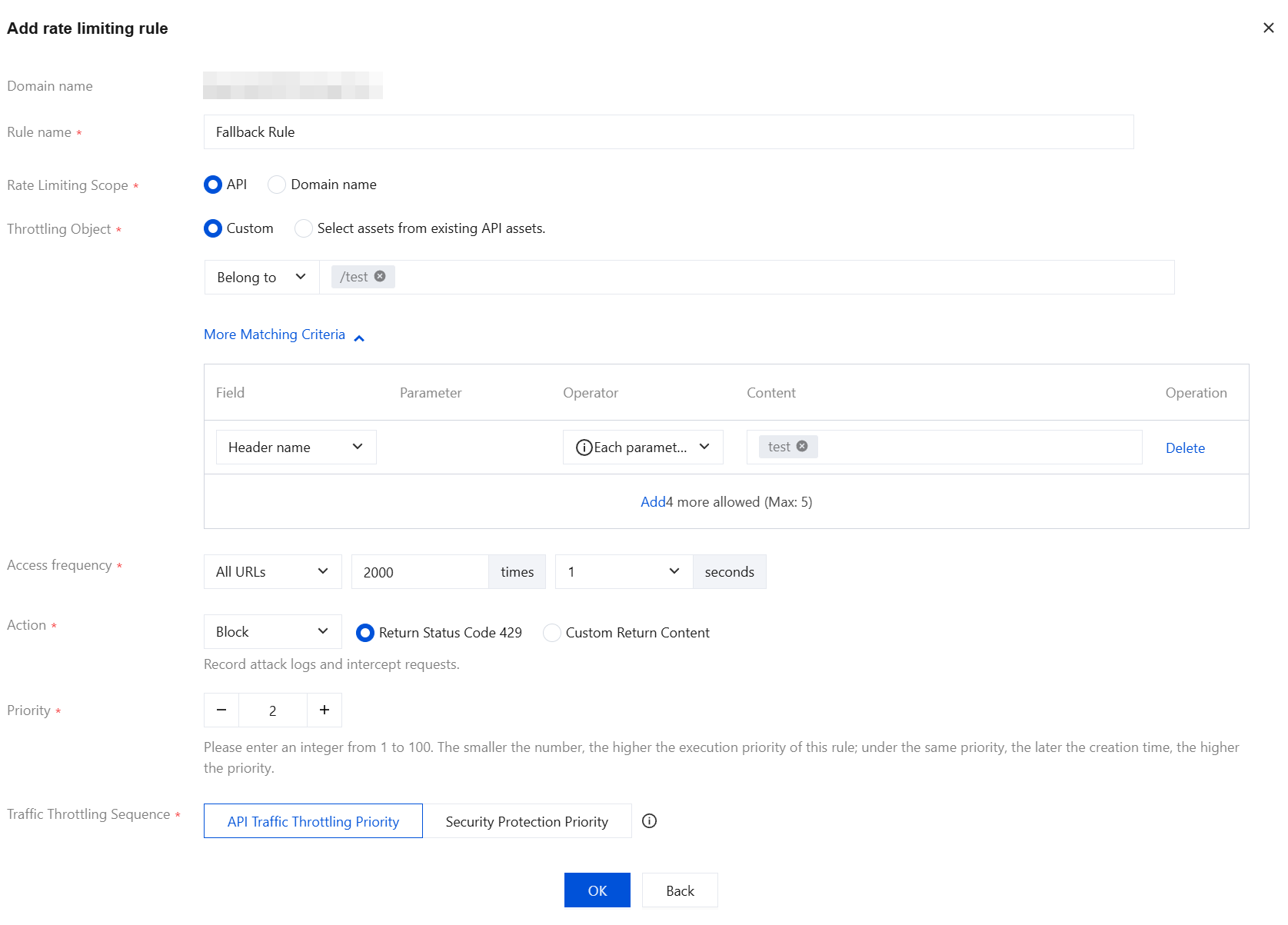
Custom Rule: It sets a rate limit of 10000 QPS for the parameter values
test1 and test2 that appear in the test parameter. Its priority is higher than that of the fallback rule.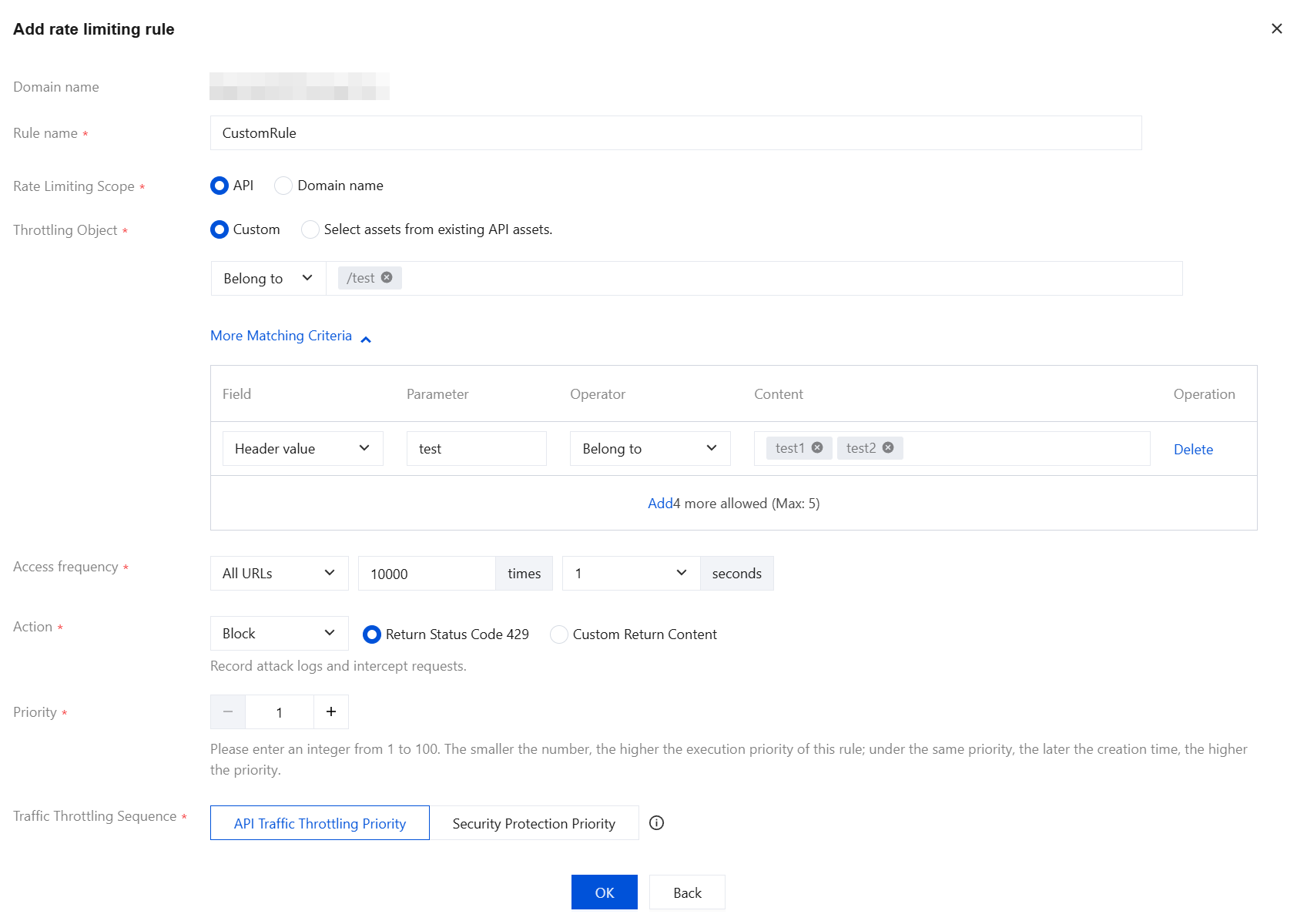
Scenario 2: Rate Limiting the Entire Domain and Key APIs
Based on the access frequency and related access characteristics configured for the API or current domain, the system counts requests that meet the matching criteria. Rate limiting is triggered when the specified frequency is exceeded.
フィードバック