Sensitive Content Detection Rule
ダウンロード
フォーカスモード
フォントサイズ
After you enable the sensitive content detection rules, the system scans the request and response content that passes through the API (including headers, body, query, cookie, and response) based on the built-in rules by default to identify whether the content contains personally identifiable information (PII) and sensitive credentials. If a match is found, the system tags the API asset as sensitive and generates a risk event. In addition to the built-in rules, you can add custom rules as needed to extend the detection scope.
Enabling System-Built-in Rules
On the API Security > Rule Configuration > Sensitive Content Detection Rule page, you can view and manage the system built-in rules. The system built-in rules are used to identify common sensitive data. You can enable or disable a single rule, but the rules cannot be edited or deleted. The system built-in rules generally cover the following categories:
Personally identifiable information (PII): such as mobile phone numbers, ID card numbers, and so on.
Secret credentials: such as access keys from mainstream vendors or platforms.
The specific rule items and categories are subject to what is displayed in the console.
Adding Custom Rule
After you enable the sensitive content detection rules, you can customize sensitive detection rules based on your business needs. You can flexibly define the detection scope using keywords, character patterns, or regular expressions according to your requirements.
Note:
A maximum of 20 custom sensitive content detection rules can be manually added to a single domain.
1. On the API Security > Rule Configuration > Sensitive Content Detection Rule page, click Add Rule.
2. In the Add Rule window, configure the relevant parameters and click OK to create the rule.
3. After you add a rule, you can edit or delete the corresponding rule.
Configuration Item Description
Rule name: Supports custom input, does not allow duplicates, and is recommended to be prefixed with a domain name or API path. The maximum length is 128 characters.
Parameter Location: Supports detection across multiple locations, including headers, body, query, cookie, and response.
Condition && Content
Match by keyword: Detects whether keywords are contained. When you select keyword matching, you can choose to Include any (OR) Include all (AND) of the keywords. Enter multiple keywords by pressing Enter. You can enter a maximum of 20 keywords.
Character matching: Detects the length range of the content and whether it consists of specific character types. When you select Character matching, you can choose from three character types: Lowercase letters, Uppercase letters and Digit. Multiple selections are allowed. After selection, enter the character length range, with a minimum of 6 characters and a maximum of 128 characters.
Regex match: Detects whether content matches specific regular expressions. When you select Regex match, you can enter multiple regular expressions by pressing Enter for matching. You can enter a maximum of 20 regular expressions.
Parameter Generalization: After you select generalization, the corresponding parameter value in the API asset parameter sample will display the generalized data.
Risk Level: Supports selection of ultra-high-risk, high-risk, medium-risk, and low-risk to indicate the risk level of corresponding security events.
On/Off: Controls whether to enable or disable this rule. The default setting is On.
Custom Rule Configuration Example
Configuration scenario: The business prohibits carrying sensitive
user_id content. Assets containing sensitive content are detected to drive internal remediation.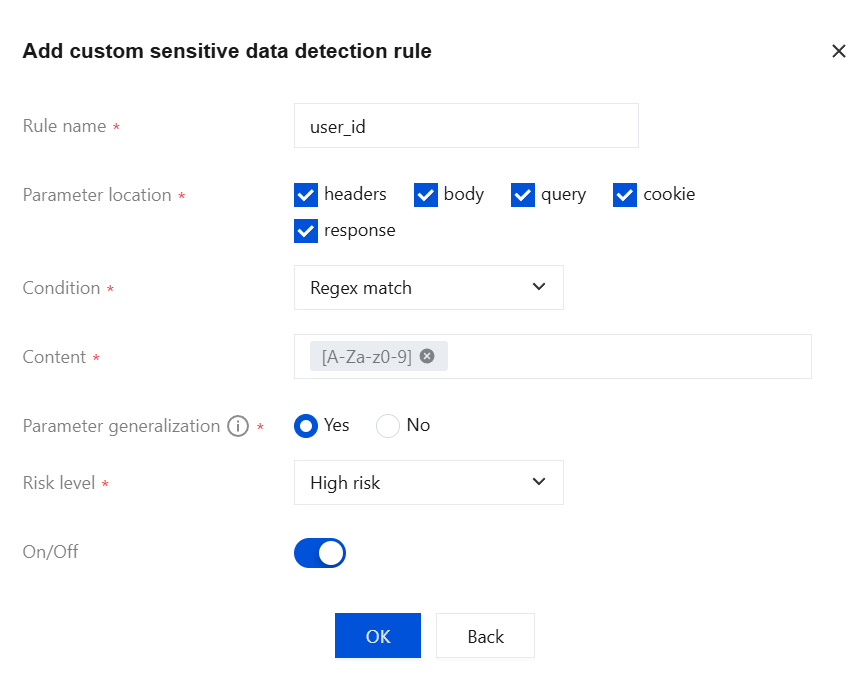
Configuration effect: If a request carries sensitive information, the system applies a sensitive Tag to the asset. If a related data leakage risk is detected, the system generates an API risk event.
フィードバック