tencent cloud

TDMQ for CKafka

Release Notes and Announcements
Release Notes
Broker Release Notes
Announcement
Product Introduction
Introduction and Selection of the TDMQ Product Series
What Is TDMQ for CKafka
Strengths
Scenarios
Technology Architecture
Product Series Introduction
Apache Kafka Version Support Description
Comparison with Apache Kafka
High Availability
Use Limits
Regions and AZs
Related Cloud Services
Billing
Billing Overview
Pricing
Billing Example
Changing from Postpaid by Hour to Monthly Subscription
Renewal
Viewing Consumption Details
Overdue Payments
Refund
Getting Started
Guide for Getting Started
Preparations
VPC Network Access
Public Domain Name Access
User Guide
Usage Process Guide
Configuring Account Permission
Creating Instance
Configuring Topic
Connecting Instance
Managing Messages
Managing Consumer Group
Managing Instance
Changing Instance Specification
Configuring Traffic Throttling
Configuring Elastic Scaling Policy
Configuring Advanced Features
Viewing Monitoring Data and Configuring Alarm Rules
Synchronizing Data Using CKafka Connector
Use Cases
Cluster Resource Assessment
Client Practical Tutorial
Log Integration
Open-Source Ecosystem Integration
Replacing Supporting Route (Old)
Migration Guide
Migration Solution Overview
Migrating Cluster Using Open-Source Tool
Troubleshooting
Topics
Clients
Messages
​​API Reference
History
Introduction
API Category
Making API Requests
Other APIs
ACL APIs
Instance APIs
Routing APIs
DataHub APIs
Topic APIs
Data Types
Error Codes
SDK Reference
SDK Overview
Java SDK
Python SDK
Go SDK
PHP SDK
C++ SDK
Node.js SDK
SDK for Connector
Security and Compliance
Permission Management
Network Security
Deletion Protection
Event Record
CloudAudit
FAQs
Instances
Topics
Consumer Groups
Client-Related
Network-Related
Monitoring
Messages
Agreements
CKafka Service Level Agreements
Contact Us
Glossary

Regular Expression Extraction

PDF
フォーカスモード
フォントサイズ
最終更新日: 2026-01-20 17:02:41
The data processing feature of the TDMQ for CKafka (CKafka) connector provides the capability to extract message content based on regular expressions. Extraction based on regular expressions uses the open-source regular expression extraction package re2.
Java's standard regular expression package java.util.regex and other widely used regular expression packages, such as PCRE, Perl RE, and Python (re), all use a rollback policy. That is, when a pattern presents two alternatives a|b, the engine will first attempt to match the subpattern a. If the match fails, it will reset the input stream and attempt to match the subpattern b.
If this matching pattern is deeply nested, then this policy requires exponentially nested parsing of the input data. If the input string is long, the matching time can tend towards infinity.
In contrast, the RE2J algorithm achieves regular expression matching in linear time by using a non-deterministic finite automaton to simultaneously check all matching items during a single parse of the input data.
Regular expression extraction in data processing is suitable for extracting specific fields from long-array messages. This document describes how to use the regular expression auto-generation feature provided by CKafka and several common extraction patterns.

Automatically Generating Regular Expressions

Regular expression auto-generation is applicable to the log parsing pattern, where each line in the log text represents a raw log entry, and each log can be extracted into multiple key-value pairs using regular expressions.
When configuring the single-line full regular expression pattern, you need to first input a log sample and then customize a regular expression. After the configuration is completed, the system will extract corresponding key-value pairs based on the capture groups in the regular expression.
This section describes how to collect logs in single-line full regular expression pattern.

Prerequisites

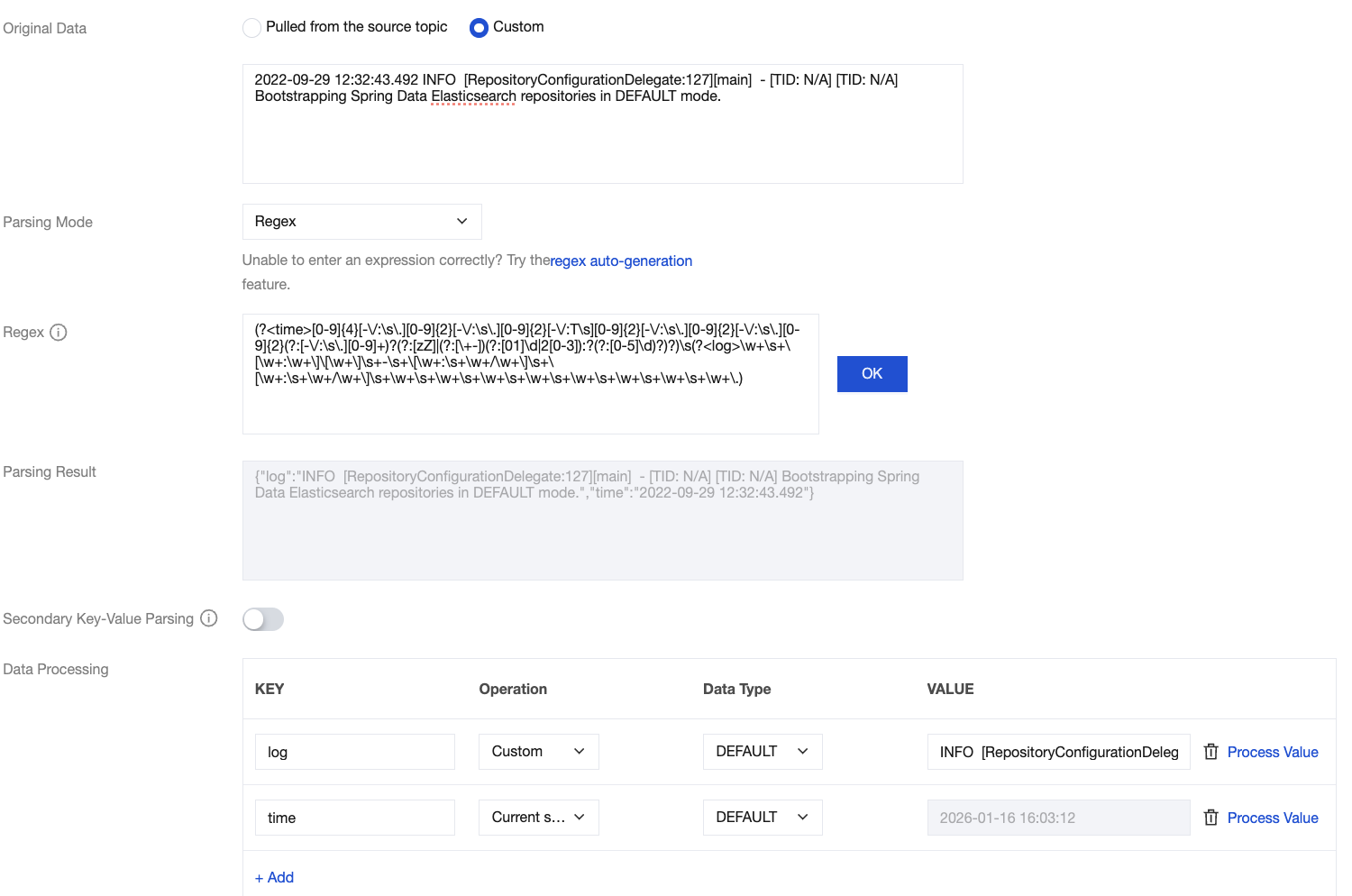
Assume the raw data of a log is:
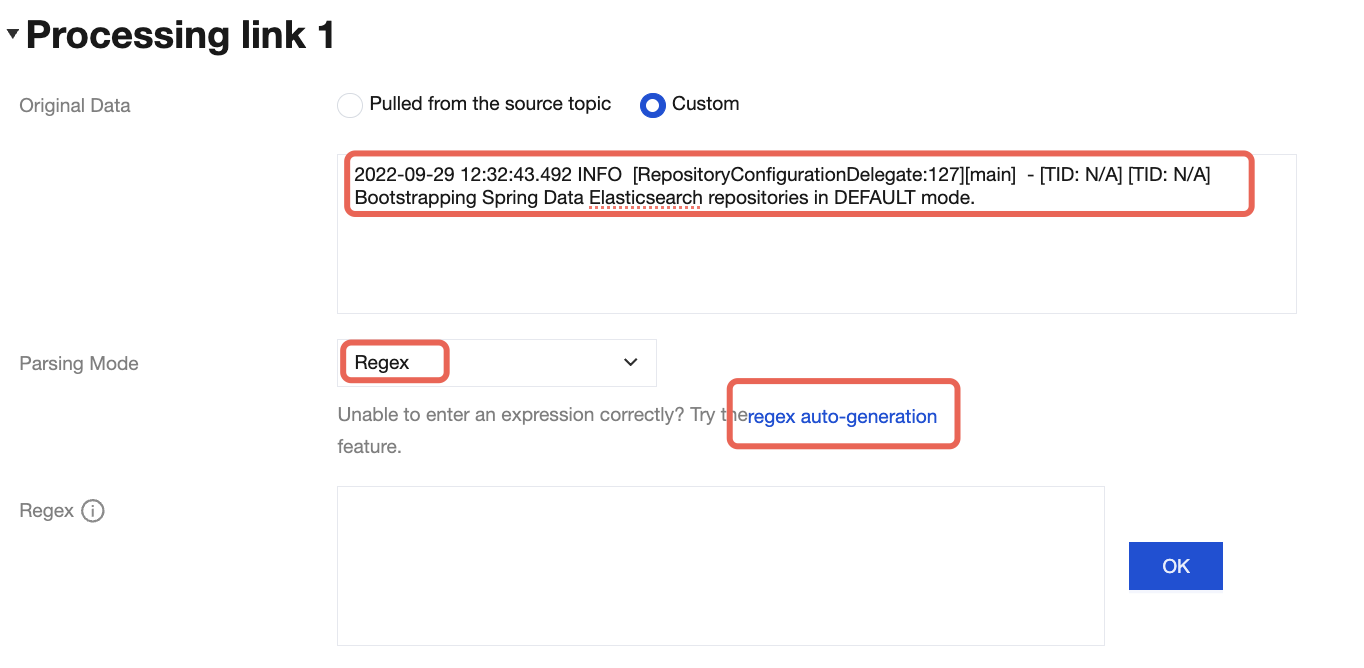
2022-09-29 12:32:43.492 INFO  [RepositoryConfigurationDelegate:127][main]  - [TID: N/A] [TID: N/A] Bootstrapping Spring Data Elasticsearch repositories in DEFAULT mode.
The configured custom regular expression is:
(?<time>[0-9]{4}[-\\/:\\s\\.][0-9]{2}[-\\/:\\s\\.][0-9]{2}[-\\/:T\\s][0-9]{2}[-\\/:\\s\\.][0-9]{2}[-\\/:\\s\\.][0-9]{2}(?:[-\\/:\\s\\.][0-9]+)?(?:[zZ]|(?:[\\+-])(?:[01]\\d|2[0-3]):?(?:[0-5]\\d)?)?)\\s(?<log>\\w+\\s+\\[\\w+:\\w+\\]\\[\\w+\\]\\s+-\\s+\\[\\w+:\\s+\\w+/\\w+\\]\\s+\\[\\w+:\\s+\\w+/\\w+\\]\\s+\\w+\\s+\\w+\\s+\\w+\\s+\\w+\\s+\\w+\\s+\\w+\\s+\\w+\\s+\\w+\\.)
After the system extracts the corresponding key-value pair based on the () capture groups, you can customize the key name of each group as follows:
{"time":"2022-09-29 12:32:43.492",
"log":"INFO  [RepositoryConfigurationDelegate:127][main]  - [TID: N/A] [TID: N/A] Bootstrapping Spring Data Elasticsearch repositories in DEFAULT mode."}

Operation Steps

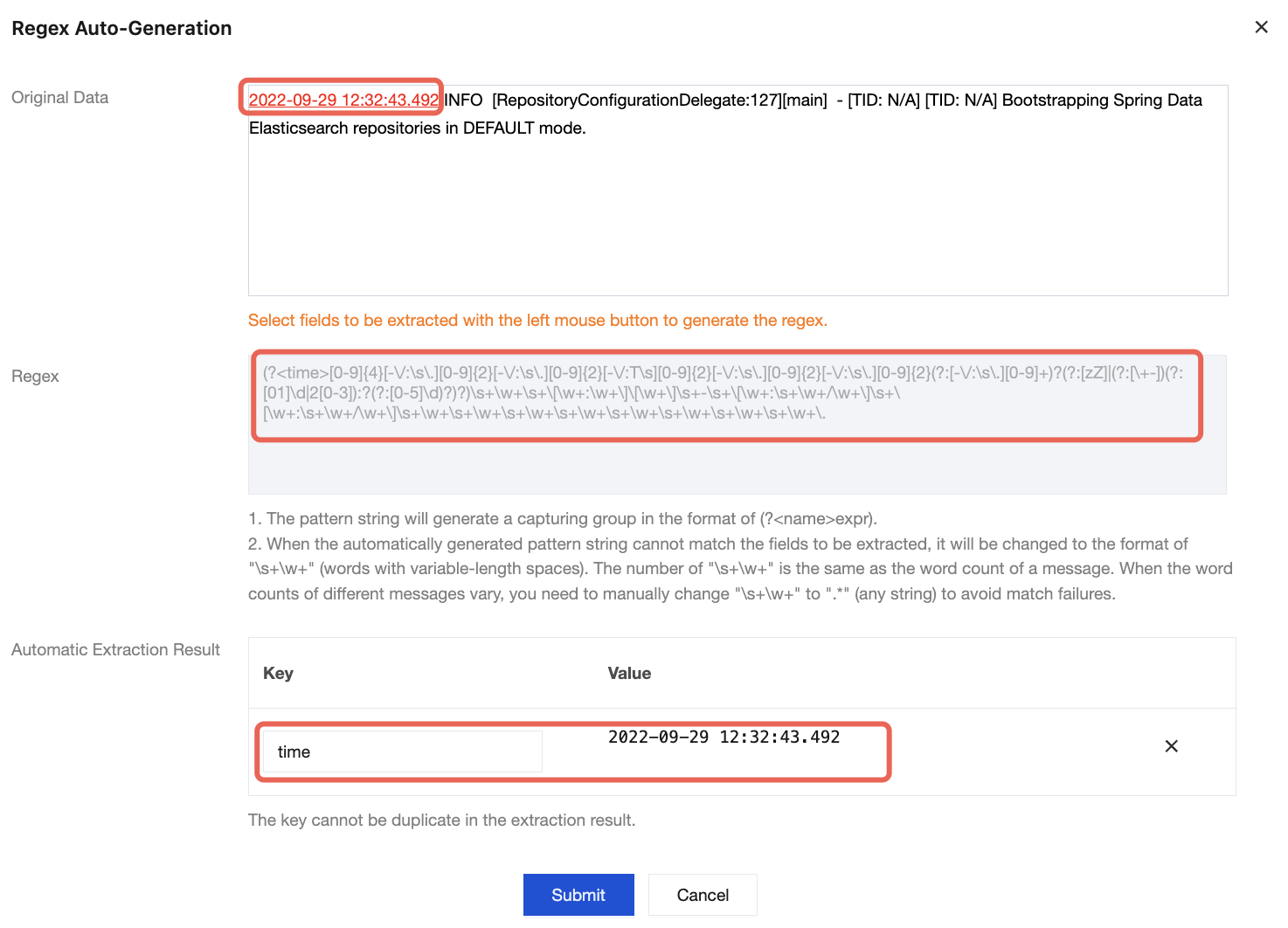
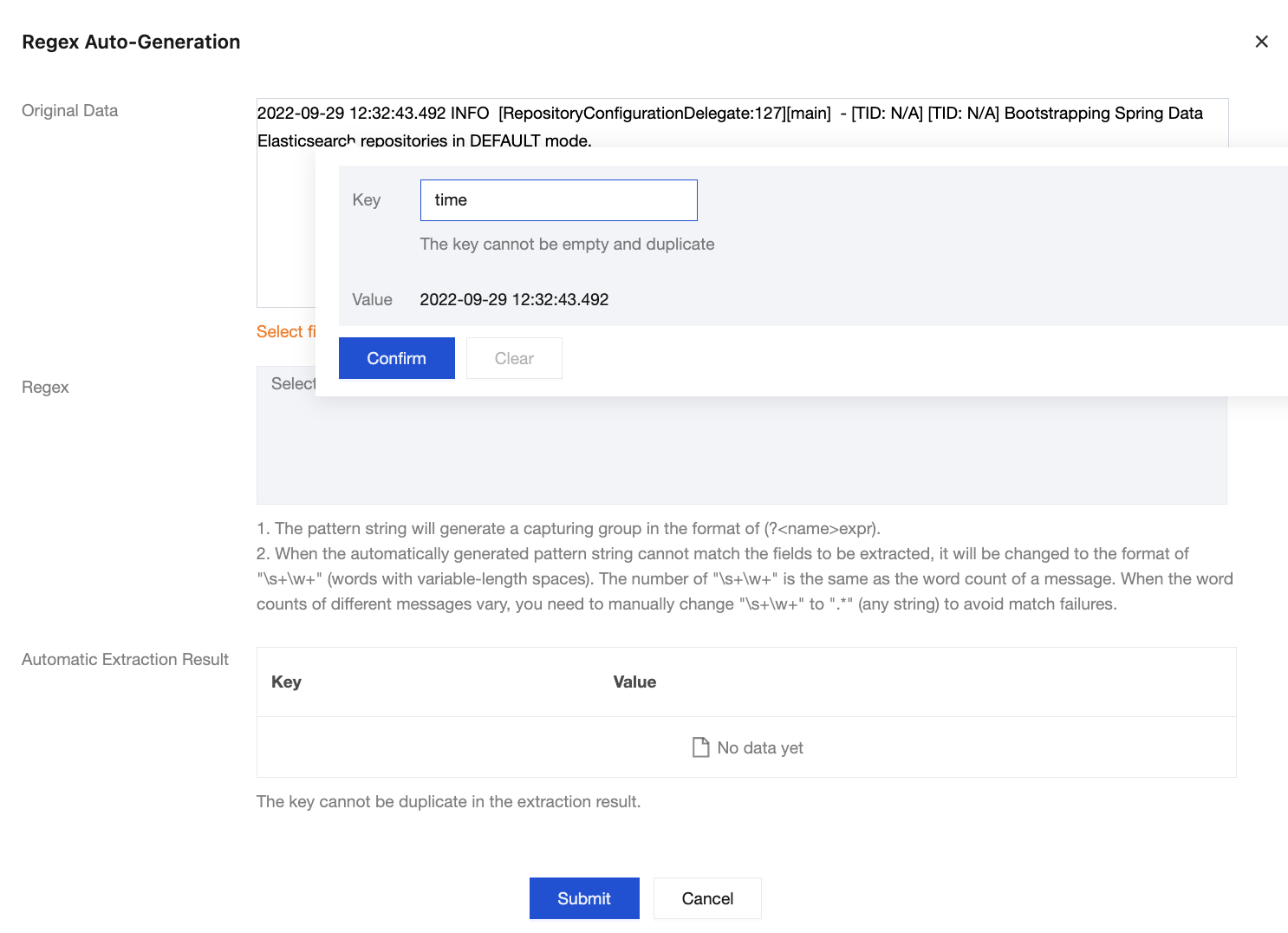
1. On the page for data processing rule configuration, enter a log sample in the Raw Data field, set the parsing pattern to Regex Extraction, and click Auto-Generate Regular Expression under Parsing Pattern.


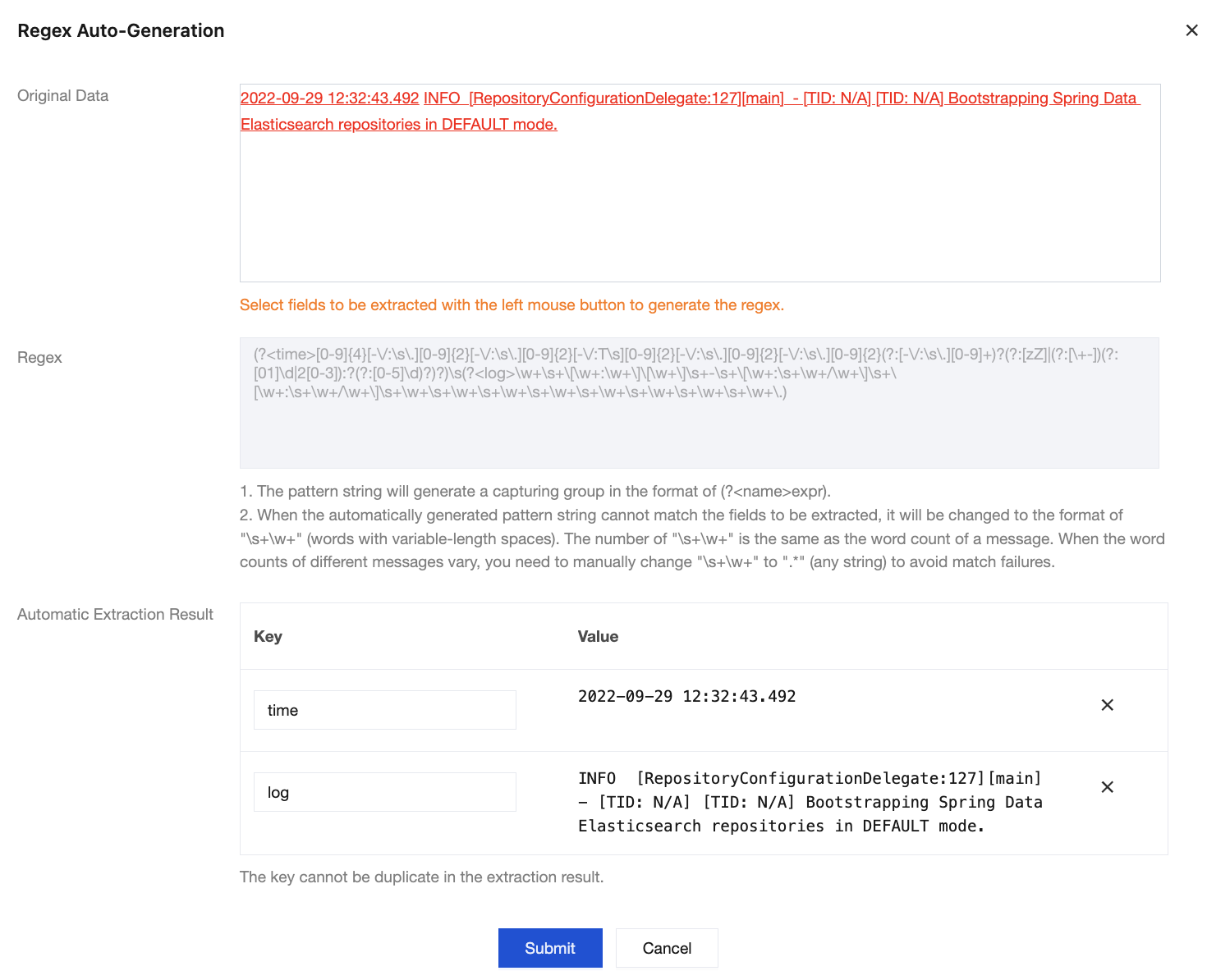
2. In the pop-up Auto-Generate Regular Expression modal view, select the log content from which you want to extract key-value pairs according to your actual search and analysis needs. Then, enter the key name in the text box and click Submit.


3. The system will automatically extract a regular expression for this portion of content, and the auto-extraction results will appear in the key-value table.


4. Repeat Step 2 until all key-value pairs are extracted.

5. Click Submit, and the system will automatically generate a complete regular expression based on the extracted key-value pairs.


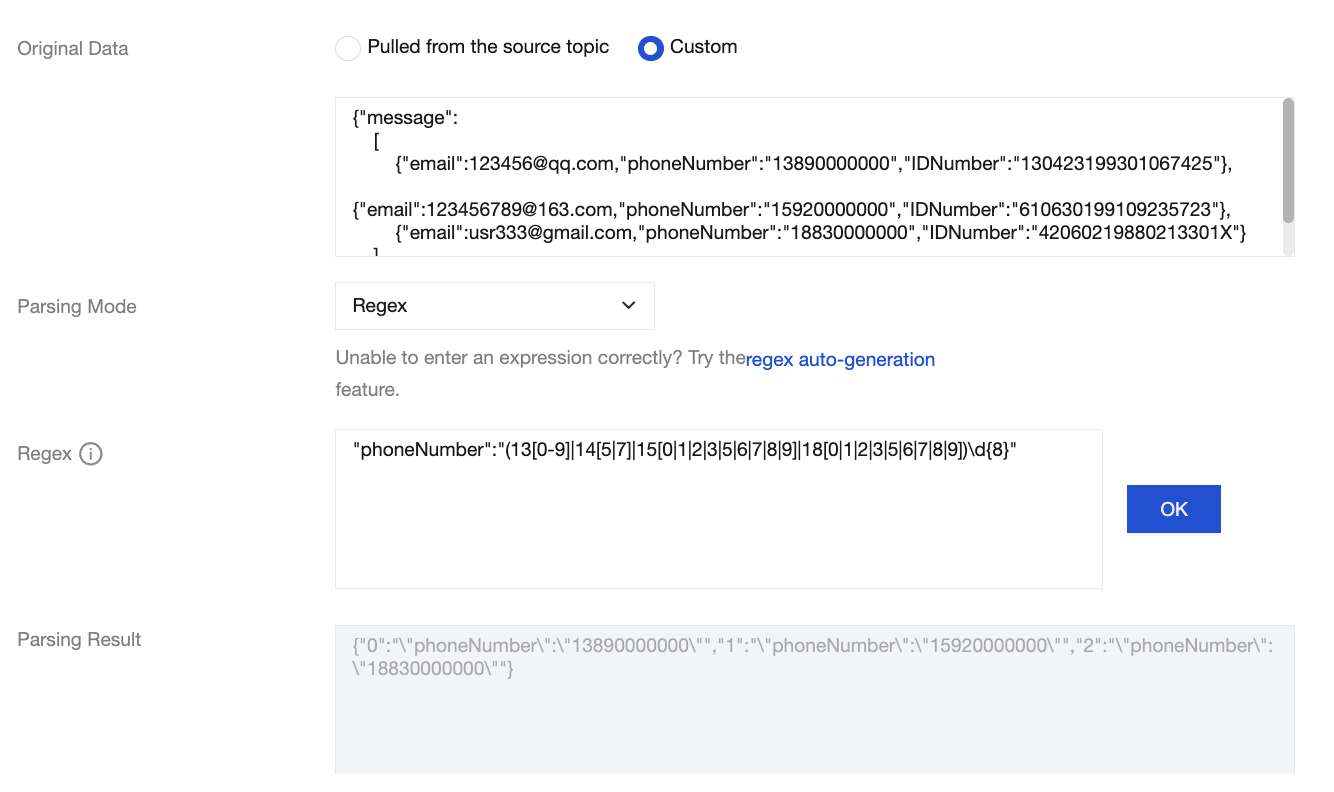
Case 1: Extracting the Mobile Number Field

Input message:
{"message":
[
{"email":123456@qq.com,"phoneNumber":"13890000000","IDNumber":"130423199301067425"},
{"email":123456789@163.com,"phoneNumber":"15920000000","IDNumber":"610630199109235723"},
{"email":usr333@gmail.com,"phoneNumber":"18830000000","IDNumber":"42060219880213301X"}
]
}
Target message:
{
"0": "\\"phoneNumber\\":\\"13890000000\\"",
"1": "\\"phoneNumber\\":\\"15920000000\\"",
"2": "\\"phoneNumber\\":\\"18830000000\\""
}
The regular expression used is:
"phoneNumber":"(13[0-9]|14[5|7]|15[0|1|2|3|5|6|7|8|9]|18[0|1|2|3|5|6|7|8|9])\\d{8}"


Case 2: Extracting the Email Field

Input message:
{"message":
[
{"email":123456@qq.com,"phoneNumber":"13890000000","IDNumber":"130423199301067425"},
{"email":123456789@163.com,"phoneNumber":"15920000000","IDNumber":"610630199109235723"},
{"email":usr333@gmail.com,"phoneNumber":"18830000000","IDNumber":"42060219880213301X"}
]
}
Target message:
{
"0": "\\"email\\":\\"123456@qq.com\\"",
"1": "\\"email\\":\\"123456789@163.com\\"",
"2": "\\"email\\":\\"usr333@gmail.com\\""
}
The regular expression used is:
"email":"\\w+([-+.]\\w+)*@\\w+([-.]\\w+)*\\.\\w+([-.]\\w+)*"


Case 3: Extracting the ID Card Field

Input message:
{
"@timestamp": "2022-02-26T22:25:33.210Z",
"input_type": "log",
"operation": "INSERT",
"operator": "admin",
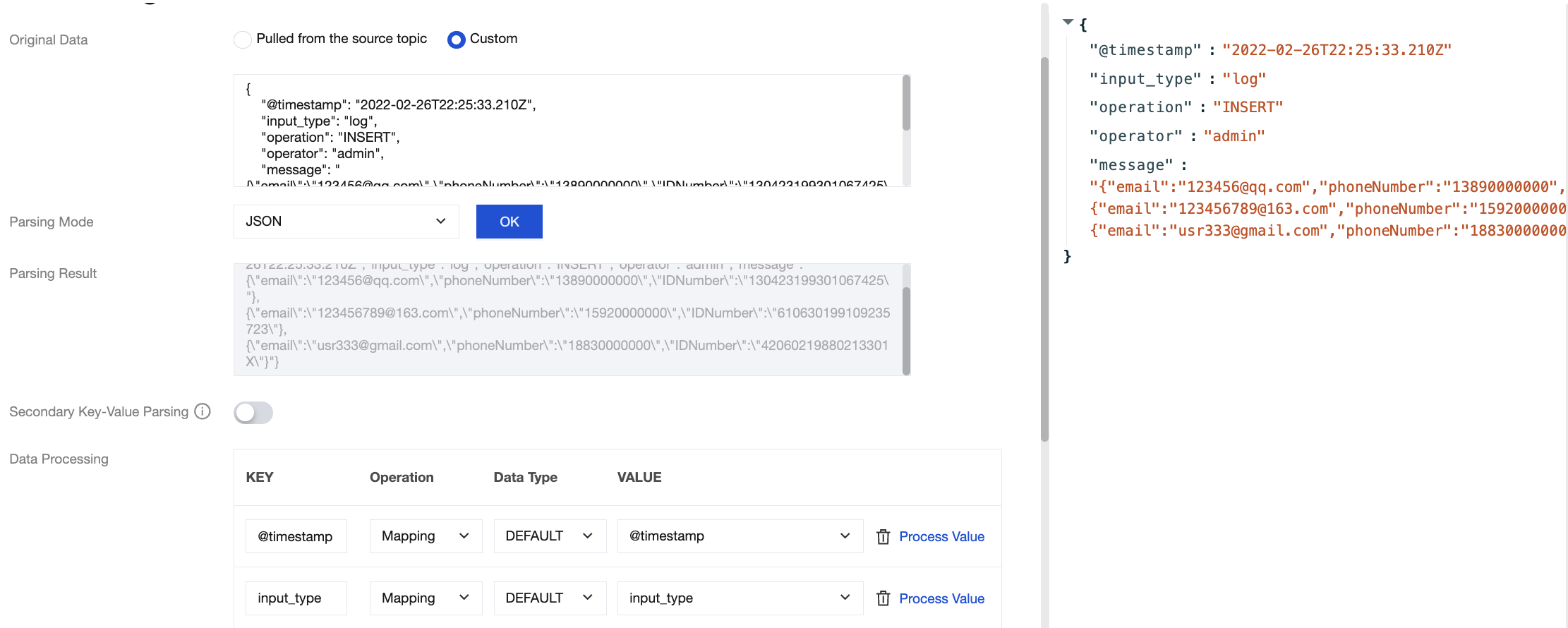
"message": "{\\"email\\":\\"123456@qq.com\\",\\"phoneNumber\\":\\"13890000000\\",\\"IDNumber\\":\\"130423199301067425\\"},{\\"email\\":\\"123456789@163.com\\",\\"phoneNumber\\":\\"15920000000\\",\\"IDNumber\\":\\"610630199109235723\\"},{\\"email\\":\\"usr333@gmail.com\\",\\"phoneNumber\\":\\"18830000000\\",\\"IDNumber\\":\\"42060219880213301X\\"}"
}
Target message: Retain external fields and extract N ID Number fields from the message field.
{
"@timestamp": "2022-02-26T22:25:33.210Z",
"input_type": "log",
"operation": "INSERT",
"operator": "admin",
"message.0": "130423199301067425",
"message.1": "610630199109235723",
"message.2": "42060219880213301X"
}
The regular expression used is:
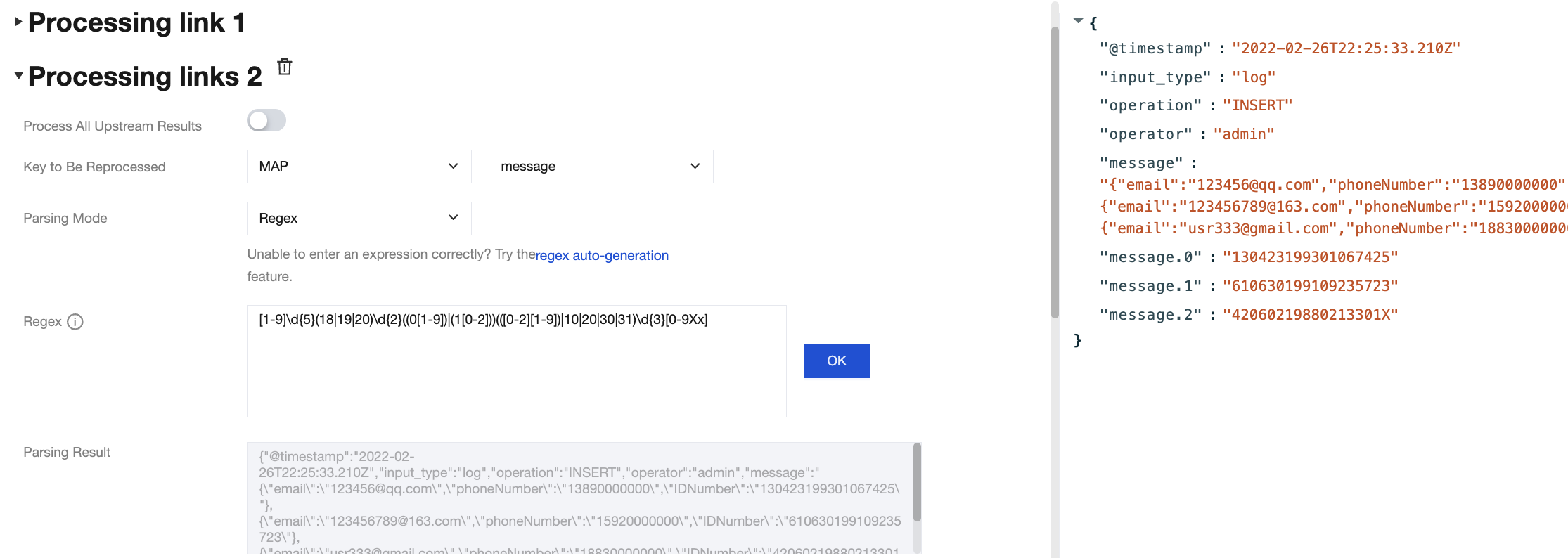
[1-9]\\d{5}(18|19|20)\\d{2}((0[1-9])|(1[0-2]))(([0-2][1-9])|10|20|30|31)\\d{3}[0-9Xx]
Here, processing is performed through multiple processing chains. The processing result of chain 1 is as follows:


At this point, secondary processing is required for the message field. The processing result of chain 2 is as follows:


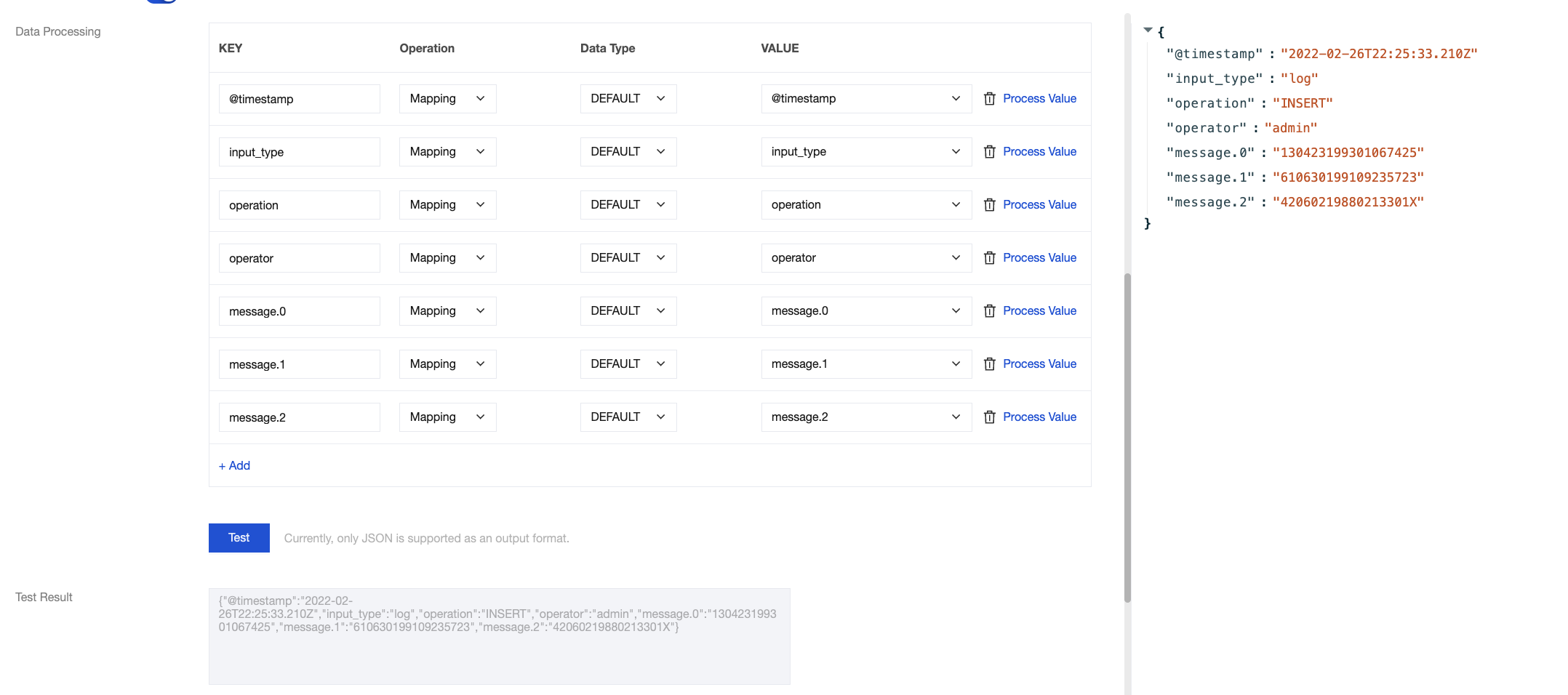
Processing result:
{
"@timestamp": "2022-02-26T22:25:33.210Z",
"input_type": "log",
"operation": "INSERT",
"operator": "admin",
"message.0": "130423199301067425",
"message.1": "610630199109235723",
"message.2": "42060219880213301X"
}
The required ID Number fields were extracted, the original message field was deleted, and the required external fields, such as operation and the N required data items from the message, were retained.
ヘルプとサポート

この記事はお役に立ちましたか?

フィードバック