Intelligent Video Generation/Q&A Agent Integration
Download
Focus Mode
Font Size
Product Capabilities Introduction
Intelligent Video Generation Agent
Simply provide a batch of video materials and describe the final video requirements in natural language. The Agent then automatically handles the entire workflow, including material analysis, script creation, AI voiceover, smart music scoring, fine-grained editing, and subtitle generation, and directly outputs a complete, publish-ready video. It is not a traditional editing tool but an intelligent Agent with editing decision-making capabilities. You only need to provide the materials and creative intent, and the Agent will complete the full production chain in a closed loop, from parsing material content and building the video narrative structure to selecting suitable shots, aligning rhythm and beats, rendering and outputting, and performing final video self-checks, delivering a finished video in one stop.
The intelligent video creation Agent supports two video creation modes: original audio videos and narrated videos. With natural language input, it covers the entire workflow from raw materials to publish-ready videos. All generated videos support common configurations such as subtitles, background music, and aspect ratio.
Video Generation Mode
Mode | Description |
Original audio video | Preserves the original audio in the materials, with AI handling segment selection, sorting, trimming, and stitching to generate an editing plan and produce the final video. Suitable for scenarios that require retaining authentic original audio, such as voiceover reviews, interview recordings, live stream highlight clips, and event/activity highlights. Supported configurations: Content organization strategy: video goals (product promotion, seeding, brand awareness, event recap, and so on) and target audience. You can also add key selling points, a reference structure (opening hook - body - closing CTA), and mandatory clips. Final video duration: AI auto-determined / 15s / 20s / 25s / 30s / 60s / Custom. Source audio processing: Keep the full original audio / Remove BGM and keep only the vocals. Audio processing: Use the original video audio, and so on. |
Narration video | Removes the original audio from the materials, with AI generating or verifying the narration script, synthesizing TTS voiceover, and matching visuals sentence by sentence based on the narration. Suitable for scenarios that require a unified narration tone, such as product explainers, commentary remixes, and brand promotional videos. Supported configurations: Narration script source: User-provided script / AI-generated script (generated directly or based on the source material and requirements). Script content requirements: Configurable only when the script is AI-generated. Include video goals and target audience. You can also add key selling points, a reference structure, and mandatory clips. Final video duration: AI auto-determined / 15s / 20s / 25s / 30s / 60s / Custom. Source audio processing: Remove all original audio. Audio: Use TTS. |
General Video Configuration
Subtitles: Do not burn in subtitles / Burn in subtitles (supports configuring subtitle size, outline, and so on).
Background music: No BGM / Upload BGM / AI-generated BGM.
Aspect ratio: Landscape / Portrait. Supports landscape-to-portrait conversion.
Intelligent Q&A Agent
It supports natural language Q&A on media assets in the intelligent media asset library, enabling convenient content search and interaction.
Note:
To use this capability, you need to create a video knowledge base and ingest videos into it.
Billing details
1. Smart video generation Agent billing: Using the Media AI Agent smart video generation capability incurs charges. Billing is uniformly based on tokens. For billing details, see Media AI Agent Billing.
2. Smart Q&A Agent billing:
2.1 Video large model parsing fees: Ingestion understanding is billed based on the enabled understanding dimensions.
Audio-level understanding: Video summarization fees apply. For details, see Intelligent Media Asset > Large Model Video Summarization Billing.
Video-level/frame summary understanding: Large model video understanding fees apply. For details, see Media AI Agent > Large Model Understanding Billing.
Text transcription: ASR fees apply. For details, see Intelligent Media Asset > ASR Billing.
2.2 Video ingestion incurs vectorization storage fees. For details, see Intelligent Media Asset > Vectorization Storage Billing.
2.3 For Q&A fees incurred by video Q&A, see Media AI Agent > Agent LLM Billing.
Console Usage
Capability | Usage |
Smart Video Generation Agent | 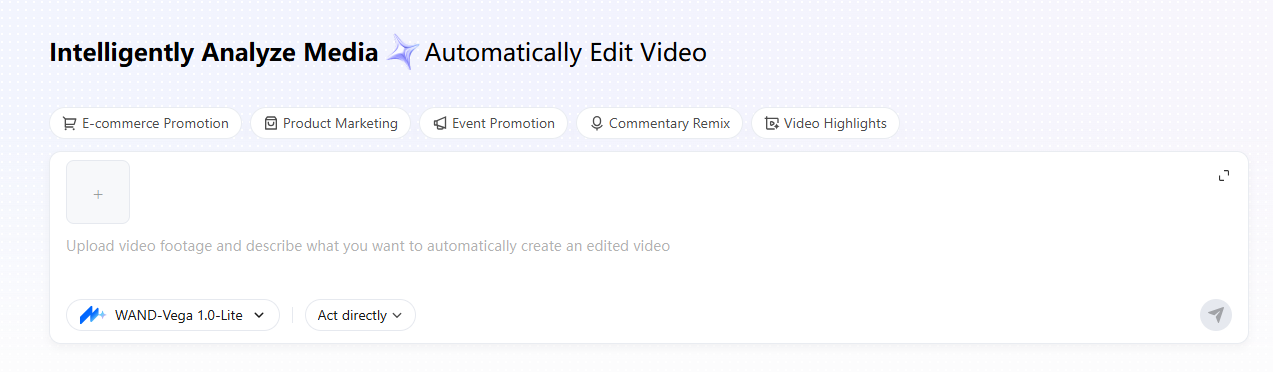 |
Intelligent Q&A Agent | 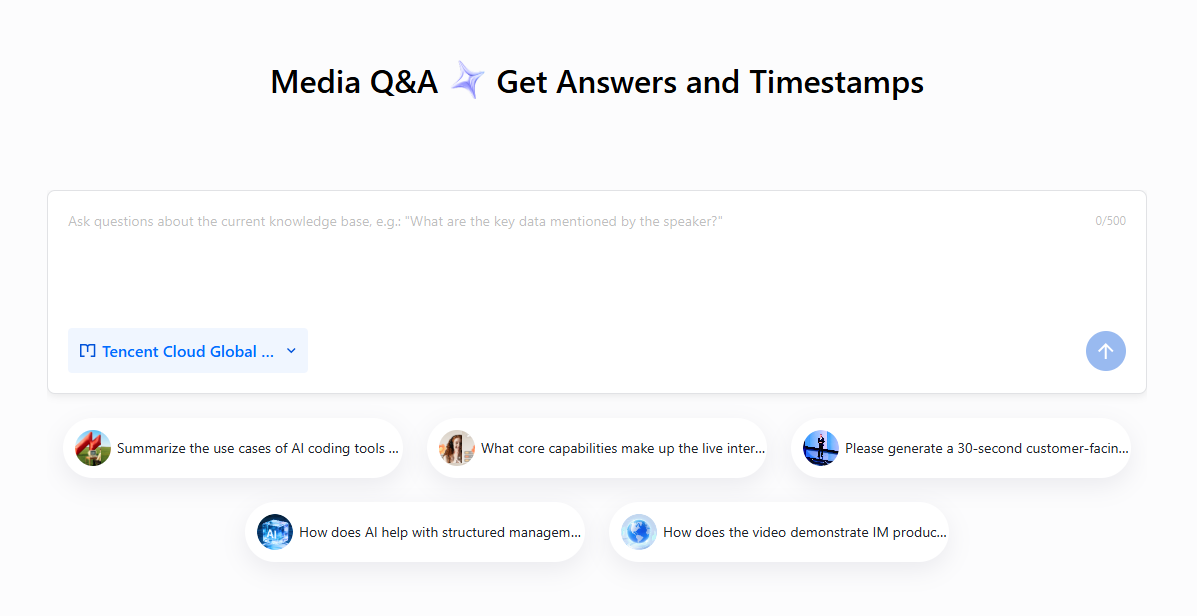 |
API Integration
This capability is integrated using the AG-UI protocol.
1. Agreement Overview
AG-UI (Agent-User Interaction Protocol) is a streaming Agent interaction protocol based on HTTPS + SSE, offering a rich set of capabilities:
A complete event system (text messages, reasoning processes, tool call lifecycles, and step tracking).
Native HITL interrupt/resume mechanism (implemented through the RunFinished outcome).
Each tool can be interrupted and resumed independently. Each tool pending confirmation generates a separate Interrupt, which can be approved/rejected individually.
Message snapshot query (/history endpoint).
2. Request
Creating an API Token
Attention:
Tokens do not expire. As long as you do not delete them, they remain valid, so you do not need to create a new Token for each call.
The created Token is associated with the selected sub-application. When the Agent is subsequently called, it can only access files under that sub-application.
Keep the Token you created secure and prevent it from being leaked.
Starting an Agent Conversation
VOD Agent uses the AG-UI protocol. You can also refer to the AG-UI official documentation to understand the meaning of each field.
Request URL: https://smartmedia.vod-qcloud.com/agui/chat
POST /agui/chatHost: smartmedia.vod-qcloud.comContent-Type: application/jsonAuthorization: Bearer <TOKEN>{"threadId": "my-thread-001","runId": "run-001","messages": [{"role": "user", "content": "Help me create a 30-second vertical Douyin product-promotion short video based on the provided materials. The main product is XXX, and highlight the XXX selling point. Write the voiceover script, add AI voiceover at 1.2x speed, add background music, remove the original audio from the materials, add subtitles with a font size of 50px and a 3px stroke, keep the pace upbeat, and end with a call to action. Material URL: XXXX"}],"forwardedProps": {"approval_mode": "level:high","scenario_name": "video-mixcut"}}
Field | Type | Required | Description |
threadId | string | Yes | Thread ID. A single thread shares context. |
runId | string | Yes | Unique ID of the current run. |
messages | array of Message | Yes | Message list. |
tool | array | No | |
forwardedProps | object | No | |
resume | array | No |
Message Field
Field | Type | Required | Description |
role | string | Yes | Message role. Valid values: user tool |
content | string or array of ContentPart | Yes | Message content. For plain text input, you can directly enter a string. For inputs that contain attachments such as images, use a ContentPart array. |
ContentPart Field
Field | Type | Required | Description |
type | string | Yes | Content type. Optional values: text mixcut_assets |
text | string | No | Fill in the text content when type is text. |
metadata | object | No | Extended metadata of the content fragment. |
forwardedProps Field
Field | Type | Required | Default Value | Description |
model | string | No | wand-1.0-lite | Model used by the agent. Available values: hy3 / wand-vega-1.0-lite Lightweight edition, fast and cost-effective. deepseek-v4-flash / wand-vega-1.0-standard hy4-preview / wand-vega-1.5-standard Balance between speed, cost, and quality. glm-5.1 / wand-vegat-1.0-pro Stronger reasoning capabilities and longer context, suitable for complex problems and production-level tasks. tgg-3.5-flash / wand-vega-1.0-max tgg-3.8-flash / wand-vega-1.1-max Top-tier expert edition for the most challenging tasks, with excellent reasoning and instruction-following capabilities. |
approval_mode | string | No | never | Approval mode: level:high Triggers approval when a high-risk tool is called. (Applicable scenario: review the editing plan before producing the final video.) never Never triggers approval. (Applicable scenario: directly produce the final video.) |
scenario_name | string | Yes | - | Scenario name. Available values: video-qa Video question answering scenario. video-mixcut Intelligent video generation scenario. |
database | string | No | default | Name of the intelligent media asset library. It is currently valid only in the video-qa scenario. |
Querying Message History
Request URL: https://smartmedia.vod-qcloud.com/agui/history
POST /agui/historyHost: smartmedia.vod-qcloud.comContent-Type: application/jsonAuthorization: Bearer <TOKEN>{"threadId": "my-thread-001","forwardedProps": {"scenario_name": "video-mixcut"}}
Returns a complete message snapshot of the thread.
Interrupting an Ongoing Conversation
Request URL: https://smartmedia.vod-qcloud.com/agui/cancel
POST /agui/cancelHost: smartmedia.vod-qcloud.comContent-Type: application/jsonAuthorization: Bearer <TOKEN>{"threadId": "my-thread-001","forwardedProps": {"scenario_name": "video-mixcut"}}
After an Agent conversation is initiated, the session continues running in the background even if the connection is disconnected. If you need to interrupt Agent execution, call this API to cancel it.
3. Response (SSE Event Stream)
id: <ID>data: {"type":"<EventType>","timestamp":<timestamp>,...}
Event type
Lifecycle Events
Event type | Description |
RUN_STARTED | Run started. |
RUN_FINISHED | Run finished (completed normally or interrupted). |
RUN_ERROR | Run error occurred. |
Message Events
Event type | Description |
TEXT_MESSAGE_START | Text message starts. |
TEXT_MESSAGE_CONTENT | Text content increment. |
TEXT_MESSAGE_END | Text message ends. |
Reasoning Events
Event type | Description |
REASONING_START | The reasoning phase starts. |
REASONING_MESSAGE_START | Reasoning message starts. |
REASONING_MESSAGE_CONTENT | Reasoning content increment. |
REASONING_MESSAGE_END | Reasoning message ends. |
REASONING_END | The reasoning phase ends. |
Tool Invocation Events
Event type | Description |
TOOL_CALL_START | Tool call started (with toolCallId and toolCallName). |
TOOL_CALL_ARGS | Tool argument increment. |
TOOL_CALL_END | Tool call ends. |
TOOL_CALL_RESULT | Tool call result. |
Normal Conversation Event Stream
The following is the actual SSE output of a complete conversation (simplified):
id: RUN_STARTED_1784102011155data: {"type":"RUN_STARTED","timestamp":1784102011155,"threadId":"thread-001","runId":"run-001"}id: REASONING_START_1784102012264data: {"type":"REASONING_START","timestamp":1784102012264,"messageId":"msg-001"}id: REASONING_MESSAGE_START_1784102012264data: {"type":"REASONING_MESSAGE_START","timestamp":1784102012264,"messageId":"msg-001","role":"reasoning"}id: REASONING_MESSAGE_CONTENT_1784102012264data: {"type":"REASONING_MESSAGE_CONTENT","timestamp":1784102012264,"messageId":"msg-001","delta":"The user wants to search for ocean wave videos..."}id: REASONING_MESSAGE_END_1784102013400data: {"type":"REASONING_MESSAGE_END","timestamp":1784102013400,"messageId":"msg-001"}id: REASONING_END_1784102013401data: {"type":"REASONING_END","timestamp":1784102013401,"messageId":"msg-001"}id: TEXT_MESSAGE_START_1784102019000data: {"type":"TEXT_MESSAGE_START","timestamp":1784102019000,"messageId":"msg-002"}id: TEXT_MESSAGE_CONTENT_1784102019050data: {"type":"TEXT_MESSAGE_CONTENT","timestamp":1784102019050,"messageId":"msg-002","delta":"I'll help you search."}id: TEXT_MESSAGE_END_1784102024858data: {"type":"TEXT_MESSAGE_END","timestamp":1784102024858,"messageId":"msg-002"}id: TOOL_CALL_START_1784102126631data: {"type":"TOOL_CALL_START","timestamp":1784102126631,"toolCallId":"call-001","toolCallName":"search_media_by_semantics","parentMessageId":"msg-002"}id: TOOL_CALL_ARGS_1784102126631data: {"type":"TOOL_CALL_ARGS","timestamp":1784102126631,"toolCallId":"call-001","delta":"{\\"query\\":\\"ocean waves\\"}"}id: TOOL_CALL_END_1784102126631data: {"type":"TOOL_CALL_END","timestamp":1784102126631,"toolCallId":"call-001"}id: TOOL_CALL_RESULT_1784102126886data: {"type":"TOOL_CALL_RESULT","timestamp":1784102126886,"messageId":"msg-003","toolCallId":"call-001","content":"{\\"Recall\\":[]}","role":"tool"}id: RUN_FINISHED_1784102025004data: {"type":"RUN_FINISHED","timestamp":1784102025004,"threadId":"thread-001","runId":"run-001"}
HITL Interruption Event Stream
When a tool requires confirmation, the data of RUN_FINISHED carries outcome.type = "interrupt". A separate Interrupt is generated for each tool that requires confirmation:
id: TOOL_CALL_START_1784102316642data: {"type":"TOOL_CALL_START","timestamp":1784102316642,"toolCallId":"call-001","toolCallName":"search_media_by_semantics","parentMessageId":"msg-001"}id: TOOL_CALL_END_1784102316642data: {"type":"TOOL_CALL_END","timestamp":1784102316642,"toolCallId":"call-001"}id: RUN_FINISHED_1784102316731data: {"type":"RUN_FINISHED","timestamp":1784102316731,"threadId":"thread-001","runId":"run-001","outcome":{"type":"interrupt","interrupts":[{"id":"interruptId-001","reason":"tool_call","message":"Semantically search the video library for clips related to ocean waves.","toolCallId":"call-001","responseSchema":{"properties":{"feedback":{"description":"Optional user feedback for the approval decision.","type":"string"}},"type":"object"}}]}}
Here, outcome.interrupts[N].message is a natural-language description of the tool call, which the client can display to users to request approval.
Interrupt Field
Field | Description |
id | Interrupt ID. Pass it as resume[].interruptId during recovery. |
reason | Interruption reason. Fixed value: tool_call. |
message | Tool operation description (generated by the LLM). |
toolCallId | ID of the associated tool call. |
responseSchema | schema of the recovery response, including an optional feedback field. |
Each tool pending confirmation has a unique Interrupt ID, which allows the client to resume each tool individually.
4. HITL Interruption and Recovery
Approval Mode
Mode | Description |
never (default) | All tools are directly executed. |
level:high | Only high-risk tools are interrupted. |
When the value is not "never", a HITL interrupt may be triggered before the tool is called.
Recovery Request
After making a decision, the user sends a new request and passes a resume entry for each Interrupt in the resume array.
Approve All
{"threadId": "my-thread-001","runId": "run-002","messages": [{"role": "user", "content": ""}],"forwardedProps": {"approval_mode": "level:low", "scenario_name": "video-mixcut"},"resume": [{"interruptId": "interruptId-001", "status": "resolved"},{"interruptId": "interruptId-002", "status": "resolved"}]}
Reject All (with Feedback)
{"threadId": "my-thread-001","runId": "run-002","messages": [{"role": "user", "content": ""}],"forwardedProps": {"approval_mode": "level:low", "scenario_name": "video-mixcut"},"resume": [{"interruptId": "interruptId-001", "status": "cancelled", "payload": {"feedback": "No cropping needed"}},{"interruptId": "interruptId-002", "status": "cancelled", "payload": {"feedback": "No watermark needed"}}]}
Independent Decision per Tool (Partial Approval and Rejection)
{"threadId": "my-thread-001","runId": "run-002","messages": [{"role": "user", "content": ""}],"forwardedProps": {"approval_mode": "level:low", "scenario_name": "video-mixcut"},"resume": [{"interruptId": "interruptId-001", "status": "resolved"},{"interruptId": "interruptId-002", "status": "cancelled", "payload": {"feedback": "Do not add a watermark"}}]}
Resume Entry Fields
Field | Type | Required | Description |
interruptId | string | Yes | The id returned in the interrupt response cannot be empty. |
status | string | Yes | resolved (approved) or cancelled (rejected). |
payload | object | No | Can include a feedback field to convey user feedback. |
Note:
The interruptId of each entry cannot be empty.
The same interruptId cannot appear more than once in the resume array.
resume entries should correspond one-to-one with interrupts.
The resume request must still carry the same forwardedProps.approval_mode and forwardedProps.scenario_name.
The messages in the resume request can be set to an empty string ({"role": "user", "content": ""}), so there is no need to repeat the user instruction.
5. Scenario Configuration
Reference the server-side preset scenario through forwardedProps.scenario_name:
{"threadId": "thread-001","runId": "run-001","messages": [{"role": "user", "content": "Search for ocean wave videos"}],"forwardedProps": {"scenario_name": "video-mixcut"}}
The currently supported scenarios are:
video-qa
video-mixcut
video-qa (Video Q&A)
The video Q&A scenario supports specifying the intelligent media asset knowledge base visible to the agent in forwardedProps.database. You can view and manage existing knowledge bases in the Tencent Cloud console.
video-mixcut (Smart Video Generation)
In the video mashup scenario, you can include mashup assets in user messages. The assets use a custom ContentPart of the type mixcut_assets.
Place the attachment list in metadata.attachments. For each attachment, fill in only one source field: url or fileId.
Field | Type | Required | Description |
type | string | Yes | Enter mixcut_assets. |
metadata | object | Yes | Extended information of the mixed clip assets. |
metadata.attachments | array of object | Yes | Attachment list of the current user message. |
metadata.attachments[].url | string | Choose one of the two | External asset URL. |
metadata.attachments[].fileId | string | | VOD file ID. |
Complete request example:
{"threadId": "thread-001","runId": "run-001","messages": [{"role": "user","content": [{"type": "text","text": "Help me mash up these assets"},{"type": "mixcut_assets","metadata": {"attachments": [{"url": " http://example.com/video-a.mp4"},{"fileId": "vod-file-001"}]}}]}]}
6. External Tools
External tools are tools that the Agent invokes but the server does not directly execute. After the LLM decides to invoke a tool, the server suspends execution and returns the tool call information to the client. The user then executes the tool on the client side and fills in the execution result, after which the Agent flow continues. This applies to scenarios that require human intervention or client-side execution, such as internal knowledge base queries and approval operations.
Tool Schema Definition
Each external tool is defined by a standard JSON Schema and registered by the client through the tools field in the request:
{"name": "<tool_name>","description": "<Tool purpose description, based on which the LLM decides when to call>","parameters": <JSON schema definition of the tool parameters>}
Example: clarify Tool Schema:
{"name": "clarify","description": "Ask the user a question when you need clarification...","parameters": {"type": "object","properties": {"question": {"type": "string","description": "The question itself. Do NOT embed options here."},"choices": {"type": "array","items": { "type": "string" },"maxItems": 4,"description": "Selectable options (up to 4). Omit for free-text."}},"required": ["question"]}}
Interaction Process
Complete interaction model of external tools:
Request → LLM decides to call an external tool↓ SSE event streamTOOL_CALL_START { toolCallId, toolCallName }TOOL_CALL_ARGS { delta (JSON fragment) }TOOL_CALL_END { toolCallId }↓ Tool execution is suspended, and the Agent ends the current turn.RUN_FINISHED[The client executes the external tool and fills in the result]↓Send a new request (/agui/chat){"threadId": "...","runId": "...","messages": [ { "role": "tool", "content": "<tool_execution_result>", "toolCallId": "<id>" } ],"tools": [ ... ]}→ The Agent continues execution.
SSE Event Examples
id: TOOL_CALL_START_xxxdata: {"type":"TOOL_CALL_START","timestamp":...,"toolCallId":"call-ext-001","toolCallName":"external_search","parentMessageId":"msg-001"}id: TOOL_CALL_ARGS_xxxdata: {"type":"TOOL_CALL_ARGS","timestamp":...,"toolCallId":"call-ext-001","delta":"{\\"query\\":\\"VOD architecture document\\"}"}id: TOOL_CALL_END_xxxdata: {"type":"TOOL_CALL_END","timestamp":...,"toolCallId":"call-ext-001"}id: RUN_FINISHED_xxxdata: {"type":"RUN_FINISHED","timestamp":...,"threadId":"thread-001","runId":"run-001"}
RUN_FINISHED is a regular end event and does not carry outcome or interrupts.
Recovery Request
After the external tool finishes execution, the client sends a new request and returns the execution result in messages with role: "tool":
{"threadId": "my-thread-001","runId": "run-002","messages": [{"role": "tool","content": "<tool_execution_result (a string that the LLM interprets)>","toolCallId": "call-ext-001"}],"tools": [{"name": "clarify","description": "...","parameters": {"type":"object","properties":{}}}]}
Field | Type | Required | Description |
messages[].role | string | Yes | Fixed to "tool". |
messages[].content | string | Yes | Tool execution result, an arbitrary string. |
messages[].toolCallId | string | Yes | The toolCallId in the corresponding interruption event. |
tools | array | Yes | List of tool schemas, consistent with the initial request. |
forwardedProps | object | No | Must carry extended configurations such as approval_mode from the initial request. |
Keep the tools and forwardedProps parameters consistent with the previous request.
7. SDK Call Examples
Python(AG-UI Python SDK)
Installation: pip install ag-ui-protocol
from ag_ui.client import HttpAgentfrom ag_ui.core import RunAgentInput, Message, ResumeEntryBASE_URL = "https://smartmedia.vod-qcloud.com/agui"API_KEY = "<your-token>"def run_agent(thread_id, run_id, message, resume=None, forwarded_props=None):agent = HttpAgent(base_url=BASE_URL,api_key=API_KEY,)input_params = RunAgentInput(thread_id=thread_id,run_id=run_id,messages=[Message(role="user", content=message)],)if forwarded_props:input_params.forwarded_props = forwarded_propsif resume:input_params.resume = resumeinterrupts = []for event in agent.run(input_params):etype = event.typeif etype == "TEXT_MESSAGE_CONTENT":print(event.delta, end="", flush=True)elif etype == "TOOL_CALL_START":print(f"\\n[Tool] {event.tool_call_name}")elif etype == "RUN_FINISHED":outcome = getattr(event, "outcome", None)if outcome and outcome.type == "interrupt":interrupts = outcome.interruptsfor i, intr in enumerate(interrupts):print(f"\\n[Interrupt {i + 1}] {intr.message} (id: {intr.id})")elif etype == "RUN_ERROR":print(f"\\n[Error] {event.message}")return interrupts# 1. First Conversationinterrupts = run_agent(thread_id="thread-001",run_id="run-001",message="Search for ocean wave videos and trim the first 10 seconds",forwarded_props={"approval_mode": "level:low","scenario_name": "media_management",},)# 2. Independent Decision per Tool — Approve the First, Reject the Secondif interrupts:print(f"\\n{len(interrupts)} tools require confirmation")resume = []for i, intr in enumerate(interrupts):if i == 0:resume.append(ResumeEntry(interrupt_id=intr.id,status="resolved",))else:resume.append(ResumeEntry(interrupt_id=intr.id,status="cancelled",payload={"feedback": "This operation is not needed"},))# 3. Resume (with the same approval_mode)run_agent("thread-001", "run-002", "",resume=resume,forwarded_props={"approval_mode": "level:low"},)
Node.js / TypeScript(AG-UI TypeScript SDK)
Installation: npm install @ag-ui/client @ag-ui/core
import { HttpAgent } from "@ag-ui/client";import type { RunAgentInput, Interrupt } from "@ag-ui/core";const BASE_URL = "https://smartmedia.vod-qcloud.com/agui";const API_KEY = "<your-token>";async function runAgent(params: {threadId: string;runId: string;message: string;forwardedProps?: Record<string, unknown>;resume?: Array<{interruptId: string;status: "resolved" | "cancelled";payload?: Record<string, unknown>;}>;}): Promise<Interrupt[]> {const agent = new HttpAgent({serverUrl: BASE_URL,apiKey: API_KEY,});const input: RunAgentInput = {threadId: params.threadId,runId: params.runId,messages: [{ role: "user", content: params.message }],forwardedProps: params.forwardedProps,resume: params.resume,};const interrupts: Interrupt[] = [];// Subscribe to the event streamconst unsubscribe = agent.subscribe((event: any) => {switch (event.type) {case "TEXT_MESSAGE_CONTENT":process.stdout.write(event.delta || "");break;case "TOOL_CALL_START":console.log(`\\n[Tool] ${event.toolCallName}`);break;case "RUN_FINISHED":if (event.outcome?.type === "interrupt") {interrupts.push(...event.outcome.interrupts);interrupts.forEach((intr, i) =>console.log(`\\n[Interrupt ${i + 1}] ${intr.message} (id: ${intr.id})`));}break;case "RUN_ERROR":console.error(`\\n[Error] ${event.message}`);break;}});// Run the Agentawait agent.run(input);unsubscribe();return interrupts;}// Usage example: independent approval per toolasync function main() {// 1. First Conversationconst interrupts = await runAgent({threadId: "thread-001",runId: "run-001",message: "Search for ocean wave videos and trim the first 10 seconds",forwardedProps: {approval_mode: "level:low",scenario_name: "media_management",},});// 2. Independent Decision per Tool — Approve the First, Reject the Secondif (interrupts.length > 0) {console.log(`\\n${interrupts.length} tools require confirmation`);await runAgent({threadId: "thread-001",runId: "run-002",message: "",forwardedProps: { approval_mode: "level:low" },resume: interrupts.map((intr, idx) => ({interruptId: intr.id,status: idx === 0 ? "resolved" as const : "cancelled" as const,payload: idx === 0 ? undefined : { feedback: "This operation is not needed" },})),});}}main();
cURL
# Start a Conversation (May Trigger Multiple Tool Interruptions)curl -N -X POST https://smartmedia.vod-qcloud.com/agui/chat \\-H "Content-Type: application/json" \\-H "Authorization: Bearer <token>" \\-d '{"threadId": "thread-001","runId": "run-001","messages": [{"role": "user", "content": "Search for ocean wave videos and trim the first 10 seconds"}],"forwardedProps": {"approval_mode": "level:low","scenario_name": "media_management"}}'# Resume — Independent Decision per Toolcurl -N -X POST https://smartmedia.vod-qcloud.com/agui/chat \\-H "Content-Type: application/json" \\-H "Authorization: Bearer <token>" \\-d '{"threadId": "thread-001","runId": "run-002","messages": [{"role": "user", "content": ""}],"forwardedProps": {"approval_mode": "level:low"},"resume": [{"interruptId": "lineage-uuid:ckpt-uuid:call-001", "status": "resolved"},{"interruptId": "lineage-uuid:ckpt-uuid:call-002", "status": "cancelled", "payload": {"feedback": "No cropping needed"}}]}'# Query Historycurl -X POST https://smartmedia.vod-qcloud.com/agui/history \\-H "Content-Type: application/json" \\-H "Authorization: Bearer <token>" \\-d '{"threadId": "thread-001"}'
8. Event Handling Recommendations
RUN_STARTED → UI: Display "Thinking..."REASONING_START → UI: Start reasoning areaREASONING_MESSAGE_* → UI: Display reasoning process (collapsible)REASONING_END → UI: End reasoning areaTEXT_MESSAGE_* → UI: Stream the replyTOOL_CALL_START/END → UI: Display the tool call cardTOOL_CALL_RESULT → UI: Display the tool resultRUN_FINISHED → Check outcome:No outcome → Ends normallytype=interrupt → Enter the HITL confirmation processRUN_ERROR → UI: Display the error
Appendix: Smart Video Generation Prompt Guide
The following is only a sample prompt. Write your prompt based on your actual scenario.
Scenario | Prompt Example |
E-commerce product promotion | Help me edit a Douyin vertical e-commerce short video based on the provided materials, about 30 seconds long, with the main product being XXX and highlighting the XXX selling point. Write the voiceover script, add AI voiceover - 1.2x speed, add background music, remove the original audio from the materials, add subtitles - font size 50px, stroke 3px, keep the pace upbeat, and end with a call to action to place an order. |
Product marketing | I have already written the copy. Strictly follow this copy to add visuals, add voiceover, and burn subtitles. Do not modify the copy: Tired-looking skin, dullness, and fine lines? This serum addresses them all at once. With third-generation Pro-Xylane, apply it once in the morning and once at night, and see visible brightening within 28 days. Order now and receive a free eye cream of the same line. The platform is Xiaohongshu vertical format. The video duration should match the copy duration. The visuals should align with the content of each sentence. |
Event promotion | Help me edit a 45-second event promotional video, highlight XXX, add AI voiceover and a more grand background music, and add subtitles. Note that all materials are in landscape 16:9, and keep the aspect ratio consistent. |
Commentary-based derivative content | This is a documentary about XXX. Help me turn it into a "Understand in 3 Minutes" explainer re-creation: extract the key points, rewrite the narration script, add AI voiceover, select corresponding shots from the original film for the visuals, add subtitles, and remove the original audio from the materials. Keep the style light and educational. Note that only use footage that actually appears in the materials, and do not fabricate content that is not in the original film. |
Highlight reel | Help me pick out the most exciting highlight moments, edit them into a 60-second highlight reel, keep the original audio, make the pacing tight, and add subtitles. |
Help and Support
Was this page helpful?
You can also Contact sales or Submit a Ticket for help.
Help us improve! Rate your documentation experience in 5 mins.
Feedback