Sentinelモード
ダウンロード
フォーカスモード
フォントサイズ
操作シナリオ
Sentinel(センチネル)は独立して動作するプロセスです。Tencent Cloud 分散型キャッシュデータベースクラスタ内のマスターノードとスレーブノードの状態を監視するために使用されます。マスターノードに異常が発生した場合、Sentinelはスレーブノードから新しいマスターノードを選出し、自動的に元のマスターノードを置き換えて、業務の安定稼働を保証します。これは高可用性ソリューションです。
説明:
Memcached版はSentinelモードをサポートしていません。
Sentinel関連コマンド
Tencent Cloud 分散型キャッシュデータベース4.0以降のバージョンでは、すべてデフォルトでSentinel(センチネル)モードをサポートしています。以下のSentinel関連コマンドを使用できます。
SENTINEL sentinels
監視対象のmasterに関連するsentinels情報をリストします。
コマンド形式
SENTINEL sentinels <任意名称>使用例
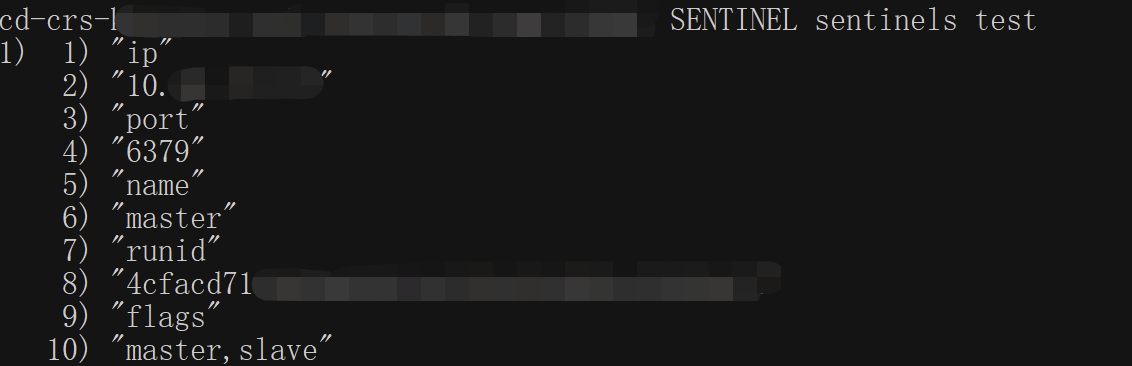
SENTINEL get-master-addr-by-name
master-nameに関連するip addrの情報を取得します。
コマンド形式
SENTINEL get-master-addr-by-name <任意名称>使用例

Sentinelモード接続例
事前準備
Tencent Cloud 分散型キャッシュデータベースRedisのバージョンは4.0または5.0です。
データベースインスタンスの稼働状態は正常で、実行中です。
Distributed Cacheコンソールのインスタンス詳細ページにあるネットワーク情報エリアで、データベース接続用のプライベートIPv4アドレスとポートを取得してください。詳細については、インスタンス詳細の表示をご参照ください。
データベースにアクセスするためのアカウントとパスワードを取得済みです。具体的な操作については、アカウント管理を参照してください。
クライアントJedisをダウンロードしてください。最新バージョンの使用を推奨します。
接続例
Jedisはバージョン3.6.0以降です。
Lettuceはバージョン5.3.0.RELEASE以降です。
Spring Data Redisはバージョン2.5.1以降であり、spring.redis.sentinel.passwordパラメータを設定する必要があります。
コメントに従って、データベース接続のIP、ポート、およびアカウントパスワード情報のパラメータを変更する必要があります。
Java方式による接続
package com.example.demo;import org.apache.commons.pool2.impl.GenericObjectPoolConfig;import redis.clients.jedis.JedisSentinelPool;import java.util.HashSet;import java.util.Set;public class Main {public static void main(String[] args) {String masterName = "test";Set<String> sentinels = new HashSet<>();//以下では、データベースインスタンスのプライベートIPv4アドレスとポートを設定する必要があります。sentinels.add("XX.XX.XX.XX:6379");GenericObjectPoolConfig poolConfig = new GenericObjectPoolConfig();String dbPassword = "root:xxx";//データベースにアクセスするためのパスワードに置き換えてください。String sentinelPassword = "root:xxx";//データベースにアクセスするためのパスワードに置き換えてください。JedisSentinelPool jedisSentinelPool =new JedisSentinelPool(masterName, sentinels, poolConfig,2000, 2000, dbPassword,0, null, 2000, 2000,sentinelPassword, null);System.out.println("jedisSentinelPool.getResource().ping() = " + jedisSentinelPool.getResource().ping());jedisSentinelPool.close();}}
Spring Dataフレームワークによる接続
package com.example.demo;import org.springframework.beans.factory.annotation.Qualifier;import org.springframework.boot.SpringApplication;import org.springframework.boot.autoconfigure.SpringBootApplication;import org.springframework.boot.autoconfigure.condition.ConditionalOnBean;import org.springframework.context.annotation.Bean;import org.springframework.context.annotation.Configuration;import org.springframework.data.redis.connection.RedisPassword;import org.springframework.data.redis.connection.RedisSentinelConfiguration;import org.springframework.data.redis.connection.jedis.JedisConnectionFactory;import org.springframework.data.redis.core.RedisTemplate;import redis.clients.jedis.JedisPoolConfig;@SpringBootApplicationpublic class DemoApplication {public static void main(String[] args) {SpringApplication.run(DemoApplication.class, args);}}@Configurationclass RedisConfig {@Bean@Qualifier("jedisConnectionFactory")public JedisConnectionFactory connectionFactory() {RedisSentinelConfiguration sentinelConfig = new RedisSentinelConfiguration().master("test").sentinel("XX.XX.XX.XX", 6379);//データベースインスタンスのプライベートIPv4アドレスとポートに置き換えてください。sentinelConfig.setPassword(RedisPassword.of("xxx"));//データベースにアクセスするためのパスワードに置き換えてください。sentinelConfig.setSentinelPassword(RedisPassword.of("xxx"));//データベースにアクセスするためのパスワードに置き換えてください。JedisPoolConfig poolConfig = new JedisPoolConfig();JedisConnectionFactory connectionFactory = new JedisConnectionFactory(sentinelConfig, poolConfig);connectionFactory.afterPropertiesSet();return connectionFactory;}@Bean@ConditionalOnBean(JedisConnectionFactory.class)public RedisTemplate<String, String> redisTemplate(@Qualifier("jedisConnectionFactory") JedisConnectionFactory factory) {RedisTemplate<String, String> template = new RedisTemplate<>();template.setConnectionFactory(factory);template.afterPropertiesSet();//testtemplate.opsForValue().set("test", "test1");System.out.println("template.opsForValue().get(\\"test\\") = " + template.opsForValue().get("test"));return template;}}
フィードバック