AI Agent Inbound Call
ダウンロード
フォーカスモード
フォントサイズ
Feature Overview
In an inbound call scenario, your AI voice agent automatically answers calls when a user dials the specified number. The platform provides two implementation methods: static binding and dynamic API routing. You can choose the appropriate solution based on your business routing flexibility requirements. Both solutions support fallback through stacking.
Method 1: Static number binding in the console (fixed AI Agent answering)
Bind a phone number directly to a specified AI Agent/IVR through the console. After binding, all incoming calls to that number are uniformly handled by the fixed AI Agent or IVR.
Applicable Characteristics: It enables rapid deployment, requires no backend service integration, and is suitable for fixed scenarios where all incoming calls follow a unified script and reception logic.
Method 2: Inbound API dynamic routing (personalized on-demand allocation)
When an inbound call is triggered, the TCCC platform actively calls back your business backend API. Your backend then queries the caller's information in real time (such as VIP status, registered name, region, and so on). It dynamically informs TCCC which AI Agent/IVR instance to dispatch for the current call and simultaneously passes in conversation initialization variables. This process enables a personalized call answering and greeting logic tailored to each individual.
Applicable Characteristics: It supports differentiated AI Agent assignment based on caller identity and custom conversation initialization parameters. This makes it suitable for complex business scenarios that require personalized reception, tiered service, and dynamic conversation scripts.
A single phone number can be configured with both static binding + dynamic API routing capabilities: The inbound API dynamic routing is executed first. If the backend API times out, receives no response, or fails with an exception, the system automatically performs a fallback. It enables the statically bound AI Agent / IVR for that number to handle the call, ensuring the call is not interrupted.
Prerequisite
Premium Edition software seats have been activated.
Integrate ChatGPT (or the large model of your choice) and have built at least one AI Agent. For details, see Build a Conversation Workflow.
A number that has been purchased and is visible in Numbers > Number Management within the Tencent Cloud Contact Center (TCCC) management workspace.
Method 1: Static Binding via the Console (Fixed AI Agent Answering)
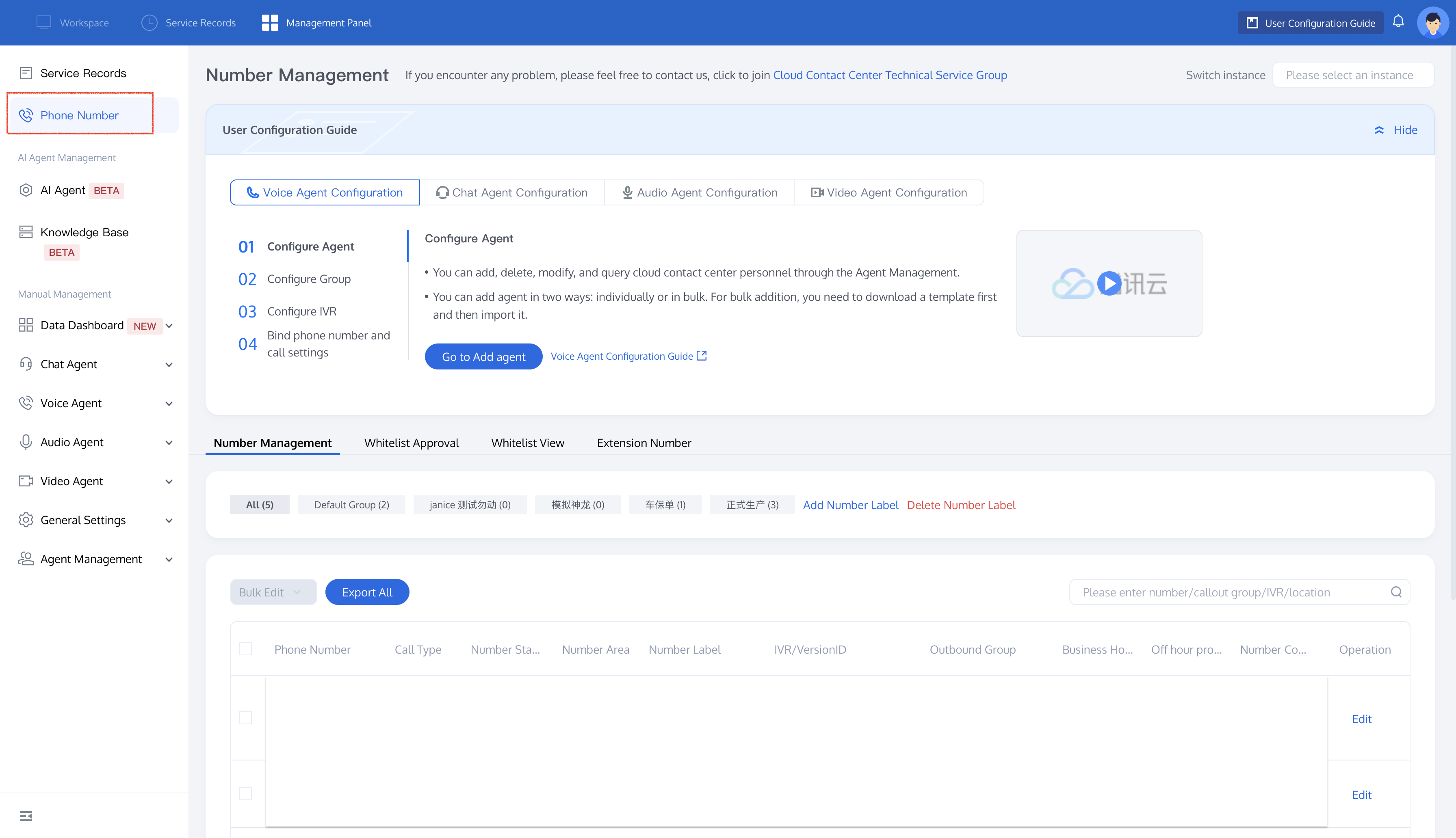
1. Open the Tencent Cloud Contact Center (TCCC) management workspace. In the left sidebar, select Numbers. In the Number Management area, locate the target number and click Edit under the Actions column.
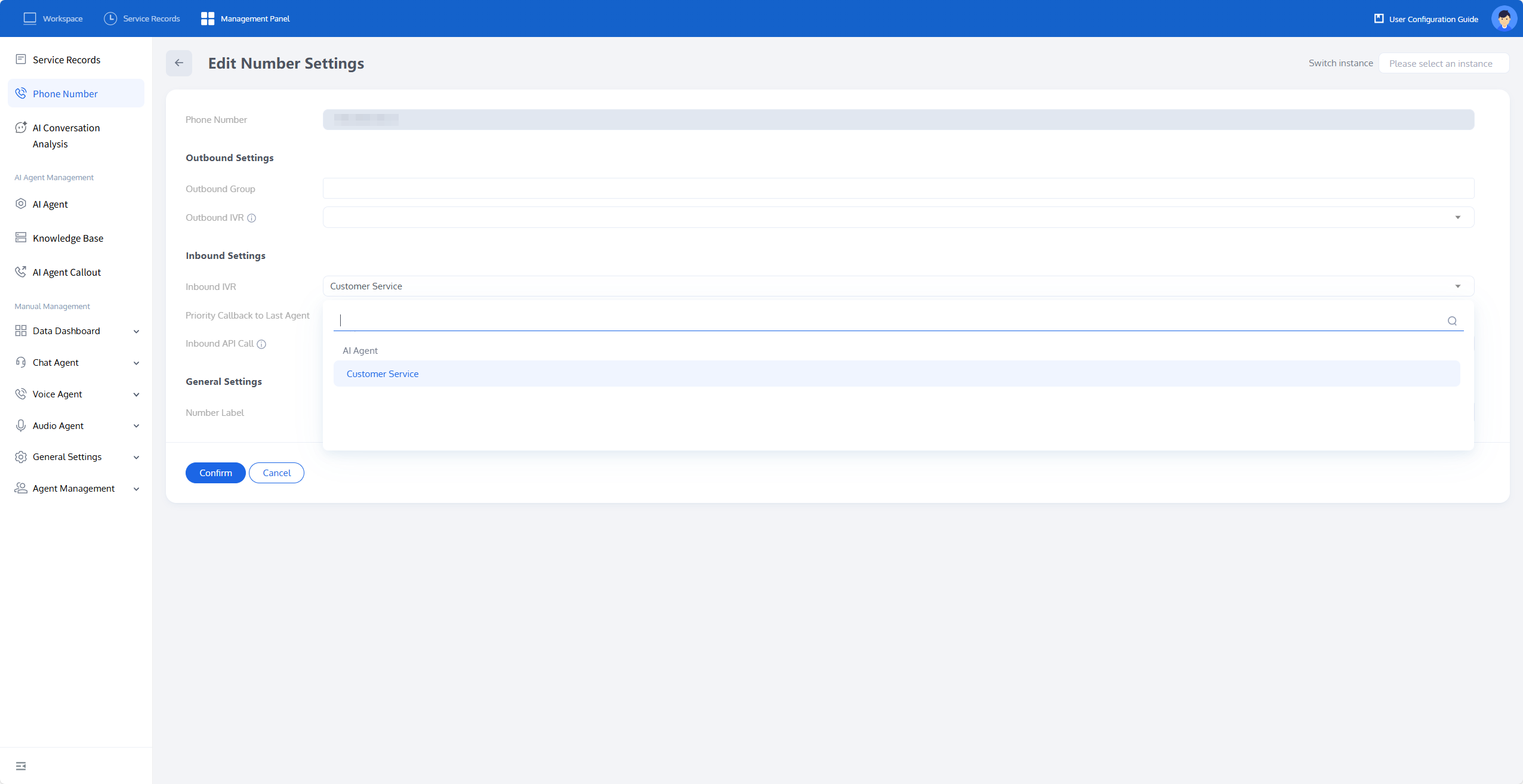
2. In Inbound Settings > Inbound IVR, choose your AI Agent (for example, "Customer Service") from the dropdown menu. Click Confirm to save the binding.
3. Wait for about one minute for the binding to take effect. Then, dial the number to verify that the AI Agent answers the call.
Method 2: Dynamic Routing via the Inbound API (Personalized On-Demand Allocation)
Use the inbound API when the AI Agent, IVR, or greeting must depend on who is calling. For example, you can direct VIP customers to a premium support agent, route others to a standard agent, or pre-initialize the conversation with the caller's name retrieved from the CRM.
How It Works
When a call arrives, TCCC sends an HTTP request to the callback URL you provide. Your backend queries the caller and responds with the AI Agent ID (or IVR ID) to use, along with optional variables. The caller's phone continues to ring until your response is received, so the end user does not perceive this query.
Timeout and Retry:
If your API does not respond within 5 seconds, TCCC retries. After 2 failed retries, TCCC abandons the query and routes the call to the AI Agent / IVR that is statically bound to that number (Method 1). If nothing is bound, the call ends.
Enabling the Inbound API
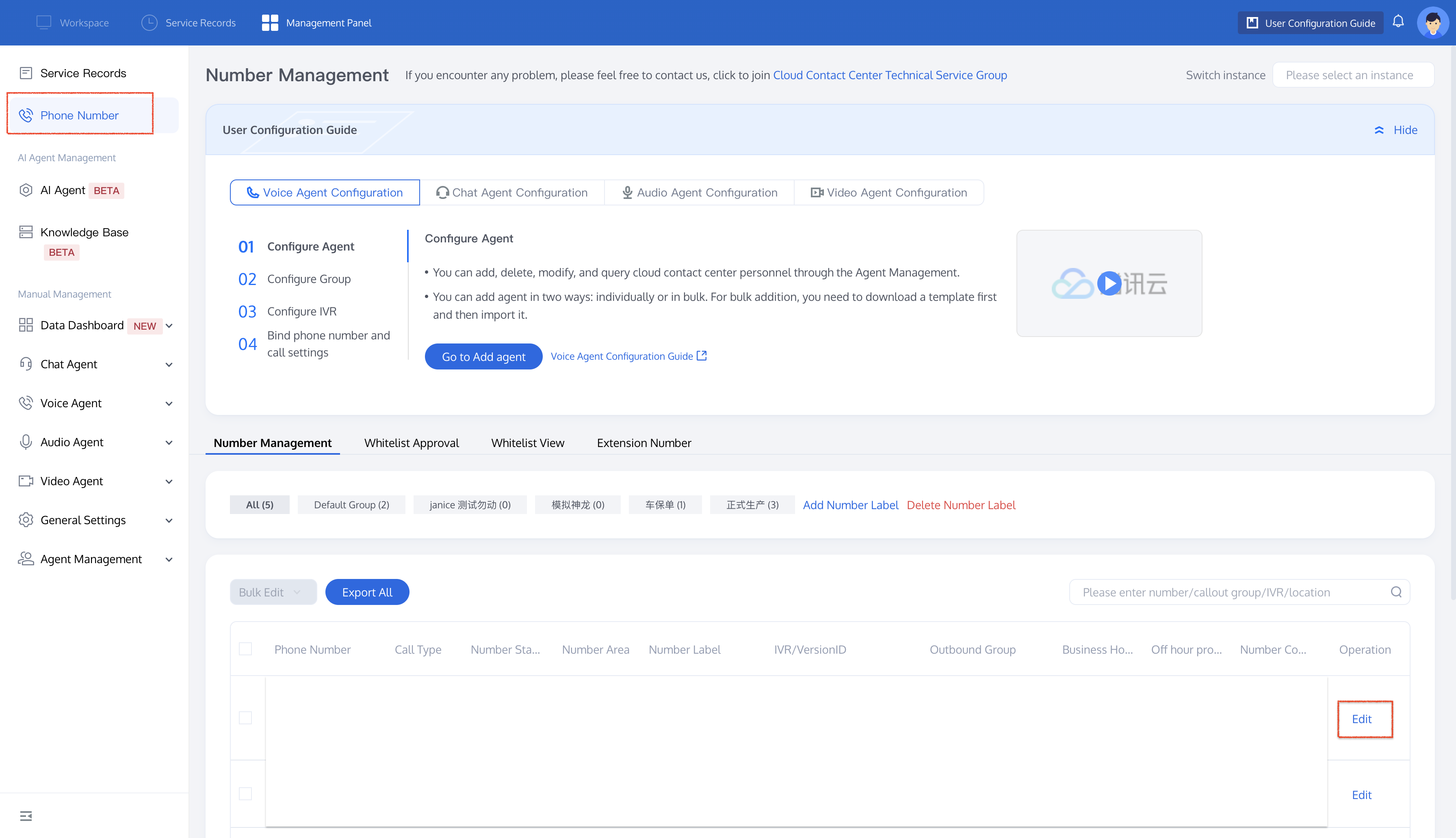
1. In the Tencent Cloud Contact Center (TCCC) management workspace, open Numbers, locate the target number, and click Edit.
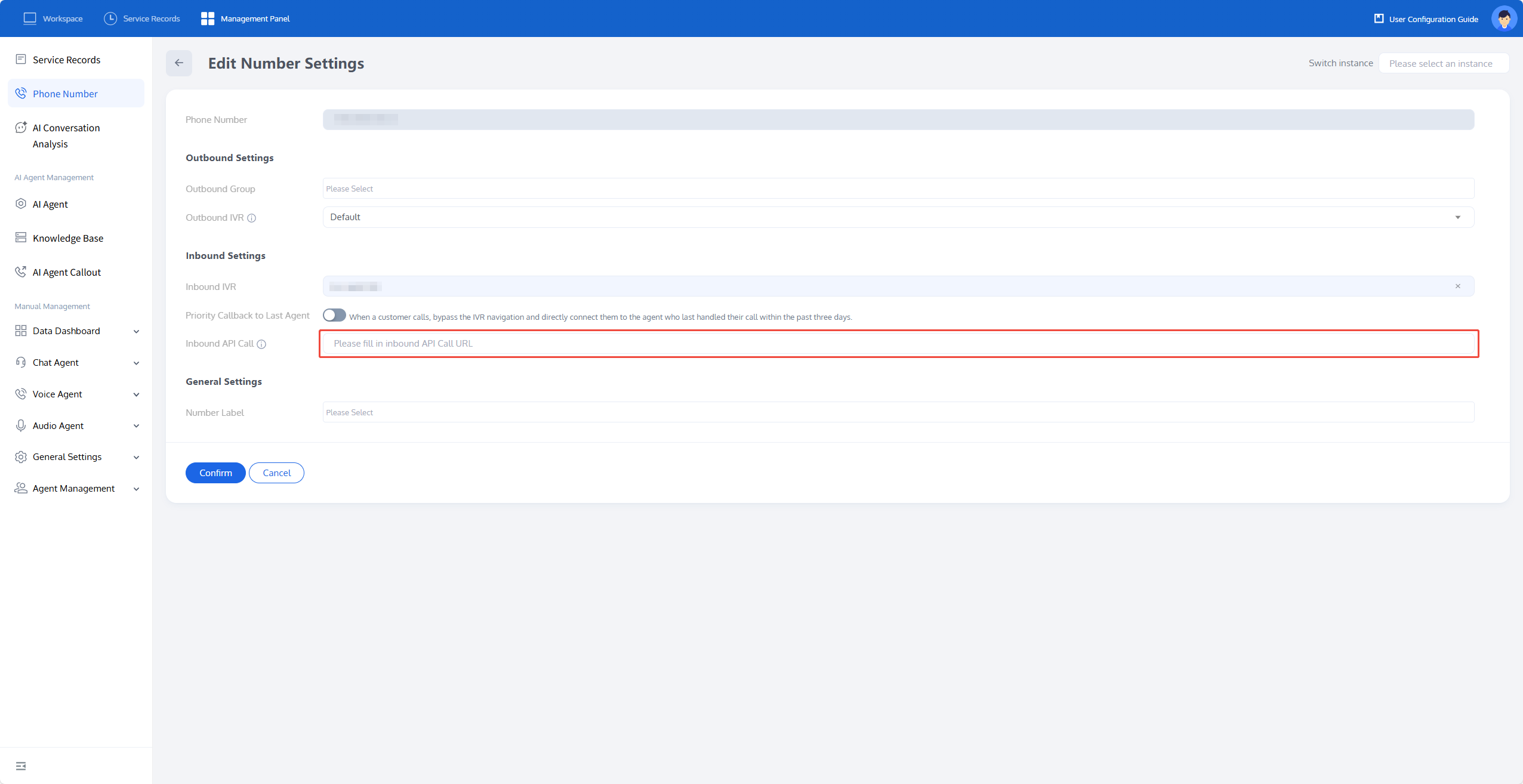
2. On the Edit Number Settings page, fill in the callback URL under Inbound Settings > Inbound API Calls. Then, click Confirm.
API Request Format
When a user dials in and the call starts ringing, TCCC POSTs the following JSON to your callback URL:
Field | Description |
SessionId | The unique ID for this call. |
SdkAppId | The application ID associated with this number. |
CallInBound.AIAgentId | The ID of the AI Agent statically bound to this number ( 0 if none). |
CallInBound.IvrId | The ID of the IVR statically bound to this number ( 0 if none). |
CallInBound.Caller | The calling number (customer). |
CallInBound.Callee | The called number (your TCCC number). |
{"Event": "CallInBound","SessionId": "01bd935d-c45e-476a-9e5b-700e09494470","SdkAppId": 1400692008,"CallInBound": {"AIAgentId": 123,"IvrId": 0,"Caller": "008613066668888","Callee": "008675566668888"}}
API Response Format
Your backend responds with a JSON response body, instructing TCCC on how to handle the call.
Field | Description |
CallInBound.OverrideAIAgentId | The target AI Agent ID to be used for this call. Mutually exclusive with OverrideIvrId. |
CallInBound.OverrideIvrId | The target IVR ID to be used for this call. Mutually exclusive with OverrideAIAgentId. |
CallInBound.Variables | An optional {Key, Value} key-value pair list that will be injected as variables into the AI Agent (referenced in dialogue nodes via ${Key}). |
{"CallInBound": {"OverrideAIAgentId": 388,// "OverrideIvrId": 435,"Variables": [{"Key": "name","Value": "Xiao Ming"}]}}
Note:
Hang Up Programmatically:
To hang up a call before it is answered (for example, for a blocklist number), return an empty response body for
CallInBound. TCCC will then automatically hang up the call.Typical Scenarios
VIP Routing: Query the caller in your CRM. Route VIPs to a premium support AI Agent and route others to a standard agent.
Personalized Greeting: Pass the caller's name as a variable so that the welcome message says \\"Hello, Xiao Ming\\" instead of a generic greeting.
Region-Based Agent Selection: Branch based on number prefix or geographic query to select an AI Agent for a specific language.
Blocklist: Return an empty
CallInBound for blocklist numbers to hang up immediately.Related Guides
Select the corresponding path based on your deployment method.
First time user? Deploy a functional AI Agent in just five minutes create a conversation flow or integrate an external model.
Want to learn about our conversation flow nodes? Go to Conversation Nodes.
Build a knowledge base for your conversation flow? Go to Build Your Knowledge Base.
How to test your model? Refer to Test Conversation Workflow.
Configure a voice AI Agent with your own model? Go to Integrate External Model, Edit Conversation Content, Configure Voice Interaction, and Add Call Control.
Want to view application scenarios? Try Voice Notification, Lead Mining, Feedback Collection, or Customer Support.
How to make outbound and inbound calls with an AI Agent? Refer to AI Agent Outbound Calls or AI Agent Inbound Calls.
View data logs? Refer to Call Records, Call Recordings, Latency.
How to create and view post-call tags? Refer to Post-call Tags (Created via Conversation Flow) or Post-call Tags (Created via External LLM).
フィードバック