Transferring to an External Line
ダウンロード
フォーカスモード
フォントサイズ
Feature Introduction
Use the External Line transfer node when you need to route a call to a phone number outside TCCC or to a customer's own platform, for example, to a partner hotline, an external expert agent, or the customer's existing call center system.
Guide
Go to the created workflow canvas. Then, choose Start Call> +> Transfer to Agent > Transfer to External Line on the canvas in order. Fill in the following configuration items in the pop-up window.
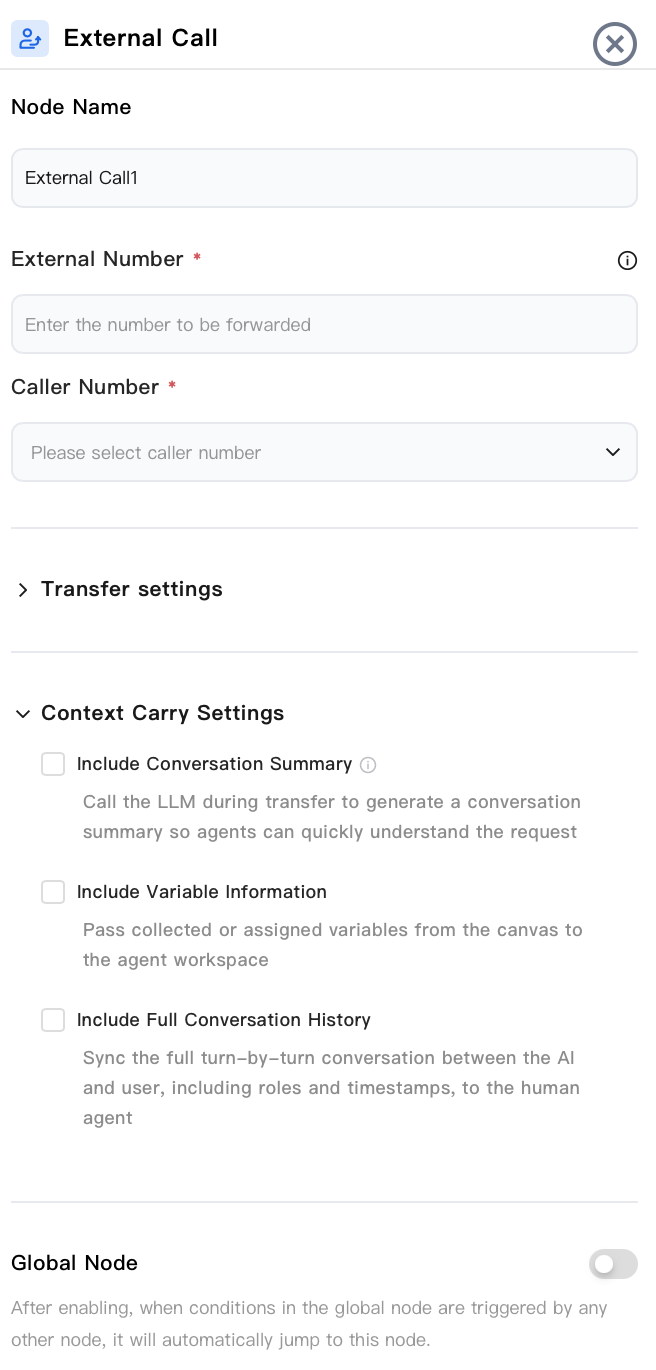
Node Name
Enter a node name, for example, "Transfer to Partner Hotline".
External Line Number
Required. This is the external phone number that answers this transfer. It supports fixed numbers or variables.
Caller Number
Required. This is the caller ID displayed when an outbound call is made. Select a number from the drop-down list of provisioned numbers.
Transfer Settings
Transfer Success Settings: You can configure the Transfer Initiation Prompt text, the audio Played During Wait, and the Transfer Success Prompt text.
Transfer Failure Settings: You can configure the corresponding Transfer Failure Prompt text for when a transfer fails because the external line is not answered or the transfer information is configured incorrectly.
Transfer Timeout Settings: You can set a wait time. If the wait exceeds this set time, a wait timeout prompt tone and text will be played. After the playback ends, the customer can press any key to continue waiting or press the # key to exit the wait.
Carry-Over Information Settings
During transfer, the context accumulated during the AI phase is pushed to the external platform, so the recipient does not need to have the customer repeat the description. You must first select the corresponding item for the information to be carried during transfer.
Carry Call Summary: During transfer, the large model is called in real time to generate a summary of the current call, helping the receiving party quickly understand the customer's request.
Carry Variable Information: Variables that have been collected/assigned in the process (for example, customer name, order number, vehicle model) are delivered to the recipient. You can choose to deliver all variables or specified variables.
Carry Complete Conversation Record: The turn-by-turn conversation between the AI and the user (including roles and timestamps) is synchronized to the recipient.
Third-Party Platform Push API Specification
When a call is transferred to an external line/third party and the recipient is the customer's own platform, TCCC pushes the aforementioned context via HTTP POST to the Push Address you configured (in JSON format, and the address supports variables).
Request method
Project | Value |
Method | POST |
Content-Type | application/json; charset=utf-8 |
Destination Address | The pushUrl configured in the canvas |
Request header.
Header | Description |
Content-Type | application/json; charset=utf-8 |
X-TCCC-PUSH-UUID | A unique identifier for the push, used for deduplication. Retries for the same push carry the same UUID. |
Request body JSON format
{"sessionId": "session-xxx","sdkAppId": 1400000000,"summary": "The user called to inquire about a refund question for order number 20240601001, and the refund eligibility has been confirmed.""summaryError": "","messages": [{"timestampMs": 1718000001000,"role": "user","content": "Hello, I want a refund.""roundId": "round-1","userId": "user-001"},{"timestampMs": 1718000002000,"role": "assistant","content": "Okay, please provide your order number.""roundId": "round-1"},{"timestampMs": 1718000003000,"role": "user","content": "20240601001","roundId": "round-2","userId": "user-001"},{"timestampMs": 1718000004000,"role": "assistant","content": "Your order has been found, and you are now being transferred to an Agent.""roundId": "round-2"}],"variables": {"orderNo": "20240601001","customerName": "Zhang San","refundReason": "Product quality issue"},"timestamp": 1718000005000}
Field Description
Field | Type | Description |
sessionId | string | Conversation ID |
sdkAppId | number | Application ID |
summary | string | Call summary text. Empty when not enabled or generation fails. |
summaryError | string | Error message when summary generation fails |
messages | array | List of conversation records (structure is the same as the messages in S2C; see Section 3) |
variables | object | Variable key-value pairs |
timestamp | number | Push timestamp (millisecond-level Unix timestamp) |
Note:
Summary Status Determination: A non-empty
summary indicates that the summary was generated successfully. A non-empty summaryError indicates that the generation failed. If both are empty, it indicates that the summary feature is not enabled.Response Requirements: The receiving end must return a response in JSON format. An
ErrCode of 0 indicates successful receipt. A non-zero ErrCode or a non-JSON response will trigger a retry.{"ErrCode": 0,"ErrMsg": "success"}
Retry Mechanisms
Project | Value |
Maximum Number of Retries | 3 times |
Retry Interval | Exponential backoff: 1s → 2s → 4s |
Timeout period | 5 seconds per request |
Deduplication identifier | X-TCCC-PUSH-UUID (remains unchanged during retries) |
Authentication method
Type | pushAuthType Value | Description |
No Authentication | Leave it blank or "nil" | No authentication header added |
BasicAuth | "basic" | Add the Authorization: Basic base64(username:password) header to the request. |
OAuth2 | "oauth2" | Use the client credentials grant to obtain an access_token, and add the Authorization: Bearer <token> header to the request. |
Node Overview
Node | Purpose |
Core interaction unit plays prompts, listens to user replies, classifies replies, and branches. | |
Exchanges data with external systems during a call (for example, queries orders, writes back results). | |
Explicitly writes or updates variables within a flow (sets default values, derives values, normalizes slots). | |
Branches based on variable values using comparison operators a generalized if/else if/else logic. | |
Branches based on date, time, and time zone (for example, business hours or non-business hours). | |
Collects numeric keypad inputs (0–9, *, #) applicable to menu-based IVR branching, Captcha/PIN entry, or numeric data collection. | |
Transfers the call to an Agent skill group. | |
Transfers the call to another AI Agent (dialog flow or proprietary model), retaining conversation history and variables. | |
Terminates the call with an optional closing message. |
Related Guides
Select the corresponding path based on your deployment method.
First time user? Deploy a functional AI Agent in just five minutes create a conversation flow or integrate an external model.
Want to learn about our conversation flow nodes? Go to Conversation Nodes.
Build a knowledge base for your conversation flow? Go to Build Your Knowledge Base.
How to test your model? Refer to Test Conversation Workflow.
Configure a voice AI Agent with your own model? Go to Integrate External Model, Edit Conversation Content, Configure Voice Interaction, and Add Call Control.
Want to view application scenarios? Try Voice Notification, Lead Mining, Feedback Collection, or Customer Support.
How to make outbound and inbound calls with an AI Agent? Refer to AI Agent Outbound Calls or AI Agent Inbound Calls.
View data logs? Refer to Call Records, Call Recordings, Latency.
How to create and view post-call tags? Refer to Post-call Tags (Created via Conversation Flow) or Post-call Tags (Created via External LLM).
フィードバック