Android(Compose)
ダウンロード
フォーカスモード
フォントサイズ
Component Overview
Search is a search component that provides users with a complete set of features, including a search box, search results display, and page navigation. The component supports friend search, group search, and message search, and provides a rich set of interactive callback interfaces.
Note:
Search function is available in the Pro edition or Enterprise edition. You can use this feature after purchasing the Pro edition or Enterprise edition package. For details, see Pricing Information.
Search Entry | Search Results |
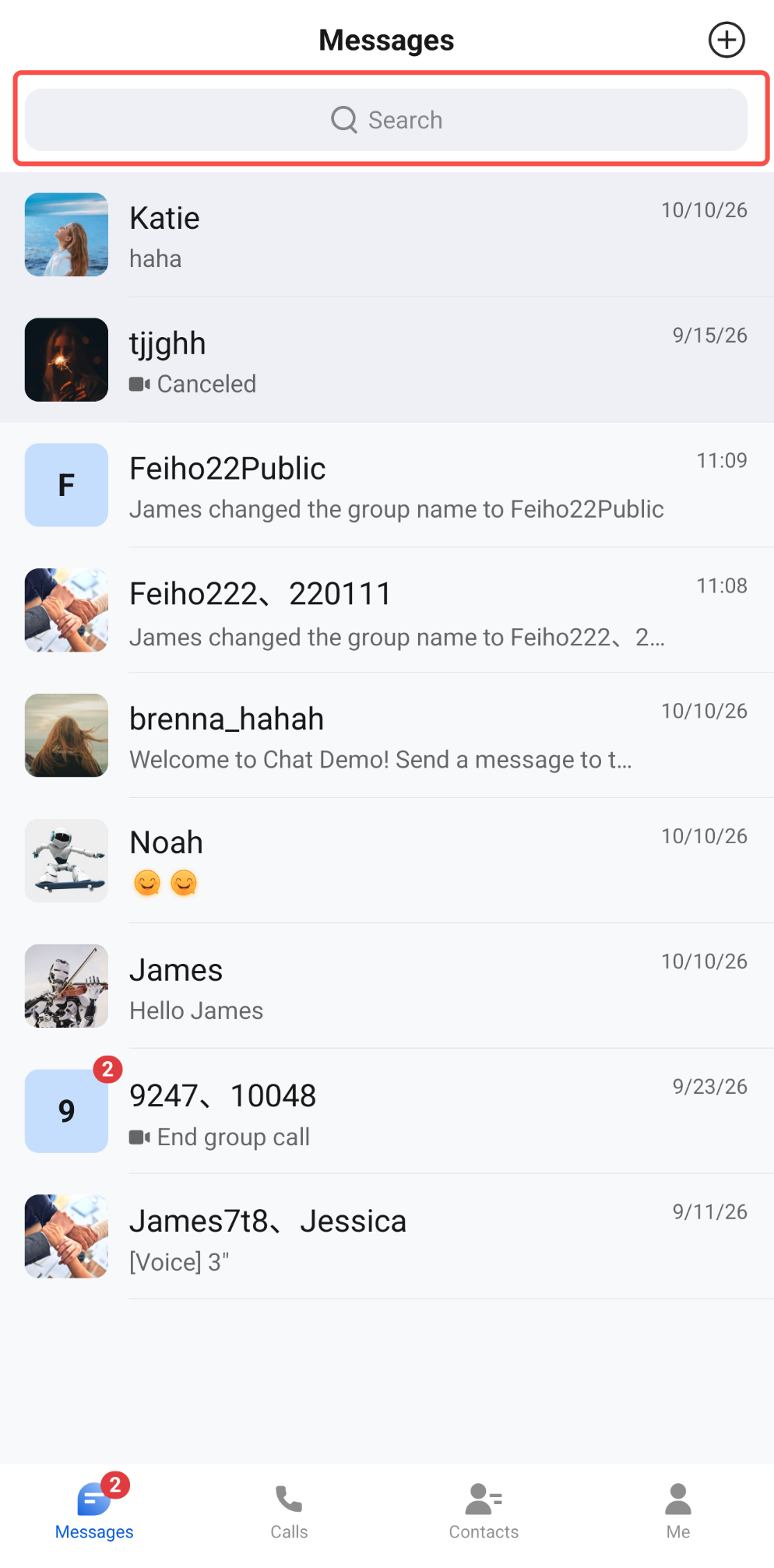 | 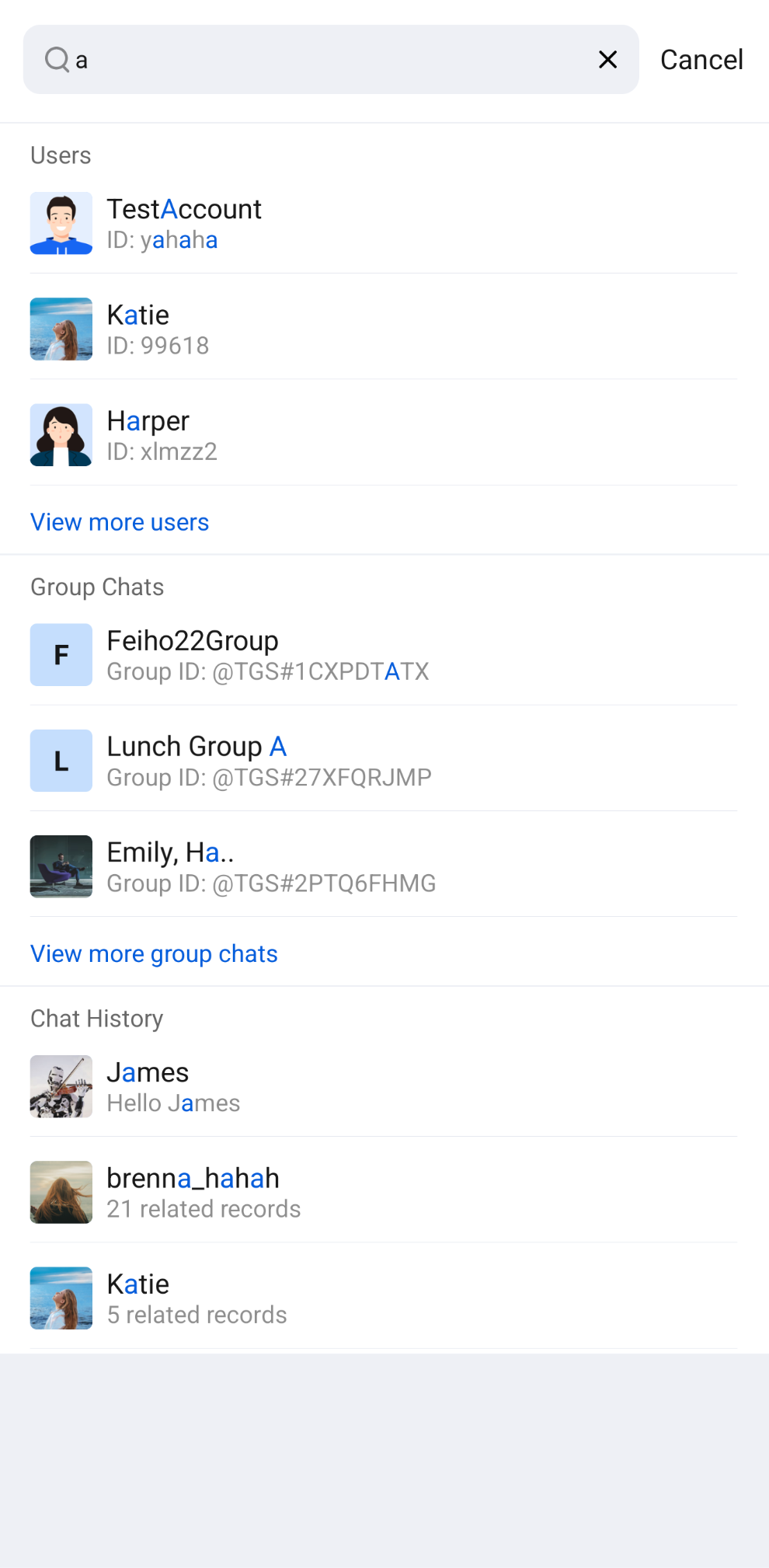 |
Component Integration
Search is a component of TUIKit Compose. Integrate TUIKit Compose to get and use ConversationList. For detailed integration steps, see the TUIKit Compose documentation.
Component Structure
SearchScreen (in the io.trtc.tuikit.chat.uikit.components.search.ui package) is the entry component of the Search component. It only exposes the initialization method of the search component; all other logic is encapsulated in SearchScreen.Method | Parameter | Description |
SearchScreen | modifier: Modifier | Used in Jetpack Compose to set the style, layout, behavior, and appearance of the component. |
| onBack: () -> Unit | Callback triggered when you click the "Cancel" button on the right side of the search box. You typically close the search page here. Optional parameter. |
| onContactSelect: (FriendSearchInfo) -> Unit | Callback triggered when you click a friend in the search results. The userID of FriendSearchInfo is the friend's user ID. Optional parameter. |
| onGroupSelect: (GroupSearchInfo) -> Unit | Callback triggered when you click a group in the search results. The groupID of GroupSearchInfo is the group ID. Optional parameter. |
| onConversationSelect: (MessageSearchResultItem) -> Unit | Callback triggered when you click the conversation information at the top of a conversation's chat history results page. The conversationID of MessageSearchResultItem is the conversation ID of that conversation. Optional parameter. |
| onMessageSelect: (MessageInfo) -> Unit | Callback triggered when you click a message on a conversation's chat history results page. Optional parameter. |
Basic Usage
Search result routing in
SearchScreen is as follows:Automatic Routing: On the search results screen, when you click the More button or a conversation's chat history entry, the component automatically completes the page navigation and opens the full results page of that category and the chat history results page of that conversation, respectively.
Custom Routing: When the user clicks a specific friend or group, or clicks the conversation information at the top or a message on a conversation's chat history results page, the component triggers the corresponding callback
onContactSelect / onGroupSelect / onConversationSelect / onMessageSelect. You need to implement custom navigation in the callback (for example, navigating to your custom chat interface).SearchScreen can be initialized and used directly. All callback parameters have default values, so you can implement only the callbacks you need. The sample code is as follows:import androidx.compose.foundation.layout.fillMaxSizeimport androidx.compose.foundation.layout.systemBarsPaddingimport androidx.compose.runtime.Composableimport androidx.compose.ui.Modifierimport io.trtc.tuikit.atomicxcore.api.conversation.ConversationTypeimport io.trtc.tuikit.atomicxcore.api.message.MessageInfoimport io.trtc.tuikit.chat.uikit.components.search.ui.SearchScreen@Composablefun SearchPage(onBack: () -> Unit,onOpenChat: (conversationID: String, locateMessage: MessageInfo?) -> Unit) {SearchScreen(modifier = Modifier.fillMaxSize().systemBarsPadding(),onBack = onBack,onContactSelect = { friend ->// Click a contact result to open a one-to-one chat with that friendonOpenChat("c2c_${friend.userID}", null)},onGroupSelect = { group ->// Click a group result to open the group chatonOpenChat("group_${group.groupID}", null)},onConversationSelect = { conversation ->// Click the conversation information at the top of the in-conversation message results page to open that conversationonOpenChat(conversation.conversationID, null)},onMessageSelect = { message ->// Click a message to open its conversation and locate that messageonOpenChat(message.conversationID, message)})}// Calculate the conversationID of the conversation that contains the messageval MessageInfo.conversationID: Stringget() = when {conversationType == ConversationType.GROUP -> "group_$to"isSentBySelf -> "c2c_$to"else -> "c2c_${from.userID}"}
Locate the Searched Message
The
MessageInfo in the onMessageSelect callback does not directly provide a conversation ID. You can calculate it using the conversationID extension property in the sample above: a group chat message is group_ plus to; for a one-to-one chat message, a message you sent is c2c_ plus to, and a message you received is c2c_ plus the sender's userID. After you open the chat page, pass this message to the locateMessage parameter of MessageList. The message list scrolls to that message and highlights it:import io.trtc.tuikit.chat.uikit.components.messagelist.ui.MessageList// After you pass in locateMessage, the message list scrolls to that message and highlights itMessageList(conversationID = conversationID,locateMessage = locateMessage)
フィードバック