tencent cloud

Elastic MapReduce

  • Release Notes and Announcements
  • Product Introduction
  • Purchase Guide
    • EMR on CVM Billing Instructions
    • EMR on TKE Billing Instructions
    • EMR Serverless HBase Billing Instructions
    • EMR Serverless TCBase Billing Overview
  • Getting Started
  • EMR on CVM Operation Guide
    • Planning Cluster
    • Administrative rights
    • Configuring Cluster
    • Managing Cluster
    • Managing Service
    • Monitoring and Alarms
    • TCInsight
  • EMR on TKE Operation Guide
  • EMR Serverless HBase Operation Guide
  • EMR Serverless TCBase Operation Guide
  • EMR Development Guide
    • Hadoop Development Guide
    • Spark Development Guide
    • Hbase Development Guide
    • Phoenix on Hbase Development Guide
    • Hive Development Guide
    • Presto Development Guide
    • Sqoop Development Guide
    • Hue Development Guide
    • Oozie Development Guide
    • Flume Development Guide
    • Kerberos Development Guide
    • Knox Development Guide
    • Alluxio Development Guide
    • Kylin Development Guide
    • Livy Development Guide
    • Kyuubi Development Guide
    • Zeppelin Development Guide
    • Hudi Development Guide
    • Superset Development Guide
    • Impala Development Guide
    • Druid Development Guide
    • TensorFlow Development Guide
    • Kudu Development Guide
    • Ranger Development Guide
    • Kafka Development Guide
    • StarRocks Development Guide
    • Flink Development Guide
    • JupyterLab Development Guide
    • MLflow Development Guide
  • Practical Tutorial
    • Practice of EMR on CVM Ops
    • Data Migration
    • Practical Tutorial on Custom Scaling
  • API Documentation
    • History
    • Introduction
    • API Category
    • Making API Requests
    • Cluster Resource Management APIs
    • Cluster Services APIs
    • User Management APIs
    • Information Query APIs
    • Scaling APIs
    • Configuration APIs
    • Other APIs
    • Cluster Lifecycle APIs
    • Serverless HBase APIs
    • YARN Resource Scheduling APIs
    • Data Types
    • Error Codes
  • FAQs
    • EMR on CVM
  • Service Level Agreement
  • Contact Us

Cluster Termination

Download
フォーカスモード
フォントサイズ
最終更新日: 2023-12-27 11:08:14

Feature Overview

When you no longer need an EMR cluster, you can terminate it in the EMR console.

Prerequisites

Pay-as-you-go cluster: once terminated, the cluster will not be retained in the recycle bin but will be completely terminated and cannot be recovered. Please do so with caution.
Before terminating a cluster, please make sure that your data has been backed up as it cannot be recovered after termination.
If there is an EIP (an IP with a secondary ENI), the instance will be retained once returned, and the idle IP will continue to incur fees. If you don't need to retain it, please release it on the corresponding resource management page.

Directions

Caution
If MetaDB in the cluster to be terminated is associated with an external cluster as a Hive metadatabase, it will be retained when the cluster is terminated; if you no longer need it, please go to the TencentDB console to terminate it. Hive metadatabases cannot be recovered once terminated. Please do so with caution.
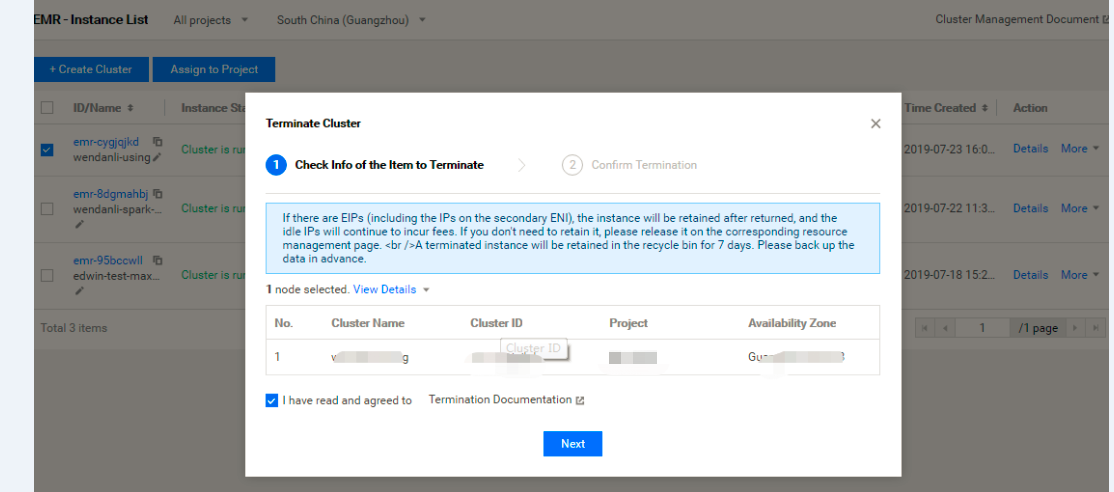
Log in to the EMR console, select Action > More > Terminate to enter the cluster termination page. Confirm the information of the cluster that needs to be terminated. After confirming that everything is correct, check I have read and agree to and click Next.

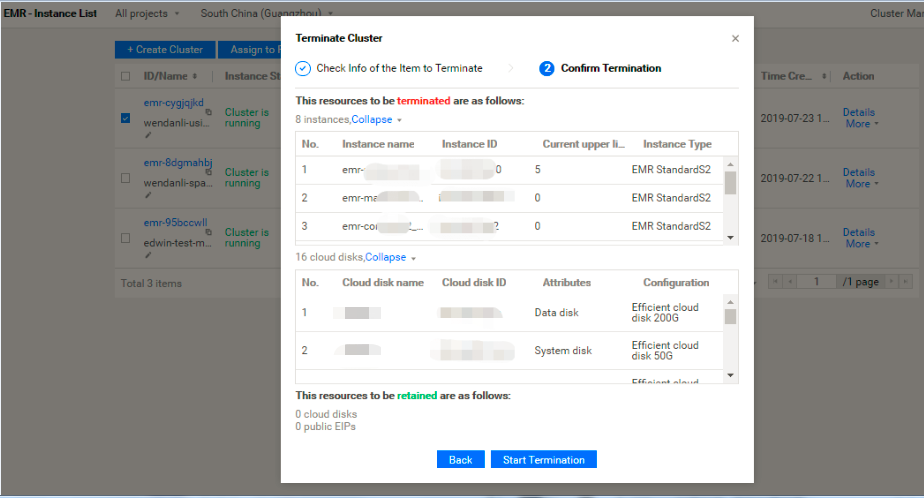
After confirming that everything is correct on the Confirm Termination tab, click Start Termination to terminate the cluster.
ヘルプとサポート

この記事はお役に立ちましたか?

フィードバック