This document provides troubleshooting information for LogListener 2.2.4 and earlier. For information on troubleshooting the latest version, see Server Group Exceptions.
Error Description
An exception occurred with log collection, and the associated server group is found to be exceptional.
Possible Causes
The heartbeat between the server group and the CLS system is interrupted, resulting in failure to collect and report logs. Possible causes for the server group exception include:
The IP address is entered incorrectly.
The network is disconnected.
The LogListener process has failed.
The LogListener configuration is incorrect.
Solution
Troubleshoot problems according to the above causes.
Directions
1. Check whether the IP address added to the server group is correct.
2. Check the IP address obtained by LogListener by running the following command:
cd loglistener/tools && ./check.sh
2.1 Log in to the Cloud Log Service Console, and click Machine Group Management in the leftside bar. On the Server Group Management page, check the IP address of the server group. The IP address must be the same as that for collection.
3. Check whether the network is connected by running the following command:
telnet <region>.cls.myqcloud.com 80
<region> is the abbreviation for the region where CLS resides. For more information on regions, see Available Regions.
The following code appears upon normal network connection. Otherwise, connection fails. Check the network and ensure normal connection.
If the connection is normal, the following code will be displayed. Otherwise, a connection failure is displayed. In this case, troubleshoot the network environment to ensure normal network connectivity.
4. Check whether LogListener processes are running normally. Go to the installation directory and run the following command:
cd loglistener/tools && ./p.sh
Normally, there are three processes:
bin/loglistenerm -d #Daemon process
bin/loglistener --conf=etc/loglistener.conf #Main process
bin/loglisteneru -u --conf=etc/loglistener.conf #Update process
If any process fails, restart it. Go to the installation directory and run the following command:
cd loglistener/tools && ./start.sh
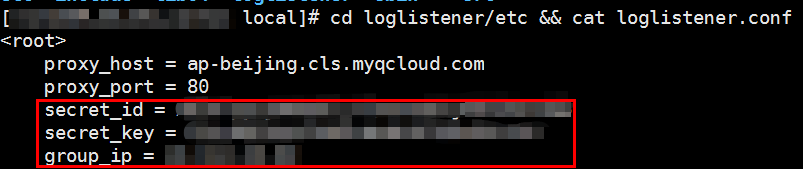
5. Check whether the key and IP address are correctly configured in LogListener. Go to the installation directory to check the configuration information by running the following command:
cd loglistener/etc &&cat loglistener.conf
See the following figure:
The key is the API key for the Tencent Cloud account or the collaborator. Project keys are not supported.
group_ip in the configuration file must be consistent with the IP address entered in the server group on the console. Since LogListener obtains the server IP address automatically, check the consistency regularly when the server is bound to multiple ENIs.