tencent cloud

Serverless Cloud Function

Release Notes and Announcements
Release Notes
Announcements
User Guide
Product Introduction
Overview
Related Concepts
How It Works
Strengths
Scenarios
Related Products
Purchase Guide
Billing Overview
Billing Mode
Billable Items and Billing Modes
Function Computing Power Support
Free Tier
SCF Pricing
Billing Example
Payment Overdue
Getting Started
Creating Event Function in Console
User Guide
Quota Management
Managing Functions
Web Function Management
Log Management
Concurrence Management
Trigger Management
Function URL
A Custom Domain Name
Version Management
Alias Management
Permission Management
Running Instance Management
Plugin Management
Managing Monitors and Alarms
Network Configuration
Layer Management
Execution Configuration
Extended Storage Management
DNS Caching Configuration
Resource Managed Mode Management
Near-Offline Resource Hosting Model
Workflow
Triggers
Trigger Overview
Trigger Event Message Structure Summary
API Gateway Trigger
COS Trigger
CLS Trigger
Timer Trigger
CKafka Trigger
Apache Kafka Trigger
MQTT Trigger
Trigger Configuration Description
MPS Trigger
CLB Trigger Description
TencentCloud API Trigger
Development Guide
Basic Concepts
Testing a Function
Environment Variables
Dependency Installation
Using Container Image
Error Types and Retry Policies
Dead Letter Queue
Connecting SCF to Database
Automated Deployment
Cloud Function Status Code
Common Errors and Solutions
Developer Tools
Serverless Web IDE
Calling SDK Across Functions
Third-Party Tools
Code Development
Python
Node.js
Golang
PHP
Java
Custom Runtime
Deploying Image as Function
Web Framework Development
Deploying Framework on Command Line
Quickly Deploying Egg Framework
Quickly Deploying Express Framework
Quickly Deploying Flask Framework
Quickly Deploying Koa Framework
Quickly Deploying Laravel Framework
Quickly Deploying Nest.js Framework
Quickly Deploying Next.js Framework
Quickly Deploying Nuxt.js Framework
Quickly Deploying Django Framework
Use Cases
Overview
Solutions with Tencent Cloud Services
Business Development
TRTC Practices
COS Practices
CKafka Practice
CLS
CLB Practice
MPS
CDN
CDWPG
VOD
SMS
ES
Scheduled Task
Video Processing
Success Stories
Tencent Online Education
Online Video Industry
Tencent Online Education
Best Practice of Tencent IEG Going Global
API Documentation
History
Introduction
API Category
Making API Requests
Other APIs
Namespace APIs
Layer Management APIs
Async Event Management APIs
Trigger APIs
Function APIs
Function and Layer Status Description
Data Types
Error Codes
SDK Documentation
FAQs
General
Web Function
Billing FAQs
Network FAQs
Log FAQs
SCF utility class
Event Handling FAQs
API Gateway Trigger FAQs
Related Agreement
Service Level Agreement
Contact Us
Glossary

Connecting SCF to Database

PDF
Mode fokus
Ukuran font
Terakhir diperbarui: 2025-10-20 15:57:47

Overview

You can quickly connect to your local or TencentDB databases by writing code in SCF. This document describes how to use an existing SDK to connect to a TencentDB for MySQL database in the SCF function code and perform operations such as insertion and query in the database. TDSQL-C and TDSQL for MySQL databases can also be connected, and you can perform relevant operations as needed.

Prerequisites

You have registered a Tencent Cloud account and completed identity verification.
Interconnect network environments:
For self-built databases (non-TencentDB databases), you need to enable public network access first before you can connect to them; otherwise, the connection may fail due to the lack of network connectivity.
For TencentDB databases, it is necessary to ensure that the function and database are in the same VPC.

Directions

You can follow the steps below to connect to and manage your TencentDB database in the function code.

Creating VPC

Note:
You can skip this step for self-built databases.
Follow the steps below to create a VPC and subnet. For more information, see Building Up an IPv4 VPC.
1. Log in to the VPC console.
2. Select the region of the VPC at the top and click +Create.
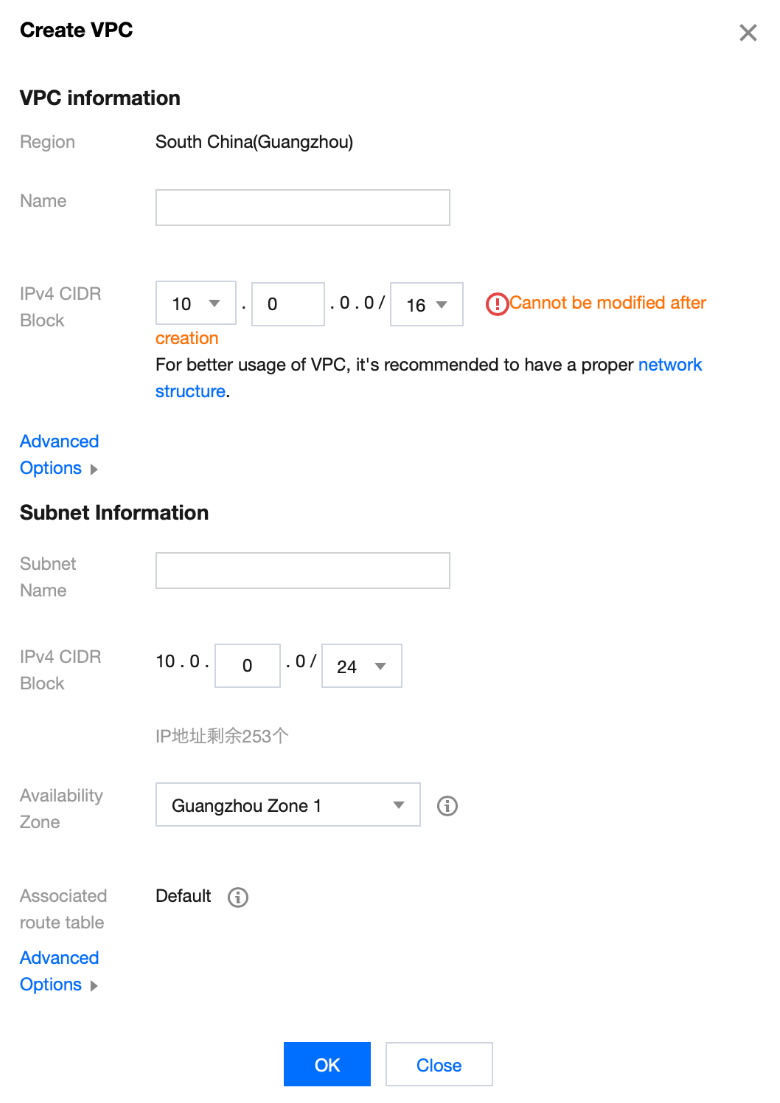
3. In the Create VPC pop-up window, enter the VPC information, initial subnet name, and region based on the following information as shown below:

4. Click OK.

Creating database instance

Note:
You can skip this step for self-built databases.
The following steps take TDSQL-C as an example to describe how to quickly create a MySQL database.
Note:
For other types of databases, see corresponding product documents:
1. Log in to the TDSQL-C purchase page, select the deployment region, AZ, database specification, and other information, and click Buy Now.
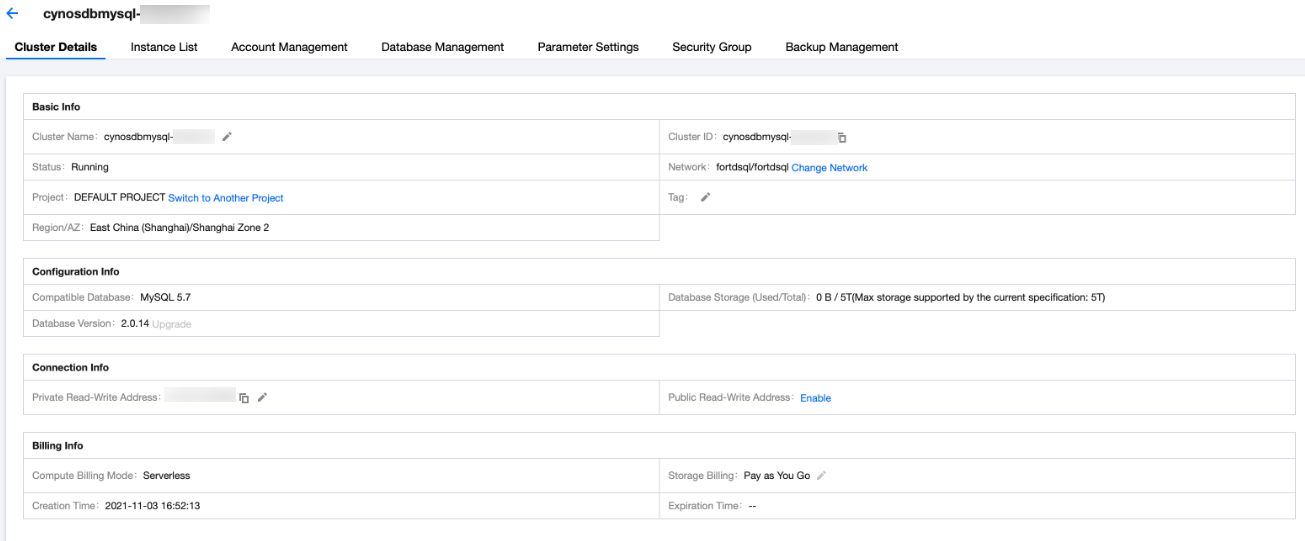
2. After the purchase is completed, you will be redirected to the cluster list. After the status of the cluster becomes Running, it can be used normally as shown below:


3. Click the cluster ID to enter the cluster details page. You can modify configurations, manage accounts, set security groups, and perform other operations for your database cluster as shown below.


Creating a function

1. Log in to the SCF console and click Function Service on the left sidebar.
2. Write your business code and connect to the database through an existing SDK or the SCF DB SDK for MySQL tool encapsulated by SCF by following the normal way of connecting to the database. Here, the Node.js function is used as an example. For other languages, see the function code samples below.
Note:
To use an existing SDK, you need to install the dependency package first. For more information, see Dependency Installation.
exports.main_handler = async (event, context, callback) => {
var mysql = require('mysql2');
var connection = mysql.createConnection({
host : process.env.HOST,
user : process.env.USER,
password : process.env.PASSWORD
});
connection.connect();
connection.query('SELECT 1 + 1 AS solution', function (error, results, fields) {
if (error) throw error;
console.log('The solution is: ', results[0].solution);
});
connection.end();
}
3. Enter the Function Configuration page of the function and configure the function as shown below:
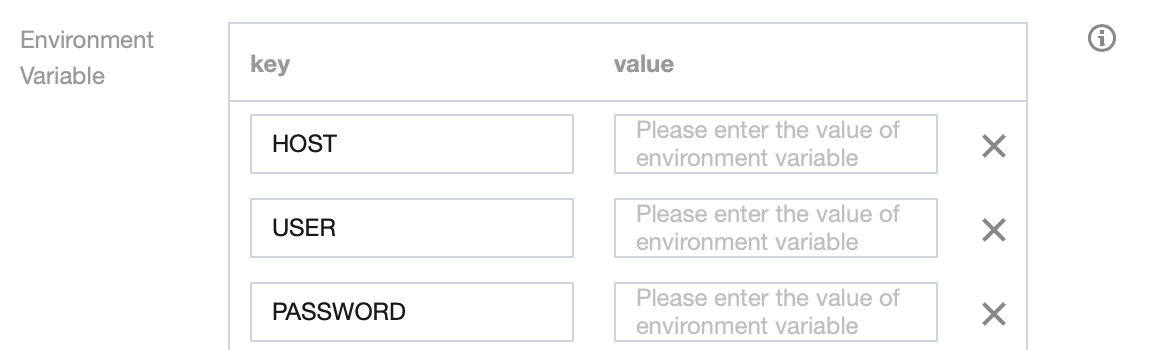
3.1 Add an environment variable and enter the information by referring to the table below:


key
value
HOST
Database address
USER
Database username
PASSWORD
Database password
3.2 Enable VPC and select the same VPC and subnet as those of the database as shown below:


4. After completing the configuration, save it and invoke your function to connect to and manage your database.

Function code samples

You can refer to the following code samples to create functions and configure corresponding environmental variables:
Python
Node.js
PHP
Java
In Python, you can use the built-in pymysql dependency package in the SCF environment to connect to the database. The sample code is as follows:
# -*- coding: utf8 -*-
# python3.6
from os import getenv
import pymysql
from pymysql.err import OperationalError
mysql_conn = None
def __get_cursor():
try:
return mysql_conn.cursor()
except OperationalError:
mysql_conn.ping(reconnect=True)
return mysql_conn.cursor()
def main_handler(event, context):
global mysql_conn
if not mysql_conn:
mysql_conn = pymysql.connect(
host = getenv('DB_HOST', '<YOUR DB HOST>'),
user = getenv('DB_USER','<YOUR DB USER>'),
password = getenv('DB_PASSWORD','<YOUR DB PASSWORD>'),
db = getenv('DB_DATABASE','<YOUR DB DATABASE>'),
port = int(getenv('DB_PORT','<YOUR DB PORT>')),
charset = 'utf8mb4',
autocommit = True
)

with __get_cursor() as cursor:
cursor.execute('select * from employee')
myresult = cursor.fetchall()
print(myresult)
for x in myresult:
print(x)

Node.js allows you to use a connection pool for connection, which supports automatic reconnection to effectively avoid connection unavailability due to connection release by the SCF underlying layer or database. The sample code is as follows:
Note:
Before using a connection pool, you need to install the mysql2 dependency package first. For more information, see Dependency Installation.
'use strict';
const DB_HOST = process.env[`DB_HOST`]
const DB_PORT = process.env[`DB_PORT`]
const DB_DATABASE = process.env[`DB_DATABASE`]
const DB_USER = process.env[`DB_USER`]
const DB_PASSWORD = process.env[`DB_PASSWORD`]
const promisePool = require('mysql2').createPool({
host : DB_HOST,
user : DB_USER,
port : DB_PORT,
password : DB_PASSWORD,
database : DB_DATABASE,
connectionLimit : 1
}).promise();

exports.main_handler = async (event, context, callback) => {
let result = await promisePool.query('select * from employee');
console.log(result);
}

In PHP, you can use the pdo_mysql or mysqli dependency package for data connection. The sample code is as follows:
<?php
function handler($event, $context) {
try{
$pdo = new PDO('mysql:host= getenv("DB_HOST");dbname= getenv("DB_DATABASE"),getenv("DB_USER"),getenv("DB_PASSWORD")');
$pdo->setAttribute(PDO::ATTR_ERRMODE, PDO::ERRMODE_EXCEPTION);
}catch(PDOException $e){
echo 'Databases connection failed: '.$e->getMessage();
exit;
}
}
<?php
function main_handler($event, $context) {
$host = "";
$username = "";
$password = "";

// Create a connection
$conn = mysqli_connect($servername, $username, $password);

// Test the connection
if (!$conn) {
die("Connection failed: " . mysqli_connect_error());
}
echo "Connected successfully";

mysqli_close($conn);
echo "Disconnected";
}
?>
1. Please install the following dependencies as instructed in Dependency Installation.
<dependencies>
<dependency>
<groupId>com.tencentcloudapi</groupId>
<artifactId>scf-java-events</artifactId>
<version>0.0.2</version>
</dependency>
<dependency>
<groupId>com.zaxxer</groupId>
<artifactId>HikariCP</artifactId>
<version>3.2.0</version>
</dependency>
<dependency>
<groupId>mysql</groupId>
<artifactId>mysql-connector-java</artifactId>
<version>8.0.11</version>
</dependency>
</dependencies>

2. Use HikariCP for connection. The sample code is as follows:
package example;

import com.qcloud.scf.runtime.Context;
import com.qcloud.services.scf.runtime.events.APIGatewayProxyRequestEvent;
import com.qcloud.services.scf.runtime.events.APIGatewayProxyResponseEvent;
import com.zaxxer.hikari.HikariConfig;
import com.zaxxer.hikari.HikariDataSource;
import javax.sql.DataSource;
import java.sql.Connection;
import java.sql.PreparedStatement;
import java.sql.ResultSet;
import java.sql.SQLException;
import java.util.HashMap;
import java.util.Map;
public class Http {
private DataSource dataSource;
public Http() {
HikariConfig config = new HikariConfig();
config.setJdbcUrl("jdbc:mysql://" + System.getenv("DB_HOST") + ":"+ System.getenv("DB_PORT") + "/" + System.getenv("DB_DATABASE"));
config.setUsername(System.getenv("DB_USER"));
config.setPassword(System.getenv("DB_PASSWORD"));
config.setDriverClassName("com.mysql.jdbc.Driver");
config.setMaximumPoolSize(1);
dataSource = new HikariDataSource(config);
}

public String mainHandler(APIGatewayProxyRequestEvent requestEvent, Context context) {
System.out.println("start main handler");
System.out.println("requestEvent: " + requestEvent);
System.out.println("context: " + context);

try (Connection conn = dataSource.getConnection(); PreparedStatement ps = conn.prepareStatement("SELECT * FROM employee")) {
ResultSet rs = ps.executeQuery();
while (rs.next()) {
System.out.println(rs.getInt("id"));
System.out.println(rs.getString("first_name"));
System.out.println(rs.getString("last_name"));
System.out.println(rs.getString("address"));
System.out.println(rs.getString("city"));
}
} catch (SQLException e) {
e.printStackTrace();
}

APIGatewayProxyResponseEvent apiGatewayProxyResponseEvent = new APIGatewayProxyResponseEvent();
apiGatewayProxyResponseEvent.setBody("API GW Test Success");
apiGatewayProxyResponseEvent.setIsBase64Encoded(false);
apiGatewayProxyResponseEvent.setStatusCode(200);

Map<String, String> headers = new HashMap<>();
headers.put("Content-Type", "text");
headers.put("Access-Control-Allow-Origin", "*");
apiGatewayProxyResponseEvent.setHeaders(headers);

return apiGatewayProxyResponseEvent.toString();
}
}


SCF DB SDK for MySQL

For ease of use, the SCF team encapsulated the code related to connection pools in Node.js and Python as SCF DB SDK for MySQL. With this SDK, you can connect to MySQL, TDSQL-C, or TDSQL for MySQL databases and performs operations such as insertion and query.
SCF DB SDK for MySQL has the following features:
It can automatically initialize the database client from environment variables.
It can maintain a persistent database connection globally and handle reconnection after disconnection.
The SCF team will continuously check issues to ensure that the database connection is available, so you don't need to pay attention to connection issues.
The sample code is as follows:
Node.js SDK
Python SDK
'use strict';
const database = require('scf-nodejs-serverlessdb-sdk').database;
exports.main_handler = async (event, context, callback) => {
let pool = await database('TESTDB2').pool()
pool.query('select * from coffee',(err,results)=>{
console.log('db2 callback query result:',results)
})
// no need to release pool

console.log('db2 query result:',result)
}

from serverless_db_sdk import database
def main_handler(event, context):
print('Start Serverlsess DB SDK function')
connection = database().connection(autocommit=False)
cursor = connection.cursor()
cursor.execute('SELECT * FROM name')
myresult = cursor.fetchall()
for x in myresult:
print(x)

Note:
1. Python 3.6, Python 2.7, Node.js 12.16, and Node.js 10.15 have built-in SCF DB SDK for MySQL, so no additional installation is required.
2. For other Node.js versions, please refer to Dependency Installation to install scf-nodejs-serverlessdb-sdk.
3. For specific usage of the SDK for Node.js, see SCF DB SDK for MySQL.

FAQs

How do I manage database connections more efficiently under the operating mechanism of SCF?

Each SCF request actually runs on a container that can be reused for a period of time when there are continuous requests. A database connection is better to be established when the container is initialized, i.e., corresponding to the global part of the function code. After the database connection is established, it can be reused during the existence of the container and will be closed when the container is released. Please avoid frequent database connections and disconnections inside the entry function, as they affect the performance. To ensure the database connection availability, a connection check can be performed inside the entry function.
We recommend you use the database connection pool for container database connection management and set the minimum number of connections to 1.

How do I perform database connection management in high-concurrency scenarios?

In high function concurrency scenarios, the number of concurrent connections may exceed the maximum number of database connections. You can refer to the following solutions for handling:
Increase the maximum number of database connections.
Set the maximum dedicated concurrency quota for functions and limit the number of concurrent function connections to be less than the maximum number of database connections.
TencentDB for MySQL provides the database proxy feature. Requests arriving at the proxy address are all relayed through the proxy cluster to access the source and replica nodes of the database. Read/Write separation is implemented, so that read requests are forwarded to read-only instances, which lowers the load of the source database.

Bantuan dan Dukungan

Apakah halaman ini membantu?

masukan