tencent cloud

Tencent Kubernetes Engine

Release Notes and Announcements
Release Notes
Announcements
Release Notes
Product Introduction
Overview
Strengths
Architecture
Scenarios
Features
Concepts
Native Kubernetes Terms
Common High-Risk Operations
Regions and Availability Zones
Service Regions and Service Providers
Open Source Components
Purchase Guide
Purchase Instructions
Purchase a TKE General Cluster
Purchasing Native Nodes
Purchasing a Super Node
Getting Started
Beginner’s Guide
Quickly Creating a Standard Cluster
Examples
Container Application Deployment Check List
Cluster Configuration
General Cluster Overview
Cluster Management
Network Management
Storage Management
Node Management
GPU Resource Management
Remote Terminals
Application Configuration
Workload Management
Service and Configuration Management
Component and Application Management
Auto Scaling
Container Login Methods
Observability Configuration
Ops Observability
Cost Insights and Optimization
Scheduler Configuration
Scheduling Component Overview
Resource Utilization Optimization Scheduling
Business Priority Assurance Scheduling
QoS Awareness Scheduling
Security and Stability
TKE Security Group Settings
Identity Authentication and Authorization
Application Security
Multi-cluster Management
Planned Upgrade
Backup Center
Cloud Native Service Guide
Cloud Service for etcd
TMP
TKE Serverless Cluster Guide
TKE Registered Cluster Guide
Use Cases
Cluster
Serverless Cluster
Scheduling
Security
Service Deployment
Network
Release
Logs
Monitoring
OPS
Terraform
DevOps
Auto Scaling
Containerization
Microservice
Cost Management
Hybrid Cloud
AI
Troubleshooting
Disk Full
High Workload
Memory Fragmentation
Cluster DNS Troubleshooting
Cluster kube-proxy Troubleshooting
Cluster API Server Inaccessibility Troubleshooting
Service and Ingress Inaccessibility Troubleshooting
Common Service & Ingress Errors and Solutions
Engel Ingres appears in Connechtin Reverside
CLB Ingress Creation Error
Troubleshooting for Pod Network Inaccessibility
Pod Status Exception and Handling
Authorizing Tencent Cloud OPS Team for Troubleshooting
CLB Loopback
API Documentation
History
Introduction
API Category
Making API Requests
Elastic Cluster APIs
Resource Reserved Coupon APIs
Cluster APIs
Third-party Node APIs
Relevant APIs for Addon
Network APIs
Node APIs
Node Pool APIs
TKE Edge Cluster APIs
Cloud Native Monitoring APIs
Scaling group APIs
Super Node APIs
Other APIs
Data Types
Error Codes
TKE API 2022-05-01
FAQs
TKE General Cluster
TKE Serverless Cluster
About OPS
Hidden Danger Handling
About Services
Image Repositories
About Remote Terminals
Event FAQs
Resource Management
Service Agreement
TKE Service Level Agreement
TKE Serverless Service Level Agreement
Contact Us
Glossary
DokumentasiTencent Kubernetes EngineUse CasesNetworkLimiting the bandwidth on pods in TKE

Limiting the bandwidth on pods in TKE

PDF
Mode fokus
Ukuran font
Terakhir diperbarui: 2024-12-18 14:21:17

Overview

This document describes how to restrict the Pod bandwidth in TKE. Currently, TKE does not support Pod speed restriction; however, you can modify the CNI plugin to achieve it based on your actual scenario.

Notes

TKE supports using the bandwidth plugin of the community to restrict the network speed. Currently, it can be used in GlobalRouter mode and VPC-CNI shared ENI mode.
Currently, it is not supported for the VPC-CNI dedicated ENI mode.

Directions

Modifying CNI plugin

GlobalRouter mode

The GlobalRouter network mode is a routing policy for communication between the container network and VPC based on the global routing capabilities of the underlying VPC. It is suitable for common scenarios and seamlessly compatible with standard Kubernetes features. For more information, see GlobalRouter Mode.
1. Log in to the Pod node as instructed in Logging in to Linux Instance Using Standard Login Method.
2. Run the following command to view the configuration of tke-bridge-agent:
kubectl edit daemonset tke-bridge-agent -n kube-system
Add args --bandwidth to enable the support for the bandwidth plugin.

VPC-CNI shared ENI mode

The VPC-CNI mode is the container network capability implemented based on CNI and VPC ENI in TKE, suitable for the scenarios with high requirements on latency. The open-source Bandwidth component supports outbound and inbound traffic shaping for the Pod, as well as bandwidth control.
1. Log in to the TKE console, click Clusters in the left sidebar.
2. On the cluster management page, click the cluster ID for which you want to enable security groups to go to the cluster details page.
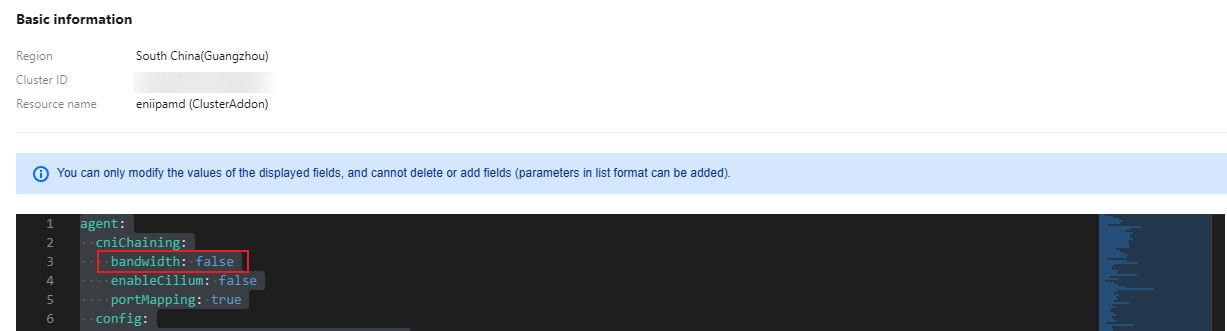
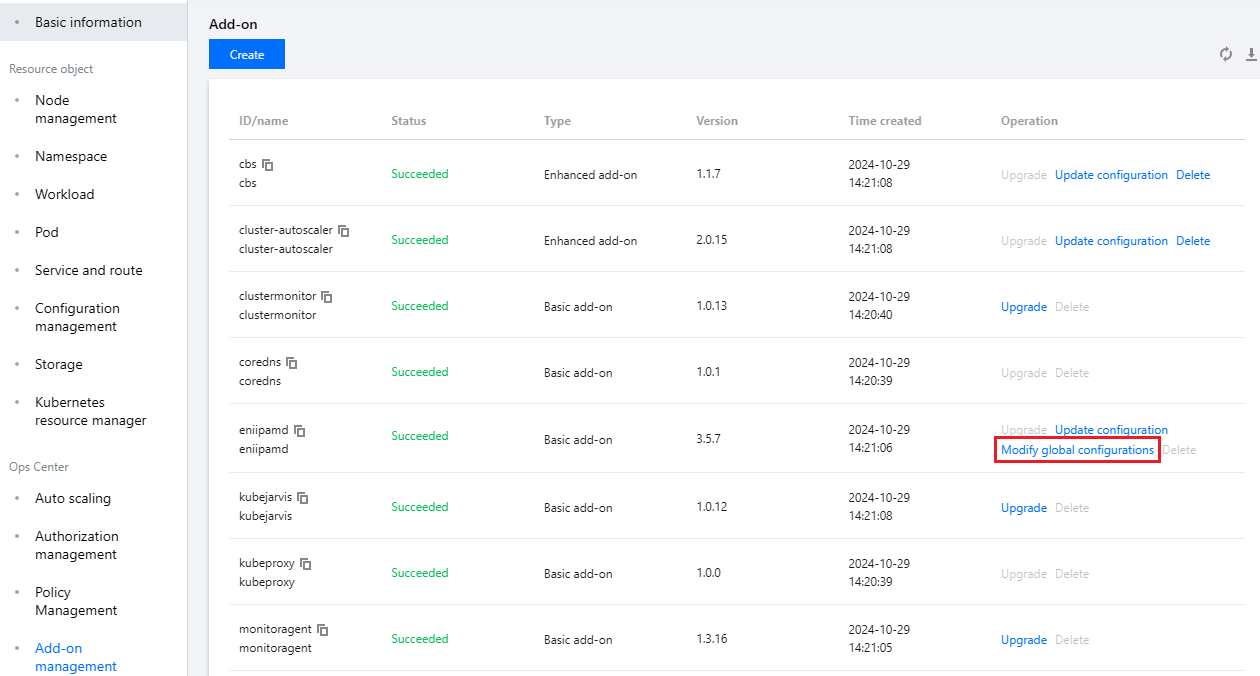
3. On the cluster details page, click Add-on Management on the left sidebar. On the add-on management page, click eniipamd on the right of the component and select Modify global configurations.


4. In the global configuration, find the configuration item of the bandwidth plugin (path: agent.cniChaining.bandwidth) and change it to true.


Note:
You can enable or disable this feature simply by modifying the above parameters for the component tke-eni-agent. Deployment, enablement, and disablement are supported, which take effect only for newly-added Pods.

Specifying annotation in Pod

You can configure in the method provided by the community:
Use the kubernetes.io/ingress-bandwidth annotation to specify the inbound bandwidth cap.
Use the kubernetes.io/egress-bandwidth annotation to specify the outbound bandwidth cap.
Sample:
apiVersion: apps/v1
kind: Deployment
metadata:
name: nginx
spec:
replicas: 1
selector:
matchLabels:
app: nginx
template:
metadata:
labels:
app: nginx
annotations:
kubernetes.io/ingress-bandwidth: 10M
kubernetes.io/egress-bandwidth: 20M
spec:
containers:
- name: nginx
image: nginx

Configuration Verification

You can verify whether the configuration succeeds in the following two methods:
Method 1: log in to the Pod node and run the following command to check whether the caps have been added:
tc qdisc show
If a result similar to the following is returned, the caps have been added successfully:
qdisc tbf 1: dev vethc09123a1 root refcnt 2 rate 10Mbit burst 256Mb lat 25.0ms
qdisc ingress ffff: dev vethc09123a1 parent ffff:fff1 ----------------
qdisc tbf 1: dev 6116 root refcnt 2 rate 20Mbit burst 256Mb lat 25.0ms
Method 2: run the following command to use iperf for testing:
iperf -c <service IP> -p <service port> -i 1
If a result similar to the following is returned, the caps have been added successfully:
------------------------------------------------------------
Client connecting to 172.16.0.xxx, TCP port 80
TCP window size: 12.0 MByte (default)
------------------------------------------------------------
[ 3] local 172.16.0.xxx port 41112 connected with 172.16.0.xx port 80
[ ID] Interval Transfer Bandwidth
[ 3] 0.0- 1.0 sec 257 MBytes 2.16 Gbits/sec
[ 3] 1.0- 2.0 sec 1.18 MBytes 9.90 Mbits/sec
[ 3] 2.0- 3.0 sec 1.18 MBytes 9.90 Mbits/sec
[ 3] 3.0- 4.0 sec 1.18 MBytes 9.90 Mbits/sec
[ 3] 4.0- 5.0 sec 1.18 MBytes 9.90 Mbits/sec
[ 3] 5.0- 6.0 sec 1.12 MBytes 9.38 Mbits/sec
[ 3] 6.0- 7.0 sec 1.18 MBytes 9.90 Mbits/sec
[ 3] 7.0- 8.0 sec 1.18 MBytes 9.90 Mbits/sec
[ 3] 8.0- 9.0 sec 1.18 MBytes 9.90 Mbits/sec
[ 3] 9.0-10.0 sec 1.12 MBytes 9.38 Mbits/sec
[ 3] 0.0-10.3 sec 268 MBytes 218 Mbits/sec


Bantuan dan Dukungan

Apakah halaman ini membantu?

masukan