Adjusting Mongod Node Specification
ダウンロード
フォーカスモード
フォントサイズ
Overview
To ensure that resources always match business needs, you can flexibly adjust instance specifications based on business load conditions such as the initial phase, peak phase, and stable phase. You can handle growth and ensure performance through configuration upgrades, or optimize idle resources and achieve cost savings through configuration downgrades, thereby achieving a dynamic balance between resource utilization and cost expenditure.
Feature Description
Configuration adjustments to Mongod are a primary operation for optimizing performance and capacity, including adjusting its compute specifications and disk capacity. To ensure the desired results, you are advised to understand product specifications in advance.
Impacts and Constraints
Impact Category | Description |
Billing impact | Adjust the instance configurations. Billing starts based on the new configurations. Ensure that the Tencent Cloud account has sufficient balance. For more information, see Billing Instructions for Configuration Changes. |
Service impact | Resources on the physical machines where each node resides are sufficient when storage space is scaled up: No service interruption: the system performs scale-up directly on local disks without data migration. This does not cause connection interruptions and is completely transparent to the business. If the resources on the physical machines where each node resides are insufficient when storage space is scaled up: This causes momentary disconnections. The system needs to create nodes on new physical machines and synchronize data, and 1-2 database disconnections of about 10 seconds each occur during the final switchover. It is recommended that applications implement an automatic reconnection mechanism. Note: During the adjustment, if your writeConcern is set to majority, brief request delays may occur. You are advised to adjust the business timeout appropriately to avoid errors. After the specification is scaled in or out, the system triggers a new auto-backup task again. |
Connection impact | After the configuration is adjusted, the instance name, private network address, and port remain unchanged. You do not need to modify the application's connection string. |
Operation constraints and limits | The change is irreversible. Once a configuration adjustment task is initiated, it cannot be canceled midway. Confirm carefully before proceeding. Capacity lower limit: When the configuration is adjusted, the system requires that the capacity of the new node configuration cannot be lower than the maximum value of the capacity already used by the current node. |
Suggestions for Change
To ensure business stability and instance health, you are advised to follow these recommendations:
Operation Timing
To avoid impacts of momentary disconnection on peak-hour services, be sure to initiate the change during off-peak periods, such as at night or during a maintenance window.
Subsequent Optimizations (Key Steps)
After the instance is scaled up, it is strongly recommended that you adjust the Oplog capacity accordingly. If the Oplog is too small, operation records may be quickly overwritten, which can affect the rollback features of MongoDB. Evaluate and set an appropriate Oplog size based on your business write volume. For details, see Adjusting Oplog Capacity.
Prerequisites
You have created a TencentDB for MongoDB instance. For more information, see Creating TencentDB for MongoDB Instance.
If your instance is pay-as-you-go, make sure that your Tencent Cloud account balance is sufficient.
Ensure that the instance and its associated instances are in the running state and no tasks are being executed.
Directions
1. Log in to the TencentDB for MongoDB console.
2. In the MongoDB drop-down list on the left sidebar, select Replica Set Instance or Shard Instance. The directions for the two types of instances are similar.
3. Select a region at the top of the instance list page on the right.
4. In the instance list, find the target instance.
5. In the Operation column of the target instance, select Adjust Configuration in the drop-down list.
6. On the Adjust Configuration page, you can adjust the node memory and total node capacity.
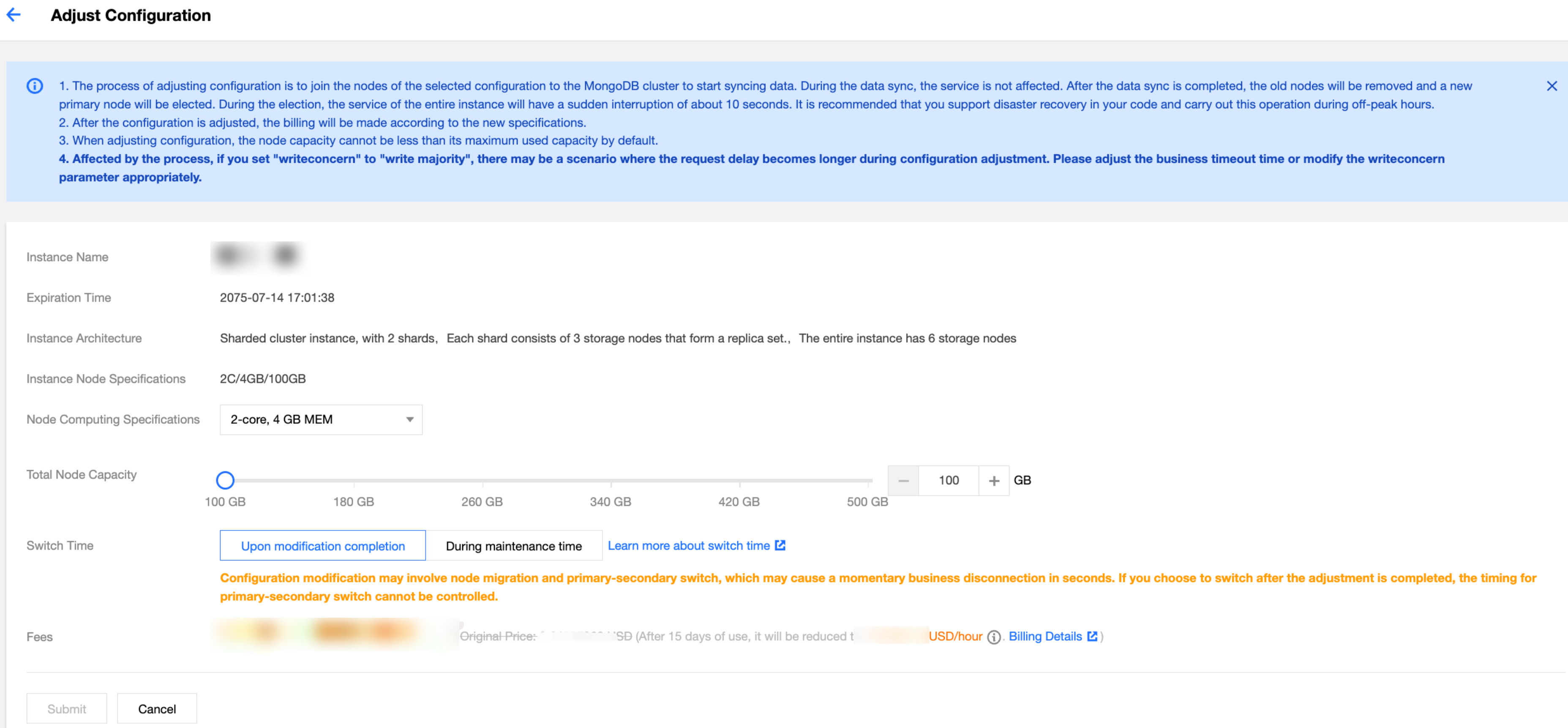
Parameter | Description | Example |
Instance Name | The name of the instance that requires specification adjustment. | test-4dot2-XXX |
Expiration Time | The expiration time of the instance, specifically for subscription-based billing, serves as a reminder for the instance's expiration date. | 2022-04 24 19:23:43 |
Instance Architecture | The description of the instance's cluster architecture. For more information, see System Architecture. | A sharded cluster instance has two shards, and each shard consists of three storage nodes to form a replica set. Hence, the entire instance has six storage nodes in total. |
Instance Node Specifications | The specifications of a single Mongod node in the current instance include: number of CPU cores, memory capacity, and disk size. | 2C/4GB/10GB |
Node Computing Specifications | In the dropdown list, reselect the specifications for a single Mongod node. For detailed guidance on selecting specifications, please refer to the Mongod specifications outlined in Product Specifications. | 8GB |
Total Node Capacity | Adjust the total disk capacity per mongod node on the slider, which is the same as the total capacity of the current node by default. For how to choose a specification, see the mongod specifications in Product Specifications. Note: When adjusting disk capacity, it must be at least 120% of the currently used capacity. | 500 GB MEM |
Switch Time | If you select Upon modification completion, the instance specification adjustment task will be executed immediately. Instance memory and disk adjustment may involve node migration or primary-secondary switch. As the switch time is uncontrollable, disconnection or restart may occur. If you select During maintenance period, the task will be executed during the maintenance period. For more information, see Setting Instance Maintenance Period. | During maintenance period |
Fees | Pay-as-you-go: the billing unit price per hour after the instance configuration is adjusted. Click Billing Details to view billing items and billing formulas, and confirm the fees. Yearly/monthly subscription: for configuration upgrade, the additional fee to be paid before the instance expires is displayed. For configuration downgrade, the amount to be refunded before the instance expires is displayed. For billing details after configuration adjustment, see Billing Instructions for Configuration Change. | USD 166.92 |
7. After confirming that everything is correct, click Submit.
Related APIs
API Name | Capability Description |
Adjusts the cloud database instance configurations | |
Queries the sales specifications of cloud databases | |
Queries node properties, including the AZ where the node resides, node name, address, role, status, primary-secondary delay, priority, voting rights, tags, and other properties. |
フィードバック