Purchase Guide
Unduh
Mode fokus
Ukuran font
Purchase Procedure
Based on your actual needs, select the configuration for the enterprise cloud drive and complete the purchase.
The purchasing steps are as follows:
1. Log in to your Tencent Cloud account. If you do not have a Tencent Cloud account, see account registration tutorial.
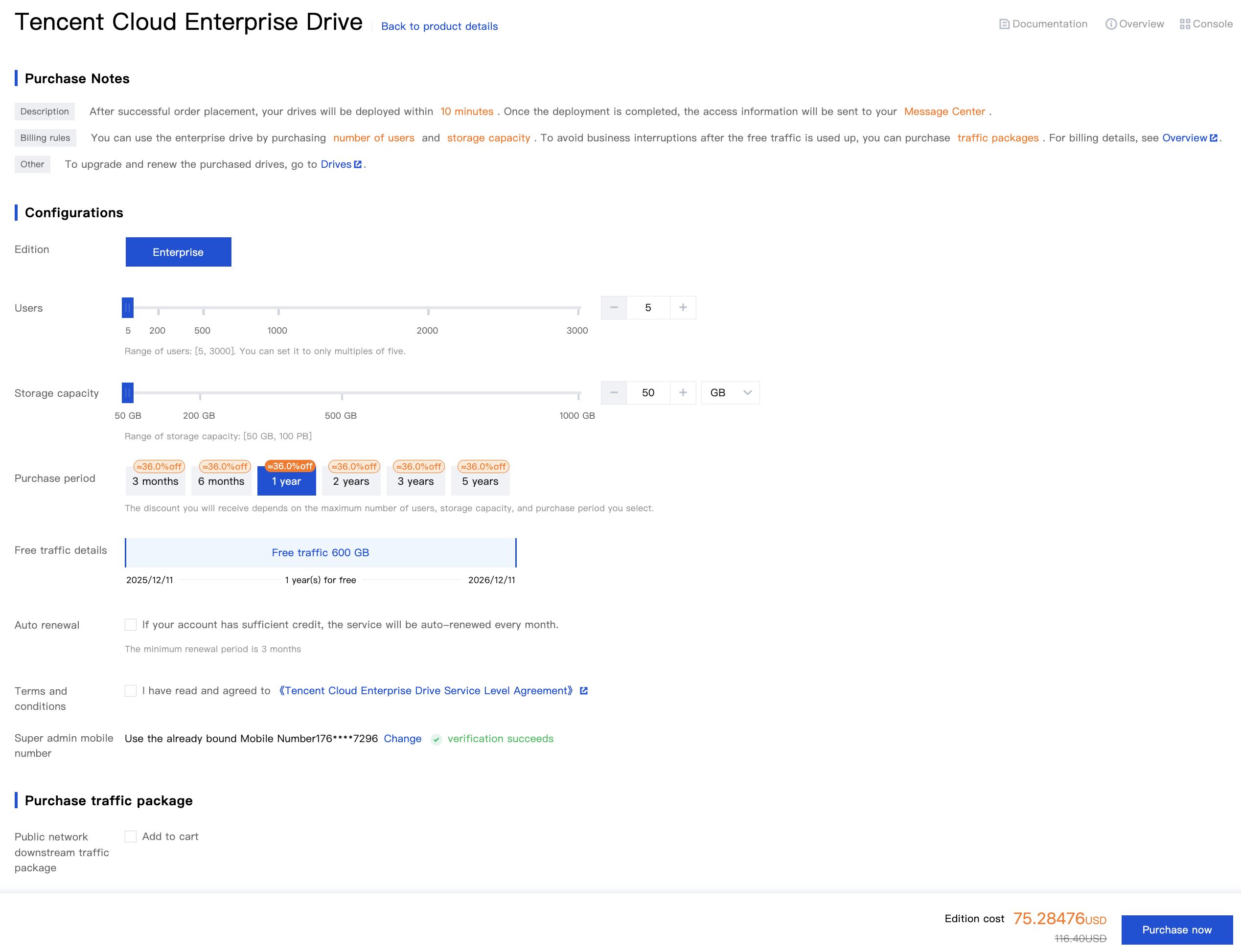
2. Go to the Enterprise Cloud Drive purchase page, as prompted on the page, you need to select the number of users, storage capacity, and subscription duration; at the same time, you can choose whether to purchase a downstream traffic package for the public network, enable auto-renewal, and so on, based on your actual needs.
Name | Required or Not | Description |
Number of users | Yes | The number of users refers to the number of users utilizing the enterprise cloud drive. The minimum selectable number of users is 5, and the maximum is 3000. If you require more users than the selectable quantity, please submit a ticket to contact us. |
Storage capacity | Yes | Storage capacity refers to the storage space of the enterprise cloud drive. The purchased storage capacity represents the peak of usable storage capacity for the cloud drive. For example, if you purchase 1TB of storage capacity, the globally usable capacity for the entire organization is 1TB. The minimum selectable storage capacity is 50GB, and the maximum is 100PB. If you require more storage capacity than the selectable quantity, please submit a ticket to contact us. |
Subscription Duration | Yes | The subscription duration for the enterprise cloud drive, with a minimum term of 3 months and a maximum term of 5 years. |
Automatic renewal | No | When you select this option, the cloud drive will be automatically renewed on a monthly basis upon expiration, provided that your account has sufficient balance. You can cancel the automatic renewal at any time on the Cloud Drive Management page or the Tencent Cloud Renewal Management page. |
Bind the mobile number of the super administrator | Yes | Used for the initial login to the cloud drive and managing data of the cloud drive. After purchase, it can be changed in the console for the cloud drive > Cloud Drive Management. |
Resource Pack for Public Network Downstream Traffic | Resource Pack for Public Network Downstream Traffic | You can purchase additional traffic resource packs of the desired amount. The resource packs you purchase will be used to offset downstream traffic for the public network exceeding the complimentary allowance. For the complimentary allowance, see the Free Quota documentation. |
3. Click Buy Now and complete the payment as prompted. After purchase, we will deploy your cloud drive environment within 10 minutes. Upon completion, the system will notify you via email and in-site message. You may then log in and start using the enterprise cloud drive according to the notification instructions.
Bantuan dan Dukungan
Apakah halaman ini membantu?
Anda juga dapat Menghubungi Penjualan atau Mengirimkan Tiket untuk meminta bantuan.
masukan