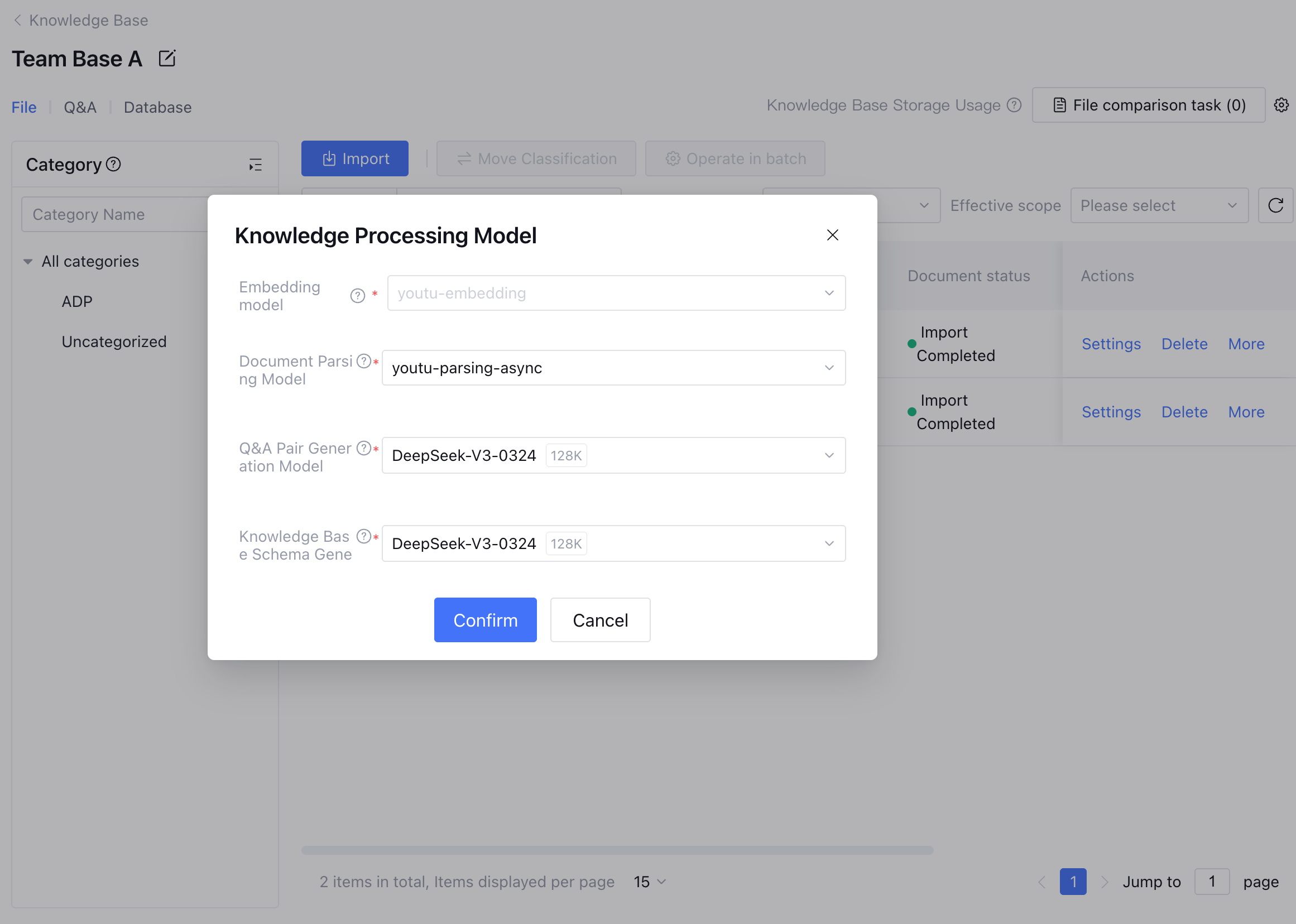
Knowledge Processing Model Settings
You can set uniformly the knowledge processing model of the standard mode application knowledge base through the set button. The standard mode application knowledge base supports setting vector model, QA pair generative model, and knowledge base Schema generative model. Go to Model Marketplace to configure appropriate models to meet needs in different business scenarios. Knowledge Process Model Description
1. Vector model: The default model for knowledge base document Embedding processing. Both retrieval and knowledge base import use this Embedding model for vectorization processing. Tencent Cloud Intelligence Development Platform (Tencent Cloud ADP) currently only supports 1024-dimensional text vector models. Once documents have been uploaded or a database has been associated with the knowledge base, the vector model of the knowledge base cannot be changed. The vector model can only be modified after the knowledge base content is cleared.
2. Document parsing model: Convert multiple different documents such as images and PDFs into Markdown file format, parseable content elements including tables, formulas, images, titles, paragraphs, headers, and footers, and intelligently convert content into sequential reading order.
3. Generative model for QA pairs: The default model for documentation generation of QA pairs in the knowledge base.
4. Knowledge base Schema generative model: The default model used for knowledge base Schema generation.
Knowledge base settings for single workflow mode and Multi-Agent Mode will be unified with standard mode in later versions.
Document Parsing Model Instructions
Tencent Cloud ADP offers multiple document parsing service access methods:
1. Official built-in document parsing service: The document parsing service officially provided by Tencent Cloud ADP team is developed on their own. Based on scene required, it offers synchronous parsing service (youtu-parsing-sync) and async DNS (youtu-parsing-async).
2. The document parsing service added by user customization through the standard protocol provided by Tencent Cloud ADP. You need to encapsulate the service according to the ADP Document Resolution Service Access Guide. Once encapsulation is completed, you can add the service via the platform interface. Note:
The "webpage file" upload function for knowledge base document upload and the "parsing split intervention" function for knowledge base files depend on your knowledge base setting's document parsing model supporting the handling of Markdown format files. If you switch to a document parsing service that does not support processing Markdown format files, the "webpage file" upload function and the "parsing split intervention" function for knowledge base files will become invalid. Proceed with caution.
Precautions for Replacing a Vector Model
Note:
When the knowledge base is empty or emptied, you can replace the vector model. Once the vector model is selected and knowledge is uploaded to the knowledge base, when the knowledge base content is not empty, you will be unable to change the vector model used by this knowledge base. Proceed with caution.
The core value of a knowledge base lies in "precise retrieval". The stored knowledge and the user's questions must be processed using the same model to calculate the similarity between them. Changing the model midway can cause confusion between legacy and new data in math space, and you will be unable to retrieve any knowledge stored in the old model. When configuring your knowledge base, ensure that once documents are uploaded or data is associated, the currently selected vector model will be locked and cannot be changed. Only when you empty all content in the knowledge base can you reselect the vector model.