Database is a system used to store and manage structured data files. By connecting a database to the Tencent Cloud Agent Development Platform, you can enable agents to perform Q&A based on structured data, supporting both single-table and multi-table queries.
Unlike traditional BI tools, which require professionals to build models, write SQL, or configure reports, integrating databases with agents allows business users to query and analyze data directly through natural language. In Data+AI scenarios, this approach not only provides greater interactivity but also enables multi-dimensional exploration and analysis with contextual understanding. This shifts data analysis from being “expert-driven” to “business-driven,” greatly improving enterprise data utilization and decision-making agility.
Note:
The target database must be MySQL 5.7 or later, SQL Server 2012 or later, PostgreSQL 12.22 or later, or Oracle 12c or later.
If database connection security is a major concern, it is recommended to configure security groups and only allowlisted Tencent Cloud egress IPs (specific IPs can be obtained by contacting technical support ). This effectively reduces the risks of public network exposure. Creating a Database
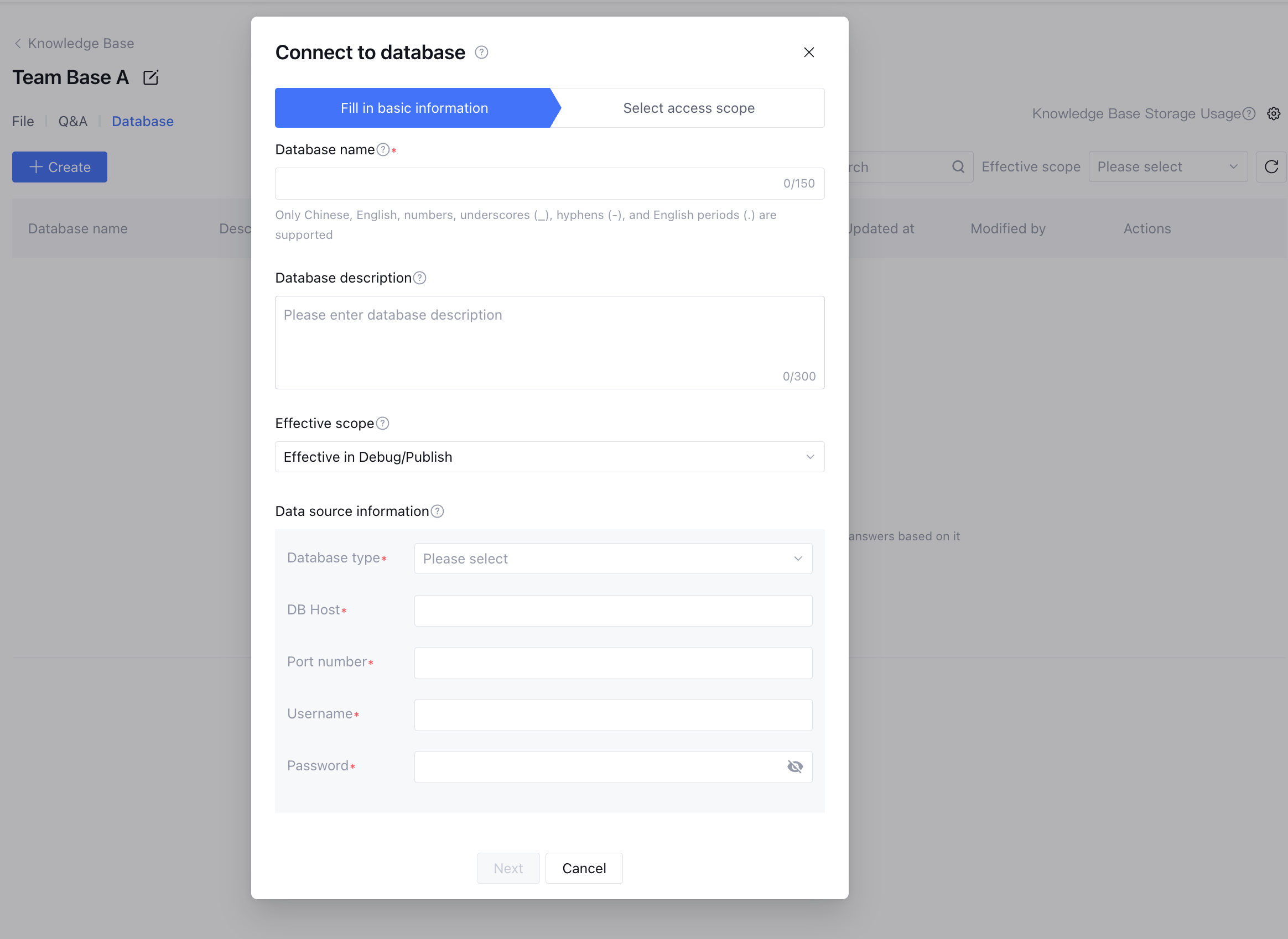
1. Enter the knowledge base, click Database > Create, and fill in the basic information of the database. Here, you can enter the database name (required), database description, and data source information (required).
Database name: Only Chinese, English, digits, underscores (_), hyphens (-), and periods (.) are supported, with a character limit of 50.
Database description: Enter a repository description, up to 100 characters.
Effective scope: support selection of "Not Effective", "Only Effective in Debug", "Only Effective in Publish", or "Effective in Debug/Publish". Select it, then the knowledge will take effect according to settings without needing to release application.
Not Effective: unable to retrieve knowledge in both development and release domains.
Only Effective in Debug: can only retrieve knowledge in the development domain.
Only Effective in Publish: can only retrieve knowledge in the release domain.
Effective in Debug/Publish: can retrieve knowledge in both development and release domains.
Database type: support drop-down selection of MySQL, SQL Server, PostgreSQL, and Oracle database.
Database Host: The data source Host must be a public network address.
Port number: a unique identifier for database service.
Username: Manually input the username of the current database.
Password: Manually input the password of the current database.
Note:
Each account supports up to 100 databases. Each database can have up to 100 data tables.
2. After filling in the basic information, click Next to select the scope of integration, i.e., choose the database and tables to connect. Then click Confirm Integration to complete the integration.
Database list
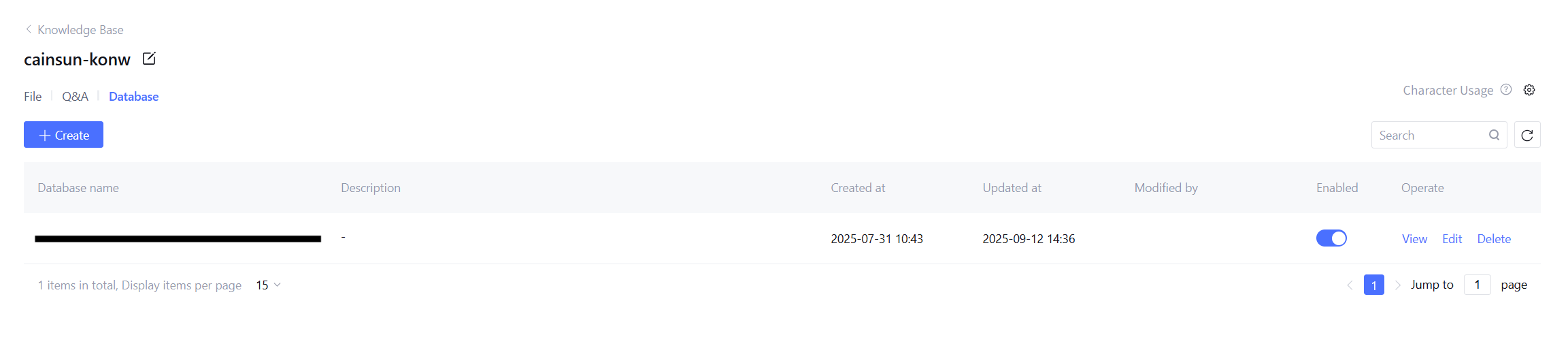
On the Database list page, you can view, edit, and delete databases.
The fields are described as shown in the table below:
|
Database name. | Database name |
Database ID | Unique identifier string for locating the data source and troubleshooting |
Release status | Released, Pending |
Creation time. | The time when the database was integrated |
Update time. | The time the database list notes were last updated |
Database Operations
Edit Database: Click Edit Database basic information, need to enter database login password, editable after verification passes.
View database: Click View Database to enter the data table list page. The list supports viewing database table name, table description, creation time, update time, data volume, released status, and enable status.
Delete Database: Click Delete Database to drop the currently connected database.
Table Operations
On the data table list page, you can click edit data table to enter the data table settings. Here, you can:
Edit data table Chinese name: Add a Chinese name for the data table.
Edit data table description: accurately describe the application scenario of the table. The large model will identify and call this table based on the description.
Effective scope: support selection of "Not Effective", "Only Effective in Debug", "Only Effective in Publish", or "Effective in Debug/Publish". Select it, then the knowledge will take effect according to settings without needing to release application.
Not Effective: unable to retrieve knowledge in both development and release domains.
Only Effective in Debug: can only retrieve knowledge in the development domain.
Only Effective in Publish: can only retrieve knowledge in the release domain.
Effective in Debug/Publish: can retrieve knowledge in both development and release domains.
Column settings support adding column description (up to 100 characters), column Chinese name (up to 15 characters), organization information, and turning on or off the column index.
Click Confirm to save the above information.