Single AI Agent Outbound Call
Unduh
Mode fokus
Ukuran font
Overview
You can integrate outbound call capabilities into your business system via calling AI Agent API or directly initiating AI outbound calls.
Prerequisite
You need to purchase the AI Agent Package.
AI Outbound Calls require integration of self-owned phone number. You can use the test number provided after creating the application to try this feature.
Call API to Initiate Outbound Call
Method 1: Call using the AI Voice Agent Created in the Management Console
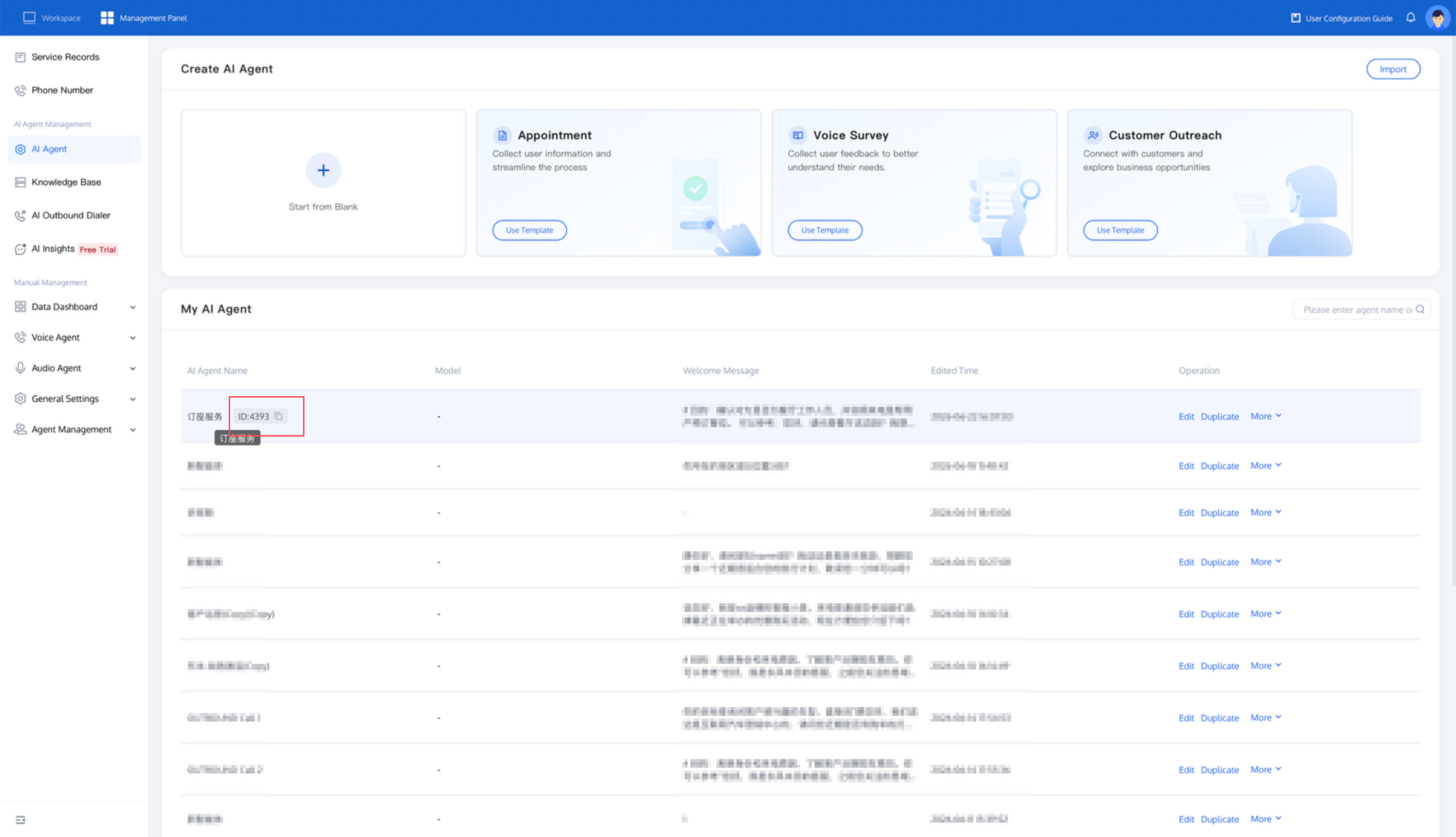
To initiate an outbound call, call the Create AI Agent Session API (CreateAIAgentCall) and pass parameters such as the AI Agent ID, caller number, and callee number in the API. The method to obtain the AI Agent ID is as follows:
After integrating external models, you can click AI Agent in the left sidebar of the Tencent Cloud Contact Center (TCCC) management workspace to view and manage all your created AI Agents in the My AI Agents module. Hover the mouse over the AI Agent name to display its ID, then click the copy button to copy the AI Agent ID.
Method 2: Directly Initiate AI Outbound Calls
If you need to change AI Agent properties frequently during outbound calls, you can skip the agent creation procedure and call the Create AI Session API (CreateAICall) directly.
Before initiating a call, please confirm whether your model is compatible with OpenAI, Azure, or MiniMax Protocol, and visit the model service provider's website to obtain the relevant authentication information:
OpenAI Protocol
Currently, it supports general models such as GPT, Hunyuan, Deepseek, and Tongyi Qianwen.
{"LLMType": "openai", // fixed as "openai""Model": "gpt-4o-mini", // model name, supports LLMs compliant with OpenAI protocol scale, such as "hunyuan-standard", "deepseek-chat""APIKey": "114514", // large model key to verify requester identity, please visit model service provider website to obtain authentication information"APIUrl": "https://xxx/v1/chat/completions" // large model interface address}
Common model parameter example:
Parameter | GPT | Deepseek |
Model | "gpt-4o-mini", "gpt-4o" | "deepseek-chat" |
APIKey | ||
APIUrl | "https://api.openai.com/v1/" | "https://api.deepseek.com/v1" |
Azure Protocol
{"LLMType": "azure", //"Model": "gpt-4o-mini", // model name"APIKey": "114514", // large model key to verify requester identity."APIUrl": "https://{your-resource-name}.openai.azure.com?api-version={api-version}"" // large model interface address}
Parameter | Example | Description |
LLMType | azure | Protocol Name. |
Model | gpt-4o-mini | Model Name. |
APIKey | 114514 | The large model key is used to verify the identity of the requester. For the specific acquisition method, refer to Azure OpenAI service documentation. |
APIUrl | https://{your-resource-name}.openai.azure.com?api-version={api-version} | Large model interface address. |
MiniMax Protocol
{"LLMType": "minimax", //"Model": "abab6.5s-chat", // model name"APIKey": "114514", // large model key to verify requester identity."APIUrl": "https://api.minimax.chat/v1" // large model interface address}
Parameter | Example | Description |
LLMType | minimax | Protocol Name. |
Model | abab6.5s-chat | Model Name. |
APIKey | 114514 | The large model key is used to verify the identity of the requester. For the specific acquisition method, refer to MiniMax Open Platform official documentation. |
APIUrl | https://api.minimax.chat/v1 | Large model interface address. |
Related Guides
Select the corresponding path based on your deployment method:
First time using? You can deploy a usable AI Agent in just five minutes create a conversation flow or integrate an external model.
Want to learn about our conversation flow nodes? Go to Conversation Nodes.
Want to build a knowledge base for your dialogue flow? Go to Build Your Knowledge Base.
How to test your model? Refer to Test Dialogue Workflow.
Configure a voice AI Agent with your own model? Go to Integrate External Model, Edit Conversation Content, Configure Voice Interaction, and Add Call Control.
Want to view application scenarios? Try Voice Notification, Lead Mining, Feedback Collection, or Customer Support.
How to make outbound and inbound calls with an AI Agent? Refer to AI Agent Outbound Calls or AI Agent Inbound Calls.
View data logs? Refer to Call Records, Call Recordings, Latency.
How to create and view post-call tags? Refer to Post-Call Tags (Created via Conversation Flow) or Post-Call Tags (Created via External Large Model).
Bantuan dan Dukungan
Apakah halaman ini membantu?
Anda juga dapat Menghubungi Penjualan atau Mengirimkan Tiket untuk meminta bantuan.
masukan