Configuring the VPC Network
Unduh
Mode fokus
Ukuran font
Scenarios
When purchasing a cluster, if you select a Virtual Private Cloud (VPC) network and specify a particular VPC network (such as VPC A), then by default, only resources within that VPC network can access the TDMQ for RabbitMQ service (including producing/consuming data). If other VPC networks (such as VPC B) need to access the TDMQ for RabbitMQ service later, you can achieve this by configuring a VPC network routing policy for the RabbitMQ cluster to bind VPC B to the TDMQ for RabbitMQ service.
Constraints and Limitations
A Managed Edition cluster supports creating up to 5 VPC access policies.
A Serverless Edition cluster supports at most 1 VPC access policy. When you purchase a Serverless Edition cluster, the system automatically generates a VPC route based on the VPC network you configured, and the route cannot be deleted. Therefore, you do not need to manually add a routing policy. You can directly obtain the VPC access point to connect to the cluster for production and consumption.
Operation Steps
1. Log in to the TDMQ for RabbitMQ console.
2. In the left sidebar, choose Cluster, select a region, and click the ID of the target cluster to go to the basic cluster information page.
3. In the Client Access module, click Add Network Access Policy in the upper-right corner.
4. In the pop-up window, set the routing type to VPC Network and select the target VPC network and subnet.
Note:
1. Specifying IP addresses was supported when Virtual Private Cloud (VPC) network access was used. Specifying an IP address to keep the addresses unchanged when changing the access method.
2. IP addresses ending with ".1" or ".255" are not allowed, as they are typically the default gateway and broadcast address of the subnet, respectively.
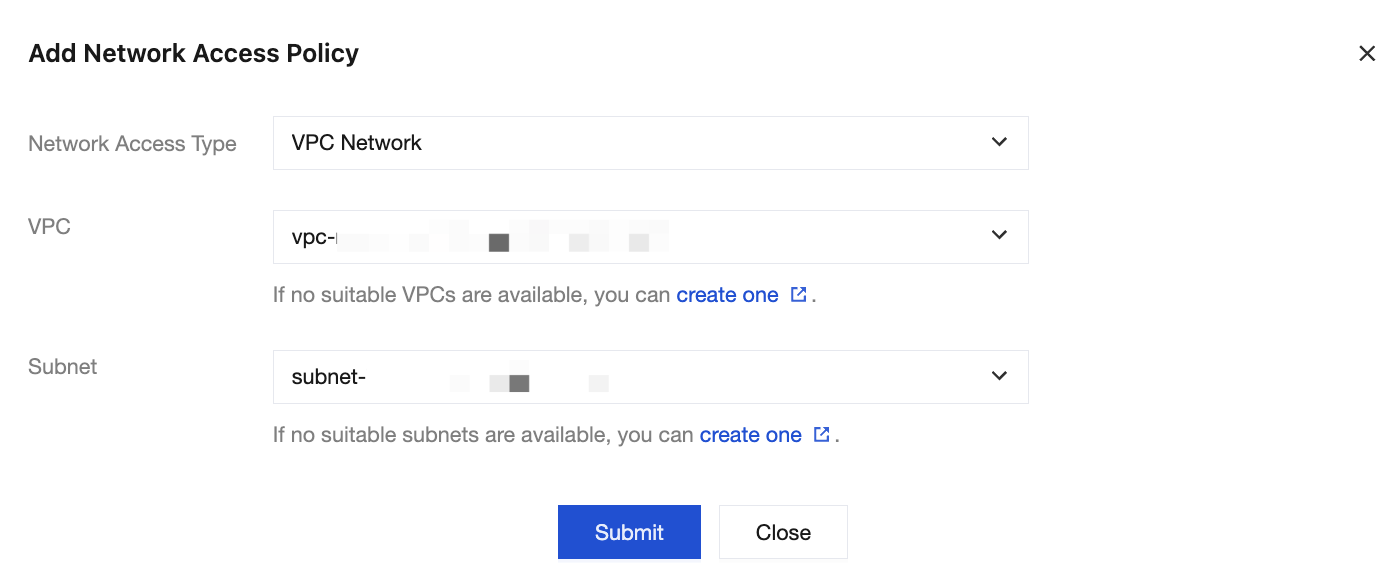
5. Click Submit to complete the policy addition. You can obtain the cluster access point information in the route list.

Bantuan dan Dukungan
Apakah halaman ini membantu?
Anda juga dapat Menghubungi Penjualan atau Mengirimkan Tiket untuk meminta bantuan.
masukan