In most cases, browsers for PCs can obtain the intermediate certificate from the URL of Authority Information Access (AIA). However, on browsers of some Android systems, the certificate may appear to be untrusted or cannot be accessed.
This main reason is that browsers for those Android systems do not support obtaining the intermediate certificate from the URL of AIA. In this case, you need to combine the certificate chain files into one according to the SSL certificate chain structure and deploy it on the server again. When the browser connects with the server, it downloads the user certificate as well as the intermediate certificate so that the certificate will appear to be trusted for your browser’s access. The SSL certificate chain structure is as follows:
-----BEGIN CERTIFICATE-----
Domain certificate
-----END CERTIFICATE-----
-----BEGIN CERTIFICATE-----
Root CA certificate
-----END CERTIFICATE-----
-----BEGIN CERTIFICATE-----
Intermediate CA certificate
-----END CERTIFICATE-----
Note:
Normally, an SSL certificate chain is made up of the root CA certificate > intermediate CA certificate(s) > domain certificate. There may be multiple intermediate certificates.
International standard SSL certificates provided by Tencent Cloud are complete certificate chains, which are available without needing to be combined.
How can I view the SSL certificate chain?
1. Open a browser to access the website that has successfully installed and deployed the SSL certificate. Chrome is used as an example herein.
2. Click
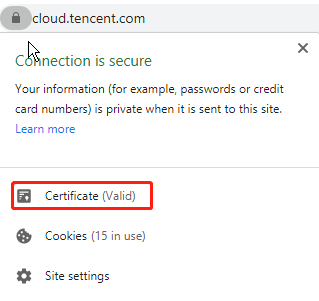
in the browser address box, and click Certificate on the page that is displayed, as shown in the following figure:
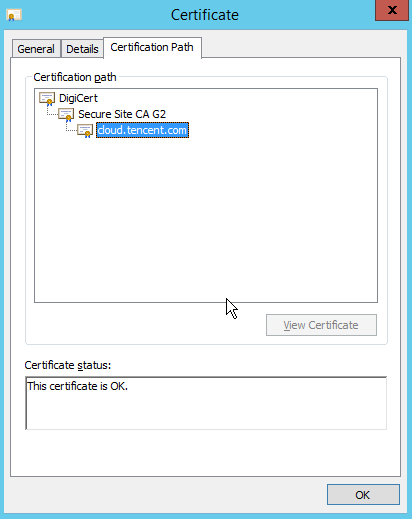
3. On the Certificate page, click Certificate Path to view the SSL certificate chain, as shown in the following figure: