Description of the Feature
Conference (TUIRoomKit) supports the in-conference call feature. Users can call other users to join the current conference at any time without prior reservation or scheduling. With the in-conference call feature, users can flexibly invite or remind relevant personnel to participate in the In-conference call, enhancing interactivity and efficiency. This article will provide a detailed introduction to this feature and explain how to use it in the TUIRoomKit component.
Use Instructions
Calling Users
When you are in a conference, you can call users who have not joined the room in the following two ways:
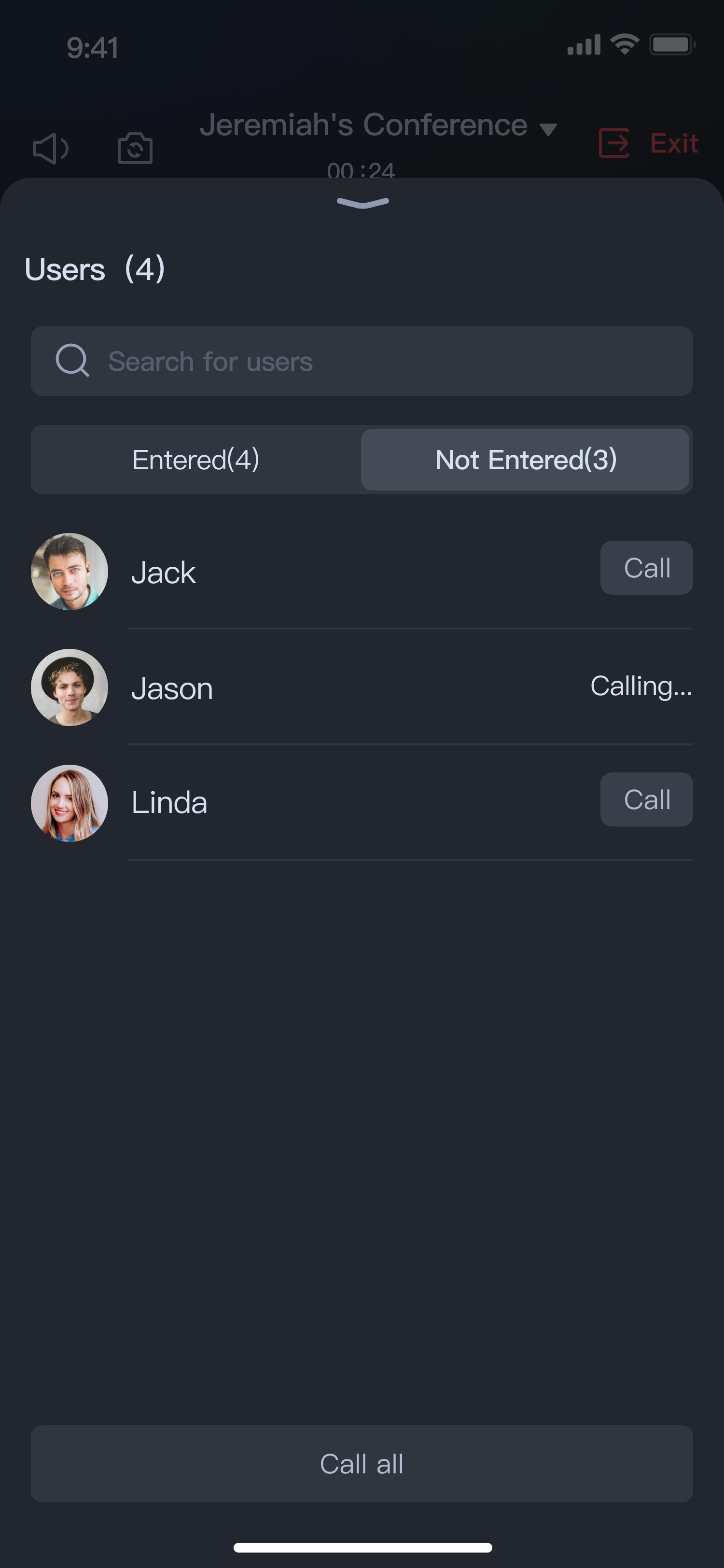
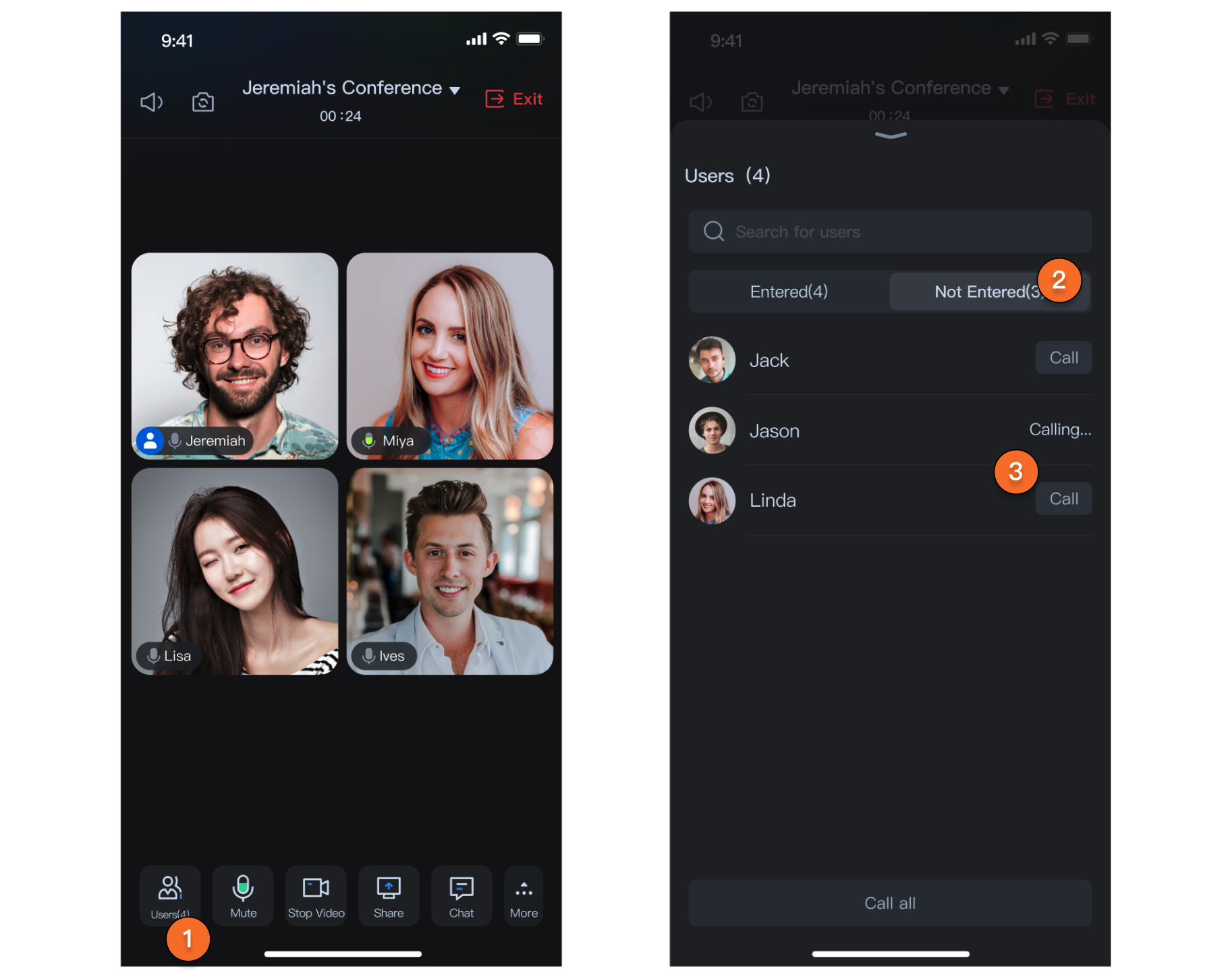
Method 1: Call users from the member list who have not joined
In the member list of the room, you will see a title bar named Not Entered. Clicking on Not Entered will show all members who have not currently joined the conference, and you can call these members who have not yet joined.
The list of users who have not joined includes two types:
Members who were invited during the conference scheduling but have not joined
Members who have been called but still have not joined the conference
Method 2: Call users from the contact list
By clicking on Invite in the bottom bar > Add Members, you can bring up your own contact list interface and call selected members from it.
If you need to use this feature, you need to import your own implemented contact list interface based on your business needs in the following way:
How to experience the call contact list members feature
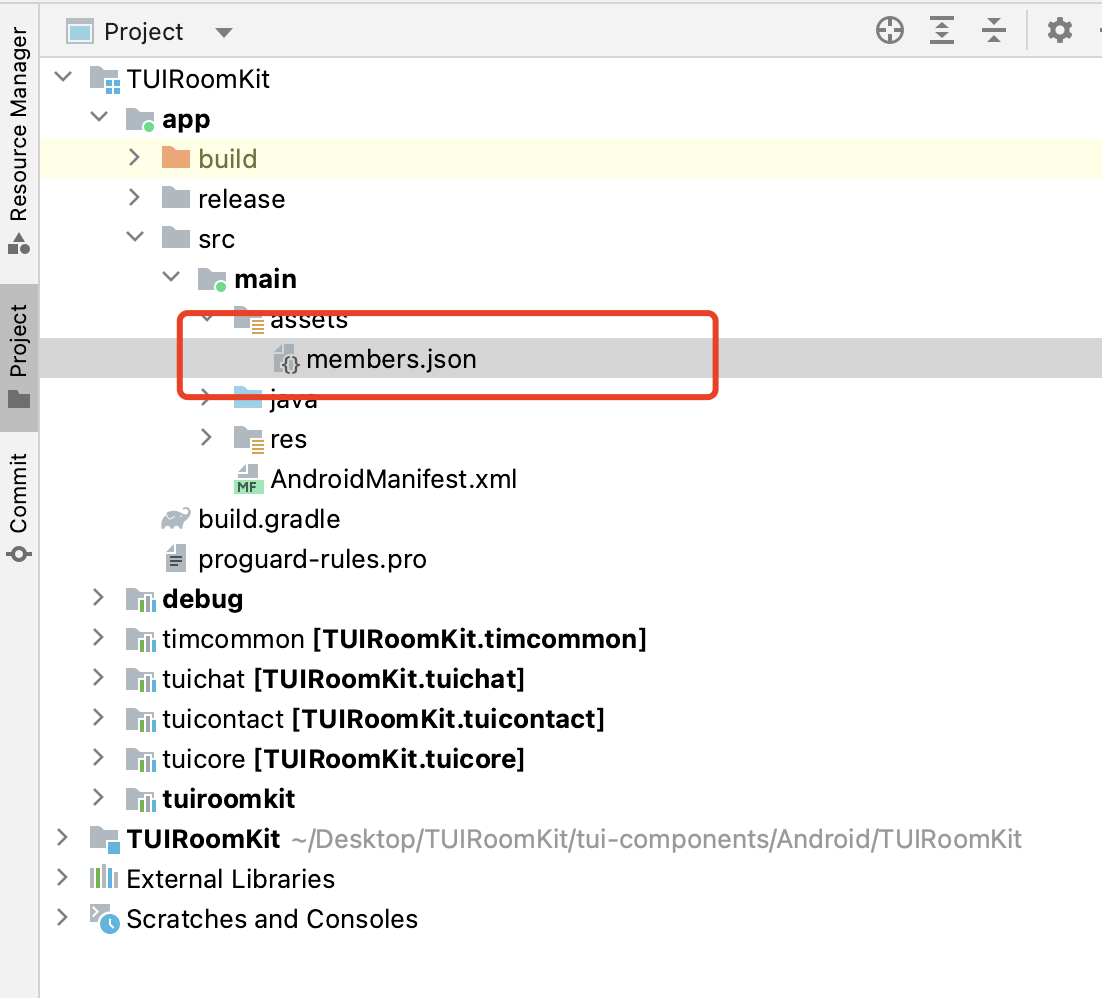
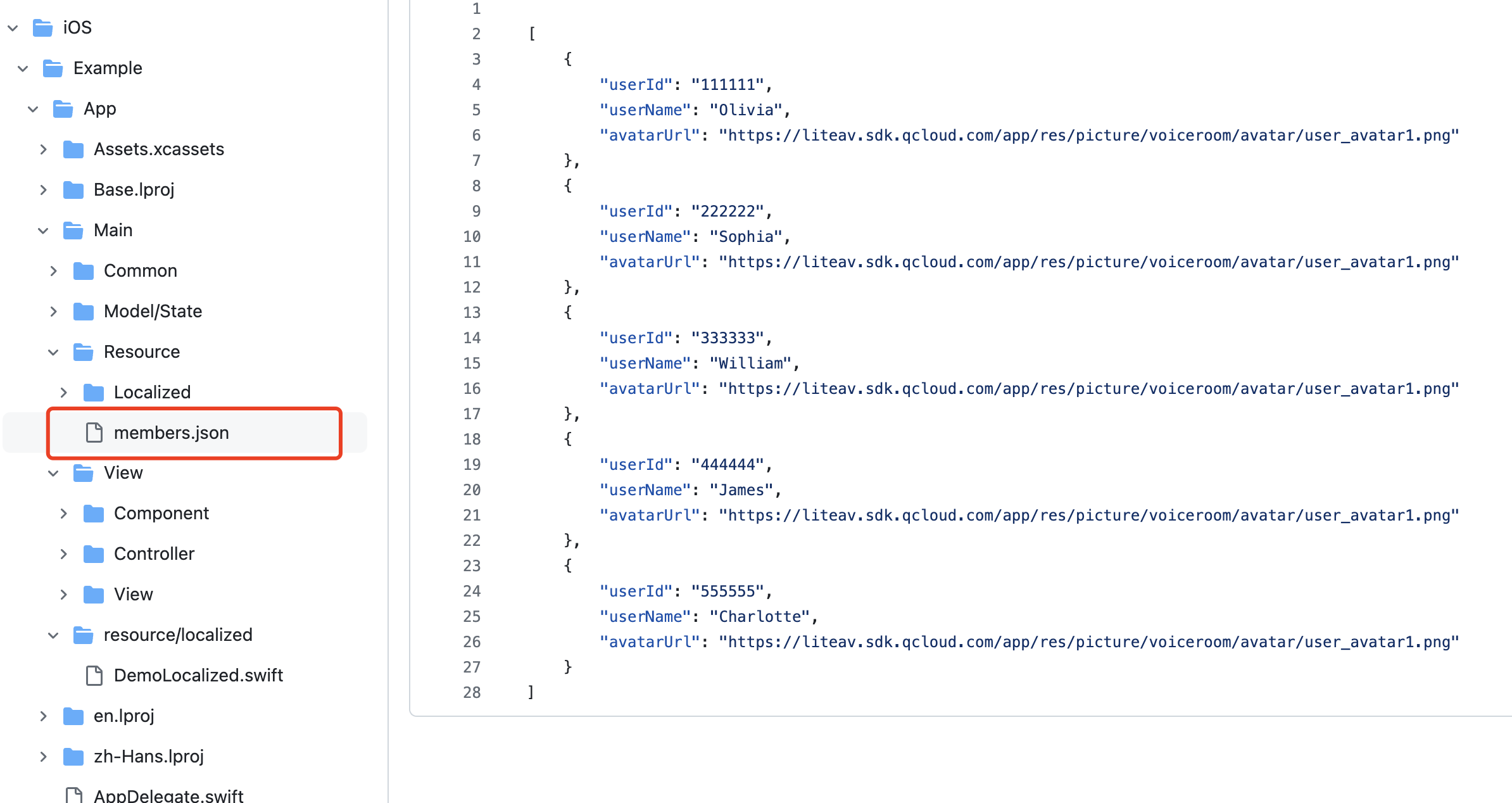
First, please refer to Run Sample Code to complete the demo running. In the members.json file of the demo project, we have pre-configured some test user information. You can choose two accounts, log in on two phones respectively using the configured userId, and then in the conference click Invite in the bottom bar > Add Members to bring up the contact list. Select another user from the contact list and click Confirm to make a call. This way, the other user will receive your call. How to use the custom contact list
1. TUIRoomKit linking with the custom contact list: Before calling users in the contact list, you need to set up the custom contact list using the following methods:
ConferenceSession.sharedInstance().setContactsViewProvider(SelectParticipantActivity.class);
ConferenceSession.sharedInstance().setContactsViewProvider(SelectParticipantActivity::class.java)
Note:
SelectParticipantActivity is an example code for the custom contact list. You can view it in the Demo project (directory: app/src/main/java/com/tencent/liteav/demo/SelectParticipants).
2. Return the selected user list from the custom contact list to TUIRoomKit: After completing user selection in the contact list, you need to return the selected user list to TUIRoomKit. You can return the data to TUIRoomKit using the following method.
Intent intent = new Intent();
ConferenceParticipants participants = new ConferenceParticipants();
...
intent.putExtra(SELECTED_PARTICIPANTS, participants);
setResult(3, intent);
finish();
val intent = Intent()
intent.putExtra(SELECTED_PARTICIPANTS, participants)
setResult(3, intent)
finish()
How to experience the call contact list members feature
First, please refer to Run Sample Code to complete the demo running. In the members.json file of the demo project, we have pre-configured some test user information. You can choose two accounts, log in on two phones respectively using the configured userId, and then in the conference click Invite in the bottom bar > Add Members to bring up the contact list. Select another user from the contact list and click Confirm to make a call. This way, the other user will receive your call. How to use the custom contact list
Considering the complexity of the user list data on the Invite Members Page, we have designed a solution that allows you to customize the Member Selection Interface. Next, we will guide you on how to integrate your own Member Selection Page (of course, you can also directly use the UI we provide in the demo, which will be introduced later).
1. Prepare your friend selection page viewController and implement the ContactViewProtocol protocol.
class SelectMemberViewController: UIViewController, ContactViewProtocol {
weak var delegate: ContactViewSelectDelegate?
var selectedList: [User]
func didSelectFinished() {
delegate?.onMemberSelected(self, invitees: selectedMembers)
}
}
Note:
It is recommended to place a ConferenceParticipants object in the constructor parameters of your Address Book Page, with data sources mentioned in the code of the second step.
The ConferenceParticipants class has two members:
selectedList: the selected members;
unSelectableList: Unselectable members. You can set specific members as unselectable in the UI. During the conference call, unselectable members are those already in the conference.
2. Before calling users in the contact list before, you need to pass your custom contact list into TUIRoomKit using the following method:
ConferenceSession.sharedInstance.setContactsViewProvider { participants in
return SelectMemberViewController(participants: participants)
}
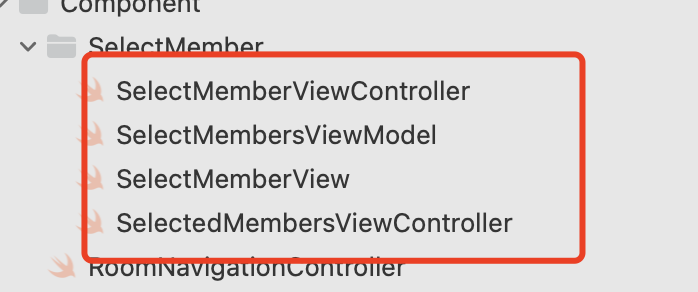
3. Following the above two steps, you can display your own contact list page. We also provide the contact list page code in the demo as shown in the image above. You can directly copy these files into your project to obtain our example page.
In the SelectMembersViewModel class, you can load your member list data (or directly fetch Chat relationship chain data) using the loadMembers method.
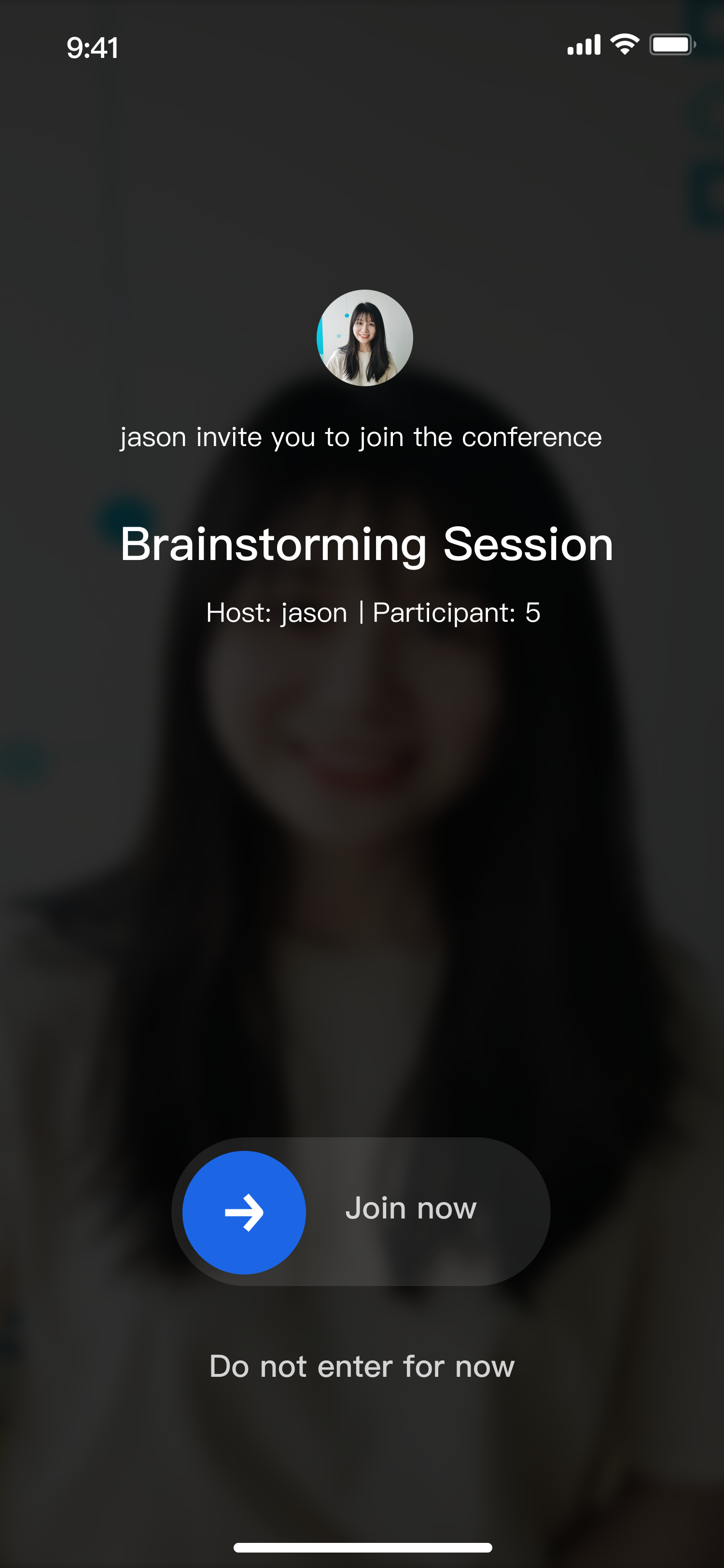
A call was received
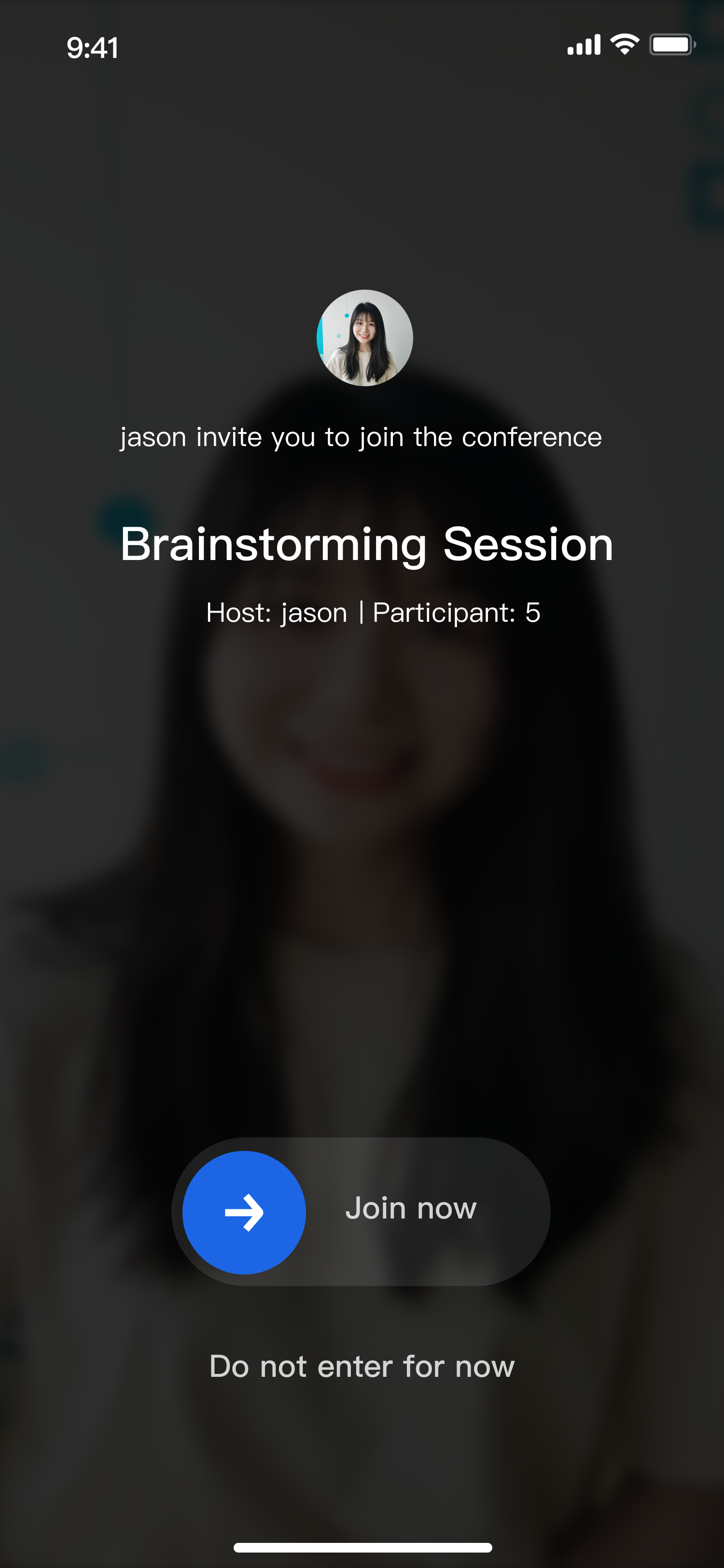
When you receive a call within the app, a page similar to the one below will pop up. You can drag the slider to choose Join now, or click Do not enter for now to decline the call.
Note:
When a user is either in a conference or being called, they will automatically reject all incoming cal
Feature Customization
If the current UI doesn't meet your needs, you can achieve your desired UI effects by modifying the source code. To facilitate your UI customization, files related to the in-conference call feature are introduced here.
Customize the called page view
If you need a custom view for the called page, please refer to the following path for changes.
component
└──InvitationReceivedView.java
ConferenceInvitation
└── ConferenceInvitationViewController.swift
Customize Member list call view
If you need a custom call view in the member list, please refer to the following path for changes.
UserControlPanel
└── CallUserView.java
UserControlPanel
└── UserListCell.swift
Key Code
Calling Users
public void inviteUsers(List<UserState.UserInfo> userInfoList, TUIConferenceInvitationManager.InviteUsersCallback callback) {
Log.d(TAG, "inviteUsers");
if (userInfoList.isEmpty()) {
return;
}
RoomToast.toastShortMessageCenter(TUILogin.getAppContext().getString(R.string.tuiroomkit_invitation_has_been_sent));
mConferenceInvitationManager.inviteUsers(mRoomState.roomId.get(), getUserIdListFromUserList(userInfoList), INVITE_TIME_OUT_SECONDS, "", new TUIConferenceInvitationManager.InviteUsersCallback() {
@Override
public void onSuccess(Map<String, TUIConferenceInvitationManager.InvitationCode> invitationResultMap) {
Log.d(TAG, "inviteUsers success");
if (callback != null) {
callback.onSuccess(invitationResultMap);
}
}
@Override
public void onError(TUICommonDefine.Error error, String message) {
Log.d(TAG, "inviteUsers error=" + error + " message=" + message);
if (callback != null) {
callback.onError(error, message);
}
}
});
}
func inviteUsers(roomId: String, userIdList: [String]) -> AnyPublisher<InviteUsersResult, RoomError> {
return Future<InviteUsersResult, RoomError> { [weak self] promise in
guard let self = self else { return }
self.invitationManager?.inviteUsers(roomId, userIdList: userIdList, timeout: timeout, extensionInfo: "") {dic in
promise(.success((dic)))
} onError: { error, message in
promise(.failure(RoomError(error: error, message: message)))
}
}
.eraseToAnyPublisher()
}
Accept Call
public void accept(String roomId, TUIRoomDefine.ActionCallback callback) {
Log.d(TAG, "accept");
mConferenceInvitationManager.accept(roomId, new TUIRoomDefine.ActionCallback() {
@Override
public void onSuccess() {
Log.d(TAG, "accept success");
if (callback != null) {
callback.onSuccess();
}
}
@Override
public void onError(TUICommonDefine.Error error, String message) {
Log.d(TAG, "accept error=" + error + " message=" + message);
if (callback != null) {
callback.onError(error, message);
}
}
});
}
func accept(roomId: String) -> AnyPublisher<String, RoomError> {
return Future<String, RoomError> { [weak self] promise in
guard let self = self else { return }
self.invitationManager?.accept(roomId) {
promise(.success(roomId))
} onError: { error, message in
promise(.failure(RoomError(error: error, message: message)))
}
}
.eraseToAnyPublisher()
}
Call denied
public void reject(String roomId, TUIConferenceInvitationManager.RejectedReason reason, TUIRoomDefine.ActionCallback callback) {
Log.d(TAG, "reject roomId= " + roomId + " reason=" + reason);
mConferenceInvitationManager.reject(roomId, reason, new TUIRoomDefine.ActionCallback() {
@Override
public void onSuccess() {
Log.d(TAG, "reject success");
if (callback != null) {
callback.onSuccess();
}
}
@Override
public void onError(TUICommonDefine.Error error, String message) {
Log.d(TAG, "reject error=" + error + " message=" + message);
if (callback != null) {
callback.onError(error, message);
}
}
});
}
func reject(roomId: String, reason: TUIInvitationRejectedReason) -> AnyPublisher<String, RoomError> {
return Future<String, RoomError> { [weak self] promise in
guard let self = self else { return }
self.invitationManager?.reject(roomId, reason: reason) {
promise(.success(roomId))
} onError: { error, message in
promise(.failure(RoomError(error: error, message: message)))
}
}
.eraseToAnyPublisher()
}
Get the call list in the room
private void getInvitationList() {
Log.d(TAG, "getInvitationList");
mConferenceInvitationManager.getInvitationList(mRoomState.roomId.get(), getAttendeeListCursor, SINGLE_FETCH_COUNT, new TUIConferenceInvitationManager.GetInvitationListCallback() {
@Override
public void onSuccess(TUIConferenceInvitationManager.InvitationListResult invitationListResult) {
Log.d(TAG, "getInvitationList");
for (TUIConferenceInvitationManager.Invitation invitation : invitationListResult.invitationList) {
InvitationState.Invitation invitationState = new InvitationState.Invitation();
invitationState.invitee = new UserState.UserInfo(invitation.invitee);
invitationState.inviter = new UserState.UserInfo(invitation.inviter);
invitationState.invitationStatus = invitation.status;
mInvitationState.invitationList.add(invitationState);
}
getInvitationListCursor = invitationListResult.cursor;
if (!"".equals(getInvitationListCursor)) {
getInvitationList();
}
}
@Override
public void onError(TUICommonDefine.Error error, String message) {
Log.d(TAG, "getInvitationList onError error=" + error + " message=" + message);
}
});
}
func getInvitationList(roomId: String, cursor: String, count: Int = 20) -> AnyPublisher<InvitationfetchResult, RoomError> {
return Future<InvitationfetchResult, RoomError> { [weak self] promise in
guard let self = self else { return }
self.invitationManager?.getInvitationList(roomId, cursor: cursor, count: count) {invitations, cursor in
promise(.success((invitations, cursor)))
} onError: { error, message in
promise(.failure(RoomError(error: error, message: message)))
}
}
.eraseToAnyPublisher()
}
User received call listener
private void initConferenceInvitationObserver() {
TUIConferenceInvitationManager invitationManager = (TUIConferenceInvitationManager) TUIRoomEngine.sharedInstance().getExtension(TUICommonDefine.ExtensionType.CONFERENCE_INVITATION_MANAGER);
invitationManager.addObserver(new TUIConferenceInvitationManager.Observer() {
@Override
public void onReceiveInvitation(TUIRoomDefine.RoomInfo roomInfo, TUIConferenceInvitationManager.Invitation invitation, String extensionInfo) {
if (ConferenceController.sharedInstance().getViewState().isInvitationPending.get()) {
ConferenceController.sharedInstance().getInvitationController().reject(roomInfo.roomId, REJECT_TO_ENTER, null);
return;
}
if (ConferenceController.sharedInstance().getRoomController().isInRoom()) {
ConferenceController.sharedInstance().getInvitationController().reject(roomInfo.roomId, IN_OTHER_CONFERENCE, null);
return;
}
Bundle bundle = new Bundle();
bundle.putString("roomId", roomInfo.roomId);
bundle.putString("conferenceName", roomInfo.name);
bundle.putString("ownerName", roomInfo.ownerName);
bundle.putString("inviterName", invitation.inviter.userName);
bundle.putString("inviterAvatarUrl", roomInfo.ownerAvatarUrl);
bundle.putInt("memberCount", roomInfo.memberCount);
TUICore.startActivity("InvitationReceivedActivity", bundle);
}
});
}
func onReceiveInvitation(roomInfo: TUIRoomInfo, invitation: TUIInvitation, extensionInfo: String) {
let store = Container.shared.conferenceStore()
store.dispatch(action: ConferenceInvitationActions.onReceiveInvitation(payload: (roomInfo, invitation)))
}