Concept | Tencent RTC Engine | Twilio Video | Description |
Room | Room | Room | The session space that connects RTC participants. Tencent RTC uses roomId (number) or strRoomId (string); Twilio uses name (string). |
User | User | Participant | All users participating in audio/video calls. |
Anchor | Anchor | - | User type with permission to publish streams; can send and receive audio/video streams. |
Audience | Audience | - | User type that can only receive audio/video streams. |
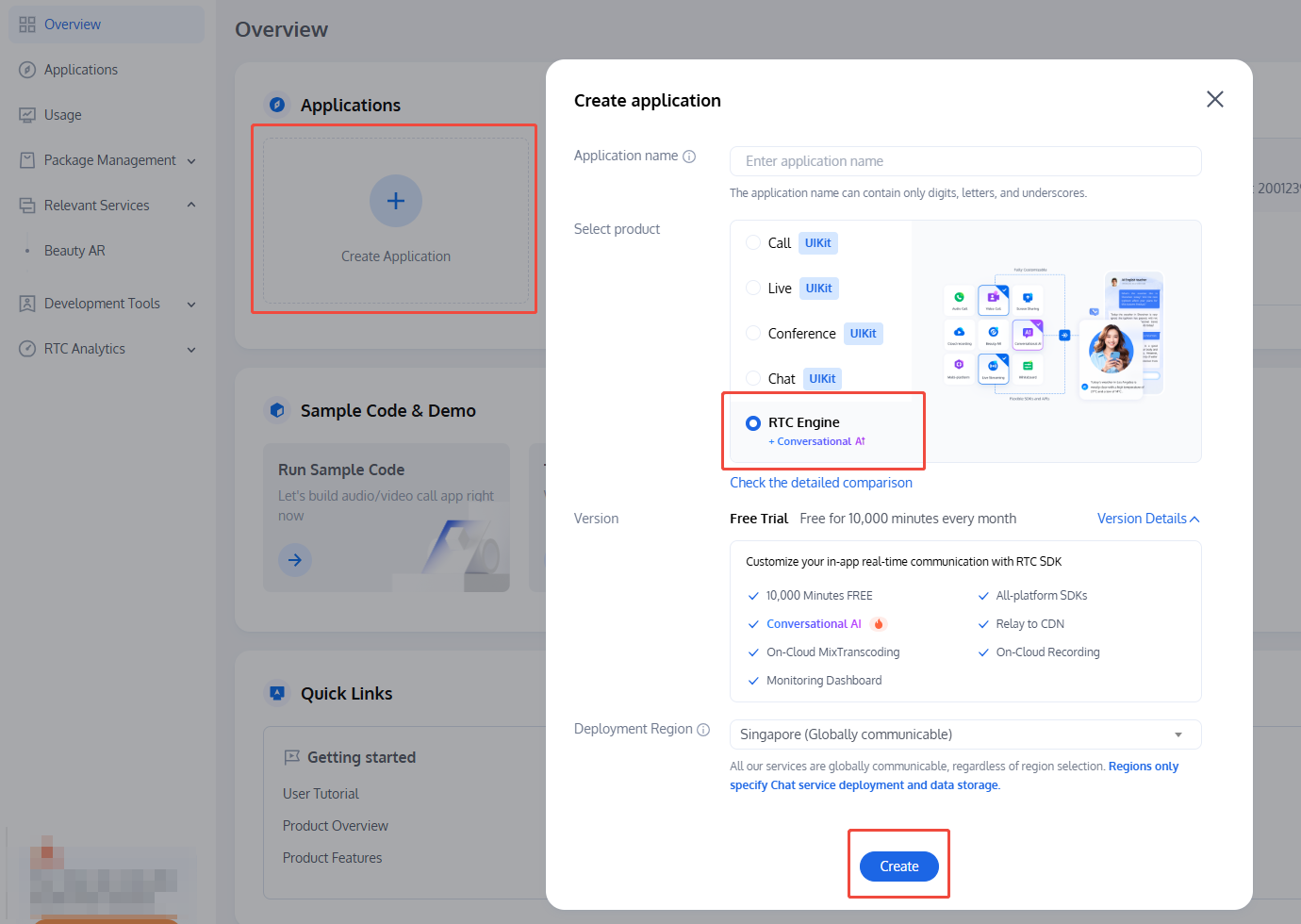
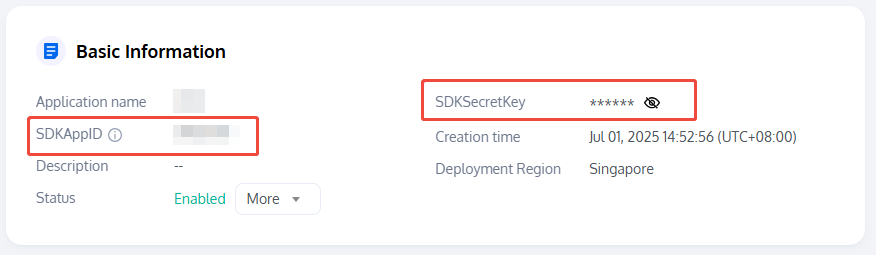
Application Identifier | SDKAppID | Account SID | Unique identifier for the application. |
Authentication Credential | UserSig | Access Token | Credential used for client authentication. |
User Identifier | userId | Identity | Unique identifier for each user. |
LocalAudioTrack and LocalVideoTrack.connect(token, { tracks }) and pass the local tracks to publish audio/video.room.on('participantConnected') or TrackPublication.on('subscribed').MediaTrack.attach(someHtmlElement).TRTC.create() and call APIs such as startLocalVideo() / startLocalAudio() to capture and publish.TRTC.EVENT.REMOTE_VIDEO_AVAILABLE) and then call startRemoteVideo().getAudioTrack() and getVideoTrack().

// npmnpm install twilio-video --save
// npmnpm install trtc-sdk-v5 --save// yarnyarn add trtc-sdk-v5
trtc-sdk-v5 directory to your project's node_modules.import * as TwilioVideo from 'twilio-video';
import TRTC from 'trtc-sdk-v5'
<script src="/your_path/trtc.js"></script>
// Twilio Video does not require explicit SDK instance creation// Connect to the room directly via the connect() static method// Optional: Set log levelTwilioVideo.Logger.setLevel('debug');
const trtc = TRTC.create();
// When a remote user joins the room...twilioRoom.on('participantConnected', participant => {console.log(`Remote participant ${participant.identity} has connected.`);});// When a remote user leaves the room...twilioRoom.on('participantDisconnected', participant => {console.log(`Remote participant ${participant.identity} has disconnected.`);});
// When a remote user joins the room...trtc.on(TRTC.EVENT.REMOTE_USER_ENTER, event => {console.log(`Remote user ${event.userId} has joined the room.`);});// When a remote user leaves the room...trtc.on(TRTC.EVENT.REMOTE_USER_EXIT, event => {console.log(`Remote user ${event.userId} has left the room.`);});
// Your Twilio access tokenconst accessToken = 'your_twilio_access_token';// Options for joining the roomconst connectOptions = {name: 'my_twilio_room'};const twilioRoom = await TwilioVideo.connect(accessToken, connectOptions);
scene parameter is set to TRTC.TYPE.SCENE_RTC or omitted, a real-time audio/video room is created (default). This mode supports up to 300 participants, with up to 50 users able to publish streams.// Set room entry parametersconst options = {sdkAppId: 2000000000, // Your SDKAppIDuserId: 'your_user_id', // User IDuserSig: 'your_usersig', // UserSig generated with SDKSecretKey and userIdstrRoomId: 'room_id', // Room ID (string)// scene: TRTC.TYPE.SCENE_RTC // Optional, defaults to real-time audio/video};// To use a numeric room ID, set options.roomId = 123456; roomId takes precedence if both are set.try {await trtc.enterRoom(options);console.log('Joined RTC room successfully.');} catch (err) {console.error('Failed to join RTC room, err=' + err);}
scene parameter is set to TRTC.TYPE.SCENE_LIVE, an interactive live streaming room is created. This mode supports up to 100,000 participants. Specify the role field to define the user's role when joining. Use trtc.switchRole() to change roles in the room.// Set room entry parametersconst options = {sdkAppId: 2000000000, // Your SDKAppIDuserId: 'your_user_id', // User IDuserSig: 'your_usersig', // UserSig generated with SDKSecretKey and userIdstrRoomId: 'room_id', // Room ID (string)scene: TRTC.TYPE.SCENE_LIVE, // Interactive live streaming scenariorole: TRTC.TYPE.ROLE_ANCHOR // Join as anchor (default), can publish streams// role: TRTC.TYPE.ROLE_AUDIENCE // Join as audience, can only watch remote streams};// To use a numeric room ID, set options.roomId = 123456; roomId takes precedence if both are set.try {await trtc.enterRoom(options);console.log('Joined live room successfully.');} catch (err) {console.error('Failed to join live room, err=' + err);}
// Create and publish local video trackconst localVideoTrack = await twilioVideo.createLocalVideoTrack();twilioRoom.localParticipant.publishTrack(localVideoTrack);// Render video preview in the browserconst localVideoContainer = document.getElementById('local-video-container');const localVideoElement = localVideoTrack.attach();localMediaContainer!.appendChild(localVideoElement);// Create and publish local audio trackconst localAudioTrack = await twilioVideo.createLocalAudioTrack();twilioRoom.localParticipant.publishTrack(localAudioTrack);// Add audio track to the web pageconst localAudioElement = localAudioTrack.attach();document.body.appendChild(localAudioElement);
// Local video stream// Get available camera devicesconst cameraList = await TRTC.getCameraList();// Publish video from the first available cameraif (cameraList[0]) {await trtc.startLocalVideo({view: document.getElementById('local-video-container'),options: { cameraId: cameraList[0].deviceId }});}// Stop publishing local video streamawait trtc.stopLocalVideo();// Local audio stream// Get available microphone devicesconst microphoneList = await TRTC.getMicrophoneList();// Publish audio from the first available microphoneif (microphoneList[0]) {await trtc.startLocalAudio({options: { microphoneId: microphoneList[0].deviceId }});}// Stop publishing local audio streamawait trtc.stopLocalAudio();
// When a remote user joins the room...twilioRoom.on('participantConnected', participant => {console.log(`Participant ${participant.sid} has joined the room.`);const remoteContainer = document.createElement('div');remoteContainer.id = `remote-container-${participant.sid}`;// When remote user starts publishing streams, add tracksparticipant.on('trackSubscribed', track => {remoteContainer.appendChild(track.attach());});participant.tracks.forEach(publication => {if (publication.isSubscribed) {remoteContainer.appendChild(publication.track.attach());}});// When remote user stops publishing streams, remove tracksparticipant.on('trackUnsubscribed', track => {track.detach().forEach(element => element.remove());});document.body.appendChild(remoteContainer);});twilioRoom.on('participantDisconnected', participant => {console.log(`Participant ${participant.sid} has left the room.`);document.getElementById(`remote-container-${participant.sid}`).remove();});
// Set up event listeners before calling trtc.enterRoom():// When a remote user publishes video...trtc.on(TRTC.EVENT.REMOTE_VIDEO_AVAILABLE, ({ userId, streamType }) => {const remoteContainerId = `${userId}_${streamType}`;const remoteContainer = document.createElement('div');remoteContainer.id = remoteContainerId;document.body.appendChild(remoteContainer);// Play the remote video streamtrtc.startRemoteVideo({ userId, streamType, view: remoteContainerId });});// When a remote user stops publishing video...trtc.on(TRTC.EVENT.REMOTE_VIDEO_UNAVAILABLE, event => {// The SDK automatically stops playback; no manual action required.});// Manually stop playback of a remote user's video streamtrtc.stopRemoteVideo({ userId: 'some_remote_user' });// By default, remote audio streams are automatically played. To block playback, see Step 10 and call muteRemoteAudio(userId, true).
localVideoTrack.disable(); // Pause publishing local video streamlocalVideoTrack.enable(); // Resume publishing local video streamlocalAudioTrack.disable(); // Pause publishing local audio streamlocalAudioTrack.enable(); // Resume publishing local audio stream
await trtc.updateLocalVideo({ mute: true }); // Pause publishing local video streamawait trtc.updateLocalVideo({ mute: false }); // Resume publishing local video streamawait trtc.updateLocalAudio({ mute: true }); // Pause publishing local audio streamawait trtc.updateLocalAudio({ mute: false }); // Resume publishing local audio stream
// Twilio Video SDK does not provide a direct API to mute RemoteAudioTrack or RemoteVideoTrack// You can manually remove the corresponding render node at the HTML level to achieve the same effect// Using detach()const audioElement = remoteAudioTrack.attach();remoteAudioTrack.detach(audioElement);
pauseRemotePlayer and resumeRemotePlayer.await trtc.muteRemoteAudio('some_user_id', true); // Mute remote audio streamawait trtc.muteRemoteAudio('some_user_id', false); // Resume remote audio streamawait trtc.callExperimentalAPI('pauseRemotePlayer', { userId: 'some_user_id' }); // Pause remote video streamawait trtc.callExperimentalAPI('resumeRemotePlayer', { userId: 'some_user_id' }); // Resume remote video stream
twilioRoom.disconnect()
// Leave the room onlyawait trtc.exitRoom();// End all RTC operations, destroy the TRTC instance, and release resourcesawait trtc.destroy();
// Twilio Video SDK does not directly provide an API for screen sharing// Use navigator.mediaDevices.getDisplayMedia() and convert the stream to LocalVideoTracknavigator.mediaDevices.getDisplayMedia().then(stream => {return new TwilioVideo.LocalVideoTrack(stream.getVideoTracks()[0]);});// For more implementations, see:// https://github.com/twilio/video-quickstart-js/blob/master/examples/screenshare/src/helpers.js// https://developer.mozilla.org/zh-CN/docs/Web/API/MediaDevices/getDisplayMedia
TRTC.EVENT.REMOTE_VIDEO_AVAILABLE event with streamType as TRTC.TYPE.STREAM_TYPE_SUB. Use trtc.startRemoteVideo() to pull the screen sharing stream.// Local: After calling trtc.enterRoom()// Enable local screen sharingawait trtc.startScreenShare();// Disable local screen sharingawait trtc.stopScreenShare();
// Remote: Register event before calling trtc.enterRoom()// Pull remote screen sharing streamtrtc.on(TRTC.EVENT.REMOTE_VIDEO_AVAILABLE, ({ userId, streamType }) => {if (streamType === TRTC.TYPE.STREAM_TYPE_MAIN) {// Main stream: user's camera videotrtc.startRemoteVideo({ userId, streamType, view: `${userId}_main` });} else {// Sub stream: user's screen sharingtrtc.startRemoteVideo({ userId, streamType, view: `${userId}_screen` });}})trtc.enterRoom(roomConfig);
// Twilio Video SDK does not provide direct APIs for encoding configuration// Use browser MediaTrackConstraints when calling connect()const videoEncodingProfile = {width: 1280,height: 720,frameRate: 24};const audioEncodingProfile = {sampleRate: 16000};await TwilioVideo.connect(token, {video: videoEncodingProfile,audio: audioEncodingProfile});// For more implementations, see:// https://developer.mozilla.org/en-US/docs/Web/API/MediaTrackConstraints
profile parameter to adjust video encoding configuration and audio encoding configuration.// Local: After calling trtc.enterRoom()// Predefined video encoding profileconst videoEncodingProfile1 = {option: {profile: '1080p' // 1920x1080, 15fps, 2000kbps}}// Custom configurationconst videoEncodingProfile2 = {option: {profile: {width: 1920,height: 1080,frameRate: 15,bitrate: 2200}}}await trtc.startLocalVideo(videoEncodingProfile1);// Dynamically adjust with updateLocalVideoawait trtc.updateLocalVideo(videoEncodingProfile2);// Local audio uplink configurationawait trtc.startLocalAudio({ option: { profile: TRTC.TYPE.AUDIO_PROFILE_STANDARD }});
// Twilio Video SDK uses the networkQuality parameter in connect() to set report granularityawait TwilioVideo.connect(token, {networkQuality: {local: 1, // Minimal, only reports local participant's qualityremote: 1 // Minimal, reports remote participants' quality}});
// Local: Register event before calling trtc.enterRoom()trtc.on(TRTC.EVENT.NETWORK_QUALITY, event => {console.log(`network-quality, uplinkNetworkQuality:${event.uplinkNetworkQuality}, downlinkNetworkQuality:${event.downlinkNetworkQuality}`)console.log(`uplink RTT:${event.uplinkRTT} loss:${event.uplinkLoss}`)console.log(`downlink RTT:${event.downlinkRTT} loss:${event.downlinkLoss}`)})
// Twilio Video's LocalTrack supports passing an existing MediaStreamTrack for custom captureconst customStream = await someCustomCapture(); // e.g. canvas.captureStream(), WebCodecs …const customMSTrack = customStream.getVideoTracks()[0]; // or getAudioTracks()[0]const customTwilioTrack = new TwilioVideo.LocalVideoTrack(customMSTrack, { name: 'my_custom_track' });const room = await TwilioVideo.connect(token, {tracks: [ customTwilioTrack /* or customMsTrack */ ],});// For more implementations, see:// https://developer.mozilla.org/en-US/docs/Web/API/MediaStreamTrack
audioTrack or videoTrack parameter for custom MediaStreamTrack capture.// Local: After calling trtc.enterRoom()const customStream = await someCustomCapture(); // e.g. canvas.captureStream(), WebCodecs …const customVideoMSTrack = customStream.getVideoTracks()[0];const customAudioMSTrack = customStream.getAudioTracks()[0];// Custom video captureawait trtc.startLocalVideo({ option: { videoTrack: customVideoMSTrack }});// Custom audio captureawait trtc.startLocalAudio({ option: { audioTrack: customAudioMSTrack }});
// Twilio Video uses LocalDataTrack objects for data channels and custom message transmissionconst dataTrack = new TwilioVideo.LocalDataTrack();const room = await TwilioVideo.connect(token, {name: 'my_room',tracks: [dataTrack /* and other tracks */ ]});// Send message locallydataTrack.send('Hello!');// Remote participants detect track type via track.kind, receive messages via track.on('message')participant.on('trackSubscribed', track => {console.log(`Participant "${participant.identity}" added ${track.kind} Track ${track.sid}`);if (track.kind === 'data') {track.on('message', data => {console.log(data);});}});// For more implementations, see:// https://www.twilio.com/docs/video/using-datatrack-api
// Local: After calling trtc.enterRoom()// Send custom messagetrtc.sendCustomMessage({cmdId: 1,data: new TextEncoder().encode('Hello!').buffer // Max 1KB per message});// Receive custom message via CUSTOM_MESSAGE eventtrtc.on(TRTC.EVENT.CUSTOM_MESSAGE, event => {// event.userId: sender's userId// event.cmdId: custom message Id// event.seq: message sequence number// event.data: message content (ArrayBuffer)console.log(`received custom msg from ${event.userId},message: ${new TextDecoder().decode(event.data)}`);});
// Send SEI message// Enable SEI functionality when creating the instanceconst trtc = TRTC.create({ enableSEI: true });// Local: After enterRoom() and startLocalVideo(), send SEI messagetry {const unit8Array = new Uint8Array([1, 2, 3]);trtc.sendSEIMessage(unit8Array.buffer);// Message queued, waiting for next video frame.} catch(error) {console.error(error);}// Receive SEI message via SEI_MESSAGE eventtrtc.on(TRTC.EVENT.SEI_MESSAGE, event =>console.log(`received SEI message from ${event.userId},message: ${event.data}`);)
roomId): Integer range 1 to 4294967294 (recommended).strRoomId): Up to 64 bytes; supports letters, numbers, and select special characters.strRoomId.roomId and strRoomId cannot be mixed; they are not interoperable. If both are set in trtc.enterRoom(), roomId takes precedence.remoteParticipant.on('trackSubscribed'). In TRTC, remote audio streams are automatically played when the user joins the room. To control playback for a specific user, use muteRemoteAudio(userId, true/false).피드백