Creating an Account
Download
Focus Mode
Font Size
Scenarios
In addition to the root account created by the system by default, you can create other business accounts via the TencentDB for MySQL console based on your business needs.
Note:
Only single-node (cloud disk) instances, two-node/three-node/four-node local disk instances, and cloud disk edition instances support account creation and management. Read-only instances, disaster recovery instances, and the read-only analysis engine do not support account creation or management.
After the read-only analysis engine is enabled, the system creates a database account named "txsqlPlugins_analytics_repl" by default. This account is used by the read-only analysis engine to pull data from the read-write instance for use. Do not delete this account.
Changing the password for the root account does not affect the features of the TencentDB for MySQL instance. It only impacts business access.
Operation Steps
1. Log in to the TencentDB for MySQL console. In the instance list, click the instance ID or click Manage in the Operation column to go to the instance management page.
2. On the instance management page, select the Account Management page and click Create Account.
3. In the pop-up Create Account dialog box, enter information such as the account name, host, password, and confirm password, and then click OK to complete the creation.
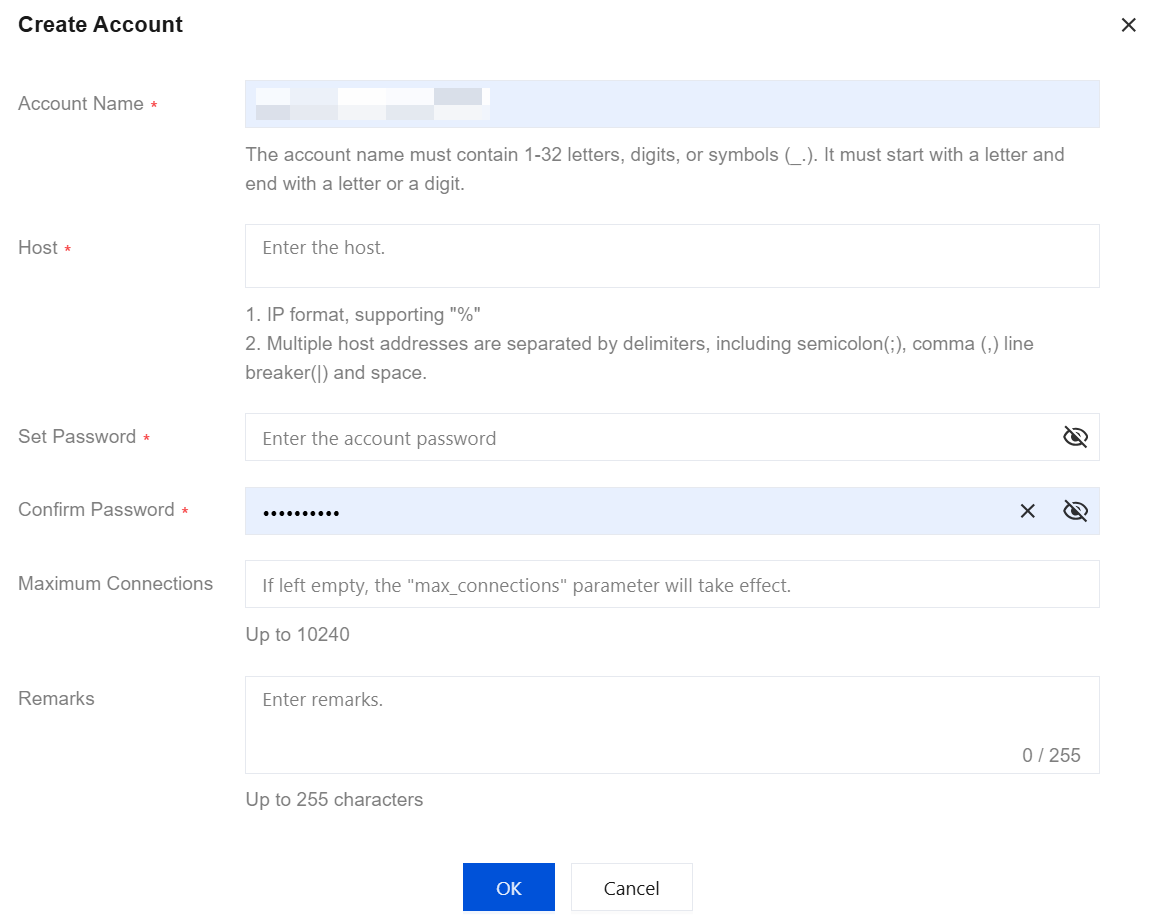
Parameter | Description |
Account Name | For MySQL versions 5.5 and 5.6, an account name must be 1 - 16 characters long and consist of letters, digits, and special characters. It must start with a letter and end with a letter or digit. The special character is _.For MySQL versions 5.7 and 8.0, an account name must be 1 - 32 characters long and consist of letters, digits, and special characters. It must start with a letter and end with a letter or digit. The special character is _. |
Host | Specify the host address to access the database. It supports IP addresses and the % sign (indicating no IP address range restriction). Multiple host addresses are separated by delimiters. Supported delimiters include line breaks, spaces, and ; , |.Example 1: Entering % indicates no restriction on the IP range, allowing clients from any IP address to access the database with this account. Example 2: Entering 10.5.10.% allows clients within the IP range 10.5.10.% to access the database with this account. |
Set Password | The minimum password length must be 8 - 64 characters. A length of 12 characters or more is recommended. The password must contain at least two types of characters from the following: English letters, digits, and symbols _+-,&=!@#$%^*().|. Setting password complexity is supported to enhance database security. For details, see Set Password Complexity. |
Confirm Password | Re-enter the password. |
Maximum Connections | The connection limit for this account must be less than or equal to 10240. If this field is left blank, no additional restriction is applied (it is still subject to the maximum connection limit). The root account is subject to the maximum connection limit of 10240 by default. |
Remarks | Enter remarks for the account. Up to 255 characters can be entered. |
4. Once a database account has been created, you can manage it in the database account list of the current instance.
Related APIs
API Name | Description |
Create cloud database account. |
Help and Support
Was this page helpful?
You can also Contact sales or Submit a Ticket for help.
Help us improve! Rate your documentation experience in 5 mins.
Feedback