tencent cloud

Cloud Virtual Machine

Release Notes and Announcements
Release Notes
Public Image Release Notes
Official End of Support Plan for the Operating System
Announcements
Product Introduction
CVM Overview
Strengths
Basic Concepts
Regions and Zones
Tutorial
Service Regions and Service Providers
Billing
Billing Overview
Billing Modes
Billing Items
Billing Mode Conversion Overview
Purchasing Instances
Configuration Adjustment Billing Guide
Overdue Payments
Getting Started
Purchasing a Customized Linux Instance
Purchasing a Customized Windows Instance
User Guide
Operation Guide Overview
Use Limits
Instances
Spot Instances
Reserved Instances
Images
Storage
Backup and Restoration
Network
Security
Passwords/Keys
Monitoring and Alarms
Ops Management
Convenience Features
Migrating a Server
Online Migration
Migration Consultation
Troubleshooting
CVM Login Failures
Windows Instance Login Failures
Linux Instance Login Failures
Other Login Failures
Instance Running Failures
Linux Instance Memory Failures
Network Failures
Use Cases
Suggestions on CVM Model Selection
Environment Building
Website Building
Application Building
Visual GUI Building
Uploading Local Files to CVM
Network Performance Test
Other Practical Tutorials
API Documentation
History
Introduction
API Category
Making API Requests
Region APIs
Instance APIs
Cloud Hosting Cluster APIs
Image APIs
Instance Launch Template APIs
Placement Group APIs
Key APIs
Security Group APIs
Network APIs
Data Types
Error Codes
Security and Compliance
CAM
Network
FAQs
Regions and Zones
Billing
Instances
Storage
Images
Server Migration
Network
Security
Operating Systems
Ops and Monitoring
CAM
NTP Service
Scenarios
Agreements
CVM Service Level Agreements
Red Hat Enterprise Linux Image Service Agreement
Public IP Service Level Agreement
Glossary

Configuring the Network Settings

PDF
Focus Mode
Font Size
Last updated: 2024-01-08 09:32:02

Overview

Tencent Cloud allows you to change the public network billing mode or public network bandwidth as needed. The change takes effect immediately. To learn more about the restrictions and price, see Adjusting Public Network Billing.

Directions

1. Log in to the CVM console. At the top of the Instances page, select the region where the target CVM instance resides.
2. On the instance management page, proceed according to the actually used view mode:
List view
Tab view
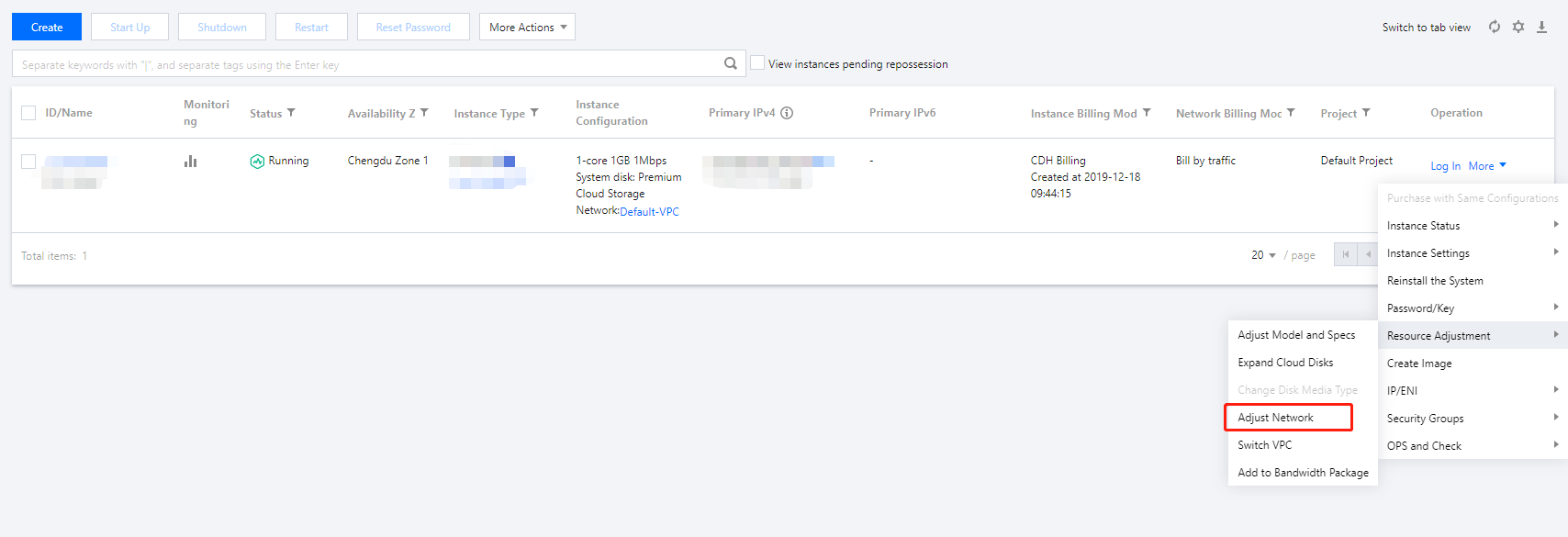
Select More > Resource Adjustment > Adjust Network on the right of the target CVM instance as shown below:


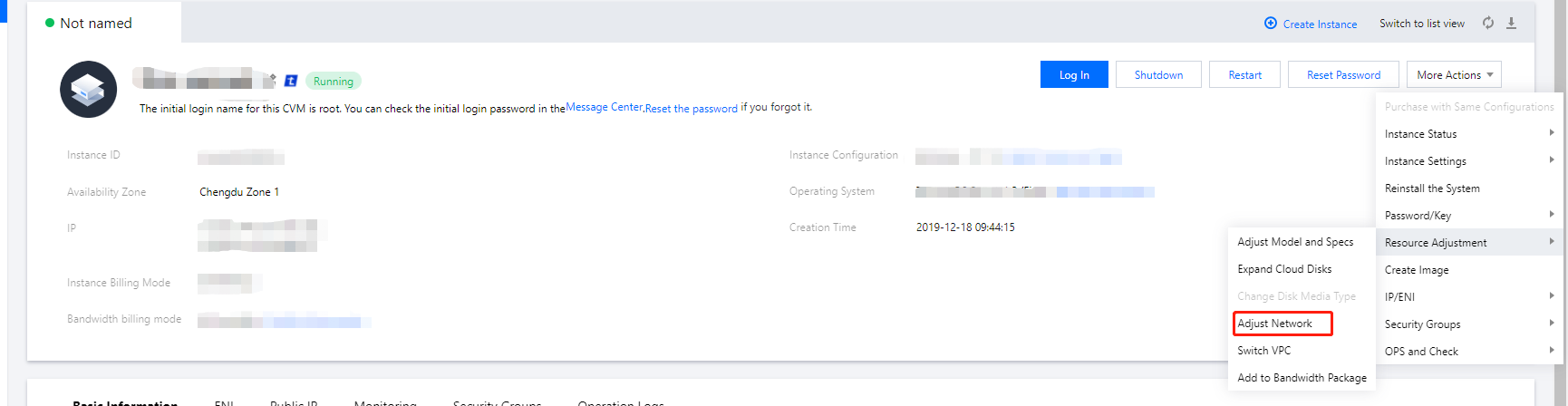
Select More Actions > Resource Adjustment > Adjust Network in the top-right corner of the page of the target instance as shown below:


3. In the Adjust Network pop-up window, adjust the public network billing mode or public network bandwidth as needed:
Network billing mode: Tencent Cloud provides two network billing modes: bill-by-traffic and bill-by-bandwidth. The bill-by-bandwidth mode is hourly postpaid.
Target bandwidth cap: Tencent Cloud provides two network configurations: dedicated public network and shared public network (billed by bandwidth package and currently in beta test). This document takes adjusting the configuration of the dedicated public network as an example, i.e., adjusting the bandwidth cap of a single CVM instance.
Note:
For more information about the bandwidth cap, see Public Network Bandwidth Cap.
4. Select the target billing mode or set the target bandwidth value and click OK.

Relevant Documentation
Help and Support

Was this page helpful?

Help us improve! Rate your documentation experience in 5 mins.

Feedback