Session State Management
Unduh
Mode fokus
Ukuran font
Feature Introduction
A session is the core mechanism in the MQTT protocol for maintaining "state" between clients and servers. By managing session state, MQTT ensures that application messages are not lost and subscriptions do not need to be rebuilt after network disconnections and reconnections, thereby guaranteeing communication continuity and reliability.
This document describes the specifications, lifecycle, and best practices for session state management in the MQTT 3.1.1 and MQTT 5.0 protocols.
Session State Definition
In the MQTT protocol, when a client establishes a connection with a server, a session starts. A session exists not only during the network connection's active period; depending on the configuration, it can also persist after the network connection is disconnected. A persistent session typically contains the following data:
Subscription
Persistent sessions retain the client's subscription information: after the client reconnects, it restores the previously subscribed Topic Filter.
Consumption Progress
For normal subscriptions: After the client reconnects, it resumes the previous consumption progress and receives the earliest unconsumed message from the messaging system. The client can still consume messages generated during the offline period normally.
For shared subscriptions: The consumption progress persists throughout the lifecycle of the shared group. As long as non-expired sessions exist within this shared group, the current consumption progress persists. For details, refer to Configuring Shared Subscriptions.
Session Expiration Time
MQTT 3.1 and 3.1.1 define the session lifecycle through clean-session. When clean-session = true, the session lifecycle aligns with the transport layer lifecycle. When clean-session = false, the session is independent of the transport layer lifecycle. To avoid resource wastage, the product defines that after transport layer disconnection, the maximum session retention period is 3 days.
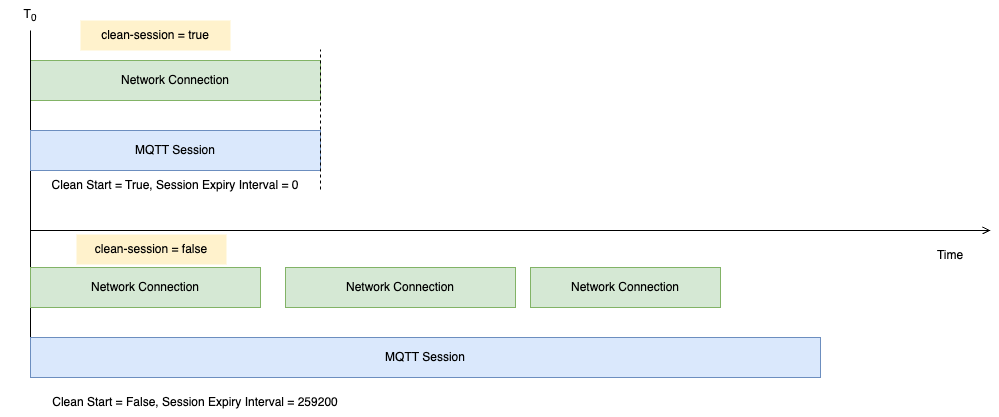
The MQTT 5.0 protocol defines the following equivalent semantics:
MQTT 3.1, 3.1.1 | MQTT 5 | |
clean-session = true | clean-start = true | session-expiry-interval = 0 |
clean-session = false | clean-start = false | session-expiry-interval = 259200 (session retention for 3 days) |
Sessions that exceed the validity period are reclaimed. Upon the client's subsequent connection, the system processes it as a first-time connection.
Scenarios
Mobile Applications and Instant Messaging
Scenario Description: Apps running on mobile devices (such as smart home apps, food delivery rider apps, and instant messaging applications). These applications frequently experience connection interruptions due to background switching, network transitions (4G/Wi-Fi), or screen lock. Users expect to immediately receive missed notifications or messages from the offline period upon reopening the App.
Recommended Configuration:
MQTT 3.1.1: Clean Session = true
MQTT 5.0: Clean Start = false, Session Expiry Interval = [a longer value, such as 1 day]
Core Value: Message loss prevention during roaming. By leveraging the persistent session mechanism, the server automatically caches messages during the App's offline period. When users reopen the App (reconnect), they can instantly retrieve unread messages without resubscribing to Topics, delivering a smooth user experience.
Over-the-Air Firmware Update
Scenario Description: The server sends "firmware upgrade" commands in batches to millions of devices. Due to the large number of devices, some may be either offline or rebooting during the upgrade process.
Recommended Configuration:
MQTT 3.1.1: Clean Session = false
MQTT 5.0: Clean Start = false, Session Expiry Interval = [a longer value, such as 1 day]
Core Value: Asynchronous decoupling. Ops personnel only need to issue the upgrade command once, without verifying whether devices are currently online. Online devices receive the command immediately; offline devices receive the upgrade command at their next connection (for example, after reboot completion or network restoration). This eliminates the need for Ops personnel to repeatedly retry sending commands.
Low-Power Devices
Scenario Description: Battery-powered devices (such as water meters, gas meters, and agricultural sensors). To conserve power, these devices remain in deep sleep mode (disconnected) most of the time, waking up only a few times daily to report data before immediately disconnecting.
Recommended Configuration:
MQTT 3.1.1: Clean Session = true
MQTT 5.0: Clean Start = true, Session Expiry Interval = 0
Core Value: Resource efficiency. The primary behavior of such devices is "unidirectional upload," typically not requiring reception of downstream commands from the server. Non-persistent session mode ensures no unnecessary state is retained after device disconnection.
Real-Time Dashboards and Other Information Display Devices
Scenario Description: Information display devices such as Web dashboards accessed by Ops personnel via browsers, advertising screens, ordering kiosks, and POS terminals.
Recommended Configuration:
MQTT 3.1.1: Clean Session = true
MQTT 5.0: Clean Start = true, Session Expiry Interval = 0
Core Value: On-demand usage. Information for these clients is typically highly time-sensitive and does not require historical messages. Their Client IDs are usually randomly generated (such as web_client_uuid). After the device is closed, this ID is no longer used, with no need to retain session state.
Billing Instructions
Message Queue MQTT edition restricts the number of connections based on different specifications. Both online sessions and offline persistent sessions consume one connection. When the number of connections reaches the upper limit, the broker rejects new connections. For details, see Billing Overview.
Bantuan dan Dukungan
Apakah halaman ini membantu?
Anda juga dapat Menghubungi Penjualan atau Mengirimkan Tiket untuk meminta bantuan.
masukan