Release Notes
Viewing and Modifying Basic Cluster Information
Scenarios
After successfully creating an MQTT cluster, you can view and adjust basic cluster information at any time via the console, including the cluster name, description, resource tags, and access endpoints, ensuring the cluster configuration consistently meets your business requirements. This document describes how to view basic cluster information in the console and modify or manage these configuration items.
Viewing Basic Cluster Information
1. Log in to the MQTT Console.
2. In the left sidebar, choose Resource Management > Cluster Management. Select a region to view the cluster list.
The lifecycle of a TDMQ for MQTT cluster refers to the statuses from startup to release. By properly managing the cluster throughout its lifecycle, you can ensure that applications running on the cluster provide services efficiently and cost-effectively. A cluster can have the following statuses:
Status Name | Status Property | Status Description |
Creating | Intermediate status | The cluster is created but has not yet entered the running status. |
Running (Healthy/Alarm) | Steady status | The cluster is running normally, with node health, disk utilization, and other metrics within normal ranges. |
Migrating | Intermediate status | Data migration is in progress while the cluster configuration is being adjusted. |
Deleting | Intermediate status | The cluster is being deleted through the console or an API. |
Isolated | Intermediate status | The cluster has overdue payments and enters isolation status. Clusters in isolation status cannot produce or consume data. Data and configurations saved in the cluster are not deleted. |
Creation Failed | Intermediate status | The fee is deducted successfully, but cluster allocation fails during a purchase through the console or an API. If this occurs, contact Online Customer Service for assistance. |
Deletion Failed | Steady status | TDMQ for MQTT fails to release cluster resources when the cluster is manually deleted or not renewed within 7 days after expiration. |
3. Click the ID of the target cluster. On the Basic Information page, you can view the cluster's basic information, overview, health status, access information, and client configurations.
Category | Description |
Basic Information | Displays basic configuration information. You can adjust some parameters in this section according to business needs. |
Cluster Overview | Displays the current overall resource usage and message production/consumption status of the cluster. These metrics help you understand the cluster's operational status. If abnormal fluctuations in production/consumption rates are detected, it may indicate performance pressure or potential issues. Scale the cluster or troubleshoot timely to ensure messaging service stability and availability. |
Access Information | Displays public and private network access endpoints. For details, see Network Connection Description. |
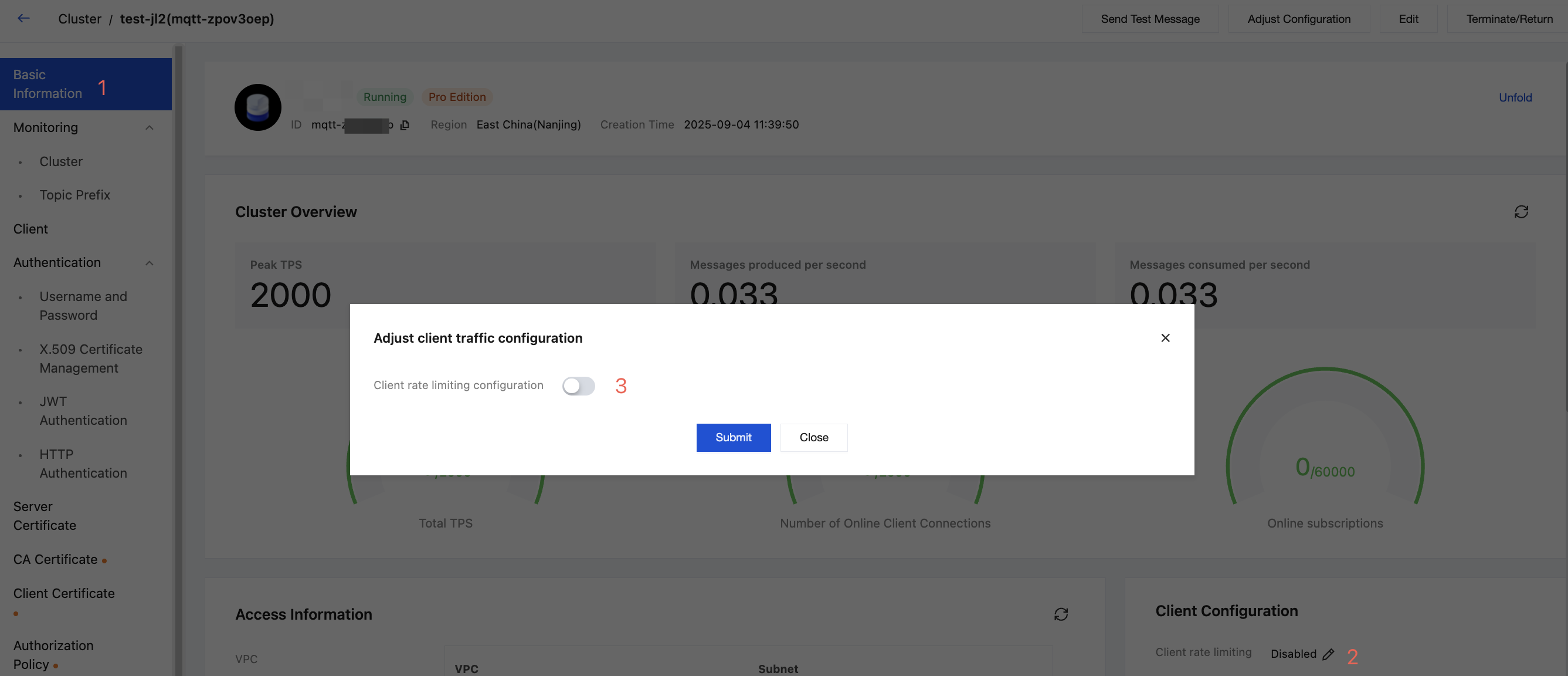
Client Configuration | You can adjust the client throttling configuration in this module. |
Modifying Basic Cluster Information
On the cluster's Basic Information page, you can modify the following parameters:
Parameter | Modification Method |
Cluster Name and Description | Click Edit next to Description, enter the cluster name and description, and then click Submit. Cluster Name: The name must be 3–64 characters long and can only contain letters, digits, hyphens (-), and underscores (_). Cluster Description: The description cannot exceed 128 characters. |
Resource Tags | Click Edit next to Resource Tags to bind or modify tags for the cluster. For details, see Configuring Resource Tags. |
Client Rate Limiting Rule Configuration
The cluster's Basic Information page includes a client configuration module where you can configure throttling rules for message publishing rates, enabling fine-grained cluster management. See the following figure for details.
Help and Support
Was this page helpful?
You can also Contact sales or Submit a Ticket for help.
Help us improve! Rate your documentation experience in 5 mins.
Feedback