Configuring SQL Filtering
다운로드
포커스 모드
폰트 크기
Background
The MQTT standard specification defines the concept of Topic Filter, allowing subscribers to select messages to receive based on the hierarchical structure and wildcards of MQTT Topic Name. While topics and wildcards provide robust filtering capabilities, in scenarios such as grayscale releases, A/B testing, and system upgrades, relying solely on Topic Filter still cannot meet more flexible business requirements.
Implementation Principles
The MQTT 5.0 protocol introduces the Subscribe User Property mechanism. Based on this mechanism, this product extends support for filtering semantics of subscribe user properties, enabling finer-grained message filtering capabilities. During message subscription, if subscribe user properties contain a property in which the key is
$where and the value is a valid WHERE clause, the MQTT Server will filter messages according to this WHERE clause during message delivery, and push only messages that meet conditions to subscribers.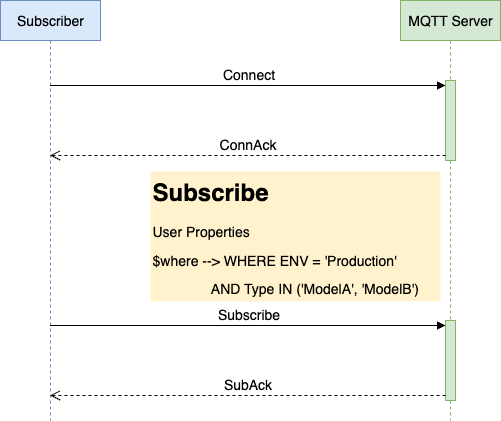
Basic Workflow
1. Subscription and Declaration: The subscriber initiates a subscribe request and declares filtering conditions ($where) in user properties.
2. Condition Parsing: The server parses and validates the effectiveness of the WHERE clause.
3. Message Matching: When messages are published, the server applies all filtering conditions of the subscriber to messages that match the topic.
4. Precise Delivery: Only the message that meet the conditions is delivered to the subscriber.
SQL Filtering Syntax
WHERE clauses support extensive operators and functions for constructing flexible filtering conditions.
Supported Operators
Type | Operator | Example | Description |
Comparison Operator | =, !=, >, >=, <, <= | payload.temp > 30 | Compare numerical values or strings |
Logical Operator | AND, OR, NOT | temp > 25 AND hum < 70 | Combine multiple conditions |
Range Judgment | IN | clientid IN ('client1', 'client2') | Determine whether a field value is in a list |
Null Check | IS NULL | payload.location IS NULL | Determine whether a field is null |
Pattern Matching | LIKE | topic LIKE 'sensor/%/temp' | Perform simple wildcard matching |
Conditional Expression | CASE WHEN...THEN...ELSE...END | CASE WHEN qos > 0 THEN 'important' ELSE 'normal' END | Implement conditional logic |
Supported Functions
Type | Function Example | Description |
String Function | UPPER(), LOWER(), LENGTH() | Process text data |
Mathematical Function | ABS() | Calculate the absolute value |
Conditional Function | COALESCE() | Return the first non-null value among the parameters |
Must-Knows
1. User properties in each subscribe request can contain only one property with the key $where. If multiple key-value pairs of $where→WHERE clause exist, only the first one takes effect.
2. For user properties in a message, if multiple key-value pairs with the same key exist, only the value from the last occurrence is used in the filter expression calculation.
3. If a field referenced in the filter expression does not exist in the message properties, its value is considered null.
4. String literals should be represented using single quotes, for example:
WHERE type = 'string-literal'.Examples
package com.tencent.tdmq.mqtt.quickstart.paho.v5.async;import java.nio.ByteBuffer;import java.nio.charset.StandardCharsets;import java.util.ArrayList;import java.util.List;import java.util.concurrent.TimeUnit;import org.eclipse.paho.mqttv5.client.IMqttToken;import org.eclipse.paho.mqttv5.client.MqttAsyncClient;import org.eclipse.paho.mqttv5.client.MqttCallback;import org.eclipse.paho.mqttv5.client.MqttConnectionOptions;import org.eclipse.paho.mqttv5.client.MqttDisconnectResponse;import org.eclipse.paho.mqttv5.client.persist.MemoryPersistence;import org.eclipse.paho.mqttv5.common.MqttException;import org.eclipse.paho.mqttv5.common.MqttMessage;import org.eclipse.paho.mqttv5.common.MqttSubscription;import org.eclipse.paho.mqttv5.common.packet.MqttProperties;import org.eclipse.paho.mqttv5.common.packet.UserProperty;public class BasicQuickStart {public static void main(String[] args) throws MqttException, InterruptedException {String serverUri = "tcp://mqtt-xxx.mqtt.tdmqcloud.com:1883";String clientId = "deviceBasic";String topic = "home/room/1";String[] topicFilters = new String[] {"home/#"};int[] qos = new int[] {1};MqttAsyncClient client = new MqttAsyncClient(serverUri, clientId, new MemoryPersistence());MqttConnectionOptions options = new MqttConnectionOptions();options.setUserName("YOUR-USERNAME");options.setPassword("YOUR-PASSWORD".getBytes(StandardCharsets.UTF_8));options.setCleanStart(true);options.setSessionExpiryInterval(TimeUnit.DAYS.toSeconds(1));client.setCallback(new MqttCallback() {@Overridepublic void disconnected(MqttDisconnectResponse response) {System.out.println("Disconnected: " + response.getReasonString());}@Overridepublic void mqttErrorOccurred(MqttException e) {e.printStackTrace();}@Overridepublic void messageArrived(String s, MqttMessage message) throws Exception {byte[] payload = message.getPayload();String content;if (4 == payload.length) {ByteBuffer buf = ByteBuffer.wrap(payload);content = String.valueOf(buf.getInt());} else {content = new String(payload, StandardCharsets.UTF_8);}System.out.printf("Message arrived, topic=%s, QoS=%d content=[%s], properties=%s%n",topic, message.getQos(), content, message.getProperties());}@Overridepublic void deliveryComplete(IMqttToken token) {}@Overridepublic void connectComplete(boolean reconnect, String serverURI) {System.out.println(reconnect ? "Reconnected" : "Connected" + " to " + serverURI);}@Overridepublic void authPacketArrived(int i, MqttProperties properties) {}});client.connect(options).waitForCompletion();try {// SubscribeMqttSubscription[] subscriptions = new MqttSubscription[topicFilters.length];for (int i = 0; i < topicFilters.length; i++) {subscriptions[i] = new MqttSubscription(topicFilters[i], qos[i]);}MqttProperties subscribeProperties = new MqttProperties();List<UserProperty> userProperties = new ArrayList<>();UserProperty userProperty = new UserProperty("$where", "where $QoS = 1 AND k1 = 'v1'");userProperties.add(userProperty);subscribeProperties.setUserProperties(userProperties);client.subscribe(subscriptions, null, null, subscribeProperties).waitForCompletion();} catch (MqttException e) {e.printStackTrace();}int total = 128;for (int i = 0; i < total; i++) {byte[] payload = new byte[4];ByteBuffer buffer = ByteBuffer.wrap(payload);buffer.putInt(i);MqttMessage message = new MqttMessage(payload);message.setQos(1);MqttProperties properties = new MqttProperties();properties.setContentType("application/json");properties.setResponseTopic("response/topic");message.setProperties(properties);System.out.printf("Prepare to publish message %d%n", i);// P2P topic format: {first-topic}/p2p/{target-client-id}client.publish(topic, message);System.out.printf("Published message %d%n", i);TimeUnit.MILLISECONDS.sleep(100);}TimeUnit.MINUTES.sleep(3);client.disconnect();}}
피드백