Configuring a Custom Domain Name
Baixar
Modo Foco
Tamanho da Fonte
Users can use a custom domain name to connect to the TDMQ for MQTT cluster. This method has several advantages:
When MQTT access points are provided to customers, maintain brand consistency for users.
Migrate the backend cluster by reparsing DNS, keeping the access point unchanged.
Reuse existing corporate PKI facilities.
Configuring an instance to use a custom domain name includes the following steps:
1. Upload a server certificate to SSL Certificate Service.
2. Configure server certificate pairs and trust certificates for the MQTT instance.
3. Create a DNS record.
Uploading Certificate Pairs and Trust Certificates to SSL Certificate Service
To ensure normal certificate rotation and expiration reminder and avoid impacting business continuity, the MQTT instance can only be configured with certificates managed by SSL Certificate Service.
Certificate Requirements
1. The server certificate (End Entity Certificate) must include the X.509 v3 Extended Key Usage extension, which must contain serverAuth (TLS Web Server Authentication) as specified in RFC 5280. The certificate should include the necessary Subject Alternative Name (SAN) extension and Common Name (CN). If your certificate is issued by a CA, it normally includes this extension.
Note:
Major browsers have deprecated CN matching, such as Chrome 58 and a later version. When Web Secure Socket is used as the MQTT transport layer, ensure the SAN extension and Server Auth value.
2. The certificate chain can contain up to 5 certificates.
3. The certificate chain file does not exceed 16 KiB.
Certificate Upload, Management, and Purchase
Configuring Certificates and Trust Certificates for the MQTT Instance
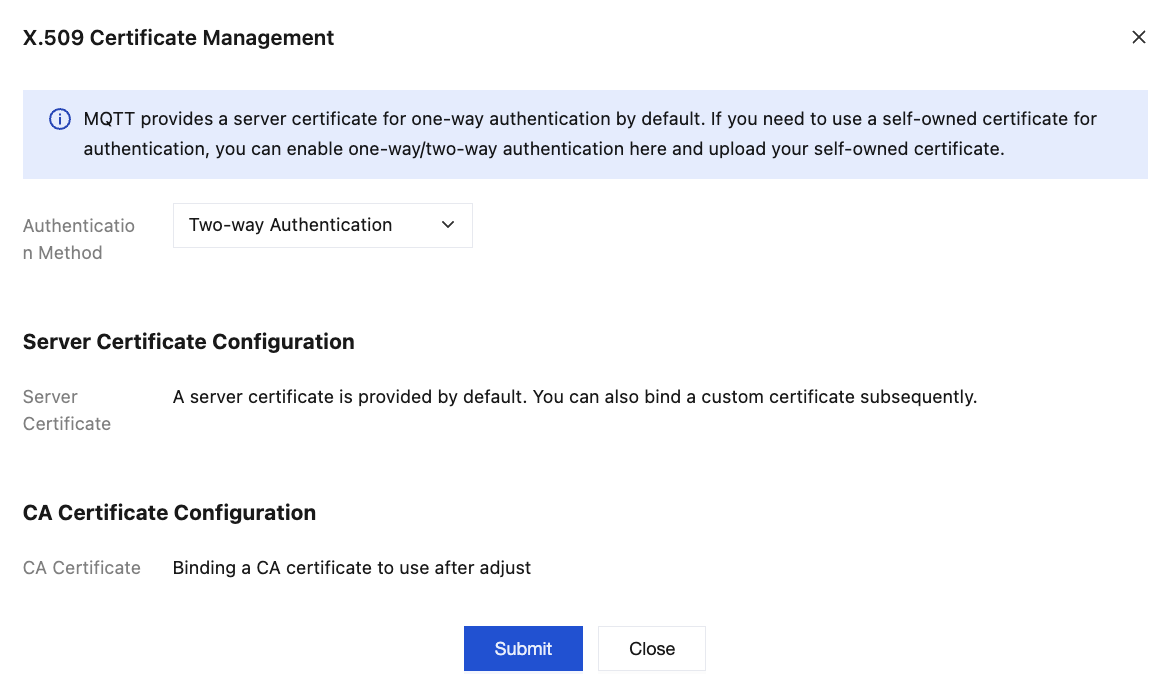
In the MQTT console, on the Cluster page, switch to Authentication Management/X.509 Certificate Management page:
Choose the appropriate authentication mode based on whether client certificate verification is required.
One-way authentication: Client certificate verification is not performed.
Two-way authentication: Client certificate verification is performed.
Assume the selected server certificate Subject Alternative Name contains the following domain name:
mqtt-abc.company.com.Creating a DNS Record
Refer to DNS - CNAME Record to create a CNAME record that resolves
mqtt-abc.company.com to the domain name provided by the instance's access point: mqtt-xxx-sh-public.mqtt.tencenttdmq.com.
Subsequently, the instance can be accessed via
mqtt-abc.company.com.Ajuda e Suporte
Esta página foi útil?
Você também pode entrar em contato com a Equipe de vendas ou Enviar um tíquete em caso de ajuda.
comentários