Easily Implementing Adaptation of a Third-Party Virtual Device with GWLB
Baixar
Modo Foco
Tamanho da Fonte
Última atualização: 2026-03-31 11:31:43
Traduzido por IA
Gateway Load Balancer (GWLB) is a load balancer running at the network layer. GWLB instances enable you to deploy, scale, and manage third-party virtual devices such as firewalls, intrusion detection and prevention systems, analysis systems, and visualization devices, with simpler operations and higher security. This document describes how to easily and efficiently implement adaptation of a third-party virtual device with GWLB.
Adaptation of the Third-Party Virtual Device
Supported Third-Party Virtual Devices
GWLB handles business traffic at the network layer and is independent of the device status. This design enables compatibility with a third-party virtual device, provided that the device supports GENEVE encapsulation/decapsulation and original data packets.
Adaptation Operation
To work with GWLB, the third-party virtual device needs to complete the following modifications:
Supports the GENEVE protocol to exchange traffic with GWLB. GENEVE encapsulation is necessary for transparent packet routing between GWLB and a device and sending of additional information (also known as metadata).
Supports encoding/decoding GENEVE Type-Length-Value (TLV) pairs related to GWLB.
Responds to TCP health checks from GWLB.
Why Do Third-Party Virtual Devices Need to Support GENEVE Encapsulation?
GWLB is deployed as a transparent gateway between the clients and the target server. Its core mechanism is to fully encapsulate user's original traffic through the GENEVE tunnel and forward the traffic to real servers. The specific process is as follows: When the original data packet sent by a client reaches GWLB, GWLB will fully encapsulate it as a whole payload into the GENEVE tunnel packet.
In the direction of accessing a real server, the source address of the outer encapsulation header is the VIP address of GWLB, the destination address is the IP address of the real server, and UDP port 6081 is used. In the return traffic direction, the source address of the outer encapsulation header and the destination address are opposite to those in the direction of accessing a real server. The GENEVE tunnel header also carries key metadata (such as the GWLBE/VPCE ID, traffic direction, flow flag Cookie, and attachment ID). This information provides real servers (usually third-party virtual devices) with context to identify the traffic source and attributes.
The GENEVE protocol (RFC 8926) is highly flexible and can support the transmission of this kind of metadata. This extensible and customized layer-3 encapsulation mechanism supports extensive use cases and improves customer experience by streamlining operations (as customers do not need to make any change to the devices at the source or target). For the specific metadata format definition, see the GENEVE TLV format description in the latter part of this document.
How GWLB Works
Technology Architecture
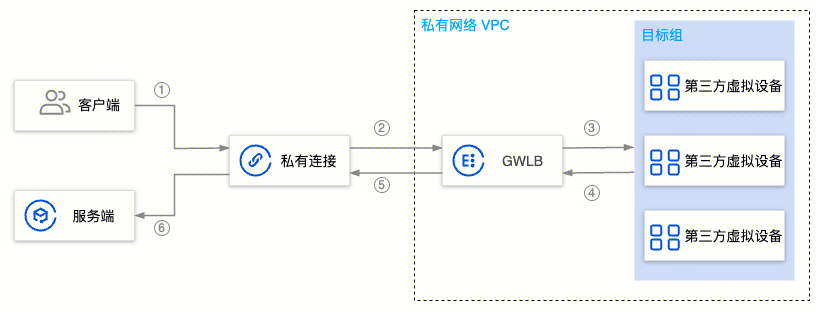
As shown in the figure below, GWLB can be connected via Private Link to a GWLB endpoint in another VPC.
GWLB is divided into frontend and backend. The side connected to the Private Link is called the GWLB frontend, while the side connected to the destination device is called the GWLB backend. In the backend, GWLB acts as a CLB to route traffic to one of multiple equivalent destination devices. GWLB ensures the stickiness of bidirectional traffic to the destination device and also reroutes the traffic if the selected device becomes unhealthy. This document focuses on the backend feature, namely communication between GWLB and the destination device.
In the data packets sent from the source to the destination, the GWLB IP address as the destination IP address is not included. Due to the route table configuration, the packets are routed to GWLB. To achieve transparent forwarding (that is, keep the original data packets unchanged), GWLB uses GENEVE to encapsulate the original data packets and send them to third-party virtual devices or receive data packets from the third-party virtual devices. The third-party virtual devices also need to decapsulate the GENEVE TLV pairs.
GWLB is a packet-in/packet-out service. It does not maintain any application program state or perform TLS/SSL decryption/encryption.
When GWLB receives a new TCP/UDP flow, it uses 5-tuple (a source IP address, source port, destination IP address, destination port, and transport protocol) consistent hashing to select a healthy device from the target group. Subsequently, GWLB routes all data packets (both forward and backward) of that flow to the same device (to maintain affinity). For non-TCP/UDP flows, GWLB still uses 3-tuple (a source IP address, destination IP address, and transport protocol) consistent hashing to make forwarding decisions.
CLB Scheduling Algorithm
Load Balancing Methods
A load balancing method is an algorithm for GWLB to allocate traffic to backend target groups. Each method produces different load balancing effects. The supported load balancing methods include 5-tuple, 3-tuple, and 2-tuple consistent hashing.
Load Balancing Flow Stickiness
Adding or removing instances in the target group: All traffic will be rehashed.
If a certain healthy instance in the target group becomes unhealthy: The traffic of the faulty node will be rehashed to other healthy nodes.
If a certain unhealthy instance in the target group becomes healthy: The traffic belonging to the recovered node will be redirected back to that node.
Health Examination
GWLB runs health checks periodically at a custom interval by sending TCP/PING packets to the device, which then responds to the TCP/PING packets. The details are as follows:
TCP: Successful connection is considered as passed.
PING: If the PING command is successful and an error message "port XX unreachable" is not returned by the real server within the response timeout period, the service is considered normal and the health check is successful.
The third-party virtual device should complete all the checks within the GWLB timeout. These checks assume that the device properly responding to TCP/PING packets (usually from its control plane) can also forward the packets to the destination through its data plane.
Data Forwarding
Step 1: When a private link (GWLBE) receives a packet from the source, it sends the packet to GWLB through the underlying PrivateLink technology. The packet stays on the VPC network and reaches GWLB.
Step 2: GWLB uses a 3-tuple (source IP address, destination IP address, and transport protocol) of the incoming data packets and selects a specific device as the destination. Additionally, it generates a flow cookie and then stores the flow entry and its corresponding flow cookie in its flow table. Then, GWLB encapsulates the original data packet with a GENEVE header and embeds metadata in the form of a TLV 3-tuple.
Step 3: GWLB forwards the encapsulated packet to a specific device. It will forward bidirectional traffic with the same 3-tuple to this device during the lifecycle of the flow.
Step 4: The device should be configured with an IP interface that can receive UDP/IP packets. All packets forwarded to the device are routed through this IP interface.
Step 5: The device encapsulates the original data packet with a GENEVE header and embeds the same metadata initially received for the flow.
Step 6: After receiving data packets from the device, GWLB will remove the GENEVE encapsulation and then verify, query, and forward the incoming (internal) data packets along with the metadata extracted from GENEVE. If the query or verification fails, GWLB will discard the incoming data packets.
Step 7: The data packets use the underlying PrivateLink technology. The data packets stay on the VPC network and reach GWLBE. GWLBE then transmits the data packets to the destination based on the next hop in the route table.
GWLB Data Format
The format of GENEVE-encapsulated packets received by the device is shown as follows. For details about the GENEVE header, see the GENEVE protocol (RFC 8926).
Source Port: The GENEVE source port is selected through 3-tuple hashing.
GWLBE/VPCE ID: This is the 64-bit endpoint service string ID assigned to GWLBE (for example, if the endpoint service string ID is vpce-12345678, then it would be 12345678 here. Service providers should add a prefix to this ID to obtain the final ID). The device can use this identifier to associate packets with its configured private link. This GWLBE/VPCE ID can be used to determine the source VPC of the traffic. Each GWLBE can only belong to one VPC and should be mapped to the source VPC through the application service provider's management software. The device should return this ID "as it is".
Customer Visible Attachment ID: currently not in use and specified as 0.
Flow Dir: identifies the flow direction. The RS should return this cookie "as it is".
1: Access from the public network to a VPC network. Under this scenario, in the original IP packet carried by the GENEVE protocol, the source IP address is the IP address of the public network, and the destination IP address is the EIP address of the VPC network.
2: Access from a VPC network to the public network. Under this scenario, in the original IP packet carried by the GENEVE protocol, the source IP address is the EIP address of the VPC network, and the destination IP address is the IP address of the public network.
3: Retain.
4: Access between VPCs.
Flow Cookie: The flow cookie is a 29-bit flow ID generated by GWLB during traffic forwarding. The RS should return this cookie "as it is".
Response Process of the Third-Party Virtual Device
1. Encapsulate the original data packet in a GENEVE header.
2. Swap the source IP address (IP address of the third-party virtual device) and the destination IP address (IP address of the GWLB instance) in the outer IPv4 header.
3. Retain the original ports, not swapping the source port and destination port in the outer IPv4 header.
4. Update the IP checksum in the outer IPv4 header.
5. Return all fields in the GENEVE header without modification.
6. Return all TLV fields (GWLBE ID, Flow Direct, Flow Cookie, and Attachment ID) in GENEVE Option without modification.
Note:
The length of the packet returned by a third-party virtual device to GWLB cannot be greater than that of the received packet.
Test Verification
When the third-party virtual device supports the GENEVE protocol and GWLB TLV encoding/decoding, and responds to health checks, test verification can be conducted.
You can first use a single device as the simplest test case. To check whether the device responds to health checks, you can enable data packet capture on the device to view the packet flow and check whether the data packets are in the expected format.