오디오 및 비디오의 수집 및 재생과 관련된 모바일 앱의 경우 일반적으로 추가적인 생존 유지 처리가 필요합니다. 그렇지 않으면 앱이 백그라운드에서 실행될 때 일부 기능적 제한을 받거나, 백그라운드에서 일정 시간 실행된 후 시스템에 의해 강제로 종료될 수 있습니다. 아래에서는 Android 앱 생존 유지 방안과 iOS 앱 생존 유지 방안을 각각 소개하겠습니다.
Android 앱 생존 유지 방안
현재 Android에서 일반적으로 사용되는 생존 유지 방식은 포그라운드 서비스를 시작하는 것입니다. 포그라운드 서비스는 특별한 서비스이고 실행 시 지속적인 알림을 표시하여 사용자에게 서비스가 실행 중임을 알립니다. 포그라운드 서비스의 알림은 지속적으로 표시되기 때문에 시스템은 이를 높은 우선순위의 작업으로 간주하며, 앱은 백그라운드에서 지속적으로 실행될 수 있고 시스템에 의해 종료되기 쉽지 않습니다. 아래에서는 포그라운드 서비스의 구현 방식 및 단계를 소개하겠습니다.
대부분의 모바일 기기에서 포그라운드 서비스를 활성화한 앱에 대해 사용자가 최근 앱 목록에서 강제 종료하면 포그라운드 서비스도 동시에 중단되고 앱이 완전히 중지됩니다. 그러나 일부 해외 브랜드 모바일 기기(예: Google Pixel 시리즈 및 SAMSUNG A 시리즈)에서는 강제 종료 후에도 앱이 완전히 중지되지 않고 포그라운드 서비스가 여전히 활성 상태를 유지하여 사용자가 미디어 재생을 계속 들을 수 있습니다.
해당 기기 유형에 대해 다음과 같은 두 가지 방안을 구현하여 강제 종료 후에도 미디어 소리가 재생되는 현상을 방지할 수 있습니다.
방안 1: 서비스 선언에서 stopWithTask 속성 정의합니다
android:stopWithTask="true" 속성 값을 추가하면 서비스는 작업이 제거될 때 즉시 중지됩니다.
위 두 가지 방법 중 하나를 선택하면 되며, android:stopWithTask="true"로 설정한 후에는 onTaskRemoved 메서드가 콜백되지 않습니다.
iOS 앱 생존 유지 방안
사용자의 프라이버시와 기기 배터리 수명을 보호하기 위해 애플은 앱의 백그라운드 동작에 엄격한 제한을 두고 있습니다. 일반적으로 특정 백그라운드 모드(Background Modes)를 활성화함으로써 어느 정도 앱 생존 유지를 구현할 수 있으며, 앱이 백그라운드에서 오디오나 비디오를 재생할 수 있는 것을 허용시킬 수 있습니다.
백그라운드 모드의 활성화
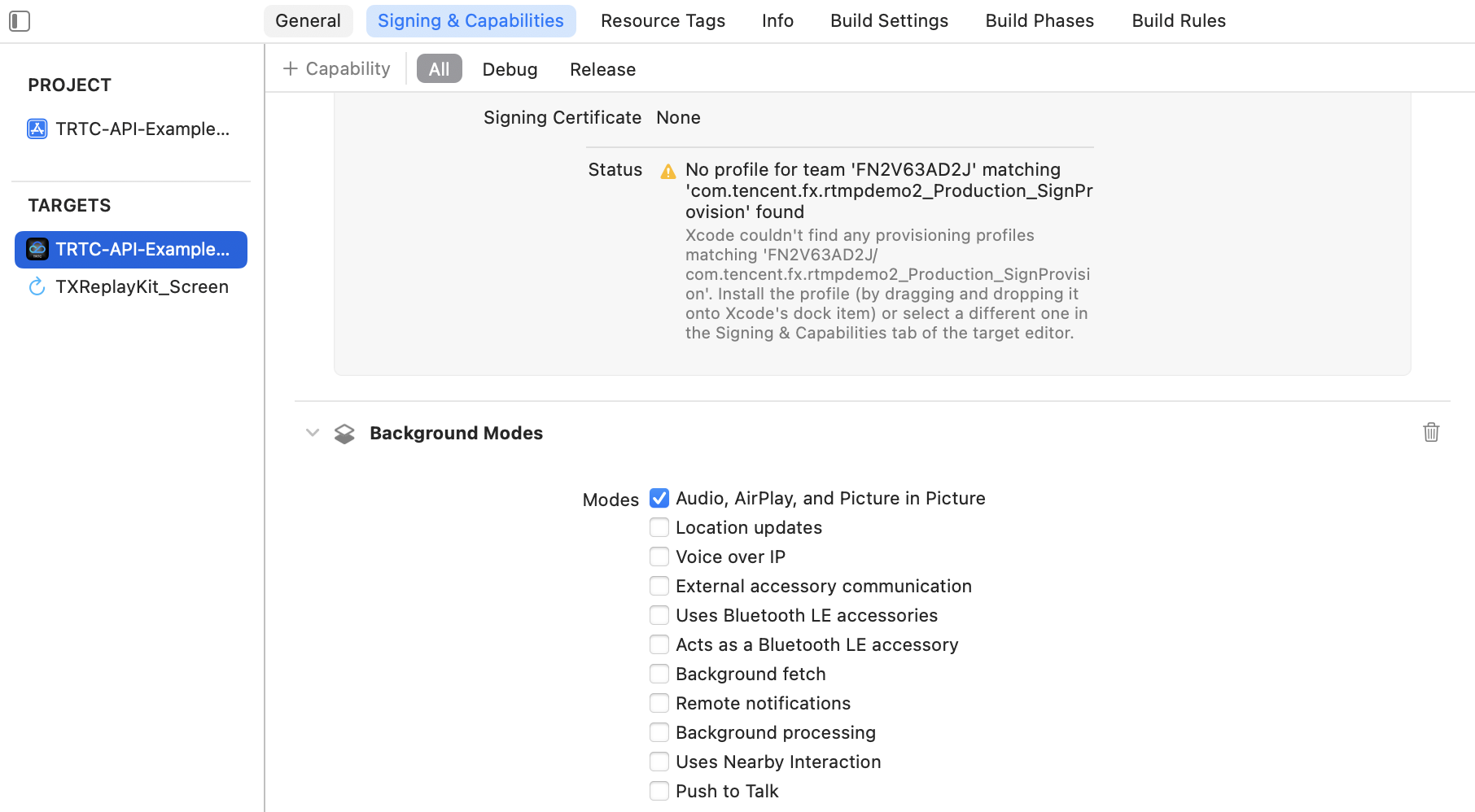
Xcode에서 백그라운드 모드(Background Modes)를 활성화하는 단계는 다음과 같습니다
1. Xcode 프로젝트를 여세요.
2. 프로젝트 파일을 선택하세요(일반적으로 프로젝트 네비게이터의 상단에 있음).
3. 프로젝트 파일에서 대상(Targets)을 선택합니다.
4. 대상 설정에서 Signing&Capabilities 탭을 선택하세요.
5. Background Modes 옵션을 찾아 Audio, AirPlay, and Picture in Picture 모드를 선택하세요.
자주 발생한 문제
1. 음성 통화 또는 라이브 스트리밍 시나리오에서 스트리머가 앱을 백그라운드로 전환하거나 화면을 잠근 경우, 이어폰을 연결/분리하는 것으로 인해 오디오 수집 및 재생이 무음이 됩니다
SDK의 기본 오디오 정책에서 시스템 볼륨 유형은 자동 전환 모드, 즉 "마이크 연결 시 통화, 마이크 꺼진 후 미디어 수행"으로 설정됩니다. 또한 볼륨 유형은 오디오 경로 변경에 따라 변동됩니다. 예를 들어 이어폰을 끼어 놓으면 통화 볼륨에서 미디어 볼륨으로 전환됩니다. 따라서 자동 전환 모드에서 스트리머가 이어폰을 연결/분리하면 시스템 볼륨 유형이 변경되며, 이때 시스템은 오디오 드라이버를 재시작해야 합니다. 그러나 iOS 시스템은 백그라운드 또는 화면 잠금 상태에서 오디오 드라이버 재시작이 실패할 가능성이 있어서 오디오 수집 및 재생이 무음이 될 수 있습니다.
이러한 문제에 대해 시스템 볼륨 유형을 고정(예: 전체 통화 볼륨 또는 전체 미디어 볼륨 지정)시켜 회피할 수 있습니다.
2. 영상 통화 또는 라이브 스트리밍 시나리오에서 스트리머가 앱을 백그라운드로 전환하거나 화면을 잠근 경우, 원격 시청자의 스트림 화면은 검은색으로 표시되지만 소리는 정상적으로 들립니다
애플 시스템은 앱이 백그라운드에서 비디오를 수집하는 것을 엄격히 금지합니다. 백그라운드 모드를 활성화한 경우에도 앱이 백그라운드로 전환되면 카메라는 자동으로 작동을 중지합니다. 이는 사용자의 프라이버시를 보호하고 사용자의 동의 없이 앱이 비디오를 녹화하는 것을 방지하기 위함입니다. 따라서 이러한 시나리오에서의 비디오 수집 문제는 당분간 피할 수 없으며, 오디오의 정상적인 수집 및 재생만 가능합니다.
3. 시청자가 방에 들어왔을 때 방 내에 스트리밍 중인 사람이 없으면 앱을 백그라운드로 전환하거나 화면을 잠급니다.나중에 방에 스트리밍을 시작하는 사람이 있어도 정상적으로 수신할 수 없습니다
iOS 앱이 백그라운드로 전환되기 전에 AudioUnit 수집 또는 재생을 시작하지 않으면 곧 일시 중단되며, 포그라운드로 전환될 때까지 수동으로 깨울 수 없습니다. 이러한 문제를 해결하려면 앱이 백그라운드로 전환되기 전에 AudioUnit이 계속 실행되도록 하면 됩니다(무음 데이터 재생). 구체적인 구현 방법은 아래 예제 코드를 참조하세요.