tencent cloud

NAT Gateway

Release Notes and Announcements
Release Notes
Announcements
Product Introduction
Overview
Features
Use Cases
Product Specifications
Relevant Products
Purchase Guide
Public NAT Gateway Billing Overview
Private NAT Gateway Operation Guide
Purchasing in the Console
Overdue Payment and Service Expiration Policies
Getting Started
Public NAT Gateway Operation Guide
Modifying NAT Gateway Configuration
Managing EIPs of NAT Gateway
Routing to NAT Gateway
Managing SNAT Rules
Managing Port Forwarding Rules
Public NAT Usage Limits
NAT Gateway Flow Logs
Binding with Anti-DDoS Pro
Monitoring and Alarms
Deleting NAT Gateway
Adjusting the Priorities of NAT Gateways and EIPs
Private NAT Gateway Operation Guide
Creating and Managing a NAT Gateway
Configuring a Route to Private NAT Gateway
Managing SNAT Rules
Managing DNAT Rules
Cloud Access Management
Practical Tutorial
Enabling Cross-VPC Access to Public Network via Standard NAT Gateway
Enabling Mutual Access between a Specified VPC Subnet and Public Network Resources via Private NAT Gateway
Enabling Secure Mutual Access with Public Network via Public CLB and NAT Gateway
Adjusting the Priorities of NAT Gateways and EIPs
API Documentation
FAQ
Billing
Concepts
Features
Service Level Agreement
Contact Us
Glossary

Modifying NAT Gateway Configuration

PDF
Focus Mode
Font Size
Last updated: 2024-01-04 21:49:21
After creating a NAT gateway, you can modify its properties.
1. Log in to the NAT Gateway Console.
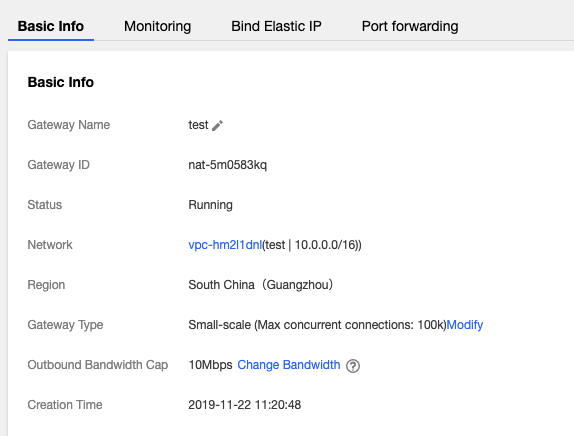
2. In the list, click the ID of the desired NAT gateway to go to its details page, where you can perform the following operations.
Change the name of the gateway.
Change the gateway type. Once made, this change takes effect immediately. Changing the gateway type does not lead to network disconnection.
Change the outbound bandwidth cap.
Add a label for permission management.

Help and Support

Was this page helpful?

Help us improve! Rate your documentation experience in 5 mins.

Feedback