Android 自定义能力
Download
聚焦模式
字号
本文主要介绍海外版慧眼 SDK 当前所具备的自定义的能力
一、自定义 UI
自定义布局
慧眼SDK支持自定义UI,主要是通过AuthUiConfig(可以参考接口概述文档)配置参数实现,通过传入Layout resId的方式可自定义UI布局。
使用方式大致如下:
AuthUiConfig authConfig = new AuthUiConfig();authUiConfig.setAuthLayoutResId(R.layout.demo_huiyan_fragment_authing);authUiConfig.setAuthCircleCorrectColor(resources.getColor(R.color.demo_blue));huiYanOsConfig.setAuthUiConfig(authUiConfig);
下图所示属于默认布局:
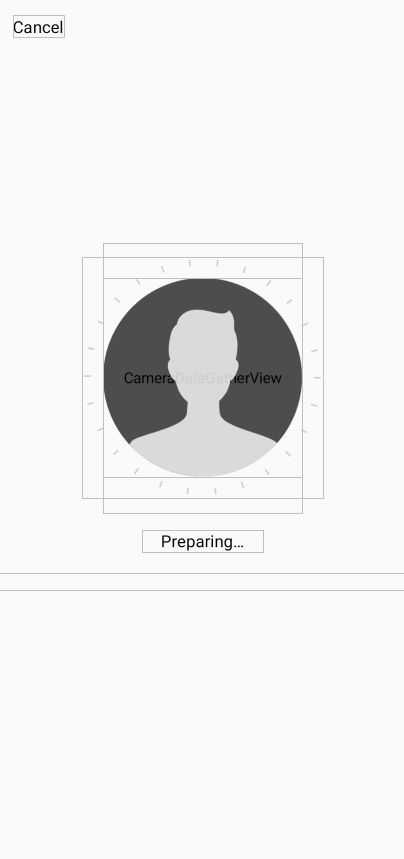
默认布局如上图所示,图中的所以控件的位置均可以通过修改布局Layout.xml进行修改。具体的可以参考 demo 中的 demo_huiyan_fragment_authing.xml文件。
注意:
demo_huiyan_fragment_authing.xml 中的View类型以及对应的 android:id 由于参与的界面事件绑定,请不要修改。
这里提供默认的布局如下
<?xml version="1.0" encoding="utf-8"?><com.tencent.could.huiyansdk.view.HuiYanReflectLayout xmlns:android="http://schemas.android.com/apk/res/android"xmlns:app="http://schemas.android.com/apk/res-auto"android:id="@+id/txy_auth_layout_bg"android:layout_width="match_parent"android:layout_height="match_parent"><!-- 取消按钮 --><TextViewandroid:id="@+id/txy_cancel_txt_btn"android:text="@string/txy_cancel"android:layout_width="wrap_content"android:layout_height="wrap_content"app:layout_constraintStart_toStartOf="parent"app:layout_constraintTop_toTopOf="parent"android:textColor="@color/txy_black"android:textSize="16sp"android:layout_marginTop="@dimen/txy_title_margin_top"android:layout_marginStart="@dimen/txy_protocol_margin_size"/><!-- 倒计时的显示控件 --><TextViewandroid:id="@+id/txy_count_down_txt_view"android:text="@string/txy_count_down_txt"app:layout_constraintTop_toTopOf="parent"app:layout_constraintEnd_toEndOf="parent"android:textSize="16sp"android:textColor="@color/txy_black"android:layout_width="wrap_content"android:layout_height="wrap_content"android:layout_marginTop="@dimen/txy_title_margin_top"android:layout_marginRight="@dimen/txy_protocol_margin_size"android:visibility="gone"/><!-- 摄像头预览界面框 720P的话,代码中height会自定乘以1.3 --><com.tencent.could.huiyansdk.view.CameraDateGatherViewandroid:id="@+id/txy_camera_gather_view"android:layout_width="@dimen/txy_auth_head_size"android:layout_height="258dp"android:background="@android:color/transparent"android:layout_marginBottom="@dimen/txy_auth_view_move"app:layout_constraintBottom_toBottomOf="parent"app:layout_constraintEnd_toEndOf="parent"app:layout_constraintStart_toStartOf="parent"app:layout_constraintTop_toTopOf="parent" /><!-- 通用背景,待竖线的圆环 --><com.tencent.could.huiyansdk.view.CommonAuthBackViewandroid:id="@+id/txy_auth_common_background_views"android:layout_width="230dp"android:layout_height="230dp"android:layout_marginBottom="@dimen/txy_auth_view_move"app:layout_constraintBottom_toBottomOf="parent"app:layout_constraintEnd_toEndOf="parent"app:layout_constraintStart_toStartOf="parent"app:layout_constraintTop_toTopOf="parent"/><!-- 展示的头像图片 --><ImageViewandroid:id="@+id/txy_camera_prepare_img"app:srcCompat="@drawable/txy_prepare_face_head_white"android:layout_width="@dimen/txy_auth_head_size"android:layout_height="@dimen/txy_auth_head_size"android:layout_marginBottom="@dimen/txy_auth_view_move"app:layout_constraintTop_toTopOf="parent"app:layout_constraintBottom_toBottomOf="parent"app:layout_constraintEnd_toEndOf="parent"app:layout_constraintStart_toStartOf="parent" /><!-- 前台的动画View --><com.tencent.could.huiyansdk.view.LoadingFrontAnimatorViewandroid:id="@+id/txy_auth_loading_front_animator_view"android:visibility="gone"app:layout_constraintTop_toTopOf="parent"app:layout_constraintBottom_toBottomOf="parent"app:layout_constraintEnd_toEndOf="parent"app:layout_constraintStart_toStartOf="parent"android:layout_marginBottom="@dimen/txy_auth_view_move"android:layout_width="@dimen/txy_auth_head_size"android:layout_height="@dimen/txy_auth_head_size"/><!-- 提示信息的展示界面 --><TextViewandroid:id="@+id/txy_auth_feed_back_txt"app:layout_constraintTop_toBottomOf="@id/txy_auth_common_background_views"app:layout_constraintStart_toStartOf="parent"app:layout_constraintEnd_toEndOf="parent"android:textColor="@color/txy_black"android:layout_marginTop="@dimen/txy_protocol_line_space"android:text="@string/txy_face_preparing3"android:textSize="18sp"android:layout_width="wrap_content"android:layout_height="wrap_content"/><!-- 额外的警告信息的提示控件 --><TextViewandroid:id="@+id/txy_auth_feed_back_extra_tip_txt"android:textSize="14sp"android:textColor="@color/txy_black"android:layout_width="match_parent"android:layout_height="wrap_content"android:gravity="center_horizontal"app:layout_constraintStart_toStartOf="parent"app:layout_constraintEnd_toEndOf="parent"android:layout_marginTop="20dp"app:layout_constraintTop_toBottomOf="@id/txy_auth_feed_back_txt"/><!-- 核身的内容提示 --><TextViewandroid:id="@+id/txy_auth_tips_txt"android:textSize="14sp"android:textColor="@color/txy_black"android:paddingHorizontal="25dp"android:layout_marginHorizontal="25dp"android:layout_marginBottom="35dp"app:layout_constraintBottom_toBottomOf="parent"app:layout_constraintStart_toStartOf="parent"app:layout_constraintEnd_toEndOf="parent"android:layout_width="wrap_content"android:layout_height="wrap_content"/></com.tencent.could.huiyansdk.view.HuiYanReflectLayout>
自定义布局的事件绑定
上一节介绍了如何进行自定义UI布局,本节主要介绍如何对自定义UI布局里新增的控件进行事件绑定,以满足您在使用阶段的各项需求。
当核身界面被创建时,HuiYanAuthEventCallBack的 onMainViewCreate(View authView)被调用到。当核身界面即将销毁的时候,会回调onMainViewDestroy()方法,您可以在对应的生命周期中自定义处理逻辑。
// 这里设置慧眼关键事件的回调监听HuiYanOsApi.setAuthEventCallBack(new HuiYanAuthEventCallBack() {@Overridepublic void onAuthTipsEvent(HuiYanAuthTipsEvent tipsEvent) {Log.e(TAG, "current is : " + tipsEvent);}@Overridepublic void onMainViewCreate(View authView) {if (authView == null) {return;}// 获取自定义添加的控件,并且注册自定义的事件Button findBtn = authView.findViewById(R.id.add_view_offer_button);if (findBtn != null) {findBtn.setOnClickListener(view -> {Log.e(TAG, "click test button!");});}}@Overridepublic void onMainViewDestroy() {Log.e(TAG, "onMainViewDestroy");}});
根据onMainViewCreate的回调与onMainViewDestroy的回调方式,您可以在完成任意对应您新增UI控件的事件绑定,以实现对应效果。
二、自定义提示与增加语言
自定义提示
如果您需要修改提示语,或者新增其他的语言文件的话,可以按照下面的方式取实现。慧眼SDK会提供一个翻译文件hy_customer_string.xml 里面包括了所有慧眼SDK对外可以进行修改的配置文字文件。
1. 打开在主module(集成慧眼SDK的module)工程。
2. 将hy_customer_string.xml添加到对应的语言文件夹下。
3. 修改其中需要自定义的文字内容即可。
4. 打包以后,您修改的内容会自动覆盖原有的内容。
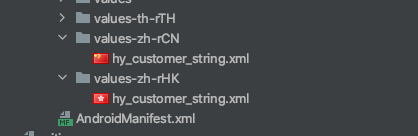
新增语言
新增语言的话文件,则需要执行以下两部就可以实现:
1. 在主module(集成慧眼SDK的module)工程里新增对应语言文件夹。
2. 将hy_customer_string.xml拷贝到改语言文件夹下,并修改对应的value内容。
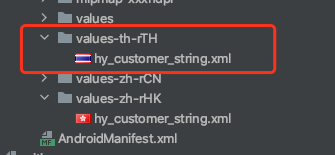
3. 在代码里指定对应的语言码即可(以泰文为例)。
huiYanOsConfig.setLanguageStyle(LanguageStyle.CUSTOMIZE_LANGUAGE);huiYanOsConfig.setLanguageCode("th-TH");
附录 Android 语言码
这里提供一下 Android 的部分语言码,以供参考。
语言码 | 对应使用的国家或地区 |
af-ZA | 公用荷兰语 - 南非 |
sq-AL | 阿尔巴尼亚 -阿尔巴尼亚 |
ar-DZ | 阿拉伯语 -阿尔及利亚 |
ar-BH | 阿拉伯语 -巴林 |
ar-EG | 阿拉伯语 -埃及 |
ar-IQ | 阿拉伯语 -伊拉克 |
ar-JO | 阿拉伯语 -约旦 |
ar-KW | 阿拉伯语 -科威特 |
ar-LB | 阿拉伯语 -黎巴嫩 |
ar-LY | 阿拉伯语 -利比亚 |
ar-MA | 阿拉伯语 -摩洛哥 |
ar-OM | 阿拉伯语 -阿曼 |
ar-QA | 阿拉伯语 -卡塔尔 |
eu-ES | 巴斯克 -巴斯克 |
be-BY | Belarusian-白俄罗斯 |
bg-BG | 保加利亚 -保加利亚 |
ca-ES | 嘉泰罗尼亚 -嘉泰罗尼亚 |
zh-HK | 华语 - 中国香港 |
zh-MO | 华语 - 中国澳门 |
zh-CN | 华语 -中国 |
zh-SG | 华语 -新加坡 |
zh-TW | 华语 - 中国台湾 |
zh-CHS | 华语 (简体化) |
zh-CHT | 华语 (传统的) |
hr-HR | 克罗埃西亚 -克罗埃西亚 |
cs-CZ | 捷克 - 捷克 |
da-DK | 丹麦文 -丹麦 |
div-MV | Dhivehi-马尔代夫 |
nl-BE | 荷兰 -比利时 |
nl-NL | 荷兰 - 荷兰 |
en-AU | 英国 -澳洲 |
en-ZA | 英国 - 南非 |
en-PH | 英国 -菲律宾共和国 |
en-NZ | 英国 - 新西兰 |
en-GB | 英国 - 英国 |
en-US | 英国 - 美国 |
fa-IR | 波斯语 -伊朗王国 |
fi-FI | 芬兰语 -芬兰 |
fr-FR | 法国 -法国 |
fr-BE | 法国 -比利时 |
fr-MC | 法国 -摩纳哥 |
fr-CH | 法国 -瑞士 |
gl-ES | 加利西亚 -加利西亚 |
ka-GE | 格鲁吉亚州 -格鲁吉亚州 |
de-DE | 德国 -德国 |
de-LU | 德国 -卢森堡 |
de-CH | 德国 -瑞士 |
el-GR | 希腊 -希腊 |
gu-IN | Gujarati-印度 |
he-IL | 希伯来 -以色列 |
hi-IN | 北印度语 -印度 |
hu-HU | 匈牙利的 -匈牙利 |
is-IS | 冰岛的 -冰岛 |
it-IT | 意大利 -意大利 |
ja-JP | 日本 -日本 |
kk-KZ | Kazakh-哈萨克 |
kn-IN | 卡纳达语 -印度 |
ko-KR | 韩国 -韩国 |
lv-LV | 拉脱维亚的 -拉脱维亚 |
lt-LT | 立陶宛 -立陶宛 |
ms-BN | 马来 -汶莱 |
ms-MY | 马来 -马来西亚 |
mr-IN | 马拉地语 -印度 |
mn-MN | 蒙古 -蒙古 |
nn-NO | 挪威 (Nynorsk)- 挪威 |
pl-PL | 波兰 -波兰 |
pt-BR | 葡萄牙 -巴西 |
pt-PT | 葡萄牙 -葡萄牙 |
ro-RO | 罗马尼亚语 -罗马尼亚 |
sa-IN | 梵文 -印度 |
ru-RU | 俄国 -俄国 |
sk-SK | 斯洛伐克 -斯洛伐克 |
es-AR | 西班牙 -阿根廷 |
es-ES | 西班牙 -西班牙 |
sv-SE | 瑞典 -瑞典 |
th-TH | 泰国 -泰国 |
tr-TR | 土耳其语 -土耳其 |
uk-UA | 乌克兰 -乌克兰 |
ur-PK | Urdu-巴基斯坦 |
vi-VN | 越南 -越南 |
文档反馈