Beauty Effects (Android)
Download
Modo Foco
Tamanho da Fonte
TUILiveKit provides two beauty enhancement options: Basic Beauty (built-in) and Advanced Beauty (requires additional integration and payment). Select the solution that best fits your requirements.
Basic Beauty
Basic Beauty is built into TUILiveKit and requires no additional setup. It offers whitening, smoothing, and rosiness effects, with adjustable beauty intensity.
Advanced Beauty
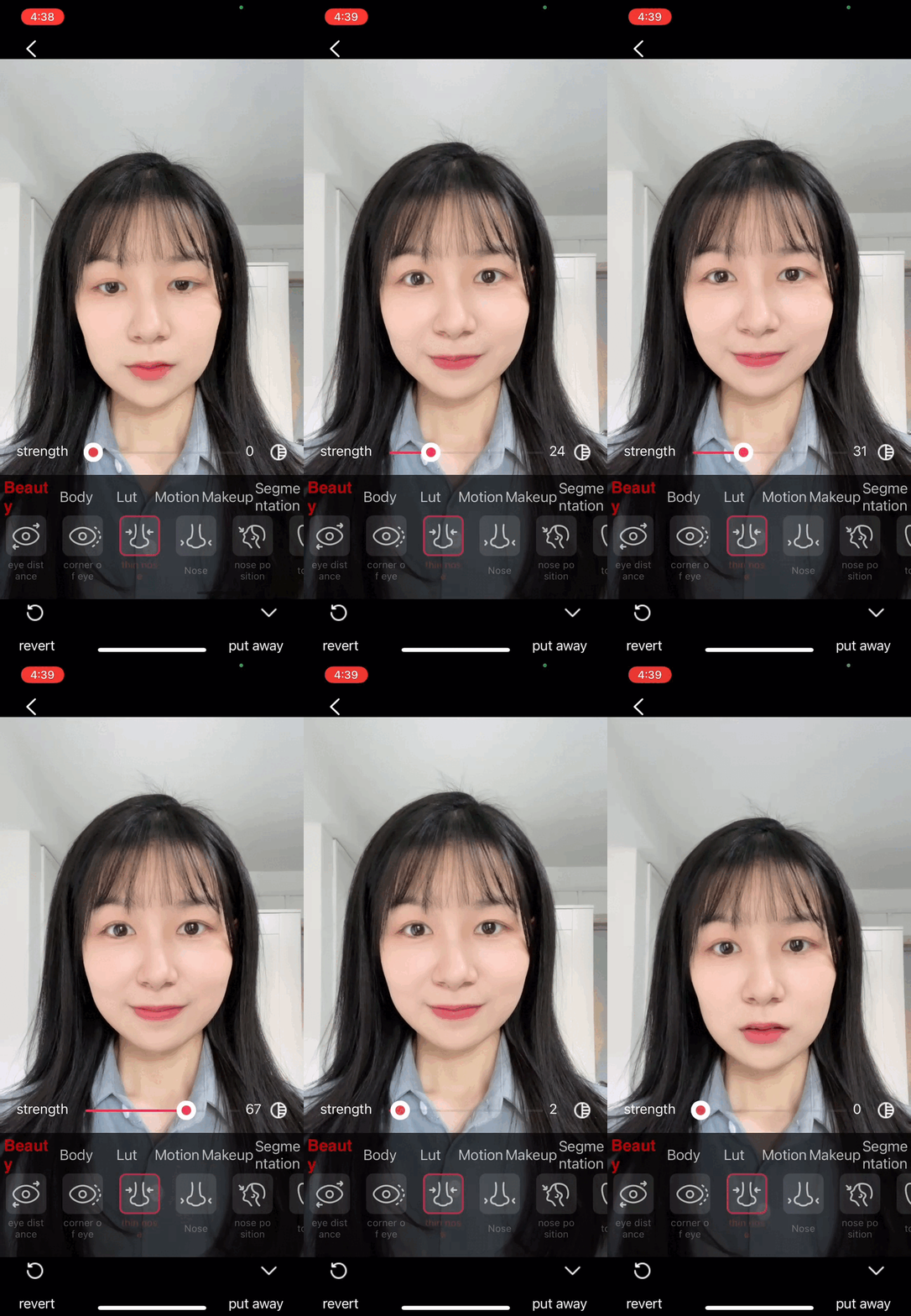
Advanced Beauty utilizes the Tencent Effects SDK to deliver an expanded and professional suite of effects, including V-face, eye spacing, nose slimming, 3D stickers, and more.
Comparison of the two beauty panel UIs:
Basic Beauty Panel | Advanced Beauty Panel |
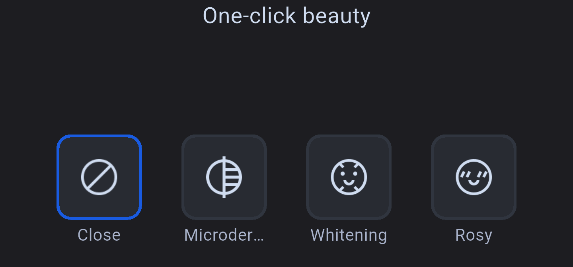 | 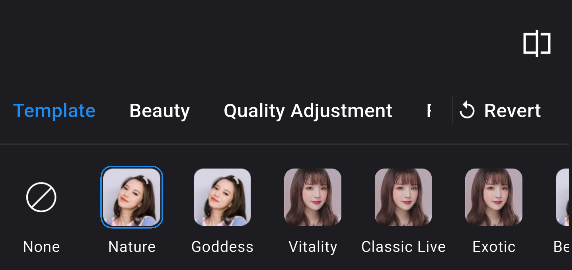 |
Advanced Beauty Effects Showcase
V-face | Eye Spacing | Nose Slimming | 3D Sticker |
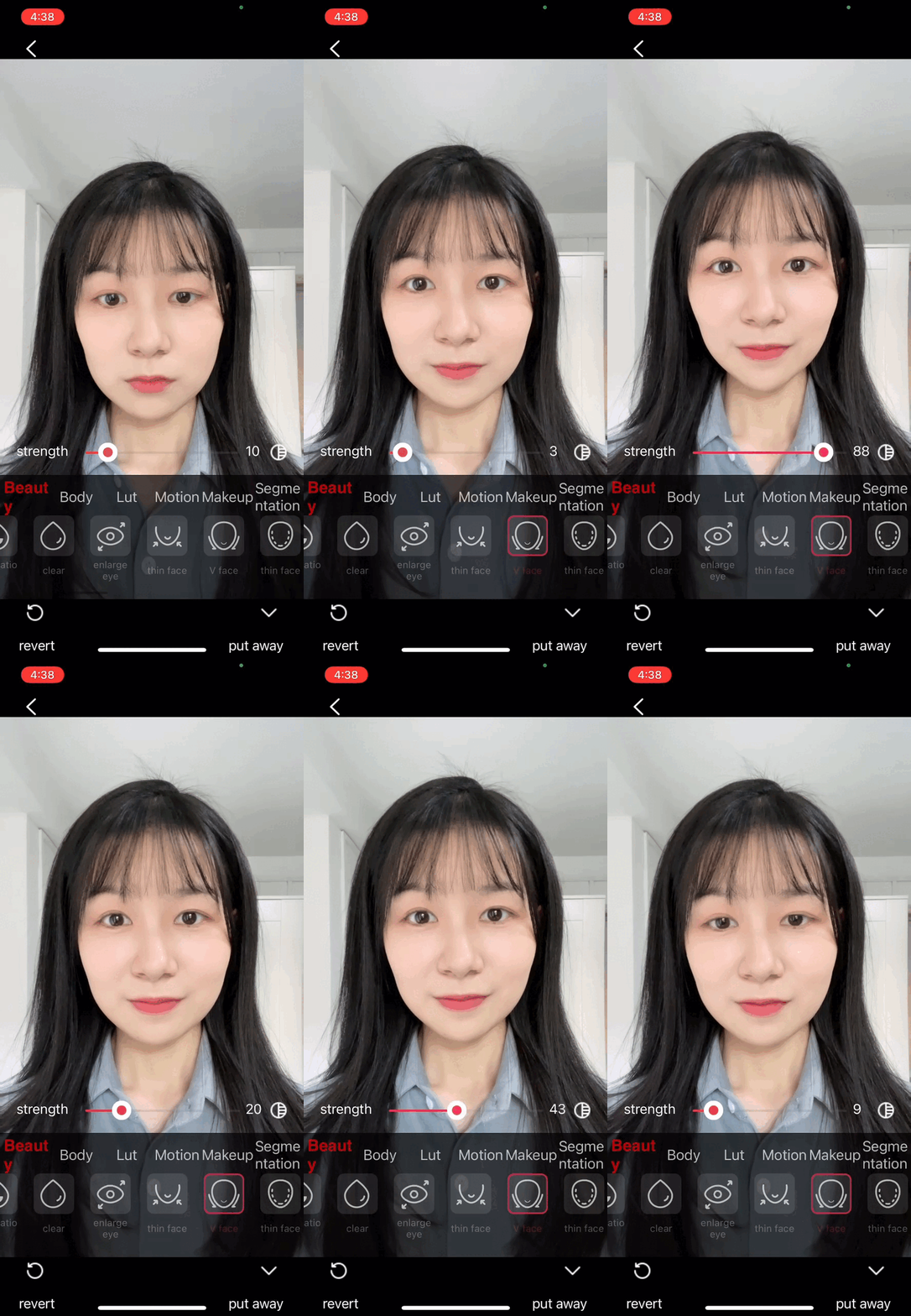 | 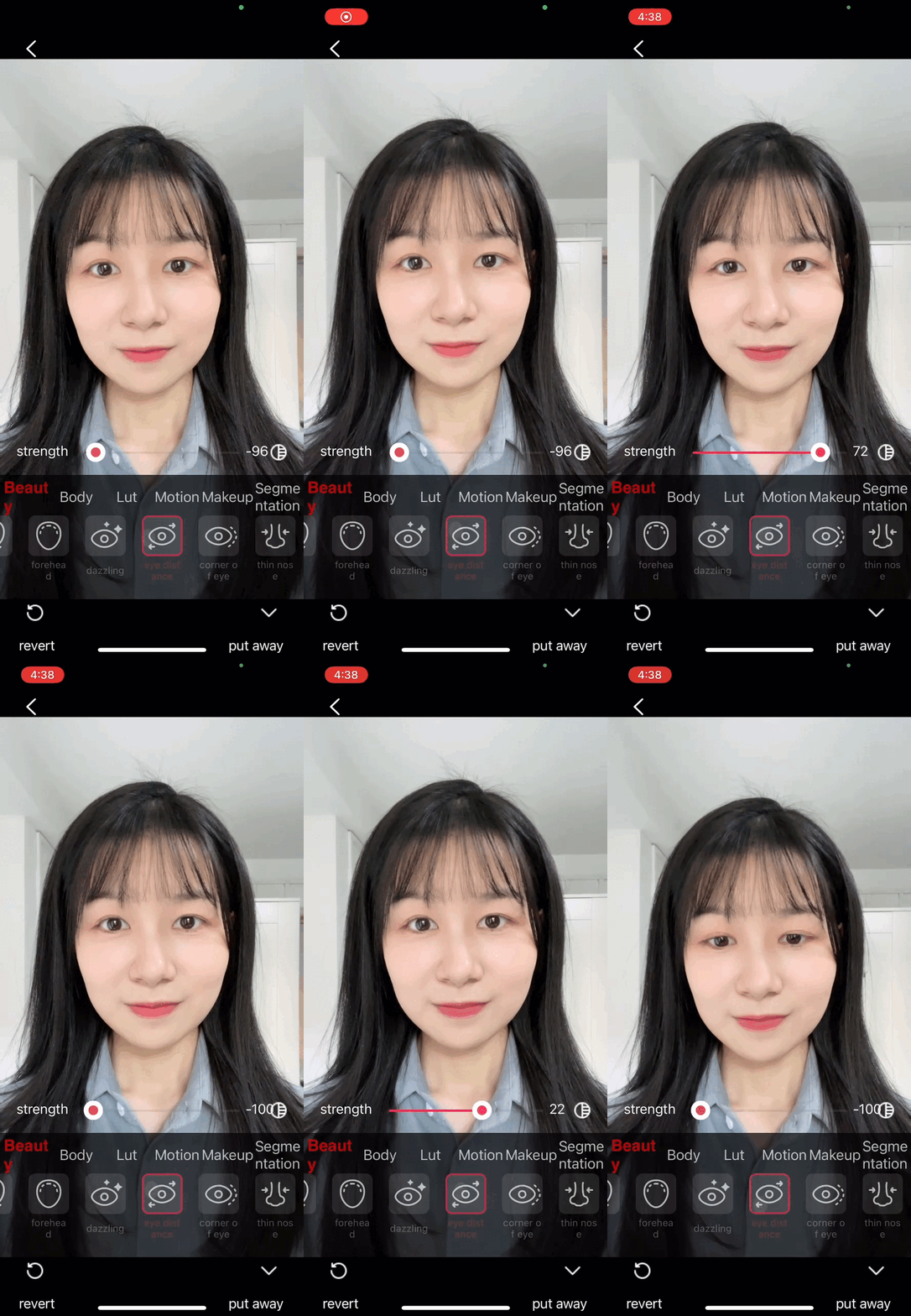 |  |  |
Prerequisites
Component Integration
TUILiveKit includes Basic Beauty by default, requiring no extra integration. To enable Advanced Beauty, follow the steps below.Note:
Step 1: Integrate the te_beauty_kit Adapter Module
1. Download and extract TUIKit_Android. Copy the TUIkit_Android/tebeautykit folder into your project at the same level as the app directory.
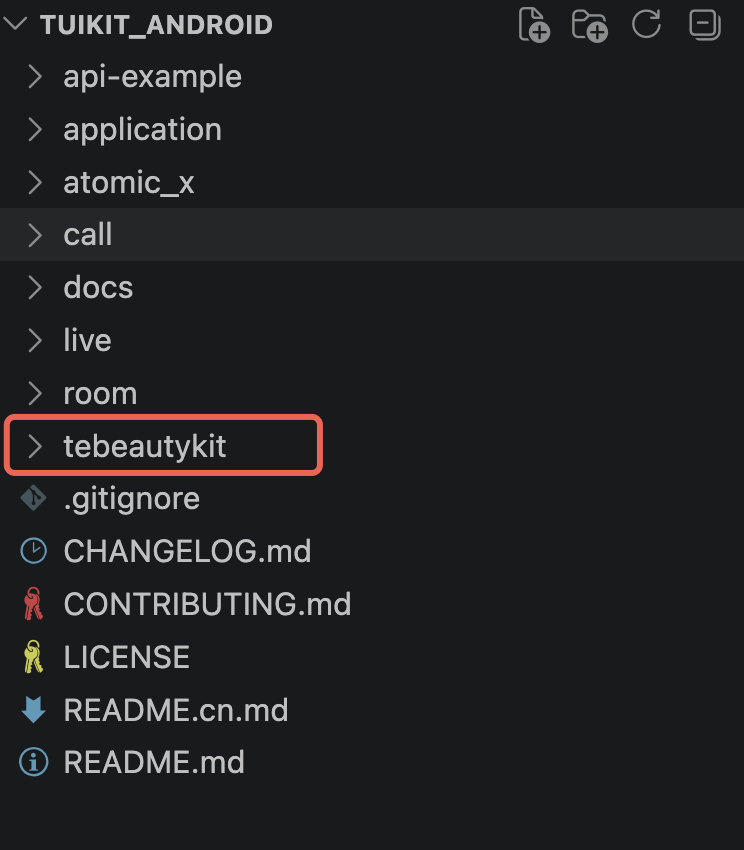
2. Update your project's
settings.gradle file with the following:include ':tebeautykit'
Step 2: Authenticate and Configure Beauty Resources
1. Request authorization to obtain your
LicenseUrl and LicenseKey. See the License Guide.2. During your business logic initialization (typically at the same location as Login), add the following code, replacing with your own
Beauty Package ID, LicenseUrl, and LicenseKey:TUIBeautyKit.instance.init(context,"LicenseUrl", // Use your LicenseUrl"LicenseKey", // Use your LicenseKeyBeautyLevel.S1_07 // Use your purchased Beauty Package ID)
Switching Beauty Packages and Customizing Beauty Panels
To switch between packages according to your purchased Beauty Package ID or customize the beauty panel, follow these instructions:
1. During authentication and resource setup, specify the Beauty Package ID you purchased. Supported Beauty Package IDs are:
enum class BeautyLevel {A1_00, A1_01, A1_02, A1_03, A1_04, A1_05, A1_06,S1_00, S1_01, S1_02, S1_03, S1_04, S1_07}
Refer to the table below for mapping Beauty Package IDs to the required panel JSONs:
Package (BeautyLevel) | Panel JSONs to Import (Full List) |
A1_00 | beauty_template, beauty, lut |
A1_01 | beauty_template, beauty, beauty_image, beauty_base_shape, lut |
A1_02 | beauty_template, beauty, beauty_image, beauty_base_shape, lut, motion_2d |
A1_03 | beauty_template, beauty, beauty_image, beauty_general_shape, lut, motion_2d |
A1_04 | beauty_template, beauty, beauty_image, beauty_general_shape, lut |
A1_05 | beauty_template, beauty, beauty_image, beauty_general_shape, lut, motion_2d, segmentation |
A1_06 | beauty_template, beauty, beauty_image, beauty_general_shape, lut, motion_2d, makeup |
S1_00 | beauty_template, beauty, beauty_image, beauty_shape, beauty_makeup, lut |
S1_01 | beauty_template, beauty, beauty_image, beauty_shape, beauty_makeup, lut, motion_2d, motion_3d, makeup, light_makeup |
S1_02 | beauty_template, beauty, beauty_image, beauty_shape, beauty_makeup, lut, motion_2d, motion_3d, motion_gesture, makeup, light_makeup |
S1_03 | beauty_template, beauty, beauty_image, beauty_shape, beauty_makeup, lut, motion_2d, motion_3d, makeup, light_makeup, segmentation |
S1_04 | beauty_template, beauty, beauty_image, beauty_shape, beauty_makeup, lut, motion_2d, motion_3d, motion_gesture, makeup, light_makeup, segmentation |
S1_05 | beauty_template, beauty, beauty_image, beauty_shape, beauty_makeup, lut, beauty_body, motion_2d, motion_3d, makeup, light_makeup, segmentation |
S1_06 | beauty_template, beauty, beauty_image, beauty_shape, beauty_makeup, lut, beauty_body, motion_2d, motion_3d, motion_gesture, makeup, light_makeup, segmentation |
S1_07 | beauty_template, beauty, beauty_image, beauty_shape, beauty_makeup, lut, beauty_body, motion_2d, motion_3d, motion_gesture, makeup, light_makeup, segmentation |
2. Customizing the Advanced Beauty Panel UI
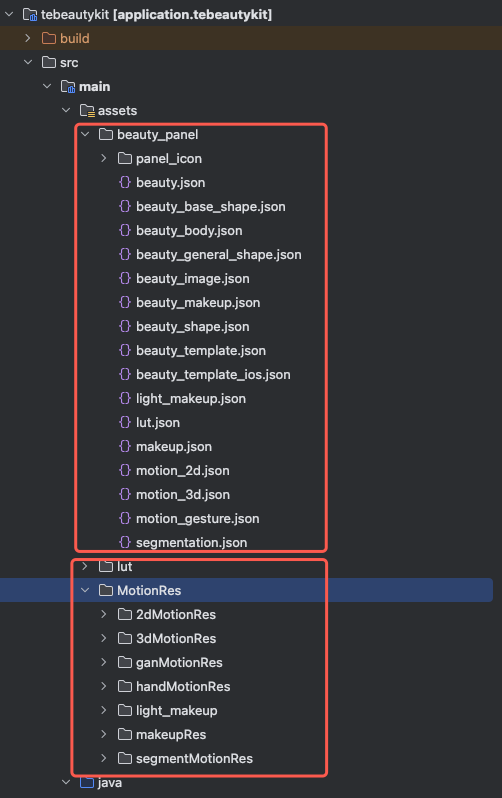
Advanced Beauty panels are defined via JSON configuration files. By default, these configuration files are stored in the assets directory of the tebeautykit module. Configuration resources consist of two main parts:
Panel configuration assets: Panel JSON files, button icons, and other resources for displaying beauty features.
Resource | Purpose |
assets/beauty_panel/*.json | Panel UI configuration (buttons, sliders, groups) |
assets/beauty_panel/panel_icon/ | Panel button PNG icons |
Beauty effect assets: Filter LUTs, 2D/3D animated stickers, and other effect-specific resources.
Resource | Purpose | Corresponding Panel Feature |
lut/ | Filter color lookup tables | Filter Tab |
MotionRes/2dMotionRes/ | 2D animated stickers | big head effects|Sticker Tab |
MotionRes/3dMotionRes/ | 3D model stickers | Sticker Tab |
MotionRes/handMotionRes/ | Gesture-triggered stickers | Gesture Tab |
MotionRes/makeupRes/ | Full Makeup Set (lipstick, eyeshadow, blush, etc.) | Makeup Tab |
MotionRes/light_makeup/ | Light Makeup assets | Light Makeup Tab |
MotionRes/segmentMotionRes/ | Portrait segmentation (green screen, matting, background blur) | Segmentation Tab |
You can dynamically control the UI of the beauty filter version by configuring the JSON file in the materials in the panel below.
FAQs
What should I do if License authentication fails?
Check that your
LicenseUrl and LicenseKey are correctly bound to your package, verify that the selected BeautyLevel matches your License, and ensure your application's BundleIdentifier matches the applicationId used when applying for the License.How do I switch packages dynamically?
Call
TUIBeautyKit.instance.init(this, LICENSE_URL, LICENSE_KEY) again to reinitialize with the new package.If the License is invalid, there may be occasional memory leaks when exiting the page.
Destroy beauty resources when leaving the beauty page by calling:
TUICore.callService("TEBeautyExtension", "destroyBeautyKit", null).Ajuda e Suporte
Esta página foi útil?
Você também pode entrar em contato com a Equipe de vendas ou Enviar um tíquete em caso de ajuda.
comentários