API Asset Discovery Rule
Baixar
Modo Foco
Tamanho da Fonte
After you enable the API asset discovery rules, you can use the regular expressions you input to discover and merge API calls with the same business meaning, consolidating them into a standard API asset. By default, the system automatically discovers assets using its built-in model. If the discovery results do not meet your expectations (for example, if an API with dynamic parameters in its path is split), you can add custom rules to adjust the discovery method. After a rule is matched, the next asset update will display the latest results and clean up historical data. The API asset discovery rules have no system-built rules. You must add custom rules yourself.
Adding Custom Rule
After you enable the API asset discovery rules, you can customize the API asset discovery rules based on your business scenarios to adjust the asset discovery method.
Note:
By default, no configuration is required. When no custom rules are defined, APIs are discovered using the system's built-in model.
If the discovery results do not meet your expectations, you can use custom discovery rules to adjust them. After a custom rule is matched, the next asset update will clean up historical data and display the latest results.
A maximum of 20 API asset discovery rules can be manually added to a single domain.
1. On the API Security > Rule Configuration > API Asset Discovery Rule page, click Add Rule.
2. In the Add Rule window, configure the following parameters and click OK to create the rule.
3. After you add a rule, you can edit or delete the corresponding rule.
Configuration Item Description
Rule Name: Supports custom input, must be unique, and cannot exceed 10 characters.
API Name: Enter the API asset path that requires custom discovery.
Request Method: Multiple selection of GET, POST, PUT, and DELETE request methods is supported.
Content: Enter a regular expression for matching, with a maximum of 200 characters.
On/Off: Controls whether to enable or disable this rule. The default setting is On.
Configuration Example
Configuration Scenario: You can configure rules to correct scenarios where asset discovery in the API asset list does not meet expectations. For example, you can consolidate URLs that match the regular expression
/test1/test2/page/[A-Za-z0-9] into the API asset /test1/test2/page.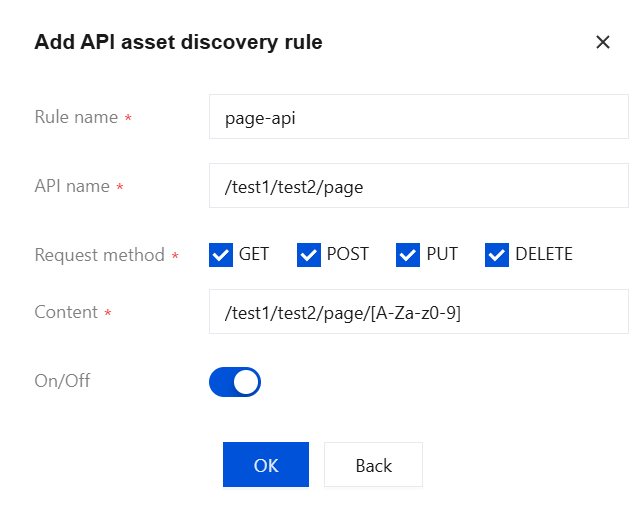
Configuration Effect: After configuration, all URLs matching the regular expression are consolidated into
/test1/test2/page, and previously discovered scattered entries are also merged into this asset.Ajuda e Suporte
Esta página foi útil?
Você também pode entrar em contato com a Equipe de vendas ou Enviar um tíquete em caso de ajuda.
comentários