Authentication Credential Identification Rule
Baixar
Modo Foco
Tamanho da Fonte
After you enable the authentication credential identification rule, you can specify a parameter named session identifier in the request (located in QUERY, BODY, COOKIE, or HEADERS) as the basis for determining whether the request carries valid authentication credentials. Based on this, the system identifies two types of risks: unauthorized access where the request carries no credentials, and privilege escalation risks (such as unauthorized access or IDOR-type risks) where credentials are present but non-owned resources are accessed. When a match is found, the system generates a corresponding API risk event.
Enabling System-Built-in Rules
After you enable the authentication credential identification rule on the API Security > Rule Configuration > Authentication Credential Identification Rules page, the system enables the built-in rules by default to identify unauthorized access and privilege escalation risks. The built-in rules can be enabled or disabled, but they cannot be edited or deleted. The platform provides a set of built-in rules, which are enabled by default and are not editable. After you disable custom rules, the system identifies risks based on the built-in model by default.
Adding Custom Rule
After you enable the authentication credential identification rule, you can customize authentication credential identification rules based on your business scenarios and configure authentication parameters for specific APIs or the current domain.
Note:
A maximum of 20 custom authentication credential identification rules can be manually added to a single domain.
1. On the API Security > Rule Configuration > Authentication Credential Identification Rules page, click Add Rule.
2. In the Add Rule window, configure the following parameters and click OK to create the rule.
3. After you add a rule, you can edit or delete the corresponding rule.
Configuration Item Description
Rule Name: Supports custom input, must be unique, and cannot exceed 10 characters.
Application Scope:
API: When you select API as the application scope, enter the API asset paths that require custom authentication credentials. You can separate multiple API assets by pressing Enter. The maximum length is 128 characters.
Domain Name: When you select the current domain as the application scope, the configuration takes effect on all API assets under the domain.
Authentication parameters location: Specify the parameter name in a specific location (QUERY, BODY, COOKIE, or HEADERS) as the session identifier to determine whether the request carries the corresponding authentication credentials.
Authentication parameters: A value identifier that uses the period (.) character to separate parameters at different levels. Example:
test: The test parameter in the JSON string is identified as the authentication parameter.
test1.test2: The test2 parameter contained within test1 in the JSON string is identified as the authentication parameter.
On/Off: Controls whether to enable or disable this rule. The default setting is On.
Configuration Example
Configuration scenario: For the API interface
/test, use the parameter token in the BODY as the credential to determine whether authentication is required, in order to identify whether the asset has unauthorized access or privilege escalation risks.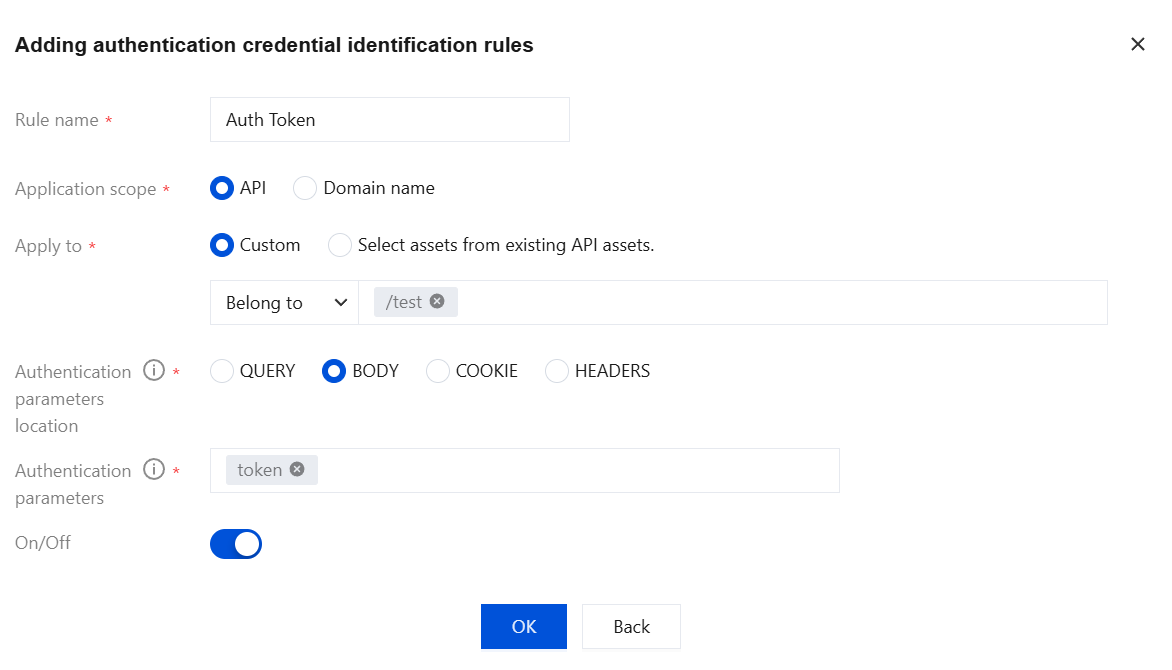
Configuration effect: After you configure the rule, the system will prioritize identification based on the custom authentication credentials. If a related API asset has privilege escalation risks, the system will generate an API risk event.
Ajuda e Suporte
Esta página foi útil?
Você também pode entrar em contato com a Equipe de vendas ou Enviar um tíquete em caso de ajuda.
comentários