tencent cloud

TDMQ for CKafka

Release Notes and Announcements
Release Notes
Broker Release Notes
Announcement
Product Introduction
Introduction and Selection of the TDMQ Product Series
What Is TDMQ for CKafka
Strengths
Scenarios
Technology Architecture
Product Series Introduction
Apache Kafka Version Support Description
Comparison with Apache Kafka
High Availability
Use Limits
Regions and AZs
Related Cloud Services
Billing
Billing Overview
Pricing
Billing Example
Changing from Postpaid by Hour to Monthly Subscription
Renewal
Viewing Consumption Details
Overdue Payments
Refund
Getting Started
Guide for Getting Started
Preparations
VPC Network Access
Public Domain Name Access
User Guide
Usage Process Guide
Configuring Account Permission
Creating Instance
Configuring Topic
Connecting Instance
Managing Messages
Managing Consumer Group
Managing Instance
Changing Instance Specification
Configuring Traffic Throttling
Configuring Elastic Scaling Policy
Configuring Advanced Features
Viewing Monitoring Data and Configuring Alarm Rules
Synchronizing Data Using CKafka Connector
Use Cases
Cluster Resource Assessment
Client Practical Tutorial
Log Integration
Open-Source Ecosystem Integration
Replacing Supporting Route (Old)
Migration Guide
Migration Solution Overview
Migrating Cluster Using Open-Source Tool
Troubleshooting
Topics
Clients
Messages
​​API Reference
History
Introduction
API Category
Making API Requests
Other APIs
ACL APIs
Instance APIs
Routing APIs
DataHub APIs
Topic APIs
Data Types
Error Codes
SDK Reference
SDK Overview
Java SDK
Python SDK
Go SDK
PHP SDK
C++ SDK
Node.js SDK
SDK for Connector
Security and Compliance
Permission Management
Network Security
Deletion Protection
Event Record
CloudAudit
FAQs
Instances
Topics
Consumer Groups
Client-Related
Network-Related
Monitoring
Messages
Agreements
CKafka Service Level Agreements
Contact Us
Glossary

JsonPath

PDF
Modo Foco
Tamanho da Fonte
Última atualização: 2026-01-20 17:02:41

Scenarios

JSON is currently one of the most common format protocols for Internet communication. Data is also parsed and processed primarily in the JSON format.
JSONPath is a message query syntax specification introduced for the JSON format. In data processing, simple JSONPath syntax can be used to quickly obtain the value of a specific member in a complex nested JSON struct. In addition, extension functions of the JayWay library can be used to aggregate or operate member fields of a certain type.

Basic Features

Basic Syntaxes

The $ root node operator represents the root node of the current JSON struct.
The .<childName> dot operator or the ['<childName>'] bracket operator represents selecting the child member named childName of the current object.
The .. recursive operator represents obtaining all child members of the current object in a recursive manner.
The [<index>] subscript operator represents obtaining the index-th child member of the current iterable object.

Obtaining a Specific Member Variable in Nested JSON

The following figure shows the container stdout log structure collected by Tencent Kubernetes Engine (TKE):
{
"@timestamp": 1648803500.63659,
"@filepath": "/var/log/tke-log-agent/test7/xxxxxxxx-adfe-4617-8cf3-9997aea90ded/c_tke-es-xxxxxxxx57-n29jr_default_nginx-xxxxxxxx49626ef42d5615a636aae74d6380996043cf6f6560d8131f21a4d8ba/jgw_INFO_2022-02-10_15_4.log",
"log": "15:00:00.000[4349811564226374227] [http-nio-8081-exec-64] INFO com.qcloud.jgw.gateway.server.topic.TopicService",
"kubernetes": {
"pod_name": "tke-es-xxxxxxxxxx-n29jr",
"namespace_name": "default",
"pod_id": "xxxxxxxx-adfe-4617-8cf3-9997aea90ded",
"labels": {
"k8s-app": "tke-es",
"pod-template-hash": "xxxx95d557",
"qcloud-app": "tke-es"
},
"annotations": {
"qcloud-redeploy-timestamp": "1648016531476",
"tke.cloud.tencent.com/networks-status": "[{\\n \\"name\\": \\"tke-bridge\\",\\n \\"interface\\": \\"eth0\\",\\n \\"ips\\": [\\n \\"172.16.x.xx\\"\\n ],\\n \\"mac\\": \\"xx:xx:xx:4a:c2:ba\\",\\n \\"default\\": true,\\n \\"dns\\": {}\\n}]"
},
"host": "10.0.xx.xx",
"container_name": "nginx",
"docker_id": "xxxxxxxx49626ef42d5615a636aae74d6380996043cf6f6560d8131f21a4d8ba",
"container_hash": "nginx@sha256:xxxxxxxx7b29b585ed1aee166a17fad63d344bc973bc63849d74c6452d549b3e",
"container_image": "nginx"
}
}
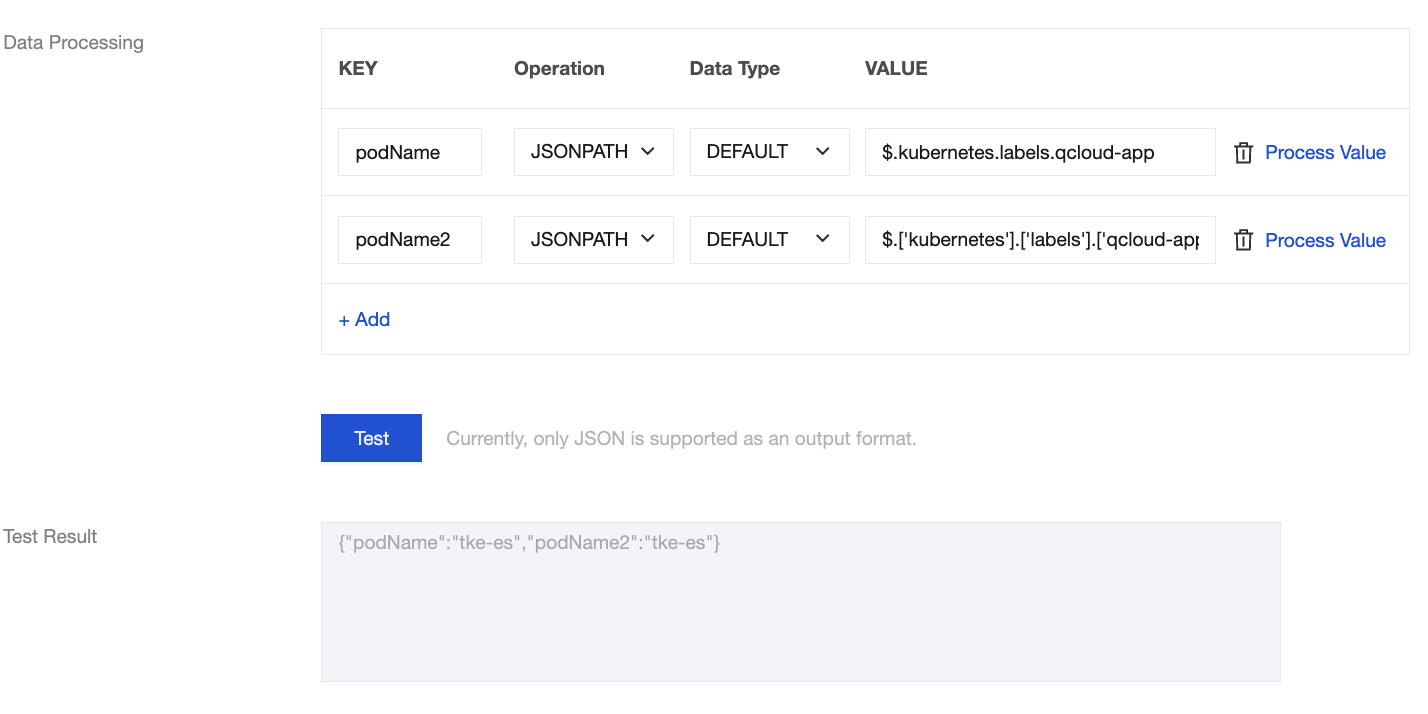
To obtain the name of the current Pod, that is, the qcloud-app member field, you can use the JSONPath syntax $.kubernetes.labels.qcloud-app or $.['kubernetes'].['labels'].['qcloud-app'] in data processing.
The execution result is as follows. It can be seen that the log corresponding to JSONPath has been successfully read in the test result.


Note
When you use JSONPath to process parameters, if a JSON variable name contains special characters such as the period (.), the bracket operator must be used to wrap the variable name.
For example, to obtain the corresponding member field in the JSON struct {"key1.key2":"value1"}, you need to use $.['key1.key2'].

Advanced Features

Advanced Syntaxes

The * wildcard operator represents obtaining all child members of the current object.
The *~ built-in function represents obtaining the names of all child objects of the current iterable object.
The min() built-in function represents obtaining the minimum value among the child objects of the current iterable object.
The max() built-in function represents obtaining the maximum value among the child objects of the current iterable object.
The sum() built-in function represents obtaining the sum of the child objects of the current iterable object.
The concat() built-in function represents concatenating multiple objects and generating a string.

Aggregating Specific Field Data

When a JSON struct contains a list of objects, the list is typically of variable length. Take the request return log in the figure below as an example:
{
"data": {
"Response": {
"Result": {
"Routers": [
{
"AccessType": 0,
"RouteId": 81111,
"VpcId": "vpc-xxxxxxxx",
"VipType": 3,
"VipList": [
{
"Vip": "10.0.0.189",
"Vport": "9xxx"
}
]
},
{
"AccessType": 0,
"RouteId": 81112,
"VpcId": "vpc-r5sbavzp",
"VipType": 3,
"VipList": [
{
"Vip": "10.0.0.248",
"Vport": "9xxx"
}
]
},
{
"AccessType": 0,
"RouteId": 81113,
"VpcId": "vpc-xxxxxxxx",
"VipType": 3,
"VipList": [
{
"Vip": "10.0.0.210",
"Vport": "9xxx"
}
]
}
]
},
"RequestId": "20e74750-ca40-403d-9ea9-d3f63b5415d2"
}
},
"code": 0
}
Processing chains cannot be used to aggregate member properties of a list with variable length, but the * syntax in JSONPath can be used to match all elements in the list.
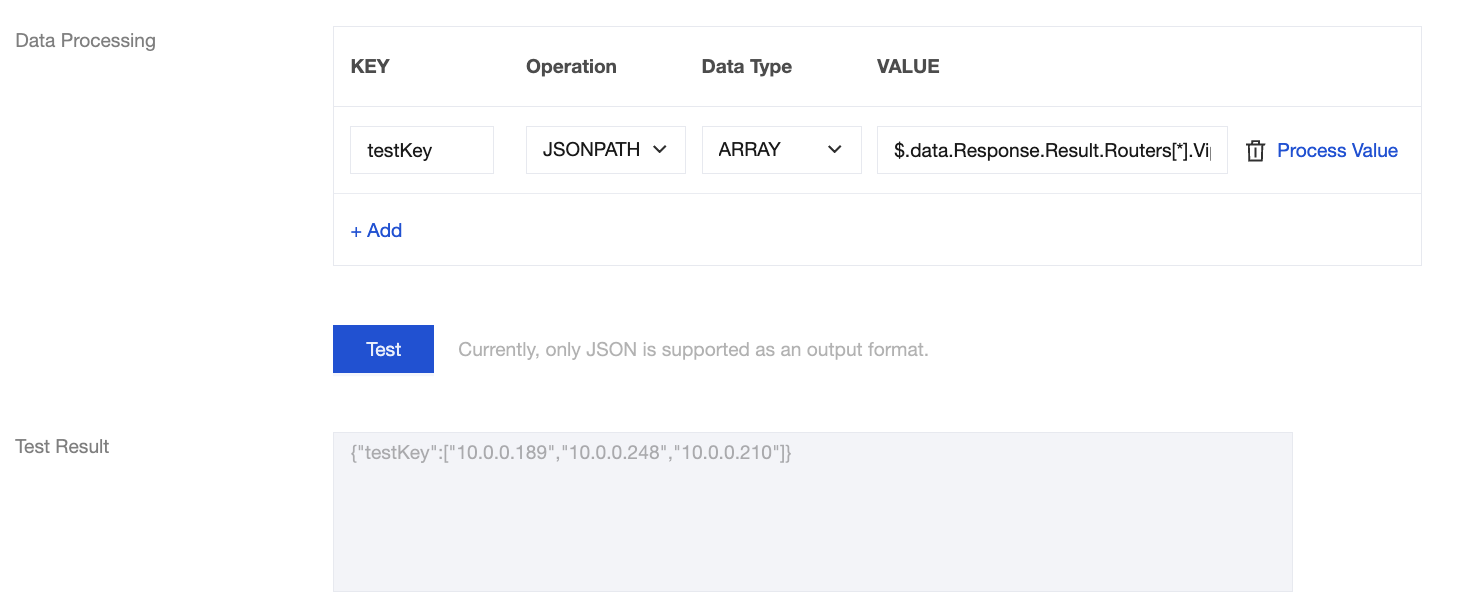
For example, to obtain all VIP addresses in the VipList, you can use the JSONPath syntax $.data.Response.Result.Routers[*].VipList[0].Vip.
The execution result is as follows. It can be seen that the VIP addresses in all structs have been successfully obtained in the test result.


Merging and Modifying Struct Members

In certain scenarios, you need to merge multiple objects in a JSON struct during data processing to deliver them to downstream systems for further operations. Consider the following format:
{
"data": {
"Response": {
"SubnetSet": [
{
"VpcId": "vpc-xxxxxxxx",
"SubnetId": "subnet-xxxxxxxx",
"SubnetName": "ckafka_cloud_subnet-1",
"CidrBlock": "10.0.0.0/19",
"Ipv6CidrBlock": "",
"IsDefault": false,
"IsRemoteVpcSnat": false,
"EnableBroadcast": false,
"Zone": "ap-changsha-ec-1",
"RouteTableId": "rtb-xxxxxxxx",
"NetworkAclId": "",
"TotalIpAddressCount": 8189,
"AvailableIpAddressCount": 8033,
"CreatedTime": "2021-01-25 17:31:00",
"TagSet": [],
"CdcId": "",
"IsCdcSubnet": 0,
"LocalZone": false,
"IsShare": false
}
],
"TotalCount": 1,
"RequestId": "705c4955-0cd9-48b2-9132-79eadae2e3e6"
}
},
"code": 0
}
When downstream systems lack computing capability, to aggregate the properties of Virtual Private Cloud (VPC) and subnets during data processing, you can use the concat() function in JSONPath to aggregate multiple fields, and further modify the strings on this basis.
For example, you can use the $.concat($.data.Response.SubnetSet[0].VpcId,"#",$.data.Response.SubnetSet[0].SubnetId,"#",$.data.Response.SubnetSet[0].CidrBlock)) syntax to concatenate the properties of VPC and subnets, and separate them with the # character.
The execution result is as follows. It can be seen that the resource information related to VPC has been successfully obtained and consolidated in the test result:




Ajuda e Suporte

Esta página foi útil?

comentários