HTTP-Triggered Function Request Concurrency Management
Baixar
Modo Foco
Tamanho da Fonte
Última atualização: 2025-10-22 15:57:37
Traduzido por IA
Request Concurrency Overview
Single concurrent request
By default, when a function is invoked, SCF will assign a concurrent instance to process the request or event. After the function code is executed and its response is returned, the instance will process other requests. If all instances are running when a request arrives, SCF will assign a new concurrent instance. One concurrent instance processes only one event at any time so as to ensure the processing efficiency and stability of each event.
Multiple concurrent requests
In most cases, one single concurrent request is the recommended mode, and you don't need to consider how to solve the typical concurrency problems for processing multiple concurrent requests, such as thread security, blocked invocation, and exception handling, when writing code.
However, in web applications, typical business scenarios are I/O-intensive, and access to downstream services such as database or other system APIs in the function takes a long time to wait for the downstream services to respond. Generally, such waits are iowait and don't consume the CPU resources. In this case, if the multiple concurrent requests feature is enabled, one instance can process multiple requests to better utilize the CPU resources of the single instance.
Currently, HTTP-triggered functions allow you to enable multiple concurrent requests. You can enable and configure this feature as needed, which supports two modes: custom concurrency and dynamic concurrency.
Custom concurrency
After it is enabled, if there are multiple concurrent requests, requests within the specified maximum number of concurrent requests will be scheduled to the same function instance for execution. If there are more concurrent requests, the function instance's CPU and memory usage will increase. We recommend you use stress tests to evaluate appropriate configurations, so as to avoid function execution exceptions. Currently, 2–100 concurrent requests are supported.
Dynamic concurrency
After it's enabled, requests are scheduled to the same function instance to the maximum extent. This feature will be released in the future.
Directions
Enabling multiple concurrent requests
1. Log in to the SCF console and select Function Service on the left sidebar.
2. On the Function Service list page, select the name of the target HTTP-triggered function.
3. On the Function Management page, select Function Configuration.
4. On the Function Configuration page, click Edit.
5. In Multiple Concurrent Requests, select Enable to enable the multiple concurrent requests mode. In the input box displayed below Custom concurrency, enter the desired maximum number of concurrent requests.
6. Click Save.
Strengths of Request Concurrency
In I/O-intensive scenarios such as WebSocket persistent connection, the billable execution duration can be shortened to reduce the costs.
Multiple concurrent requests in the same instance can reuse the database connection pool to relieve the pressure on the downstream server.
When there are intensive concurrent requests, they only require one instance for processing, with no need to start multiple instances. This reduces the instance cold starts and response latency.
Notes
Cost
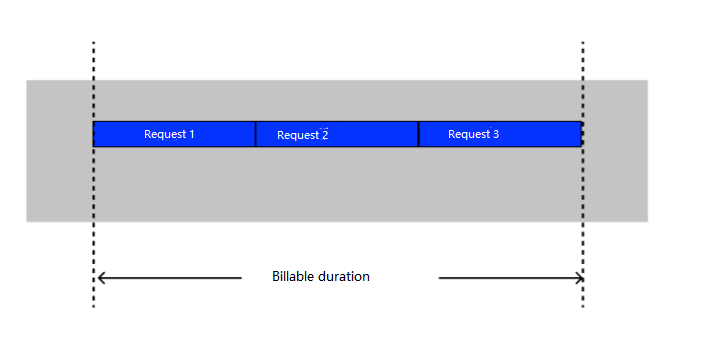
If the multiple concurrent requests feature is not enabled, a single function instance will process only one request at a time and will process the next request only after processing the current request. The memory billing duration is the sum of the execution duration of all requests as shown below:
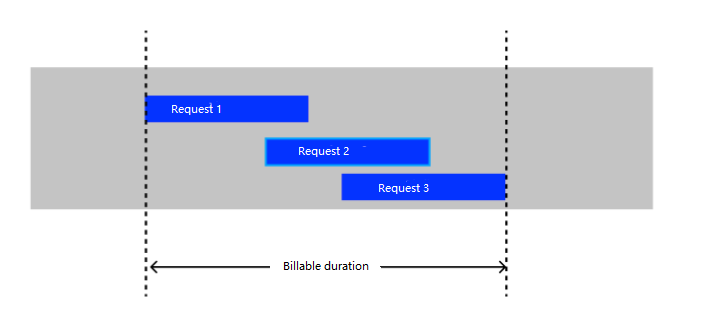
After the multiple concurrent requests feature is enabled, a single function instance will process multiple concurrent requests. If another request is received while a request is being processed, there will be a period during which the two requests are processed at the same time. In this case, the period of concurrent execution will be billed only once as shown below:
Other billable items remain unchanged. For more information, see Billing Overview.
Log
After the multiple concurrent requests feature is enabled, as multiple requests are processed concurrently, when the logs generated by each request are reported, the logs and RequestID values may not be in one-to-one correspondence. In this case, you need to correctly set a logger in the code to print RequestID values in logs. RequestID can be obtained from the X-Scf-Request-Id field in the common request header received by the HTTP-triggered function.
Limit exceeding error
OOM
Multiple concurrent requests increase the probability of OOM. If OOM occurs, the instance will restart. In this case, the abort error (error code: 434 MemoryLimitReached) will be reported for multiple ongoing requests in the instance. Before setting the maximum number of concurrent requests, you need to perform stress tests on the function to determine a safe number, so as to avoid the impact of OOM.
Timeout
If a request fails to be executed within the configured execution timeout period, it will be stopped, and error code 433 TimeLimitReached will be returned to the client. Other ongoing requests in the instance won't be affected.
Monitoring
After the multiple concurrent requests feature is enabled, the Number of Concurrent Requests panel will be displayed on the monitoring page, where you can directly view the concurrent request statistics for the specified time period.