Creating a Data Consistency Check Task
Scenarios
Data consistency check involves comparing table data between the source and target databases through Data Transfer Service (DTS) during data synchronization, providing comparison results and inconsistency details to help users quickly verify synchronization results. The data consistency check task is run independently and does not affect the normal business of the source database or the DTS tasks.
Note:
Consistency check serves only as an auxiliary data verification method. Users are still required to perform data verification by themselves to ensure that the synchronization results meet the requirements.
Check Content
Consistency check supports full check and continuous incremental check.
Full check
Compare all data in the target database before it is fully synchronized with the source database.
Continuous incremental check
Compare the incremental data generated after the initiation of the continuous incremental check task.
Note:
1. Incremental data synchronization must be included during synchronization task configuration.
2. Only one incremental check can be initiated at a time for each synchronization task.
Must-Knows and Constraints
1. The scope of the data consistency check only compares the selected database and table from the source database with those synchronized to the target database. Any data written to the target database during the synchronization task is not included in the check scope.
2. The data consistency check task may increase the load on the source database instance. Therefore, it is recommended to perform these operations during off-peak hours.
3. Multiple data consistency check tasks can be created and executed; however, only one check task can be running at the same time. A new check task can be started only after the previous one is completed or terminated.
4. If the user chooses to complete or terminate the DTS task before the data consistency check task is finished, the data consistency check task will fail.
5. When a consistency check task is created, the system will automatically create a
dts_verify_result database on the target side to store information related to the check. The tables created under the dts_verify_result database have the following schemas:diff_5xxxxxxxx4231: saves the inconsistent data after check.diff_meta_5xxxxxxxxx4231: stores the inconsistent metadata after check.result_5xxxxxxxxx4231 : records the results after each check stage is completed.status_5xxxxxxxxx4231: records the check progress.Creating a Data Consistency Check Task
Automatic Triggering
You can enable the data consistency check task when creating a DTS synchronization task. The data consistency check task is automatically triggered once the subsequent task proceeds to the incremental synchronization step.
On the Setting Up Consistency Check page, check Enable Data Consistency Check, configure the parameters, and then click Next.
Note:
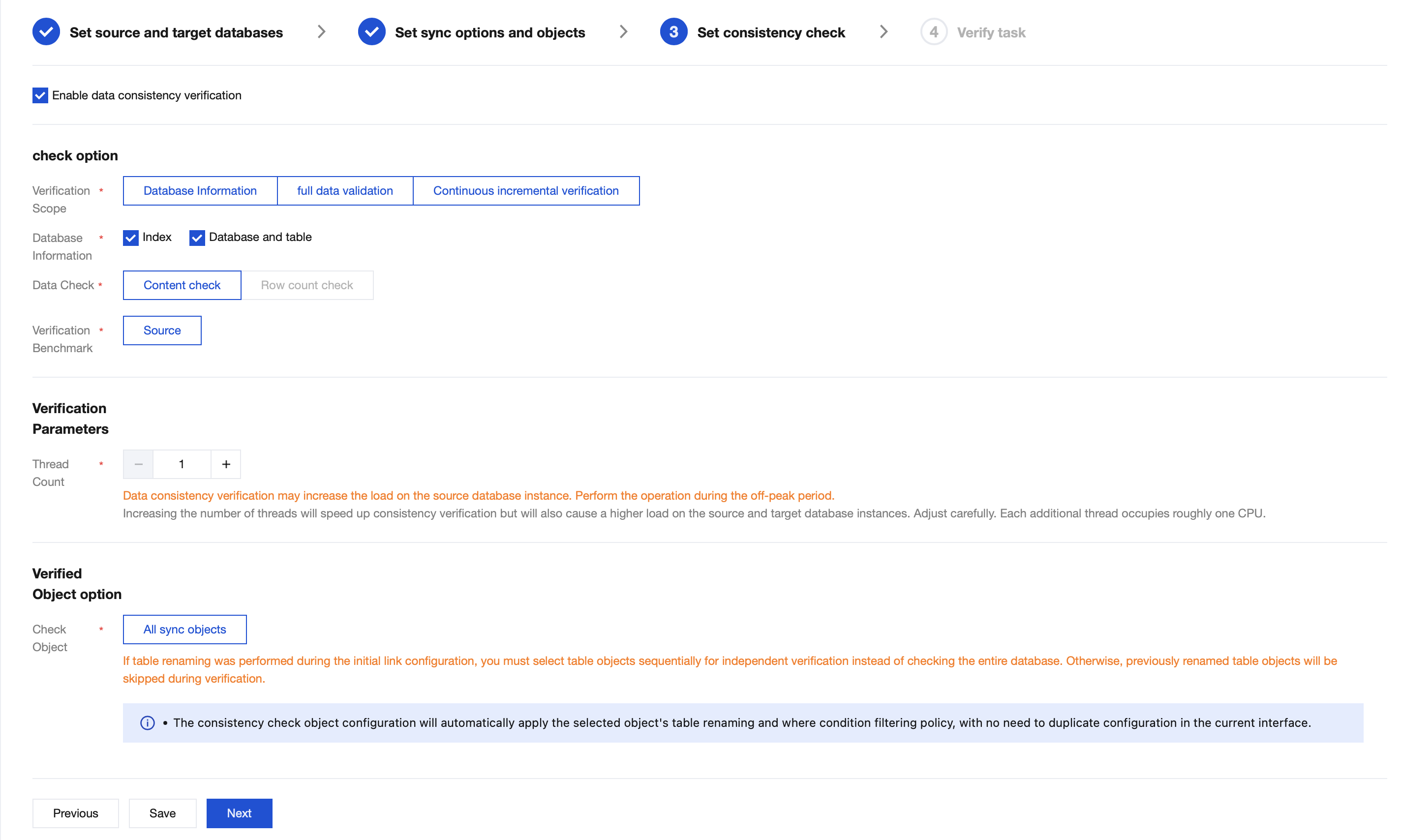
Configuration Item | Parameter | Description |
Check Option | Check Content | Database information: Check indexes, database and table information, and shard keys in the source and target databases. When both the source and target databases are sharded clusters, it is supported to select shard keys for checking. Full check: Compare all data in the target database before it is fully synchronized with the source database. Continuous incremental check: Compare the incremental data generated after the initiation of the continuous incremental check task. |
| Database Information | Checking indexes, shard keys, and database and table information is supported. When both the source and target databases are sharded clusters, it is supported to select shard keys for checking. |
| Data Check | Content check: Perform a content check on the selected check objects. Row number check: Perform a comparison of the row number on the selected check objects. |
| Check Benchmark | Source: Use data from the source as the check benchmark. |
Check Parameter Configuration | Thread Number Selection | The value range is 1–8. Select an appropriate value according to the actual situation. Increasing the number of threads can accelerate the consistency check speed, but it will also increase the load on the source and target databases. |
Check Object Options | Check Object | All synchronization objects: The check scope includes all objects selected for the synchronization task. |
Manual Creation
1. Log in to the DTS console.
2. On the Data Synchronization page, select the synchronization task to be checked, and choose More > Create Data Consistency Check Task in the operation column.

3. On the Data Consistency Check page, click Create Data Consistency Check Task.
Note:
If a consistency check task already exists, you can click Create Similar Task in the Operation column and configure the related parameters.


4. In the pop-up dialog box, click Create and Start Consistency Check Task after configuring the data consistency check parameters,
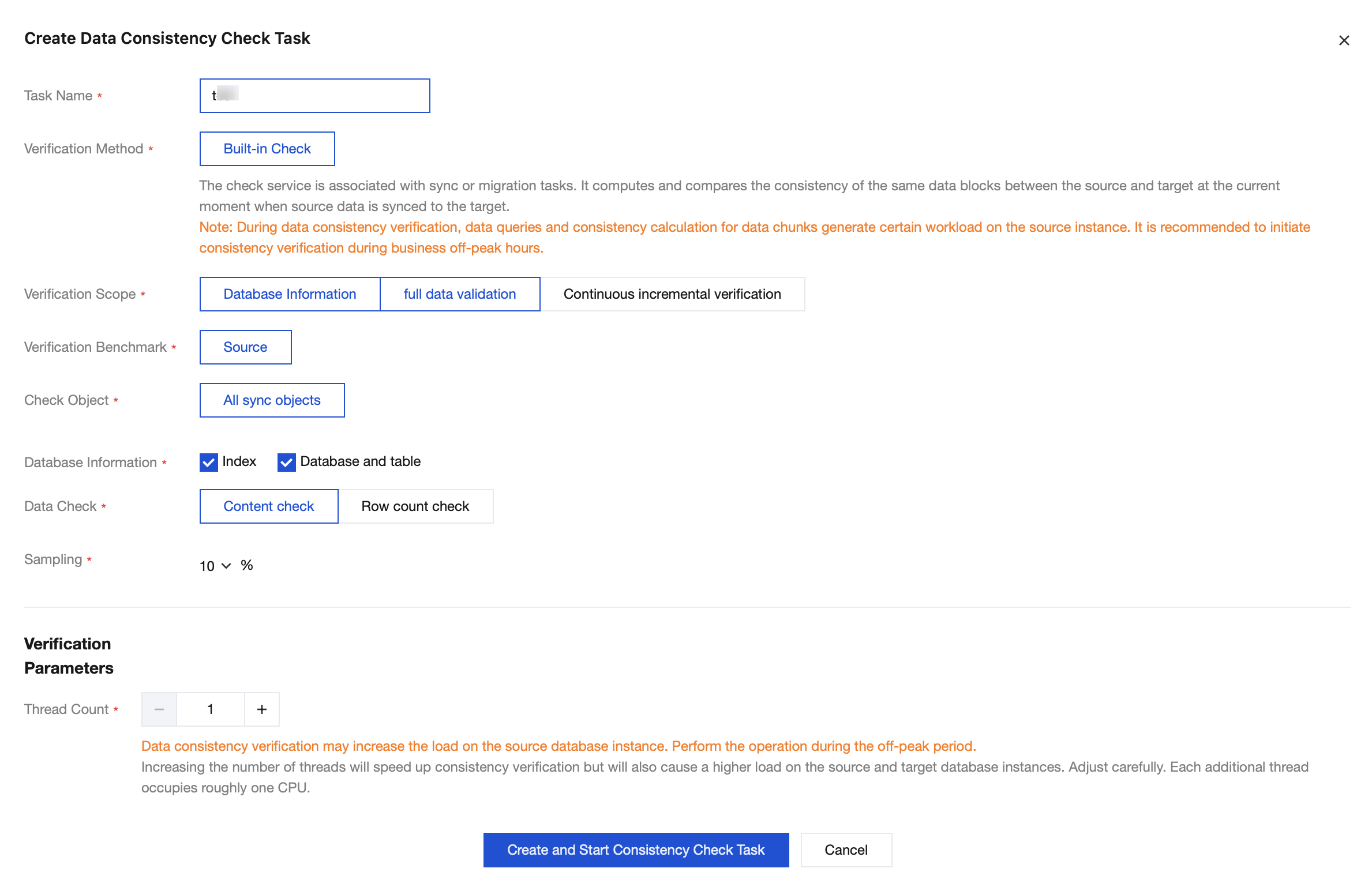
Parameter | Description |
Task Name | Name of the created consistency check task. |
Chek Method | Built-in check: The consistency check service is integrated within the DTS task and is required to be initiated while the task is running. The check cannot be initiated once the DTS task stops running. |
Check Content | Database information: Check indexes, database and table information, and shard keys in the source and target databases. When both the source and target databases are sharded clusters, it is supported to select shard keys for checking. Full data validation: Compare all data in the target database before it is fully synchronized with the source database. Continuous incremental verification: Compare the incremental data generated after the initiation of the continuous incremental check task. |
Check Benchmark | Source: Use data from the source as the check benchmark. |
Check Object | All synchronization objects: The check scope includes all objects selected for the synchronization task. |
Database Information | Checking indexes, shard keys, and database and table information is supported. When both the source and target databases are sharded clusters, it is supported to select shard keys for checking. |
Data Check | Content check: Perform the content check on the selected objects. After selection, the sampling ratio can be configured. Row number check: Perform a comparison of the row number on the selected check objects. |
Sampling | Configure the sampling ratio, which can be 10%, 20%, 30% ... 90%. Note: For scenarios involving large volumes of data, a full data check may increase the load on the source database. Users can select an appropriate sampling ratio based on their business requirements. |
Thread Number Selection | The value range is 1–8. Select an appropriate value according to the actual situation. Increasing the number of threads can accelerate the consistency check speed, but it will also increase the load on the source and target databases. |
Viewing the Data Consistency Check Results
1. On the Data Synchronization page, select the synchronization task to be viewed, and choose More > Create Data Consistency Check in the operation column.
2. Click View in the operation column to view the check results.

3. View the check results.
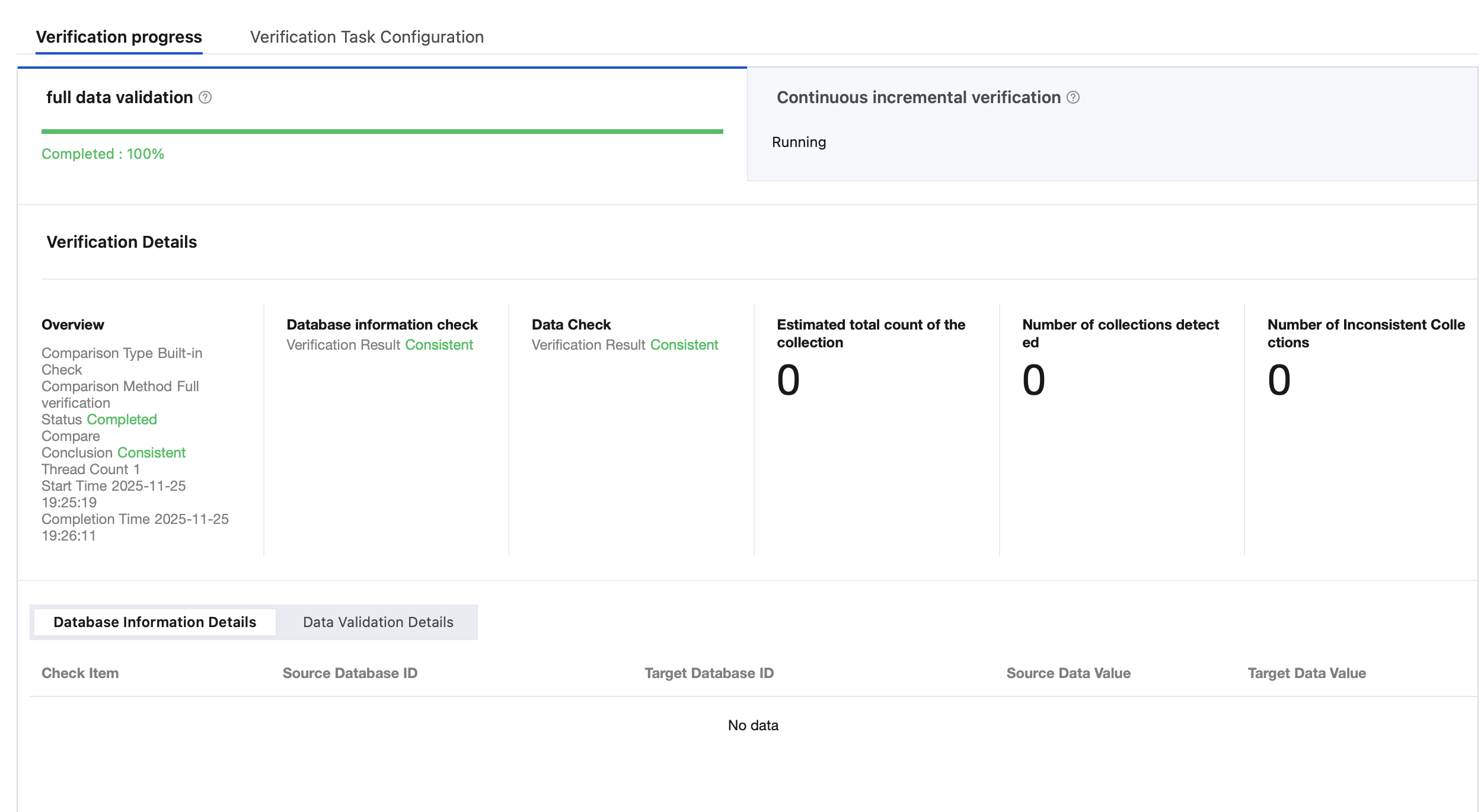
Full check: View the Estimated total count of the collection, Number of collections detected, and Number of Inconsistent Collections.
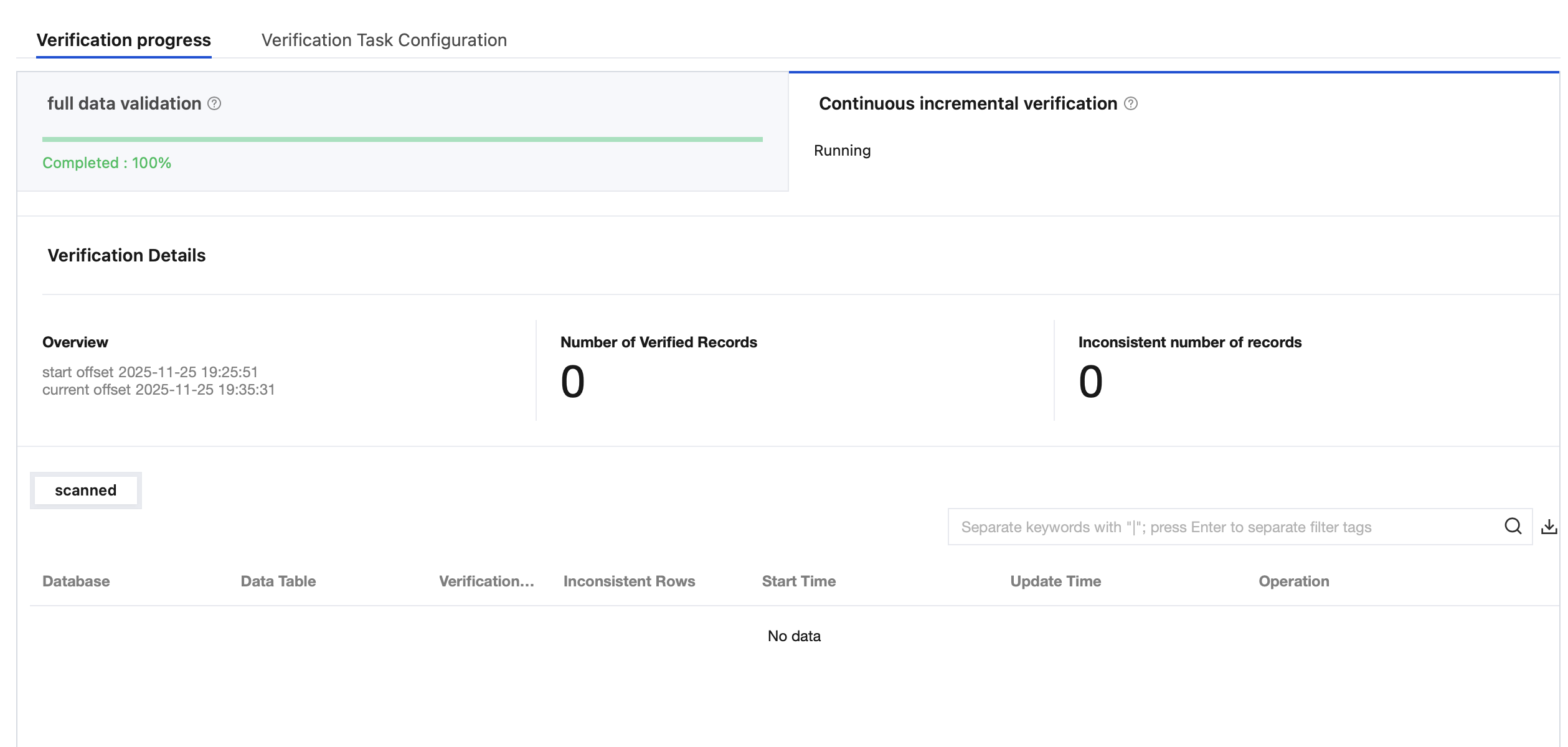
Incremental check: View the Number of Verified Records and Number of Inconsistent Records.
Summary of Data Check Results
The summary of data check results is shown in the table below:
Full check
Project | Details |
Overview | Comparison type: Currently, all are built-in checks. Comparison method: Available methods include full check, sampling check, and row number check. Status: status of the current check task, which can be created, waiting to run, running, or completed. Comparison conclusion: result of running the current check task, which can be inconsistent or consistent. Thread number: number of threads configured for the current task. Start time: start time of the current task. End time: end time of the current task. |
Database information check | Check result: result of the current database information check, which can be inconsistent or consistent. |
Data Check | Check result: result of the current data check, which can be inconsistent or consistent. |
Estimated total number of collections | Total number of all collections that need to be checked, which is estimated by the system. |
Number of detected collections | Current number of collections that have completed detections for the task. |
Number of inconsistent collections | Number of collections that are inconsistent between the source and target databases among the collections that have completed detections. You can click View in the Operation column according to business requirements to view the inconsistency details. |
Continuous incremental check
Project | Details |
Overview | Start position: start time of the incremental check. Current position: current time of the incremental check. |
Number of verified records | Current number of collections that have completed detections for the task. |
Number of inconsistent records | Number of collections that are inconsistent between the source and target databases among the collections that have completed detections. You can click View in the Operation column according to business requirements to view the inconsistency details. |
Bantuan dan Dukungan
Apakah halaman ini membantu?
Anda juga dapat Menghubungi Penjualan atau Mengirimkan Tiket untuk meminta bantuan.
masukan