Implementing Batch Scheduling and Queue Management with Kueue
Unduh
Mode fokus
Ukuran font
Overview
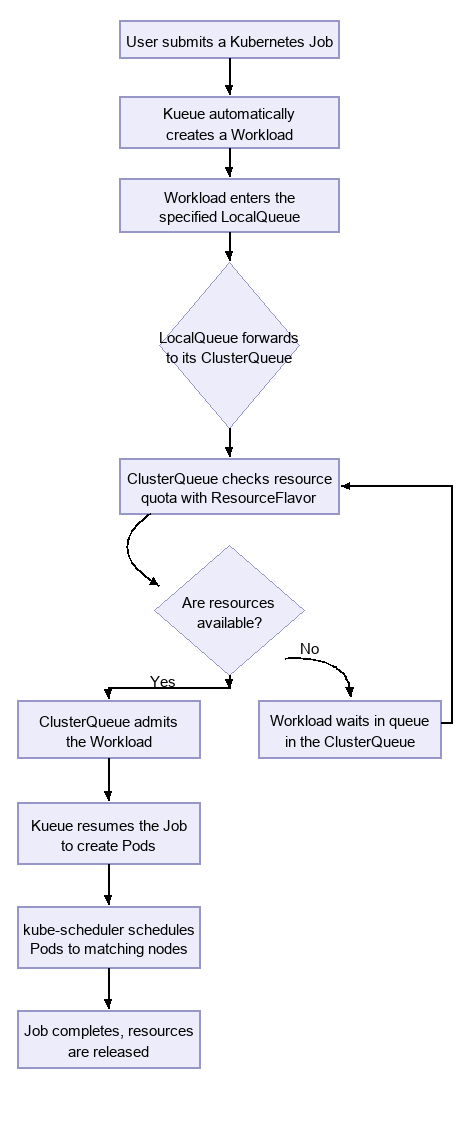
When running batch jobs on Kubernetes, users often face pain points such as resource contention and coarse-grained heterogeneous resource management. Kueue is a workload queue manager that handles the queuing, admission, and resource allocation of batch tasks such as Jobs in Kubernetes, ensuring that cluster resources are utilized fairly and efficiently. Its core working principle is as follows: after a user submits a job, Kueue suspends the job instead of immediately creating Pods. Kueue then checks the resource status in the cluster based on preset quotas and scheduling policies. Once sufficient resources are available, Kueue resumes the job so that it can run normally.
How It Works
The following flowchart provides an intuitive understanding of how several core resource objects in Kueue work together to manage job queues and resource allocation in a Kubernetes cluster. The entire process clearly illustrates the complete lifecycle of a job from submission to execution, as well as the role each object plays in it.
Core Resource Analysis
1. ResourceFlavor
Purpose: Defines "resource flavors", which describe the resource types and attributes that nodes in a cluster can provide (such as "high-CPU", "GPU-enabled", and "spot instances"). It matches nodes with specific attributes through label selectors and serves as the basis for resource allocation.
Role: Equivalent to a "menu" of resources, describing what "flavors" of resources are available for allocation in the cluster. ClusterQueue quotas are defined based on ResourceFlavor.
2. ClusterQueue
Purpose: A cluster-level resource pool. It aggregates resources described by one or more ResourceFlavors and sets overall resource quotas, queueing policies, fair sharing, and preemption rules. It is the core component for Kueue's global resource arbitration and decision-making.
Role: Equivalent to a department's "total budget", defining the capacity and allocation rules of the entire resource pool.
3. LocalQueue
Purpose: A namespace-level resource that serves as the entry point for users to submit jobs. Each LocalQueue must belong to a specific ClusterQueue. Its primary function is to forward job requests from its namespace to the corresponding ClusterQueue.
Role: Equivalent to the "budget request entry point" for each project team within a department. It unifies multi-tenant isolation (different teams have their own queues) and resource sharing (all queues consume the budget of the same ClusterQueue).
4. Job and Workload
Job: A Kubernetes workload that users submit directly, such as a Kubernetes Job.
Workload: When Kueue detects a Job with a specific queue label (such as kueue.x-k8s.io/queue-name: sample-queue), it automatically creates a corresponding Workload object for that Job. This Workload object represents the unit of work that is queued and awaiting admission within Kueue's scope. You can check the Workload status to understand the job's queueing status.
Installing Kueue
Prerequisites
A TKE cluster has been created (cluster version >= 1.29), and you have operational permissions on the cluster.
Performing Installation
1. Log in to the TKE console and go to Ops Center > Marketplace.
2. In the Marketplace, select Scheduling for the application scenario.
3. Select kueue to create it. For creation details, see Creating an Application in the Marketplace.
Checking Installation Results
1. In application management, check whether the application status is "Normal".
2. Click the application name to go to the application details page.
3. Check whether the workload status is "Normal".
Modifying Global Configurations via Component Management
TKE component management now supports Kueue, a job queue manager. After installing Kueue, you can view its status in the component management list and adjust key Kueue parameters through the Modify Global Configuration entry.
Prerequisites
Operation Steps
1. Log in to the TKE console and click the ID of the target cluster.
2. In the left sidebar, select Component Management, and then find Kueue Job Queue Manager in the list.
3. Click Modify Global Configuration in the operation column.
4. On the configuration editing page, modify the global configuration parameters of Kueue in YAML format, and then click Done.
Common Configuration Items
Configuration Item | Description |
waitForPodsReady.enable | Whether to enable All-or-Nothing scheduling. After it is enabled, Kueue continuously monitors Pod readiness after admitting jobs. |
waitForPodsReady.timeout | Timeout for waiting for Pod readiness (for example, 2m). After the timeout, the job is suspended again, created Pods are deleted, and resources are released. |
waitForPodsReady.blockAdmission | Whether to block admission of new jobs while waiting for Pod readiness to prevent multiple jobs from blocking each other and causing a deadlock. |
Note:
After you update the parameters through Modify Global Configuration, the Kueue controller-manager will restart in a rolling manner to apply the new configuration. Perform this operation during off-peak hours and note the impact on in-flight jobs.
Practice Background
Scenario 1: Batch Scheduling (All or Nothing)
1. Scenario Description
In distributed computing scenarios such as AI model training and big data analytics, a Job typically contains multiple Pod tasks that need to work collaboratively. These tasks form a whole, and all Pods must obtain resources simultaneously to start effective computation. If only some Pods are successfully scheduled (referred to as "partial scheduling"), the following issues may arise:
Scheduled Pods occupy resources without performing effective work.
The entire job cannot be completed, resulting in a waste of cluster resources.
Manual intervention is required to clean up stalled jobs.
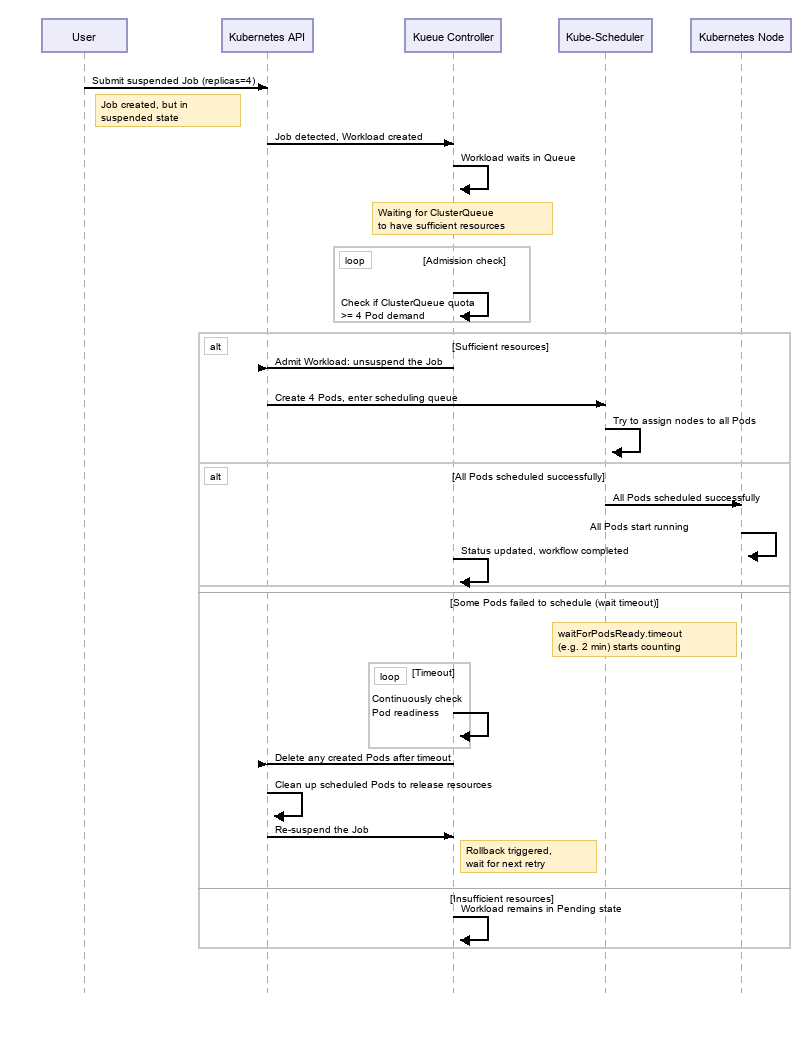
Kueue ensures "All or Nothing" scheduling for jobs: either all Pods required by a job are successfully scheduled and start running, or Kueue prevents the job from starting, or automatically cleans up Pods that were created but not fully ready after a period of time (requires waitForPodsReady configuration), thereby ensuring efficient utilization of cluster resources and job atomicity. The following sequence diagram clearly illustrates the complete workflow of a Job that requires 4 Pods, from submission to the final achievement of "All or Nothing" scheduling, especially how the waitForPodsReady mechanism works:
2. Core Configuration: Enabling waitForPodsReady
This is the core configuration for implementing "All-or-Nothing" semantics. It ensures that after Kueue admits a Job, it continuously monitors the creation and readiness status of its Pods.
Inspection and Configuration Methods
1. Check the current configuration
Check the Kueue configuration to see whether waitForPodsReady is configured and not commented out:
kubectl get cm -n kueue-system kueue-manager-config -o yaml | grep waitForPodsReady
2. Enable the configuration (if not already enabled)
Edit the Kueue configuration and add or modify the following configuration under data["controller_manager_config.yaml"]:
apiVersion: controller-runtime.sigs.k8s.io/v1alpha1kind: ControllerManagerConfiguration...waitForPodsReady:enable: true # Enable the All-or-Nothing scheduling feature.timeout: 2m # Timeout for waiting for Pods to become ready (for example, 2 minutes)blockAdmission: true # Prevents multiple jobs from blocking each other and causing a deadlock.
Set enable: true to enable this configuration. This is a prerequisite.
timeout: 2m is a critical setting. It defines the maximum duration for Kueue to wait for all Pods of a Job to become Ready after the Job is admitted. If the timeout is exceeded, Kueue suspends the Job again (suspend: true) and deletes all created Pods, releasing the occupied resources.
blockAdmission: true prevents multiple jobs from blocking each other and causing a deadlock. You can learn about deadlock scenarios here.
3. Kubernetes Object Creation
3.1 Creating a ResourceFlavor
ResourceFlavor is a custom resource defined in Kueue. It defines the resource types available in a cluster, such as CPU and GPU models.
apiVersion: kueue.x-k8s.io/v1beta1kind: ResourceFlavormetadata:name: "default-flavor"
3.2 Creating a ClusterQueue
ClusterQueue is a custom resource defined in Kueue. It defines a cluster-level resource pool and manages resource quotas through nominalQuota, serving as the core of resource allocation.
apiVersion: kueue.x-k8s.io/v1beta1kind: ClusterQueuemetadata:name: cluster-queuespec:namespaceSelector: {} # Allow all namespaces to use this.resourceGroups:- coveredResources: ["cpu"]flavors:- name: "default-flavor"resources:- name: "cpu"nominalQuota: 2 # Base quota: 2 CPU cores
3.3 Creating a LocalQueue
LocalQueue is a custom resource defined in Kueue. It serves as the entry point for users to submit jobs within a specific namespace. It does not hold quotas itself. Instead, it forwards workloads to the bound ClusterQueue for resource allocation.
apiVersion: kueue.x-k8s.io/v1beta1kind: LocalQueuemetadata:namespace: defaultname: user-queuespec:clusterQueue: cluster-queue
3.4 Submitting a Job
This is a sample Job that requires four Pods to be started simultaneously. Specify kueue.x-k8s.io/queue-name in the Job's labels to associate the Job with a specific LocalQueue, so that it enters the Kueue scheduling queue.
apiVersion: batch/v1kind: Jobmetadata:name: all-or-nothing-jobnamespace: defaultlabels:kueue.x-k8s.io/queue-name: user-queuespec:parallelism: 4completions: 4suspend: truetemplate:spec:containers:- name: testimage: alpine:latestcommand: [ "/bin/sh" ]args: [ "-c", "sleep 36000000" ]resources:requests:cpu: 1restartPolicy: Never
In this example, the Job is actually executed only when the quota defined in the ClusterQueue bound to the specified LocalQueue can simultaneously meet the resource requirements of the four Pods.
kueue.x-k8s.io/queue-name: user-queue: The quota managed in the ClusterQueue to which this queue belongs is used for resource evaluation.
When parallelism equals completions, it represents "All or Nothing" semantics.
3.5 Verifying the Results
View job status:
kubectl get jobs all-or-nothing-job
When cluster resources are insufficient, the status is as follows:
NAME STATUS COMPLETIONS DURATION AGEall-or-nothing-job Suspended 0/4 37s
View the Workload status (a Workload is a scheduling unit created by Kueue):
kubectl get workloads
The status is as follows:
NAME QUEUE RESERVED IN ADMITTED FINISHED AGEjob-all-or-nothing-job-48f8a user-queue 62s
View ClusterQueue status:
kubectl get clusterqueue cluster-queue
The status is as follows:
NAME COHORT PENDING WORKLOADScluster-queue 1
Scenario 2: Optimizing Resource Scheduling in Heterogeneous Resource Scenarios
1. Scenario Description
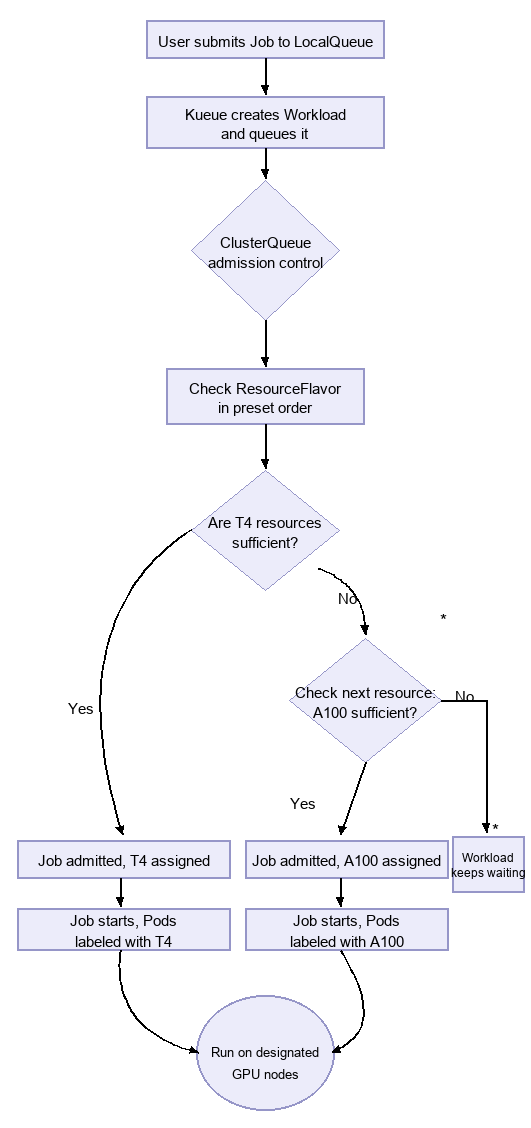
When a cluster has multiple types of dedicated hardware (for example, two different nvidia.com/gpu resources, namely T4 and A100 GPUs), a limitation exists: the system may not be able to distinguish between them, and Pods may be scheduled to either type of hardware. With the ResourceFlavor and ClusterQueue mechanisms of Kueue, you can prioritize T4 GPUs and automatically fall back to A100 GPUs when T4 GPU resources are insufficient. The workflow is as follows:
2. Creating a ResourceFlavor
First, define the ResourceFlavors corresponding to the two GPU resources. They are matched to nodes with corresponding labels through nodeSelector.
apiVersion: kueue.x-k8s.io/v1beta1kind: ResourceFlavormetadata:name: gpu-t4nodeSelector:gpu-type: nvidia-t4 # Matches T4 nodes with this label---apiVersion: kueue.x-k8s.io/v1beta1kind: ResourceFlavormetadata:name: gpu-a100nodeSelector:gpu-type: nvidia-a100 # Matches A100 nodes with this label
3. Configuring a ClusterQueue
This is the core of implementing the priority policy. The order of the flavors list directly determines the priority, and Kueue attempts to allocate resources strictly in the order from front to back.
apiVersion: kueue.x-k8s.io/v1beta1kind: ClusterQueuemetadata:name: clusterqueue-gpu-sharedspec:namespaceSelector: {} # Matches all namespaces.resourceGroups:- coveredResources: ["nvidia.com/gpu"] # The managed resource type.flavors:# Note: The order of the flavors array defines the priority!# Kueue first attempts to schedule the Pod to gpu-t4, and only tries gpu-a100 when the quota is insufficient or does not match.- name: gpu-t4resources:- name: "nvidia.com/gpu"nominalQuota: 8 # Total quota for T4 GPUs- name: gpu-a100resources:- name: "nvidia.com/gpu"nominalQuota: 4 # Total quota for A100 GPUs
4. Creating a LocalQueue
As the entry point for users to submit jobs, a LocalQueue points to the ClusterQueue created above.
apiVersion: kueue.x-k8s.io/v1beta1kind: LocalQueuemetadata:namespace: defaultname: gpu-workloadsspec:clusterQueue: clusterqueue-gpu-shared # Points to the shared cluster queue.
5. Submitting a GPU Job
apiVersion: batch/v1kind: Jobmetadata:namespace: defaultname: gpu-inference-joblabels:kueue.x-k8s.io/queue-name: gpu-workloads # Key: specifies the queue.spec:parallelism: 1completions: 1template:spec:containers:- name: inference-containerimage: nvidia/cuda:12.0-runtime-ubuntu20.04command: ["python", "model-inference.py"]resources:requests:nvidia.com/gpu: 1 # Requests 1 GPU without specifying a type.limits:nvidia.com/gpu: 1restartPolicy: Never
6. Performance and Benefits
1. It enables fine-grained management of GPU resource scheduling and usage.
2. When a Job is scheduled, Kueue first checks the quota for gpu-t4 in clusterqueue-gpu-shared. As long as the quota is sufficient, the Job is scheduled to a T4 node. If the T4 quota is exhausted but gpu-a100 still has quota available, the newly submitted Job is admitted by Kueue and scheduled to an A100 node.
3. Administrators only need to maintain a single ClusterQueue. They can easily change resource allocation policies by adjusting the order and quotas of flavors, without requiring users to modify application configurations.
Scenario 3: Cross-Tenant Resource Sharing (Removing Allowlist Restrictions)
1. Scenario Description
In a multi-tenant Kubernetes cluster, different teams (tenants) typically manage their own ClusterQueues and resource quotas independently. In previous versions, resource borrowing between ClusterQueues (through the cohort mechanism) was restricted by an allowlist. Only tenants pre-configured in the allowlist could borrow resources across tenants, which increased Ops complexity.
The cross-tenant allowlist restriction has been removed. Any ClusterQueues in the same cohort can now borrow idle resources from each other without additional allowlist configuration, making multi-tenant resource scheduling more flexible.
2. Working Mechanism
Kueue associates multiple ClusterQueues into a resource sharing group through the cohort field:
ClusterQueues within the same cohort can borrow idle quotas from each other.
After the allowlist restriction is removed, joining the same cohort automatically grants cross-tenant borrowing capabilities without requiring administrators to maintain an allowlist.
3. Configuration Example
The following example shows the configuration where two teams' ClusterQueues share the same cohort:
# ClusterQueue for Team AapiVersion: kueue.x-k8s.io/v1beta1kind: ClusterQueuemetadata:name: team-a-queuespec:cohort: shared-pool # Join the shared resource poolnamespaceSelector:matchLabels:team: aresourceGroups:- coveredResources: ["cpu", "memory"]flavors:- name: "default-flavor"resources:- name: "cpu"nominalQuota: 10- name: "memory"nominalQuota: 20Gi---# ClusterQueue for Team BapiVersion: kueue.x-k8s.io/v1beta1kind: ClusterQueuemetadata:name: team-b-queuespec:cohort: shared-pool # Join the same shared resource poolnamespaceSelector:matchLabels:team: bresourceGroups:- coveredResources: ["cpu", "memory"]flavors:- name: "default-flavor"resources:- name: "cpu"nominalQuota: 10- name: "memory"nominalQuota: 20Gi
Effect: When Team A's queue has idle CPU, Team B's jobs can automatically borrow it without allowlist authorization, effectively improving overall cluster resource utilization.
4. Precautions
Cross-tenant resource borrowing takes effect only when the source ClusterQueue has idle quotas. Once new workloads are submitted to the source queue, the borrowed resources are reclaimed.
To prevent specific queues from being borrowed, configure the corresponding policy in the
flavorFungibility or preemption field of the ClusterQueue.Bantuan dan Dukungan
Apakah halaman ini membantu?
Anda juga dapat Menghubungi Penjualan atau Mengirimkan Tiket untuk meminta bantuan.
masukan